Cisdem ContactsMate for Windows: Clean Up and Combine Your Gmail and Outlook Contacts
Cisdem ContactsMate for Windows is a contact manager for Windows 10 and 11 that pulls your Google and Microsoft 365 (Outlook) contacts into one window, merges duplicates, fixes broken entries and exports clean lists to CSV, Excel or vCard. The lifetime license costs $49.99, and you can download it free to try first.
Years of syncing phones, email accounts and old address books leave the same person listed three times, half the names blank and phone numbers in the email field. ContactsMate finds those problems for you and shows them side by side, so you decide what to merge.
Quick facts
- Version: 2.1.0, released November 6, 2025
- Developer: Cisdem
- Runs on: Windows 10 and Windows 11, 64-bit
- Accounts: Google (Gmail) and Microsoft 365 (Outlook), several at once
- Import: CSV and vCard (VCF) files
- Export: vCard, XLSX and CSV for Google, Outlook, Shutterfly, Yahoo and Apple
- Price: $49.99 for a lifetime license
- Needs: 1 GHz Intel or AMD processor, 512 MB RAM, 100 MB disk space
What we checked: the installer we downloaded from Cisdem on October 13, 2026 is version 2.1.0 (29 MB), and the lifetime license cost $49.99 at checkout on October 13, 2026.
Before you buy
The Windows version connects to Google and Microsoft 365 accounts only. It doesn't sync iCloud, Yahoo or Exchange accounts the way the Mac version does, though it can still import their contacts from a CSV or vCard file. It needs 64-bit Windows 10 or 11.
Download Free TrialBuy Now
Overview
Cisdem ContactsMate started as a Mac app. Version 2.0.0 of the Windows edition, released April 3, 2025, added several accounts at once, Google and Outlook sign-in, and two-way sync, so a contact you edit in ContactsMate also changes in Gmail or Outlook. Version 2.1.0 followed in November 2025. Each account appears in the left panel with its Favorites, All contacts, Merge & fix and Trash views, and tags work across all of them.
Features
Merge duplicates and fix broken contacts
Cisdem ContactsMate scans each account and sorts the problems into lists: exact duplicates, suspected duplicates (same name, or the same phone number or email in several contacts), incomplete or blank names, invalid phone numbers and email addresses, repeated phone numbers, emails or addresses inside one contact, and unusual name prefixes or suffixes. Exact duplicates go in one click with Merge all. Suspected ones you check pair by pair and merge, edit or ignore.
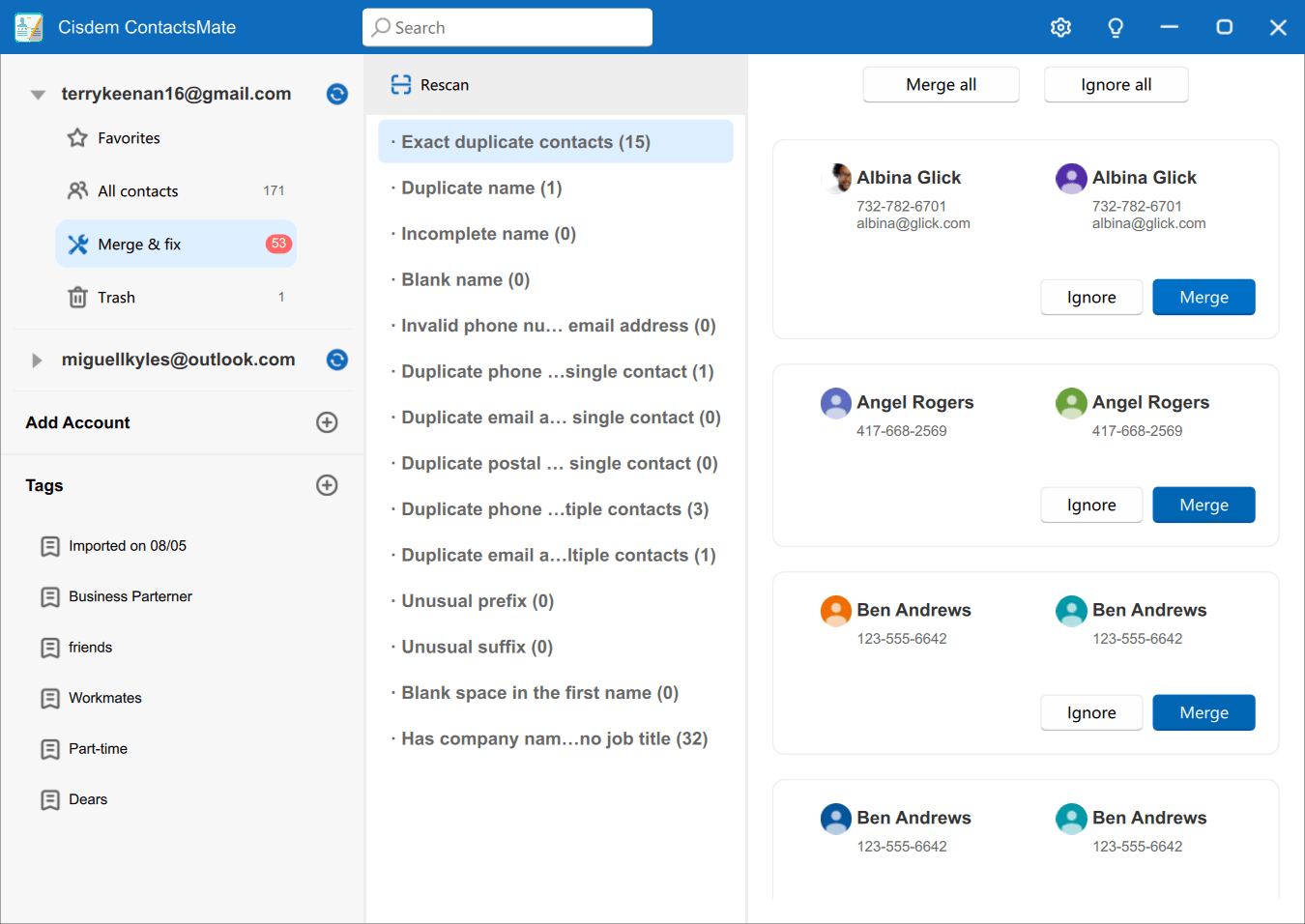
The Merge & fix view for a Gmail account: 15 exact duplicate contacts listed in pairs with Merge and Ignore buttons, Merge all and Ignore all at the top, and the other problem categories with their counts.
Gmail and Outlook in one place, kept in sync
Cisdem ContactsMate adds a Google or Microsoft 365 account with its sign-in, then lists all of its contacts. Changes you make in ContactsMate sync back to Gmail or Outlook, and changes made there come back to ContactsMate. A refresh button re-fetches an account if a sync didn't go through.
Tags, search and everyday editing
Cisdem ContactsMate lets you add, edit and delete contacts, add fields, sort by first name, last name, company or date added, and find anyone with the search bar. Tags such as "Workmates" or "Business Partner" group contacts across accounts, and imported contacts can be tagged as they come in. Deleted contacts go to a Trash, where you can restore them.
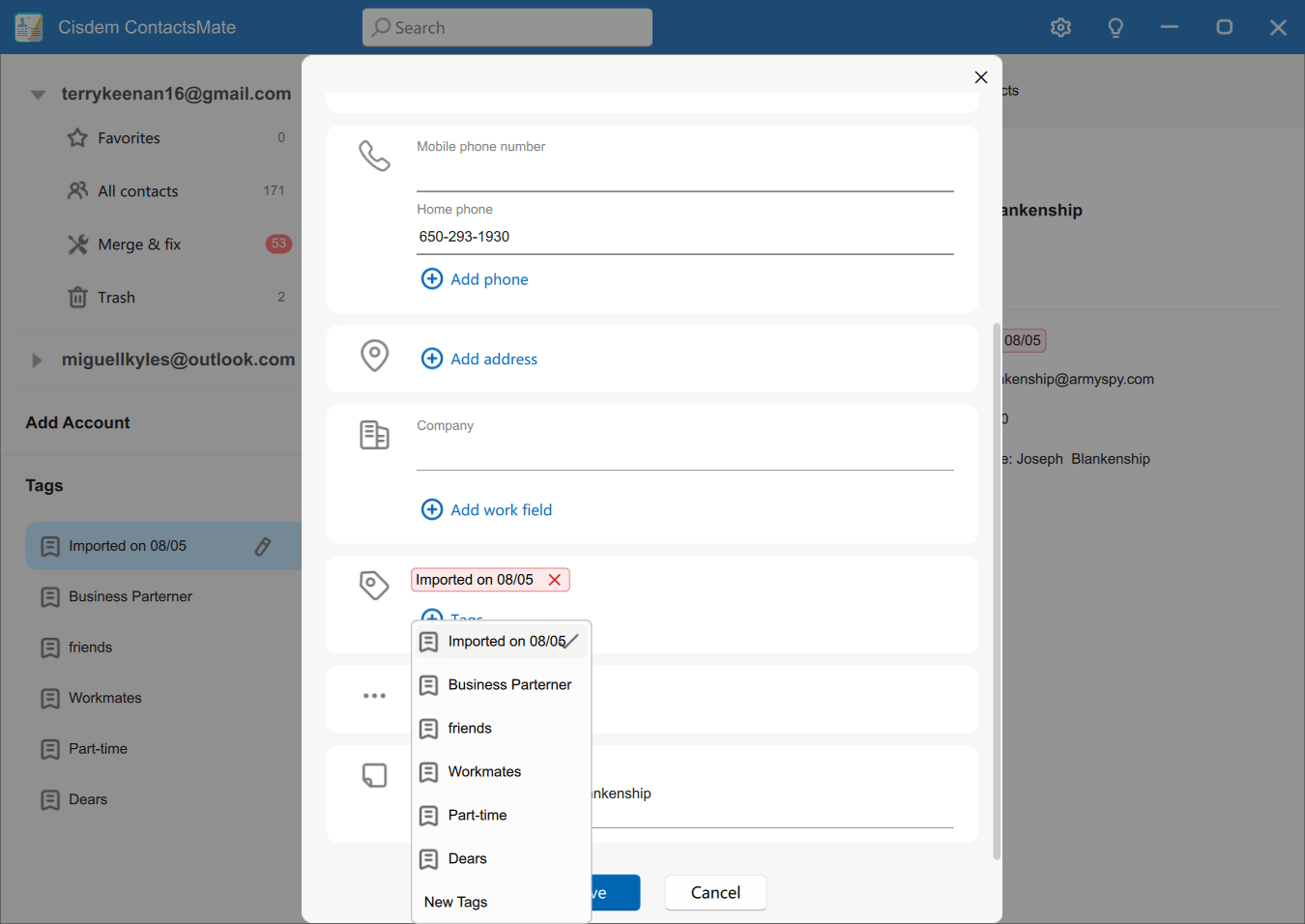
Editing a contact: phone, address and company fields, with the tag menu open showing tags such as Business Partner, friends, Workmates and Dears.
Export for Google, Outlook, Shutterfly and more
Cisdem ContactsMate exports all contacts or a chosen folder as vCard, XLSX or CSV. The CSV comes in ready-made layouts for Google, Outlook, Shutterfly, Yahoo and Apple, or a general CSV, so the file imports cleanly into the service you're moving to.
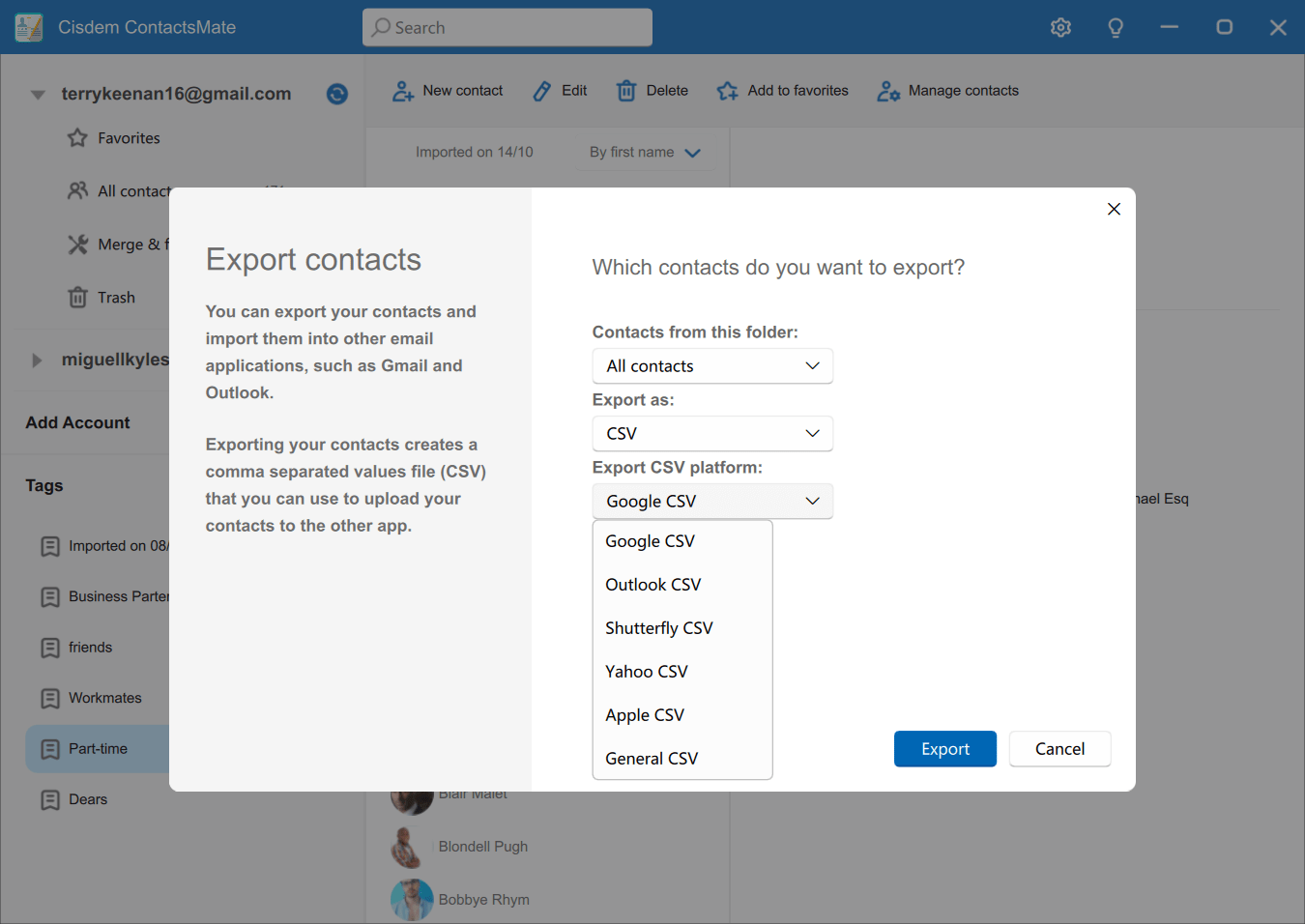
The Export contacts window, exporting All contacts as CSV with the platform list open: Google, Outlook, Shutterfly, Yahoo, Apple and General CSV.
Benefits
One clean address book. Duplicates and half-filled contacts disappear from Gmail and Outlook too, because the fixes sync back.
Less retyping. Ready-made CSV layouts save you from rearranging columns in a spreadsheet before an import.
A one-time cost. The lifetime license is paid once.
Real-World Uses
- Exporting a holiday-card list in Shutterfly's CSV layout for a photo-card order.
- Merging hundreds of duplicates after years of syncing a work Outlook account with a personal Gmail.
- Exporting a client list to Excel every week for a report.
- Backing up Outlook contacts to CSV before moving to a new email provider.
Who It's For
Cisdem ContactsMate for Windows suits people and small businesses whose contacts live in Gmail and Outlook and have grown messy. If you rely on iCloud or Exchange contacts, the Mac version supports more account types.
Usage Guide
- Install it. Download the installer, double-click the .exe file, choose a folder and click Next, Next, Install.
- Activate. Click the key icon at the top right and paste your license code.
- Add accounts. Use Add Account to sign in to Google or Microsoft 365, or import a CSV or vCard file.
- Clean up. Open Merge & fix, review the lists, and merge, edit or ignore.
- Export. Choose the contacts, the format and, for CSV, the target platform.
Tips
- Export a vCard backup of each account before a big merge.
- Use Merge all only for exact duplicates, and check suspected duplicates one by one.
- Tag contacts as you import them, so each file stays easy to find.
What Users Say
Cisdem ContactsMate for Windows is a young product, and its user reviews so far are on Cisdem's own site, which shows 13 reviews of the Windows version.
Praise on Cisdem's site
Merged hundreds of duplicates in minutes.: "I imported contacts from Google and Outlook—Cisdem ContactsMate found over 300 duplicates and cleaned them up fast. Total lifesaver!" Donald, June 2025
Helps manage my Gmail and Outlook contacts in one place: "I recently got the Windows version of ContactsMate, and it's been working great. I connected both my Gmail and Outlook accounts, and the app automatically synced my contacts. It also flagged a lot of duplicates I didn’t even know I had." Josie, July 2025
Super helpful for exporting to Shutterfly: "I was creating a photo book on Shutterfly and needed to upload a CSV of all my holiday card recipients. ContactsMate for Windows let me export the list exactly how Shutterfly required it. Saved me hours of manual editing." Gerard, July 2025
Excellent tool for contact backup and export: "I mainly use ContactsMate to export contacts from Outlook to CSV for backup. It’s so much easier than doing it manually. Everything is accurate, and the export options are flexible." Sandra, November 2025
Ease to use: "I’m not tech-savvy, but ContactsMate made it really simple to manage and clean up my address book. I like how the interface is clean, and everything is laid out logically." Paul, July 2025
It is what I need: "It meets my needs for de-duplicating contacts and I can review all the contacts before merging all of them with one-click." Les, November 2025
Criticism
A missing feature: "It does not support syncing contacts from iCloud, it is definitely a feature that you need to add in the future. By the way, It does a good job on syncing contacts between Google and Outlook." Linda, September 2025
The recurring themes: users like the duplicate cleanup and the export layouts, especially for Shutterfly, and find it easy to use. The main gap is account support: no iCloud on Windows. These reviews appear on the vendor's own site, and independent reviews of the Windows version are still scarce, so the free download is the best way to judge it.
Comparisons
Windows vs Mac version
Cisdem ContactsMate for Mac imports Apple Contacts automatically, syncs iCloud, Exchange, Yahoo and AOL as well as Google and Outlook, and adds a menu-bar version and printing. The Windows version focuses on Google and Microsoft 365, plus CSV and vCard files. They're licensed separately.
ContactsMate vs cleaning up by hand
Cleaning up by hand means working through each account separately and spotting duplicates by eye. ContactsMate checks every connected account with the same rules, catches formatting problems as well as duplicates, and exports in other services' CSV layouts.
FAQs
Does Cisdem ContactsMate for Windows work with iCloud contacts?
No. Cisdem ContactsMate for Windows syncs Google and Microsoft 365 accounts only. You can still export iCloud contacts to a vCard file and import that file.
Can Cisdem ContactsMate for Windows manage more than one account?
Yes. Cisdem ContactsMate for Windows can add several Google and Microsoft 365 accounts at once, each with its own contact list and Merge & fix view.
Will merging contacts in Cisdem ContactsMate change my Gmail or Outlook?
Yes. Cisdem ContactsMate for Windows syncs changes back to the account, so merged or deleted contacts change in Gmail or Outlook too. Export a backup first if you want to be safe.
Does Cisdem ContactsMate for Windows run on 32-bit Windows or Windows 7?
No. Cisdem ContactsMate for Windows needs 64-bit Windows 10 or Windows 11.
Is the Mac license valid for Cisdem ContactsMate for Windows?
No. Cisdem sells ContactsMate for Windows and ContactsMate for Mac as separate products with separate licenses.
Can I recover a contact I deleted in Cisdem ContactsMate?
Yes. Cisdem ContactsMate for Windows moves deleted contacts to its Trash, where you can restore them or remove them for good.
System Requirements
- Windows: Windows 10 or Windows 11, 64-bit
- Processor: 1 GHz or faster Intel or AMD
- Memory: 512 MB RAM or more
- Disk space: 100 MB or more
Conclusion
Cisdem ContactsMate for Windows does one job well: it takes the mess of duplicate and half-filled contacts across Gmail and Outlook and turns it into one clean list you can export anywhere. Its limits are clear, mainly no iCloud sync on Windows.
If your contacts live in Google and Microsoft 365, download it, run Merge & fix, and see how many duplicates it finds. $49.99 once makes it yours.
Download Free TrialBuy Now