Cisdem DVD Burner for Mac: Make DVDs with Menus That Play on Any TV Player
Cisdem DVD Burner for Mac is a $59.99 Mac app (lifetime license for one Mac) that turns MP4, MOV, MKV and other videos into DVDs with menus and chapters that play on a regular DVD player, or saves them as a DVD folder or ISO file. Version 8.3.0 runs natively on Apple silicon and Intel Macs with macOS 10.15 or later, and it's for anyone who needs to hand someone a disc rather than a link.
Maybe it's a grandparent with a DVD player under the TV, a school asking for recital copies, or a funeral home that wants a tribute video on disc. Apple dropped iDVD years ago, and the Finder only burns data discs, which most TV players won't play. Cisdem DVD Burner fills that gap: drop the videos in, pick a menu, and burn.
Quick facts
- Version: 8.3.0, released August 27, 2026
- Developer: Cisdem
- Runs on: macOS 10.15 Catalina through macOS 27, natively on Apple silicon and Intel
- Input: MP4, MOV, MKV, AVI, WMV, FLV, M4V, VOB, AVCHD (MTS/M2TS), TS, MPG, RMVB, DV and more
- Output: DVD disc, DVD folder (VIDEO_TS) or ISO file, NTSC or PAL, 16:9 or 4:3
- Menus: 50+ templates, your own background, buttons, text and music, or no menu
- Price: $59.99 for a lifetime license on one Mac
- Trial: every feature, but only the first 5 minutes of each video are burned (half of videos shorter than 5 minutes)
- Guarantee: 30-day money-back guarantee
What we checked: on October 17, 2026 we confirmed the $59.99 lifetime price on the order page, downloaded the Mac installer from Cisdem (109 MB), and read its app version (8.3.0, build 8300) and minimum macOS (10.15) from the app bundle. The program files contain both Intel and Apple silicon code, matching the release notes. We didn't burn a disc ourselves.
Before you buy
- You need a DVD burner. No current Mac has one built in, so you'll need an external USB DVD writer to burn discs. Without one you can still make ISO files and DVD folders.
- DVDs are standard definition. Whatever you put in, from 1080p to 4K, a DVD plays at 720x480 (NTSC) or 720x576 (PAL). That's a limit of the DVD format, not the app.
- It burns videos only. Cisdem says the Mac version can't burn photos to DVD, so a photo slideshow has to be made into a video first.
- It doesn't make Blu-ray discs. Output is DVD disc, DVD folder or ISO only.
Download Free TrialBuy Now
Overview
Cisdem DVD Burner for Mac works in four tabs across the top: Source, Menu, Preview and Burn. On Source you add videos as thumbnails, edit each one with the pencil icon, and set the TV standard, aspect ratio, disc type and quality at the bottom, where a bar shows how much of the disc you've used. Menu is the designer, Preview plays the disc as a DVD player would, and Burn writes it.
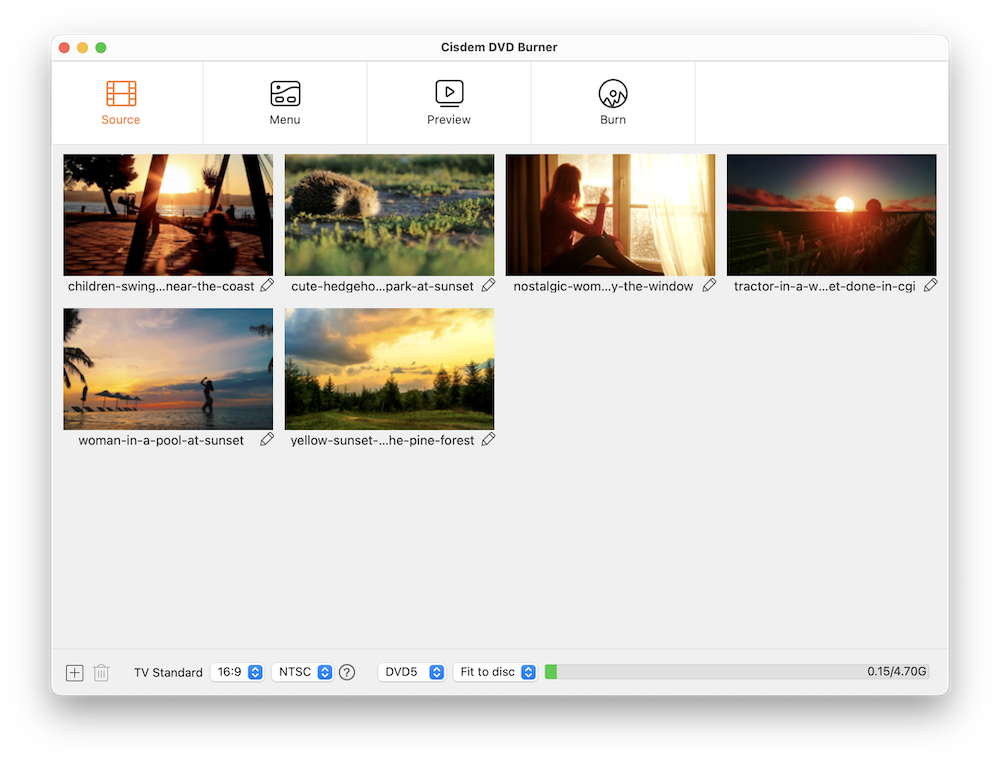
The Source tab with six videos added, each with a pencil icon for editing, and the TV Standard (16:9, NTSC), disc type (DVD5), Fit to disc quality and the capacity bar (0.15 of 4.70 GB) along the bottom.
The app has had a lot of work recently. Version 7.0.0 (January 2026) rebuilt the menu and burning engine and added chapter menus and DVD folder output, 8.0.0 and 8.1.0 fixed burn failures and menu bugs, and 8.2.0 and 8.3.0 (July and August 2026) added native Apple silicon support.
Features
Burns almost any video to a playable DVD
Cisdem DVD Burner for Mac accepts the video files you're likely to have: iPhone and camera MP4 and MOV, MKV and AVI downloads, AVCHD MTS/M2TS from camcorders, WMV, FLV, VOB, MPG, RMVB, DV and more, in any resolution. It converts them to the DVD-Video format a standalone player expects and writes a disc, a VIDEO_TS folder or an ISO image. You can put several videos on one disc and burn up to 30 copies in one run.
A menu designer with 50+ templates
Cisdem DVD Burner for Mac designs proper DVD menus from more than 50 templates in themes like travel, holidays, birthdays and weddings. You can replace the background with your own picture or a color, edit the title text, change the frames and button style, rearrange the layout, add background music, and pick each video's thumbnail frame. Three modes cover different discs: a menu with chapters, a menu only, or no menu at all.
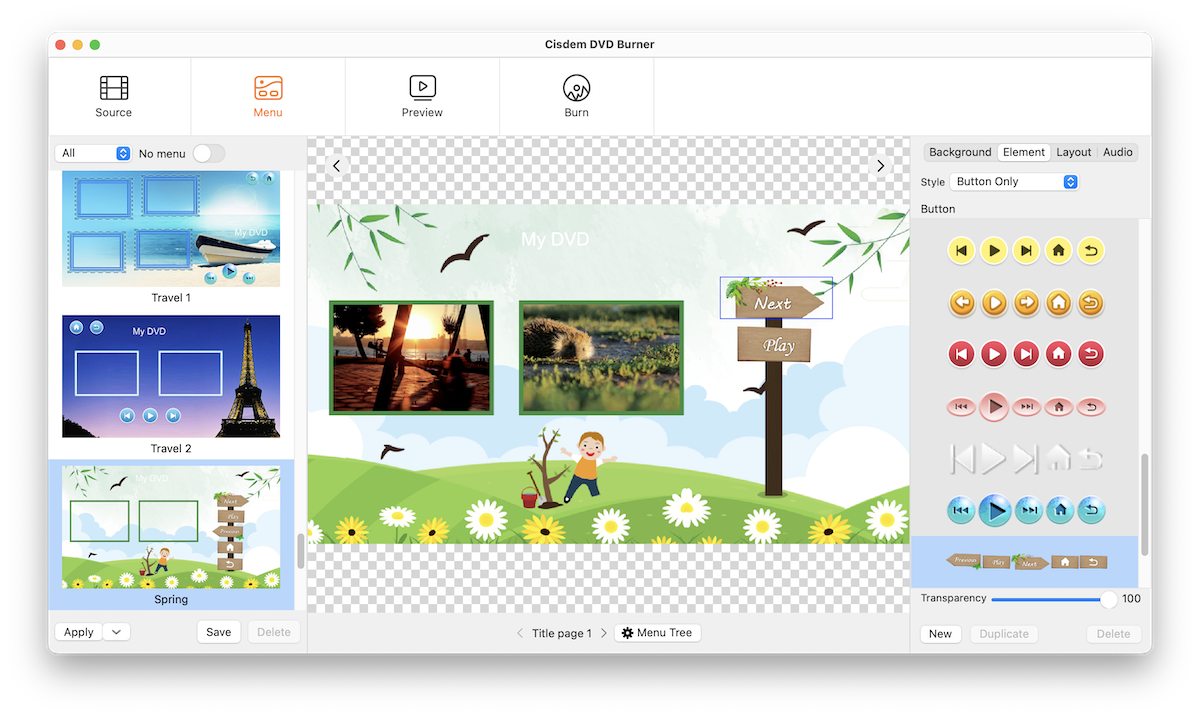
The Menu tab: templates (Travel 1, Travel 2, Spring) on the left, the Spring menu with two video thumbnails and Next/Play buttons in the middle, and the Background, Element, Layout and Audio panels with button styles on the right.
Chapters, subtitles and quick edits
Cisdem DVD Burner for Mac reads chapters you created in iMovie or another editor, and lets you add chapter markers yourself in the Edit window. The same window trims, crops and rotates video, adjusts brightness and contrast, adds a watermark, and burns in SRT subtitles. These are tidy-up tools, not a full editor.
Fit to Disc and full control over the DVD
Cisdem DVD Burner for Mac's Fit to Disc setting compresses your videos just enough to fill a single-layer DVD-5 (4.7 GB) or dual-layer DVD-9, based on their length and resolution. You can also choose a fixed quality level, NTSC or PAL for your country's players, 16:9 or 4:3, and a playback mode, such as starting from the menu and playing all titles in order.
Preview the disc before you burn
Cisdem DVD Burner for Mac's Preview tab plays your project like a DVD player, with menu navigation, play, pause, next, previous and title and chapter lists, so you can catch a wrong thumbnail or a broken button before wasting a blank disc. Projects save as .cdbproject files you can reopen later.
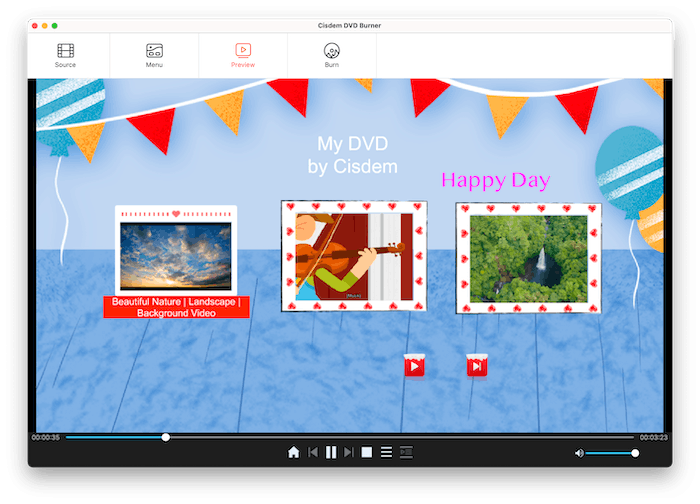
The Preview tab playing a party-themed menu titled "My DVD by Cisdem" with three video thumbnails, and DVD-player controls (home, previous, pause, next, stop, title and chapter lists) underneath.
Benefits
- Discs that look finished: a themed menu and chapters make a home video feel like a real DVD rather than a file on a disc.
- Fewer wasted blanks: the capacity bar, Fit to Disc and the preview catch problems before you burn.
- Current on new Macs: it's one of the few DVD authoring apps still updated for the newest macOS and M-series chips.
Real-World Uses
- Family gifts: iPhone videos of a new baby or a holiday, with a menu and music, burned in several copies for relatives.
- School and club events: a recital, play or match recording burned for every family.
- Memorial and wedding videos: a tribute video on a disc for venues and guests who use DVD players.
- Digitized VHS tapes: turn captured videotapes back into DVDs a parent can play on the old player.
- Archiving: save ISO images of finished projects to burn again later.
Who It's For, and Who Should Skip It
Cisdem DVD Burner for Mac suits Mac users who need to give people DVDs that play on a TV, with a decent-looking menu, without learning professional authoring software.
Skip it if:
- You only need to back up files to a disc. The Finder can burn data discs for free.
- You want Blu-ray or HD on disc. DVDs are standard definition, and this app doesn't author Blu-ray.
- You want a photo slideshow DVD straight from pictures. Turn the photos into a video first in another app.
- You burn one disc once. A $39.99 one-year subscription exists, but a free DVD tool may be enough for a single simple disc without a menu.
Usage Guide
- Install: download the DMG, drag Cisdem DVD Burner to Applications and open it. Connect your DVD burner directly to the Mac, not through an unpowered USB hub.
- Add videos: on Source, drag videos in or click +. Drag thumbnails to reorder them.
- Edit: click the pencil icon under a video to trim, crop, rotate, adjust effects, add subtitles, a watermark or chapters.
- Set the disc: choose 16:9 or 4:3, NTSC or PAL, DVD5 or DVD9, and a quality level (Fit to disc is a safe choice).
- Design the menu: on Menu, pick a template, change the background, text, buttons and music, or switch on No menu.
- Preview and burn: check everything on Preview, then on Burn choose Burn to Disc, Save as DVD Folder or Save as ISO, name the DVD, pick the playback mode and number of copies, and click Burn.
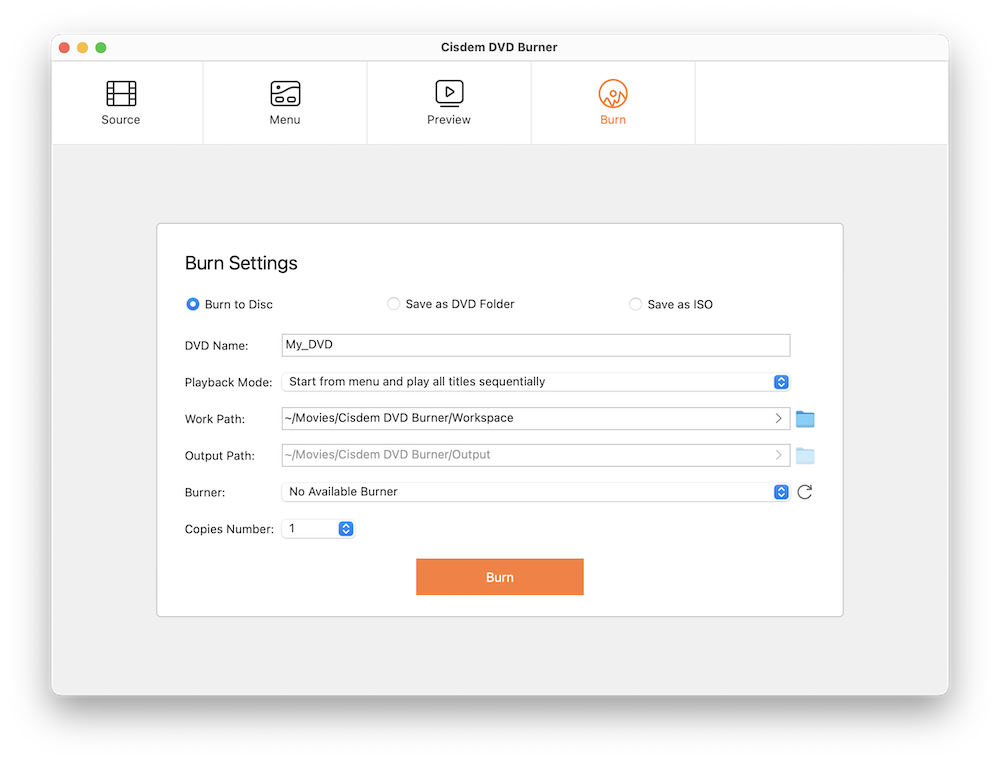
Burn Settings: Burn to Disc, Save as DVD Folder or Save as ISO, the DVD name, playback mode, work and output paths, the burner drive and the number of copies.
Tips
- If a disc plays on your Mac but not on a TV player, check NTSC versus PAL first. Most of the Americas and Japan use NTSC, most of Europe, Asia and Australia use PAL.
- For long videos, use a DVD-9 disc or Fit to Disc rather than squeezing everything onto DVD-5 at high quality.
- Keep your source videos where they are until you're done. A saved project stores only their locations, not the videos themselves.
- Save an ISO as well as the disc. It's an easy way to make more copies later.
Where it falls short
- Encoding takes time. One user on Cisdem's review page reports that a 90-minute video takes about 35 minutes to process on their Mac.
- Burn failures happen. Several 2026 releases list fixes for burn failures and crashes, and Cisdem's FAQ asks you to send log files to support when a burn fails. Testing with the trial first is wise.
- Menu limits. One MacUpdate reviewer wished for DVD menus that let viewers choose audio tracks and subtitles, which the app doesn't offer.
- External drives can be picky. Cisdem notes that some USB hubs don't supply enough power for external DVD drives during burning.
What Users Say
On Cisdem's review page
Cisdem's page for the Mac version shows 4.8 out of 5 from 106 reviews. They're hosted by the vendor, but the page includes some criticism alongside the praise.
"Speed and quality both exceeded my expectations. Burning a 2-hour 1080p video to a DVD-9 took far less time than I feared, and the picture looked clean on my TV." Brian Johnson, October 2026
"I installed it on my M4 and everything runs natively and fast, no Rosetta slowdown and no compatibility warnings." Andrew Thomas, August 2026
"Works well and the output quality is solid. Encoding speed could be better though — a 90-minute video takes about 35 minutes on my Mac. Still, it's reliable and hasn't failed me yet." Mike, July 2026
"Needed to burn a school play recording to DVD for the drama department. Dragged the file in, picked a template, hit burn. Done in 20 minutes and it played on every player we tested." Ross, June 2026
On MacUpdate
MacUpdate shows 4.1 out of 5 from 7 ratings, but its community scores for reliability, value and features are lower, at 2.5 out of 5 each. Lewis Johnson, writing about version 6.11.0 in June 2025: "New computers don't even come with disc drives anymore, and kids don't use dvds at all. At 82 years old, I'm starting to feel like a relic. But thanks Cisdem, you are still with us old folks who miss the old days." Vincent.W found it "Very easy to use" and added: "I hope the developer adds a feature that allows users to create a DVD menu for audio and subtitle settings."
On Trustpilot (Cisdem as a company)
Cisdem's Trustpilot profile covers all its apps and stood at 4.8 out of 5 from 299 reviews in October 2026, with about 11% one-star reviews. Stephen Borisoff wrote in July 2026: "First of all, Cisdem's products, such as the DVD Burner for Mac, are super and professional." On Cisdem's product page, Brandon Horn praises support for moving his license to a new Mac four years after he bought it.
Across these sources the themes are consistent: people like how easy it is and how good the menus look, and the complaints are about encoding speed, occasional burn failures (which recent versions target) and a few missing menu options. Note that the MacUpdate ratings mostly cover older versions.
Editions and Pricing
| License | 1 Mac | 2 Macs | 5 Macs | Term |
|---|
| One-Time Purchase (this listing) | $59.99 | $83.99 | $149.99 | Never expires |
| One-Year Subscription | $39.99 | $55.99 | $99.99 | Renews yearly, cancel any time |
| Business License | $79.99 | $111.99 | $199.99 | For commercial use |
Prices from Cisdem's order page on October 17, 2026. All plans have a 30-day money-back guarantee. A separate Windows version is sold under its own license.
FAQs
Does Cisdem DVD Burner for Mac run natively on M1, M2, M3 and M4 Macs?
Yes. Cisdem DVD Burner for Mac added native Apple silicon support in versions 8.2.0 and 8.3.0 (July and August 2026), and the current installer is a universal app that also runs on Intel Macs.
Will DVDs from Cisdem DVD Burner play on a normal TV DVD player?
Yes. Cisdem DVD Burner for Mac creates standard DVD-Video discs for TV players. If one plays on a computer but not on the TV, choose the right TV standard (NTSC or PAL) and check that the player supports the disc type. Cisdem also suggests saving an ISO and burning it with Disk Utility as a fallback.
Why is my 1080p video only 480p on the DVD?
Cisdem DVD Burner for Mac follows the DVD standard, which is 720x480 for NTSC or 720x576 for PAL. Every DVD is standard definition, whatever the source resolution.
What can I do if my video is too big for one DVD?
With Cisdem DVD Burner for Mac you can switch from DVD-5 to a DVD-9 disc, choose Fit to Disc so it compresses the video to fit, trim unneeded parts, or split the video across several discs.
Can I use Cisdem DVD Burner for Mac without a DVD drive?
Yes. Cisdem DVD Burner for Mac can save your project as a DVD folder or ISO file instead of burning a disc, so you can burn it later on a Mac with a drive or play it in a media player.
Does my Cisdem license work on Windows too?
No. Cisdem DVD Burner for Mac and the Windows version are sold separately, and the Mac license covers Macs only.
Can I save a DVD project and finish it later?
Yes. Cisdem DVD Burner for Mac saves projects as .cdbproject files from File > Save Project. The project stores where your videos are, so don't move or rename them before you reopen it.
System Requirements
- macOS: 10.15 Catalina, 11 Big Sur, 12 Monterey, 13 Ventura, 14 Sonoma, 15 Sequoia, 26 Tahoe or 27 Golden Gate
- Processor: Intel or Apple silicon (native)
- Memory: 512 MB RAM or more
- Disk: 10 GB of free space
- Burner: a built-in or external DVD writer for discs (not needed for ISO or DVD folder output)
Conclusion
Cisdem DVD Burner for Mac is worth $59.99 if you need to make DVDs with real menus on a current Mac, especially more than once: family videos for relatives, school events, memorials. The one reason to buy it is that it's actively maintained, runs natively on Apple silicon and makes polished menus with little effort. The main reason not to is that DVDs themselves are limited, standard definition, and you'll need an external burner. Encoding long videos also takes a while. If you only need one simple disc, the $39.99 one-year plan or a free tool may do. Run the trial on one short video and test the result in the DVD player you'll actually use.
Download Free TrialBuy Now