Cisdem PDF Compressor for Windows: Make PDFs Small Enough to Email, in Batches
Cisdem PDF Compressor for Windows is a $39.99 one-time-purchase app for 64-bit Windows 10 and 11 that shrinks PDF files by recompressing their images, one at a time or in batches, with three preset quality levels and a custom slider. It's for anyone who keeps hitting email and upload size limits and wants an offline tool instead of an online compressor.
The scanned contract is 28 MB and the mail server stops at 20. Drop it in, pick Medium File Size, click Compress, and you have a smaller copy next to the original in a few seconds.
Quick facts
- Version: 3.5.0 (installer dated October 26, 2026)
- Developer: Cisdem
- Platform: Windows 10 and 11, 64-bit only. A separate Mac version exists.
- Compression levels: Small, Medium and Large File Size, plus a custom slider
- Batch: yes, with per-file or "Apply to all" settings
- Interface languages: English, German, French, Italian, Spanish, Portuguese and Japanese
- Price: $39.99 one-time for one PC (personal use) at checkout. Business and annual licenses are also sold.
- Trial: 14 days, up to 3 files, with a watermark
- Guarantee: 30 days, for technical problems Cisdem can't fix
- What we checked: we downloaded the 20.6 MB installer from Cisdem on November 17, 2026 and read its file version, 3.5.0, dated October 26, 2026. Order page prices for all five licenses on November 17, 2026: $39.99 lifetime for 1 PC, $55.99 for 2 PCs, $99.99 for 5 PCs, $54.99 business and $19.99 a year. We didn't run our own compression tests.
Download Free TrialBuy Lifetime LicenseBuy Business LicenseBuy Annual License
Before you buy
- It shrinks images, not text: a PDF that's all text barely gets smaller. The savings come from scans, photos and graphics.
- No target size: you can't type "make it 2 MB". You pick a quality level and see what you get.
- A narrow tool: it only compresses. Cisdem PDFMaster for Windows ($89.99) includes compression along with editing, OCR and conversion.
- The refund is narrow: Cisdem's 30-day guarantee covers a technical problem its support can't fix, not a change of mind, so try three of your own files in the trial.
Overview
Cisdem PDF Compressor is a single small window. Add Files, Delete and Clear sit at the top, the file list fills the middle with each PDF's name, size and page count, and the output folder and Compress button are at the bottom. A gear icon on each row opens the compression settings. When the batch finishes, each row shows the new size next to the old one. The originals are left untouched and the compressed copies go to the output folder.
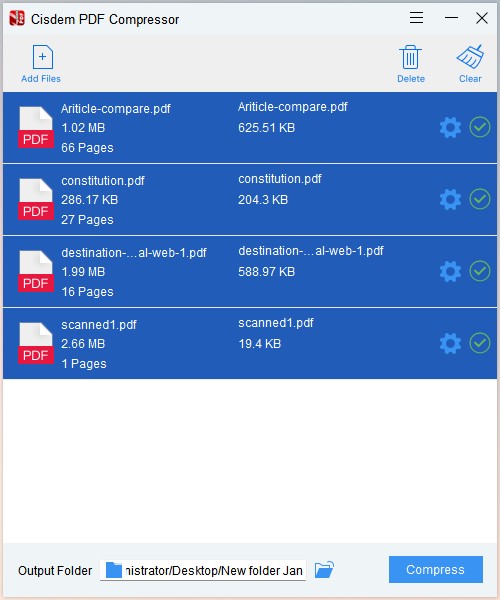
A finished batch: a 1.02 MB article went to 625.51 KB, a 286.17 KB text document only to 204.3 KB, and a 2.66 MB one-page scan to 19.4 KB.
That screenshot from Cisdem shows the pattern well: the scanned page shrank by over 99%, the text-heavy file by under a third.
Features
Three presets and a custom level
Cisdem PDF Compressor offers Small File Size (high compression, low quality), Medium File Size and Large File Size (low compression, high quality), and a Custom slider between small and large. Small suits on-screen reading and email, Large suits printing.
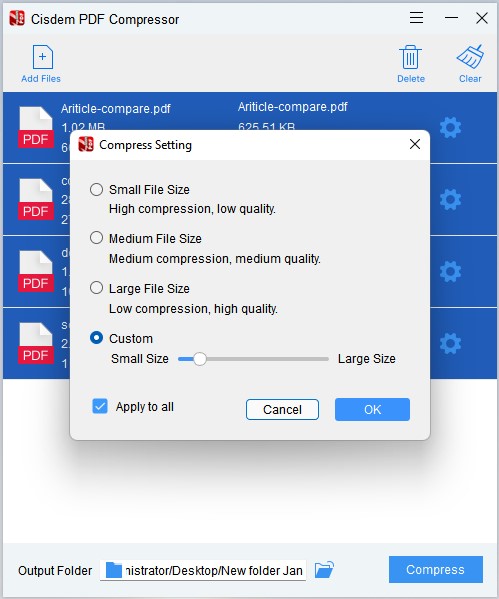
The Compress Setting dialog: three presets, the Custom slider and the "Apply to all" box.
Batch compression
Cisdem PDF Compressor takes a whole set of PDFs by drag and drop and compresses them in one run. Each file can have its own setting, or tick "Apply to all" to use one level for the batch.
How it reduces the size
Cisdem PDF Compressor lowers image resolution and JPEG quality and removes redundant data such as embedded fonts, metadata, thumbnails and duplicates, while keeping the page layout. It also compresses encrypted PDFs.
Benefits
- Gets files through: email attachments, job portals, court and government upload forms all have size limits.
- Private: files are compressed on your PC rather than uploaded to a web service.
- Quick to learn: add, choose a level, compress. There's nothing else to set up.
- Cheap: $39.99 once, or $19.99 a year.
Real-World Uses
- Job applications: shrink a portfolio PDF full of images below a portal's 5 MB limit.
- Scanned paperwork: make a stack of scanned invoices or medical records small enough to email.
- Website downloads: compress brochures and manuals so they load quickly for visitors.
- Archiving: batch-compress old scanned documents to save disk or cloud storage space.
Who It's For, and Who Should Skip It
Good fit: people who regularly send or upload image-heavy or scanned PDFs from a Windows 10 or 11 PC and want a simple offline tool.
Skip it if you compress a file once in a while: free online compressors or Word's "Save as PDF" with minimum size can do. If you need a precise target size, it can't do that. If you also edit or convert PDFs, a full editor with compression built in (Cisdem PDFMaster, Acrobat) is better value. It won't install on Windows 7, 8 or 32-bit Windows.
Usage Guide
- Download and run the installer, then launch Cisdem PDF Compressor and activate it with your license code if you've bought one.
- Click Add Files, or drag PDFs into the window.
- Click the gear icon on a file and choose Small, Medium or Large File Size, or Custom. Tick "Apply to all" to use it for every file.
- Click the folder icon next to Output Folder to choose where the compressed copies go.
- Click Compress, then compare the new sizes shown on each row.
- If images look too blurry, run it again with a larger file size level.
Where it falls short
- Small File Size can be harsh: a reviewer on Slashdot found that a 30.09 MB file compressed to 3.98 MB on Small File Size had its images turned black and white. Use Medium when color matters.
- Blurry images: the lowest settings can blur pictures. Cisdem's advice is a larger file size level.
- Custom settings aren't saved: a custom level resets the next time you open the app.
- Slow changelog: the public release notes stop at version 3.0.0 from February 2024, even though the current installer is 3.5.0, so it's hard to see what changed.
What Users Say
Slashdot: 4.0 out of 5 from 1 review
Daniel S., a columnist (September 2025), titled his review "Compresses PDF files with high quality" and wrote: "Thanks to PDF Compressor, the PDF files become smaller, and the quality of images and text isn't significantly affected." On the downside, he found only Mac and Windows versions, no online or mobile version, and the black-and-white images on the Small setting described above. He still rated his likelihood to recommend it 9 out of 10.
Users quoted on Cisdem's Windows review page
These come from Cisdem's own site, so they're favorable by selection.
Clyde (June 2025): "I regularly create reports filled with charts and graphics. Some exceeded upload limits on our portal. Cisdem PDF Compressor cut the file size dramatically while preserving clarity."
Willie (July 2025): "Cisdem helped reduce upload time by compressing large PDFs. It's especially helpful with scanned manuals."
Tina (August 2024): "It decreased about 50% size of my PDF files, which is a great achievement."
William (August 2024): "The quality of images in the PDF file is well maintained, it is a good design that it will generate a compressed PDF file instead of replacing the original PDF file."
Lupe (August 2025): "I needed to shrink some large PDFs to upload to a website, and this app did it perfectly."
Trustpilot: Cisdem as a company
Cisdem scores 4.9 out of 5 from 306 reviews on Trustpilot, which notes that Cisdem hasn't invited reviews recently. Recent reviews mostly praise fast help with licenses and activation.
The pattern: people like how simple it is and how much it shrinks image-heavy PDFs. The one detailed complaint is image quality at the most aggressive setting. Independent reviews are rare, so test a few of your own files in the trial.
Comparisons
Cisdem PDF Compressor vs. free online compressors
Online compressors cost nothing and are fine for an occasional file that isn't confidential. Cisdem PDF Compressor keeps files on your PC, has no per-day or per-file limits after purchase, and handles whole batches with one setting.
Cisdem PDF Compressor vs. Cisdem PDFMaster
Cisdem PDFMaster for Windows ($89.99) has PDF compression with preset modes and batch compression built in, along with editing, OCR, forms and conversion. Buy the compressor alone only if compressing is all you do.
Windows version vs. Mac version
The two are separate products with separate licenses. The Cisdem PDF Compressor for Mac works the same way, with presets, a custom level and batch compression.
Editions and Pricing
| License | Price at checkout | Term | PCs and use | Buy |
|---|
| Lifetime License | $39.99 | One-time, with updates | 1 PC, personal use | Buy 1 PC |
| Lifetime License for 2 PCs | $55.99 | One-time, with updates | 2 PCs, personal use | Buy 2 PCs |
| Lifetime License for 5 PCs | $99.99 | One-time, with updates | 5 PCs, personal use | Buy 5 PCs |
| Business License | $54.99 | One-time, with updates | 1 PC, commercial use | Buy Business |
| Annual License | $19.99 a year | Renews yearly until cancelled | 1 PC | Buy Annual |
Prices as seen on the order page on November 17, 2026, in US dollars before tax. Each button orders the license in its row. The lifetime license costs the same as two years of the annual plan. Cisdem offers 30% off to students and teachers and to owners of another Cisdem app.
FAQs
Why didn't Cisdem PDF Compressor make my PDF smaller?
Cisdem PDF Compressor saves space mainly by recompressing images, so a PDF that contains only text shrinks very little. Scanned documents and files with photos or charts shrink the most.
Can Cisdem PDF Compressor compress a PDF to an exact size?
No. Cisdem PDF Compressor lets you choose a quality level or a custom setting, and the result depends on the images in the file. If it's still too big, run it again at a smaller level.
Does Cisdem PDF Compressor overwrite my original files?
No. Cisdem PDF Compressor saves the compressed copies in the output folder you choose and leaves the originals as they were.
Does Cisdem PDF Compressor run on Windows 7?
No. Cisdem PDF Compressor for Windows requires 64-bit Windows 10 or Windows 11, 512 MB of RAM and 50 MB of free disk space.
Is the watermark removed after I buy Cisdem PDF Compressor?
Yes. Cisdem PDF Compressor's watermark and 3-file limit apply only to the 14-day trial. Activating a license removes both limits.
Can I use the Cisdem PDF Compressor Lifetime License at work?
Cisdem PDF Compressor's Lifetime License is for personal use, and the Business License covers commercial use with the same features.
System Requirements
- Windows 10 or Windows 11, 64-bit
- 1 GHz Intel or AMD processor or faster
- 512 MB RAM or more
- 50 MB free disk space or more
Conclusion
Cisdem PDF Compressor for Windows is worth $39.99 if you often need to shrink scanned or image-heavy PDFs and want to keep them off the web. The one reason to buy it is how little effort it takes: drop a batch in, pick a level, done. The main reason not to is that it does only this one job, and a PDF editor you may already need, such as Cisdem PDFMaster, does it too. For an occasional file, a free online compressor will do.
Download Free TrialBuy Lifetime LicenseBuy Business LicenseBuy Annual License