Cisdem PDF Compressor for Mac: Make Large PDFs Small Enough to Send
Cisdem PDF Compressor for Mac is a $39.99 one-time-purchase app that shrinks PDF files, one at a time or in batches, using preset or custom quality settings. It is for people who keep hitting email attachment limits or upload limits with image-heavy PDFs.
A 29 MB brochure bounces off a mail server. You drag it in, choose a size, and send the smaller copy. Most PDFs are big because of their images, and that is where this app does its work.
Quick facts
- Version: 6.0.0, released October 23, 2026
- Developer: Cisdem
- Platform: macOS 10.15 Catalina through macOS 27 Golden Gate, Intel and Apple Silicon. A separate Windows version exists.
- Compression: Small, Medium and Large File Size presets plus Custom
- Compatibility: PDF versions 1.0 to 1.7, batches, password-protected PDFs once you enter the password
- Price: $39.99 one-time for one Mac at checkout
- Trial: 14 days, up to 3 PDF files, with a watermark
- Guarantee: 30-day money back
- What we checked: installer size 36 MB from the vendor's download link, dated October 23, 2026, release notes, FAQ and tech specs on the vendor's site, order page price $39.99 for the one-time license on November 6, 2026. We did not measure compression on our own files.
Download Free TrialBuy Now
Before you buy
Check what your PDF is made of. Cisdem PDF Compressor works mainly on images, so a text-only PDF may barely shrink at all. Also remember the trial adds a watermark, which means you can judge the size and sharpness from it but can't use the output. And if you only shrink a file now and then, the free Quartz filter in macOS Preview may be enough.
Overview
Cisdem PDF Compressor reduces image resolution and removes redundant material such as embedded fonts, metadata, thumbnails and duplicate data. You add files, pick a preset per file or for all of them, and click Compress. It keeps your originals and saves the results to the output folder. Version 6.0 is a real update after years of quiet: it added native Apple Silicon support and a new compression engine.
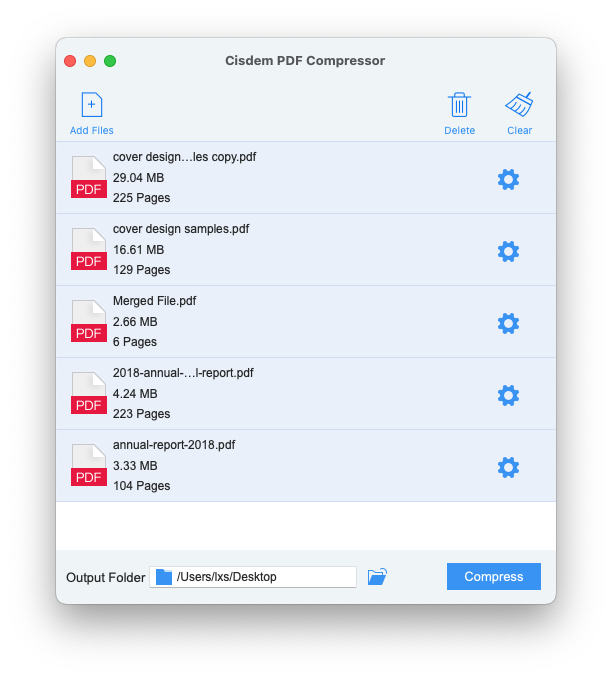
Five PDFs queued for compression, each with its own settings gear.
Features
Presets you can read
Cisdem PDF Compressor offers Small File Size for high compression and low quality, Medium File Size for a balance, and Large File Size for low compression and high quality. Cisdem's page suggests Medium for ebooks and Large for office printing.
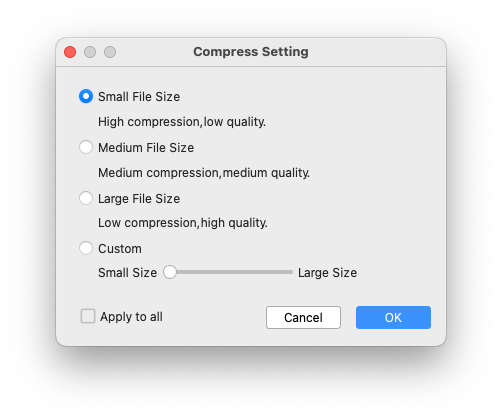
The Compress Setting dialog, with Apply to all for batches.
A custom slider when the presets miss
Cisdem PDF Compressor's Custom option adjusts resolution and JPEG quality with a slider from small to large. If images turn blurry, you raise it and run again. Custom settings aren't saved between sessions, so note the values you like.
Batch compression with the size shown
Cisdem PDF Compressor processes many PDFs in one run and lists the new size beside the old one, so you can see what each file gained. Cisdem claims a 500-page PDF takes about 10 seconds and that files can shrink by up to 90%.
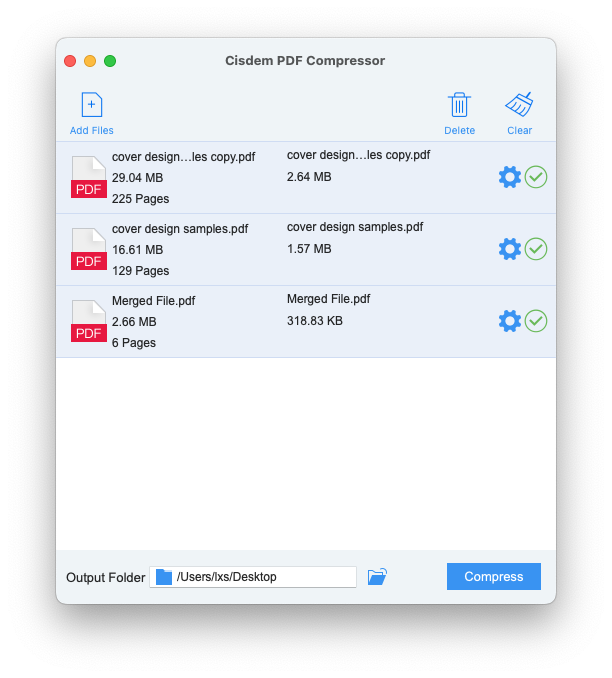
Results in Cisdem's own example: 29.04 MB became 2.64 MB, 16.61 MB became 1.57 MB, and 2.66 MB became 318.83 KB.
Works with password-protected PDFs
Cisdem PDF Compressor can process a locked PDF once you click the padlock and enter its password. It can't help if you don't know the password.
Benefits
- Attachments get through mail servers and upload forms that reject big files.
- Your PDFs stay on your Mac, unlike upload-based web compressors.
- Smaller files load faster for readers of PDFs on your website.
- A folder of scans takes far less disk space.
Real-World Uses
- A designer sends a portfolio that would otherwise exceed a client's mail limit.
- A job applicant gets a scanned certificate under a portal's upload limit.
- An office shrinks a year of scanned invoices before archiving.
- A presenter exports Keynote to PDF and needs a version small enough to share.
Who It's For, and Who Should Skip It
Cisdem PDF Compressor suits Mac users who compress PDFs every week and want batch work without uploading files.
Skip it if your PDFs are mostly text, because there is little to remove. Skip it if you need to hit an exact target size, as the app can't do that. If you already own Cisdem PDFMaster, it compresses PDFs too, so you don't need this as well. If you need a shrink only once or twice a year, try Preview or a free tool first.
Usage Guide
- Download the DMG, drag the app to Applications and open it.
- Click Add Files or drag in your PDFs. For a locked PDF, click the padlock and enter its password.
- Click the gear icon next to a file, pick a size, and tick Apply to all if the batch should match.
- Choose the output folder and click Compress.
- Open the result and zoom into a picture before sending. If it is too soft, go up a size and run again.
Where it falls short
You can't type in a target such as "under 10 MB": you adjust the settings and try again. Low settings blur images, so results need checking. One long-time MacUpdate reviewer found that the app shifted positions inside PDFs, although that was version 3 and the engine has since changed. Another complained about the annual subscription, so choose the one-time plan if that bothers you. Apple Silicon support only became native with version 6.0 in October 2026, late for a Mac tool, and reviews of that new engine are still scarce.
What Users Say
MacUpdate: 3.7 out of 5 from 6 ratings
A small and mixed sample, all from versions before 6.0.
- "It honestly deserves a higher rating. It effortlessly shrinks my large PDFs for emailing without making them look fuzzy." Sheldon Martin, July 9, 2025, version 5.0.0, 5 stars
- "Not yet compatible with M1/M2 Silicon Mac. It's been 3 years now since M1 came out!" zlazkow, November 28, 2023, version 4.0.0, 1 star
- "Annual SUB-script-ion...bye bye!" zlazkow, December 14, 2024, version 5.0.0, 1 star
- "While this is working, it modifies the positions in the pdfs." Aargl, May 1, 2018, version 3.0.1, 2.5 stars
- "Good to try. High quality and high speed." courtneywillian, December 12, 2016, version 3.0.1, 5 stars
Mac App Store
The App Store edition has too few ratings to show a score. These reviews are from 2017 and 2018.
- "Document opened quickly after compression, text and illustrations were clear, and could perform all editing functions." hobodoc, January 19, 2018
- "This app solves everything perfect quality!" Alain_Garner, July 31, 2018, on Keynote PDFs
- "I am thrilled for finding this app, as I always have many PDF files to send or share with my clients" Yola G.K, June 15, 2017
Trustpilot: 4.9 out of 5 from 304 reviews of Cisdem
This score covers all Cisdem products, but the first quote is clearly about compressing PDFs.
- "My go-to app for compressing PDF's to make them small enough to email while maximizing the PDF quality." Dale Yachimec, July 1, 2026
- "Great product and fast customer response!" Jonas Ma, August 17, 2026
The pattern: people like the easy batch workflow and the quality at email-friendly sizes. The complaints were late Apple Silicon support, which version 6.0 fixes, the annual plan and one report of shifted positions. Almost none of this feedback covers the new engine, so judge it from the trial.
Comparisons
PDF Compressor vs. macOS Preview
Preview's Reduce File Size Quartz filter is free but offers no quality control and can make text-heavy pages look rough. Cisdem PDF Compressor gives you presets, a custom slider and batches.
PDF Compressor vs. Cisdem PDFMaster
PDFMaster costs more and also edits, converts, merges, splits, encrypts and signs PDFs. PDF Compressor makes sense if shrinking is the only job you need.
Editions and Pricing
| Plan | Price | License term | Devices |
|---|
| One-Year Subscription | $19.99 | One year | 1 Mac |
| One-Time Purchase | $39.99 | Lifetime | 1 Mac |
| One-Time Purchase | $55.99 | Lifetime | 2 Macs |
| One-Time Purchase | $99.99 | Lifetime | 5 Macs |
| Business License | $54.99 | One-time | 1 Mac |
Prices are from Cisdem's buy page. The Buy Now button here is for the one-time 1-Mac license. The $99.99 bundle adds PDF Converter OCR and PDF Password Remover.
FAQs
Why won't Cisdem PDF Compressor reduce my PDF?
Cisdem says this happens when a PDF has no images and contains only text. There is nothing much for the app to downsample.
Why do my images look blurred after compression?
A very low resolution was selected. In Cisdem PDF Compressor, use a larger file size or raise the resolution and JPEG quality.
Can Cisdem PDF Compressor hit a specific file size?
No. Cisdem PDF Compressor's result depends on resolution and JPEG quality, and you can't set a target size in advance.
Does Cisdem PDF Compressor overwrite my originals?
Cisdem PDF Compressor saves results to the output folder you choose. If that is the same folder as the source, check the file names before deleting anything.
Can I reuse custom settings in Cisdem PDF Compressor?
Not automatically. Custom settings apply to the current session and aren't saved for the next time you run the app.
Does Cisdem PDF Compressor work on Apple Silicon?
Yes. Version 6.0 added native Apple Silicon support, and earlier versions didn't have it.
Does the Mac license of Cisdem PDF Compressor cover Windows?
No. The plan here covers one Mac, and the Windows version has its own buy page.
System Requirements
- macOS 10.15 Catalina, 11 Big Sur, 12 Monterey, 13 Ventura, 14 Sonoma, 15 Sequoia, 26 Tahoe or 27 Golden Gate
- Intel or Apple Silicon processor
- 512 MB RAM or more
- 50 MB free space or more for installation
Conclusion
Cisdem PDF Compressor for Mac is worth $39.99 if you shrink image-heavy PDFs often and want to do it in batches on your own Mac. Clear presets and the new native engine make it a tidy single-purpose tool.
The main reason not to buy it is occasional use: Preview or a free tool can do a one-off, and text-only files won't benefit. If you also need to edit PDFs, look at PDFMaster instead.
Download Free TrialBuy Now