Cisdem PDF Converter OCR for Windows: Turn PDFs and Scans into Word, Excel and Searchable PDFs
Cisdem PDF Converter OCR for Windows is a $69.99 one-time-purchase converter for 64-bit Windows 10 and 11 that turns native and scanned PDFs and images into Word, Excel, PowerPoint, text, images or searchable PDFs, and creates PDFs from Office and other files. It's for people who need the contents of PDFs in editable form, not for editing the PDFs themselves.
A supplier sends a 40-page scanned price list and you need it in Excel by lunch. Drop the file in, choose "to XLSX", let the OCR read the scan, and click Convert, instead of retyping every row.
Quick facts
- Version: 4.0.0, released October 21, 2026
- Developer: Cisdem
- Platform: Windows 10 and 11, 64-bit only. A separate Mac version exists.
- Converts to: DOCX, XLSX, PPTX, CSV, HTML, RTF, TXT, searchable OCR PDF, and JPG, PNG, BMP, TIFF and other images
- Creates PDFs from: Word, Excel, PowerPoint, OpenDocument, WordPerfect, XPS, RTF, TXT, HTML, images, and Outlook MSG, VCF and ICS files
- OCR languages: 29, including English, Chinese, Japanese, Korean, Arabic, Hindi, Russian and most European languages
- Price: $69.99 one-time for one PC (personal use) at checkout. Business and annual licenses are also sold.
- Trial: 14 days, converting half the pages of a file, up to 3 pages
- Guarantee: 30 days, for technical problems Cisdem can't fix
- What we checked: installer size 44.4 MB from Cisdem's download link, dated October 21, 2026, the same day as version 4.0.0 in the Windows release notes. Order page prices for all five licenses on November 17, 2026: $69.99 lifetime for 1 PC, $97.99 for 2 PCs, $174.99 for 5 PCs, $89.99 business and $49.99 a year. We didn't run our own OCR accuracy tests.
Download Free TrialBuy Lifetime LicenseBuy Business LicenseBuy Annual License
Before you buy
- It converts, it doesn't edit: you can't change text inside a PDF, fill forms or sign. For that you need a PDF editor such as Cisdem PDFMaster.
- 64-bit Windows 10 or 11 only: it won't install on Windows 7 or 8, or on 32-bit Windows.
- Personal vs. business: the $69.99 Lifetime License is for personal use. The Business License ($89.99) covers use at work with the same features.
- The refund is narrow: Cisdem's 30-day guarantee covers a technical problem its support can't fix, not a change of mind or a feature the product page doesn't describe. Run your own scans through the trial first.
Overview
The app has two tabs. Converter takes PDFs and images: each file gets a row with its size and page count, a choice of all pages or a page range, an output format menu and a gear icon for layout and OCR settings. Creator goes the other way, turning documents and images into PDFs, one per file or merged into one. An output folder and a Convert or Create button sit at the bottom. There's nothing else to learn, which is the point.
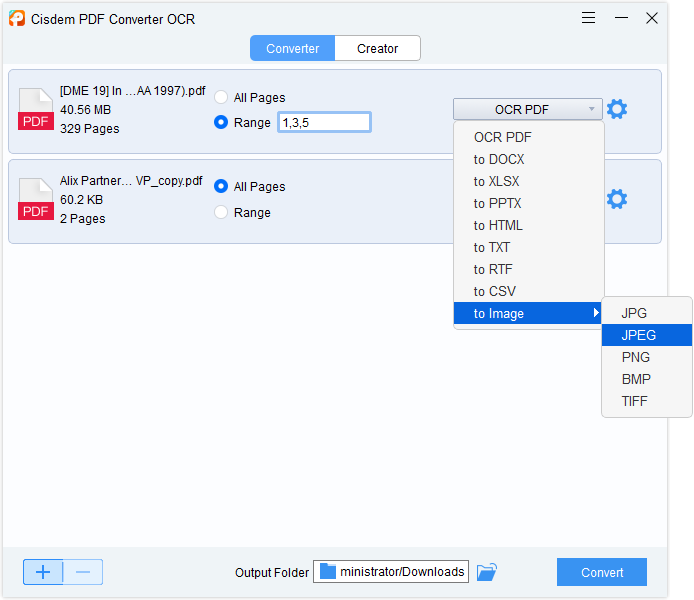
The Converter tab with two PDFs queued, one set to the page range 1,3,5, and the output menu open: OCR PDF, DOCX, XLSX, PPTX, HTML, TXT, RTF, CSV and image formats.
Features
Convert PDFs to Office and other formats
Cisdem PDF Converter OCR turns PDFs into Word, Excel, PowerPoint, CSV, HTML, RTF, TXT or images. The layout setting lets you favor accurate text for editing or the original page layout for a faithful copy. Each file can have its own format and page range, written as "1-3,8,10-12".
OCR for scanned PDFs and images
Cisdem PDF Converter OCR recognizes text in scanned PDFs and in BMP, PNG, GIF and JPEG images, and outputs a searchable PDF or any of the editable formats. It detects the language automatically, or you tick the languages yourself, including several in one document. The OCR module is a separate download that the app offers the first time you add a scan.
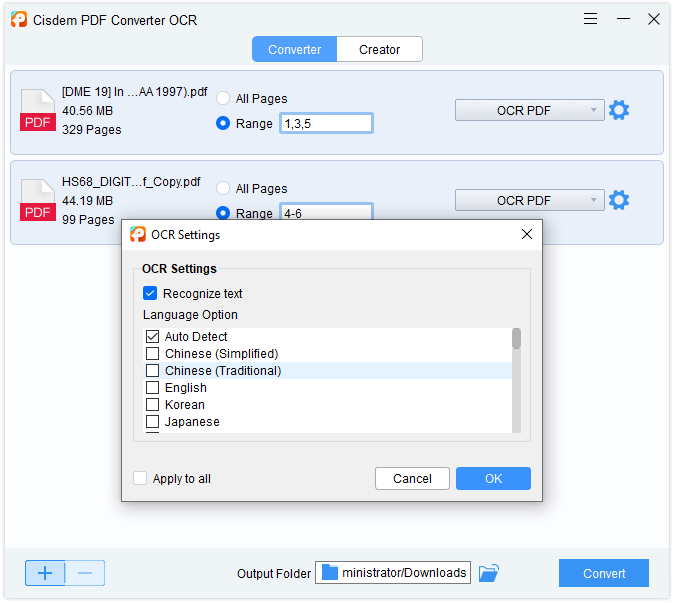
OCR Settings: Recognize text, Auto Detect or a manual language list, and Apply to all, over a 329-page scanned PDF set to OCR PDF output.
Batch conversion
Cisdem PDF Converter OCR converts a whole list of files in one run, each with its own settings. Set the format on the first file and the files you add after it take the same format, so a folder of invoices needs one choice, not fifty. There's no limit on file size or page count.
Create PDFs and merge files
Cisdem PDF Converter OCR's Creator tab turns Word, Excel, PowerPoint, OpenDocument, WordPerfect, XPS, RTF, text, HTML and images into PDFs, as well as Outlook MSG messages, VCF contacts and ICS calendar files. Switch on Merge and drag the files into order to get one combined PDF, for example a cover letter, a spreadsheet and a few scans in one attachment.

The Creator tab with Merge switched on: a PDF, a Word document, a text file and an Excel sheet combined into one PDF.
Protected PDFs
Cisdem PDF Converter OCR converts a password-protected PDF once you enter its open password on the file's thumbnail. It doesn't crack passwords you don't have.
Benefits
- No retyping: scanned contracts, invoices and old reports become text you can edit, search and paste.
- Tables stay tables: Excel and CSV output puts data back into cells, which is where most time is saved.
- Works offline on your PC: confidential files don't go to an online converter, and there are no page quotas.
- Cheap for what it does: a one-time license costs less than a few months of most subscription PDF suites.
Real-World Uses
- Bookkeeping: turn scanned supplier invoices and bank statements into Excel or CSV for import.
- Research: make old scanned papers searchable, or extract their text to a TXT file for notes or an AI summary.
- Reusing documents: convert a PDF brochure or report to Word or PowerPoint and update it instead of rebuilding it.
- Office paperwork: merge a letter, a spreadsheet and photos of receipts into one PDF for an expense claim.
- Archiving: batch-convert a folder of scans into searchable PDFs.
Who It's For, and Who Should Skip It
Good fit: office workers, students, researchers and small businesses on Windows 10 or 11 who regularly need text and tables out of PDFs and scans, and want a simple tool they pay for once.
Skip it if you need to edit, annotate, fill or sign PDFs: that's a PDF editor's job, and Cisdem's own PDFMaster ($89.99) includes the same kind of conversion and OCR plus editing. If you convert a page or two a month, Word's built-in PDF opening or a free online converter may be enough. And anyone still on Windows 7 or 8, or 32-bit Windows, can't install it.
Usage Guide
- Download the installer, double-click the .exe, choose a folder and click Next, then Install and Finish.
- To activate a license, click the key icon in the top-right corner, paste your code and click Activate.
- On the Converter tab, click + or drag PDFs and images into the window.
- Choose All Pages or type a Range, and pick the output format for each file.
- For scans, click the gear icon, tick Recognize text and check the language. Accept the OCR module download the first time.
- Pick the output folder (a local drive, not a cloud folder) and click Convert.
- To make PDFs, switch to Creator, add files, turn on Merge if you want one file, and click Create.
Where it falls short
- Fonts from scans: OCR recognizes the text but not always the font, so converted scans may need font fixes in Word.
- Language coverage: 29 OCR languages cover most users, but a SourceForge reviewer noted it "may struggle if you work with less regional files."
- Cloud folders: a red exclamation mark after Convert usually means the source file sits in a cloud drive or the output folder isn't set. Copy files to a local drive first.
- Fewer formats than on Mac: the shared product page lists EPUB, PDF/A, Pages and Keynote, but those are not in the Windows version's format list.
- A stingy trial: converting only part of each file makes it hard to judge a long document before buying.
What Users Say
SourceForge: 4.5 out of 5 from 2 reviews
Neither SourceForge reviewer says which platform they use.
A marketing specialist in e-commerce operations (5 out of 5, April 2026), titled "Fast and accurate PDF converter that saves time", praised "Very fast conversion speed, even for large files" and said it "keeps the original layout and formatting almost perfectly". The con: "Supports mainly common file languages, so it may struggle if you work with less regional files."
A project manager (4 out of 5, July 2025) wrote: "The output quality, especially formatting retention in Word/Excel, is consistently very good." The drawback: "This is purely a converter and OCR tool." and "I can't make edits to the source PDF." Their summary: "If your primary needs are high-quality conversion and reliable OCR" "on reasonably clean documents, it's a very competent tool."
Users quoted on Cisdem's Windows review page
These are on Cisdem's own site, so they're selected and positive. They show what buyers use it for.
Brett (February 2026): "I converted scanned invoices and contracts into Word files, and the formatting stayed almost perfect. Super easy to use, no learning curve at all."
Lindsey (January 2026): "I needed to extract text from scanned PDFs for research work. Cisdem's OCR recognized multiple languages accurately and saved me hours of retyping."
Breanna (December 2025): "It converts scanned PDFs into editable Word files perfectly — even complex tables came out clean!"
Clark (September 2025): "I'm not too bothered about the formatting of large PDFs,I just want the text so that Chat GPT can summarize for me. Cisdem works good on extracting texts from those large PDFs".
Willie (September 2025): "Cisdem PDF Converter OCR does a very good job of converting image PDFs to native PDF."
Kate (March 2026): "Fast conversion and solid OCR results. I especially like that I can batch convert multiple PDFs at once."
Trustpilot: Cisdem as a company
Cisdem scores 4.9 out of 5 from 306 reviews on Trustpilot, which notes that Cisdem hasn't invited reviews recently. Most recent reviews are about other Cisdem apps and praise quick help with licenses and activation ("within minutes my issue was resolved"). The criticism in recent reviews is about another app's redesigned interface, not this converter.
The pattern: users like the speed, batch work and how well Word and Excel output keeps tables and layout. The complaints are that it can't edit PDFs and that less common languages are weaker. Independent reviews of the Windows version are few, so try your own scans in the trial.
Comparisons
Cisdem PDF Converter OCR vs. Cisdem PDFMaster
Cisdem PDF Converter OCR ($69.99) converts and creates. Cisdem PDFMaster for Windows ($89.99 at checkout) also converts with OCR, and adds text and image editing, annotations, forms, signatures and redaction, and it runs on Windows 7 and 8 too. If you only ever need the contents out of PDFs, the converter is $20 cheaper and simpler. If you also work inside PDFs, PDFMaster is the better buy.
Cisdem PDF Converter OCR vs. opening PDFs in Microsoft Word
Word can open a PDF and convert it to an editable document, one file at a time, and it handles simple text documents well. Cisdem PDF Converter OCR adds batch work, page ranges, Excel, PowerPoint and CSV output, searchable PDFs, and language choice for OCR, which matter with scans and tables.
Windows version vs. Mac version
The two are separate products with separate licenses. The Cisdem PDF Converter OCR for Mac adds output to Apple's Pages, Keynote and Numbers and a few more formats. The core job, converting PDFs and scans with OCR, is the same.
Editions and Pricing
| License | Price at checkout | Term | PCs and use | Buy |
|---|
| Lifetime License | $69.99 | One-time, with updates | 1 PC, personal use | Buy 1 PC |
| Lifetime License for 2 PCs | $97.99 | One-time, with updates | 2 PCs, personal use | Buy 2 PCs |
| Lifetime License for 5 PCs | $174.99 | One-time, with updates | 5 PCs, personal use | Buy 5 PCs |
| Business License | $89.99 | One-time, with updates | 1 PC, commercial use | Buy Business |
| Annual License | $49.99 a year | Renews yearly until cancelled | 1 PC | Buy Annual |
Prices as seen on the order page on November 17, 2026, in US dollars before tax. Each button orders the license in its row. At these prices the lifetime license costs less than two years of the annual plan. Cisdem offers 30% off to students and teachers and to owners of another Cisdem app, and volume pricing for more than 5 PCs.
FAQs
Can Cisdem PDF Converter OCR edit the text of a PDF?
No. Cisdem PDF Converter OCR converts a PDF into an editable format such as Word, where you make your changes, and its Creator tab can turn the edited file back into a PDF. To edit inside the PDF itself, you need a PDF editor.
Does Cisdem PDF Converter OCR work on Windows 7 or 32-bit Windows?
No. Cisdem PDF Converter OCR for Windows needs 64-bit Windows 10 or Windows 11, 512 MB of RAM and 1 GB of free disk space.
Why does Cisdem PDF Converter OCR ask to download an OCR module?
Cisdem PDF Converter OCR installs its OCR engine separately to keep the main installer small. The prompt appears the first time you add a scanned PDF or an image; click OK to download it. If it doesn't appear, add an image file to trigger it.
Is there a page or file size limit in Cisdem PDF Converter OCR?
Not in the full version. Cisdem states there's no limit on file size or page count; long scans simply take longer, depending on your PC. The trial converts only part of each file.
Can I use the Cisdem PDF Converter OCR Lifetime License at work?
Cisdem PDF Converter OCR's Lifetime License is for personal use. Cisdem sells the Business License for commercial use; the features are the same.
Does a Windows license of Cisdem PDF Converter OCR work on a Mac?
No. Cisdem PDF Converter OCR for Windows and for Mac are separate products with separate licenses, and Cisdem may decline a refund for software bought for the wrong platform.
Does the annual Cisdem PDF Converter OCR license renew automatically?
Yes. Cisdem PDF Converter OCR's Annual License renews each year until you cancel, and Cisdem doesn't refund a renewal you forgot to stop. You can turn off automatic renewal at any time before the charge in your Verifone account, or in PayPal for PayPal orders.
System Requirements
- Windows 10 or Windows 11, 64-bit
- 1 GHz Intel or AMD processor or faster
- 512 MB RAM or more
- 1 GB free disk space or more for the app and the OCR module
Conclusion
Cisdem PDF Converter OCR for Windows is worth $69.99 if you regularly need text and tables out of PDFs and scans, and nothing else. The one reason to buy it is simple, batch OCR conversion to Word and Excel that you pay for once and run offline. The main reason not to is that it can't edit PDFs: if you'll ever need to fix text, fill forms or sign, spend the extra $20 on Cisdem PDFMaster instead. Test a few of your own scans in the trial first, and pick the Business License for work use.
Download Free TrialBuy Lifetime LicenseBuy Business LicenseBuy Annual License