Cisdem PDF Converter OCR for Mac: Turn Scanned and Native PDFs into Editable Files
Cisdem PDF Converter OCR for Mac is a $69.99 one-time-purchase Mac app that converts native and scanned PDFs to Word, Excel, PowerPoint, Pages, Keynote and searchable PDF, and creates PDFs from other files. It suits anyone who regularly has to pull text out of scans, and it runs offline on your Mac.
A scanned contract is only a picture of text: you can't search it, copy from it or edit it. OCR reads those pictures and gives you real words, and the batch mode does that for a whole stack of files while you do something else.
Quick facts
- Version: 10.0.0, released October 16, 2026
- Developer: Cisdem
- Platform: macOS 11 Big Sur through macOS 27 Golden Gate, Intel and Apple Silicon. A separate Windows version exists.
- Converts to: OCR PDF, DOCX, XLSX, CSV, PPTX, Pages, Keynote, Numbers, HTML, RTF, TXT, images
- Creates PDFs from: Word, Excel, PowerPoint, iWork, HTML, EPUB, CHM, RTF, TXT and images
- Price: $69.99 one-time for one Mac at checkout
- Trial: full features, but only the first 3 pages of a file. A file under 5 pages converts only by half.
- Guarantee: 30-day money back
- What we checked: installer size 98.7 MB from the vendor's download link, dated October 16, 2026, release notes, tech specs and trial limits on the vendor's site, order page price $69.99 for the one-time license on November 6, 2026. We did not test OCR accuracy ourselves.
Download Free TrialBuy Now
Before you buy
Test the trial on your hardest file, not your cleanest one. Scan quality decides how good OCR output is, and Cisdem itself says output can't match every PDF exactly. Also check whether you need to edit the PDF itself: this app converts and creates, and for editing inside a PDF, Cisdem sells PDFMaster instead.
Overview
Cisdem PDF Converter OCR has two tabs. Converter takes PDFs and images, and you choose an output format and page range per file. Creator goes the other way, turning documents into PDFs, with an optional merge. Version 10 added drag-and-drop sorting for merging, along with better Apple Silicon support and OCR improvements.

The Converter tab. Each file gets its own page range and output format, here OCR PDF, DOCX, XLSX, PPTX, Pages and Keynote.
Features
OCR that makes scans searchable and editable
Cisdem PDF Converter OCR detects a scanned file on import and offers to recognize it, in several languages at once if a document mixes them. Output can be a searchable PDF that keeps the page image with an invisible text layer, or an editable Word, Excel or iWork file. The OCR module downloads separately the first time you import a scan.

OCR Settings: layout and table detection, page selection, an invisible text layer and multiple languages.
Convert to Office and iWork
Cisdem PDF Converter OCR outputs DOCX, XLSX, PPTX, Pages, Keynote and Numbers, plus CSV, HTML, RTF and TXT. iWork output needs Apple's free iWork apps installed. Output as an image covers JPG, PNG, BMP, TIFF, GIF and WebP among others.
Batch and page-range conversion
Cisdem PDF Converter OCR handles many files in one queue with mixed output formats, and each PDF can use a range such as 1,3,4-7. That saves time when you want a single table out of an 83-page report.

A batch queue with page ranges set per file.
Create and merge PDFs
Cisdem PDF Converter OCR's Creator tab makes PDFs from Word, Excel, PowerPoint, iWork and image files, and merges them into one. You can set a password, size and quality on the output.
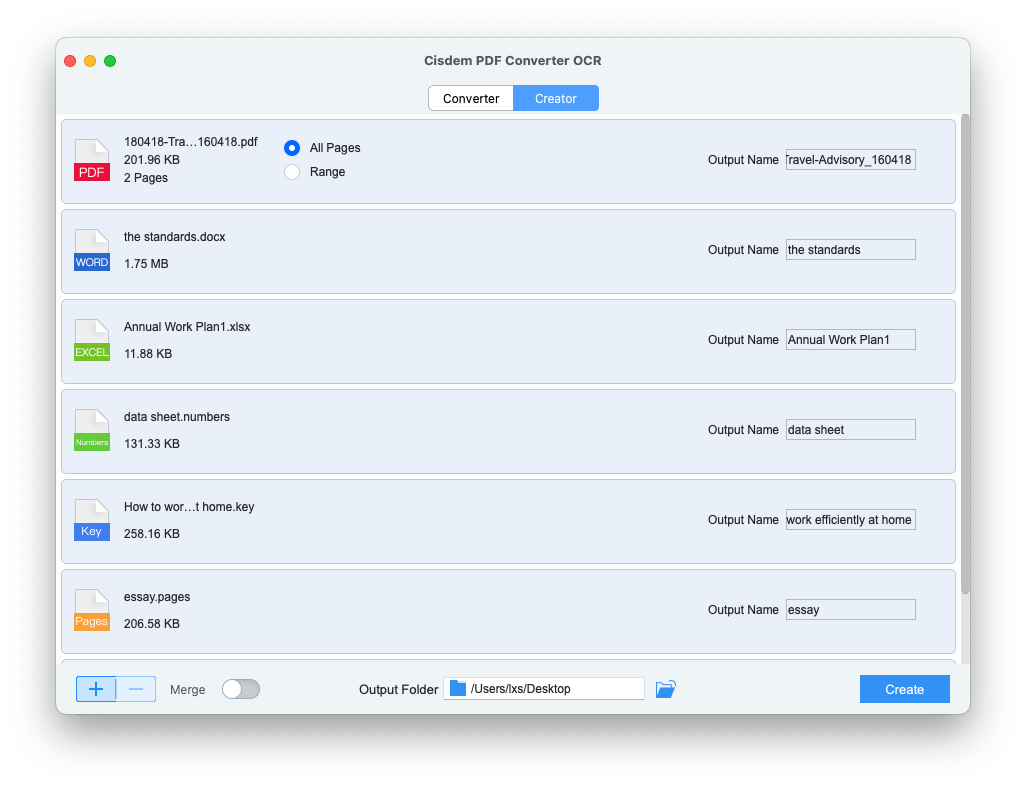
The Creator tab with mixed Office and iWork files and a Merge switch at the bottom.
Benefits
- Your documents stay on your Mac: conversion doesn't need a browser or an upload to someone's server.
- You stop retyping. An old contract or printed report becomes text you can copy.
- iWork users get native Pages, Keynote and Numbers output, which many Windows-first converters skip.
- No file size or page limit once licensed, so large archives are fair game.
Real-World Uses
- A bookkeeper converts scanned statements to Excel, then checks the totals.
- A paralegal runs a folder of scanned agreements through OCR PDF so they can be searched in Finder.
- A teacher pulls a few pages of an old textbook PDF into Pages to adapt a worksheet.
- A consultant combines Keynote slides, a Word brief and a spreadsheet into one password-protected PDF.
Who It's For, and Who Should Skip It
Cisdem PDF Converter OCR suits Mac users who convert or OCR documents every week, especially in batches, and who prefer offline work to web converters.
Skip it if you need to edit text inside PDFs, since that is what PDFMaster is for. Skip it too if you convert one clean PDF a year, because macOS Preview and Pages can cover light needs. Heavy work in less common languages is another reason to test carefully first.
Usage Guide
- Download the DMG, drag the app to Applications and open it. Register from Help > Register once you have a code.
- On the Converter tab, click + or drag in PDFs or images. Keep files on a local drive, not a cloud folder.
- Accept the OCR Module download the first time you import a scan.
- Choose an output format and page range for each file, then click the gear icon to pick OCR languages.
- Choose the output folder and click Convert.
Where it falls short
Formatting is good on simple pages and less exact on complex ones: Cisdem says the result can't be 100% identical, and fonts in scans may need fixing by hand, since OCR recognizes the text rather than the typeface. A red exclamation point after you click Convert usually means the file is on a cloud drive or no output folder is set. One MacUpdate reviewer complained that a lot doesn't work as the user guide describes, and a SourceForge reviewer said less common languages can be a struggle. There is no way to edit the source PDF. The 3-page trial limit also makes it hard to judge a long document.
What Users Say
Software review sites
SourceForge shows 4.5 out of 5 from 2 reviews.
- "Very fast conversion speed, even for large files" and it "keeps the original layout and formatting almost perfectly" Marketing Specialist on SourceForge, April 28, 2026, who adds: "Supports mainly common file languages, so it may struggle if you work with less regional files."
- "This is purely a converter and OCR tool." Project Manager on SourceForge, July 31, 2025, who still calls the conversion "excellent" and notes the source PDF can't be edited
MacUpdate: 4.0 out of 5 from 17 ratings
The written comments here are from version 7.5 and older, so they say little about version 10, and the opinions are split.
- "The most I like it is the OCR function, it can accurately extract the texts" tracidgordon, March 5, 2021
- "A really helpful software, which makes it convenient to extract the texts from an image." ruthsnowlove, March 22, 2021
- "A lot of things doesn't work as described in the users guide." Tsolak, January 26, 2021, 1 star
- "Terrible customer service! Avoid." pellegrinoriccardi531, May 4, 2020, 1 star
AlternativeTo: 6 likes
- "It converted thousands of images into PDFs in no time. Lightweight and highly user-friendly." mutenka, May 28, 2026
- "This app works as it claims. The OCR function is great." Jason Novak, August 28, 2018
Trustpilot: 4.9 out of 5 from 304 reviews of Cisdem
These cover all Cisdem products and mostly praise support, which contrasts with the older MacUpdate complaint above.
- "The UI is very intuitive and easy to use, matching to the product support is amazing as well" Raj Venkat, October 2, 2026
Press and reviewers
This quote appears on Cisdem's own site, so treat it as a selection.
- "In a few tests with various PDF files, Cisdem PDF Converter OCR works very well to extract all data from a PDF and turn it into rich DOCX file formats." OSXDaily
The pattern: people like the OCR on clean scans, the layout retention and the easy workflow. The complaints are less common languages and the lack of PDF editing. Much of the feedback is years old, so the trial on your own files tells you more than any rating.
Comparisons
PDF Converter OCR vs. Cisdem PDFMaster
PDF Converter OCR converts, recognizes and creates. PDFMaster is Cisdem's fuller app, which also edits, splits, encrypts, compresses and signs PDFs, and it costs more. If you only move content out of PDFs, this one is enough.
PDF Converter OCR vs. macOS Preview
Preview can export a PDF as an image and combine pages for free, but it can't batch OCR scans into Word or Excel. For occasional single files, try Preview first.
Editions and Pricing
| Plan | Price | License term | Devices |
|---|
| One-Time Purchase | $69.99 at checkout | Lifetime | 1 Mac |
| One-Year Subscription | $39.99 | One year | 1 Mac |
| Business License | $79.99 | One-time | 1 Mac |
The Buy Now button here is for the one-time license. On November 6, 2026 Cisdem's own buy page showed a promotional $59.99 for that plan, and the annual and business prices above are from the same page. It also lists 2-Mac and 5-Mac versions of each plan, and a bundle with PDF Password Remover and PDF Compressor at $99.99.
FAQs
Does Cisdem PDF Converter OCR work without an internet connection?
Cisdem PDF Converter OCR is a native Mac app, so conversions run on your Mac. You only need a connection to download it and the OCR module.
Is there a file size limit in Cisdem PDF Converter OCR?
Cisdem PDF Converter OCR has no limit on file size or page count in the licensed version. Time taken depends on the file and your Mac.
Do I need Apple Pages to convert a PDF to Pages?
Yes. Cisdem PDF Converter OCR needs the free iWork apps from the App Store to output Pages, Keynote or Numbers, and it shows an error if they are missing.
Do I need to clean up a scanned PDF before OCR?
No. Cisdem PDF Converter OCR doesn't need you to edit a scan first, although a cleaner scan gives better results.
Why is the font different after OCR?
Cisdem PDF Converter OCR recognizes the text in a scan, not the original typeface, so you may need to set the font in the output.
Can I convert many files to one format quickly?
Yes. Import one file in Cisdem PDF Converter OCR, pick the format, then import the rest. They use that format by default.
Does the Mac license of Cisdem PDF Converter OCR cover Windows?
Plan on a separate license. Cisdem PDF Converter OCR for Windows is sold on its own buy page, and the plan behind this page covers one Mac.
System Requirements
- macOS 11 Big Sur, 12 Monterey, 13 Ventura, 14 Sonoma, 15 Sequoia, 26 Tahoe or 27 Golden Gate
- Intel or Apple Silicon processor
- 512 MB RAM or more
- 800 MB free space or more for installation
Conclusion
Cisdem PDF Converter OCR for Mac is worth buying if scans are a regular part of your work. It combines batch OCR, native iWork and Office output and offline processing at a one-time price, which is its best argument.
The main reason not to buy it is that you need real PDF editing. In that case look at PDFMaster. Otherwise, run the trial on a hard scan, and if those three pages look right, $69.99 is fair.
Download Free TrialBuy Now