Short answer: on a Mac, Preview exports a PDF as JPEG or PNG for free. On Windows, a free web converter is fine for one file that isn't private. For regular or confidential work, buy a small desktop tool: Aiseesoft PDF to Image Converter ($25 one-time) gives you exact page ranges and DPI, and PDF To JPG Converter ($29.95 a year) handles whole folders at up to 900 DPI. If you also need Word and Excel output, PDFZilla ($29.95 a year) covers images too.
At a glance
| Aiseesoft PDF to Image | PDF To JPG Converter | PDFZilla | Cisdem for Mac |
|---|
| Price at checkout | $25 one-time, 1 PC | $29.95 a year | $29.95 a year | $69.99 one-time |
| Runs on | Windows 7, 8, 10 | Windows 7 to 11 | Windows 7 to 11 | macOS 11 and later |
| Image formats | JPEG, PNG, GIF, BMP, TGA, PPM, TIFF, JPEG 2000 | JPG, PNG, TIF, BMP, GIF | JPG, GIF, PNG, TIF, BMP | JPG, PNG, BMP, TIFF, GIF, WebP and more |
| Set DPI | ✓ | ✓ 60 to 900 | Quality setting only | Not stated |
| Page ranges | ✓ with preview | ✓ | ✓ | ✓ |
| Batch | ✓ | ✓ whole folders | ✓ | ✓ |
| Also converts to Word or Excel | ✗ | ✗ | ✓ | ✓ |
How we picked
- We kept tools that turn PDF pages into images on your own PC, and left out tools that only make PDFs from images.
- We read each order page for today's price and whether it renews.
- We compared the output formats, resolution controls and page selection that each vendor documents.
What we checked: prices and renewal terms on the order pages and the download links on November 9, 2026. We didn't convert files with these tools ourselves, so we don't rank their image quality.
The free ways first
On a Mac: Preview
Open the PDF in Preview, choose File, then Export, and pick JPEG or PNG in the Format menu. For JPEG you can set the quality. It's best for one file at a time, so a long PDF or a folder of them is where a paid tool earns its price.
On Windows: a free web converter, or a screen capture
Windows has no built-in PDF to JPG command. A free web converter handles one file well, as long as you're happy to upload it. For a single page, zoom in on it and use the Snipping Tool, and accept that you only get the resolution your screen shows.
Do you want the pages, or the pictures inside them?
The tools in this guide save whole pages as images. None of them lists pulling the original embedded pictures out of a PDF as a feature. If you want just one photo from a page, a free method works: open the PDF in desktop Word, right-click the picture and save it, or convert the page at a high DPI and crop it. Word may turn a graphics-heavy page into one picture, so results vary.
Aiseesoft PDF to Image Converter: exact settings, one-time price

Aiseesoft's own three-step picture: the file list with a page preview, the Output Settings dialog with size, DPI and color, and the progress window.
Aiseesoft PDF to Image Converter saves PDF pages as JPEG, PNG, GIF, BMP, TGA, PPM, TIFF or JPEG 2000, several PDFs at a time. A preview pane and a page range box let you type ranges such as 1,3,5-10. You set size in pixels or DPI, and the color mode, and it can write a multi-page TIFF or an animated GIF. It's the only one-time license among the Windows picks here.
What we like
- One-time payment, no renewal
- Eight image formats
- Preview, page ranges, DPI and color control
- 30-day money-back guarantee
Watch out for
- Windows 11 isn't on the vendor's list, so run the trial first
- Dated window, and the last build is from December 2023
- Images only: no Word, Excel or OCR
What reviewers say
FileHippo's editors, November 2016: "The app performs adequately and can convert PDF files to various image formats in lossless quality." Their one complaint: "Overall, Aiseesoft PDF to Image Converter has a standard, albeit slightly dated looking interface."
Aiseesoft's page shows 5.0 from 8 customer comments, but those are chosen by the vendor. Independent reviews are scarce, and we found no recent tests.
Download Aiseesoft PDF to Image TrialBuy Aiseesoft PDF to Image
PDF To JPG Converter: whole folders at up to 900 DPI
PDF To JPG Converter
$29.95 a year at checkout | Windows 7 to 11, 32 and 64-bit | Best for large batches
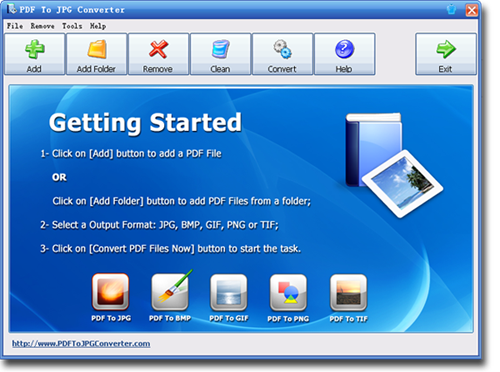
The vendor's screenshot of the main window: Add, Add Folder, Remove, Clean and Convert buttons, with the five output formats along the bottom. It shows an older Windows look.
PDF To JPG Converter does one job. You add PDFs or a whole folder, choose JPG, PNG, TIF, BMP or GIF, set a page range and DPI, and convert. JPG output runs from 60 to 900 DPI, and each PDF's images land in their own folder, so a batch stays organized.
What we like
- Add a whole folder at once
- JPG from 60 to 900 DPI
- Each PDF gets its own output folder
- Works offline
Watch out for
- Order page renews every 12 months, with renewal ticked by default
- Older download sites still say it's free, and it isn't
- Dated look
- Very little independent comment
What reviewers say
MadDownload's Jason Delacey, January 2020, when the program was free: "The UI is very straight forward and not complicated so that is a nice bonus." On output: "I never once noticed any degrading of the quality of any images that the PDF had."
Download PDF To JPG Converter TrialBuy PDF To JPG Converter
PDFZilla: images plus Word and Excel
PDFZilla
$29.95 a year at checkout | Windows 7 to 11 | Best if images are only part of what you need

PDFZilla has a separate button for each job, including PDF to Image, PDF to Word and PDF to Excel.
PDFZilla exports PDF pages to JPG, GIF, PNG, TIF and BMP, and it also converts to Word, Excel, text and HTML. Its image settings are limited to page selection and quality, so it's the choice when you want one inexpensive program for several kinds of conversion, not the best image controls. The demo converts half of each file.
What we like
- One tool for images, Word and Excel
- Batch conversion and page ranges
Watch out for
- Few image settings compared with the two tools above
- Renews yearly, with renewal ticked by default
What reviewers say
PrivateProxyGuide's Marcus Eriksson, August 2026: "PDFZilla surely works pretty well and without problems." He lists "Fast PDF conversions" and "Very affordable" as pros, and "Its interface is outdated" as a con.
Download PDFZilla TrialBuy PDFZilla
On a Mac with many files: Cisdem PDF Converter OCR
Cisdem PDF Converter OCR for Mac is a good step up from Preview when you have a queue of files. It saves to JPG, PNG, BMP, TIFF, GIF and WebP among others, and each file in the batch can have its own page range. It costs more than the Windows tools because it's a full converter with OCR, so it only makes sense if you'll use those too. The trial converts only the first 3 pages of a file.
Download Cisdem PDF Converter TrialBuy Cisdem PDF Converter
Prices side by side
Price for one user at checkout (USD)
Aiseesoft PDF to Image Converter (one-time)$25.00
PDF To JPG Converter (per year)$29.95
PDFZilla (per year)$29.95
Cisdem PDF Converter OCR for Mac (one-time)$69.99
Checkout prices checked on November 9, 2026.
Which should you choose?
| Your situation | Pick | Why |
|---|
| One PDF on a Mac | Preview | It's free and already installed |
| One non-private PDF on Windows | A free web converter | No reason to pay for a single file |
| Exact pages and sizes, no subscription | Aiseesoft PDF to Image Converter | One-time $25, page preview and DPI control |
| Folders of PDFs, or print-resolution pages | PDF To JPG Converter | Add Folder, and up to 900 DPI |
| Images and Word or Excel output | PDFZilla | One program covers all three |
| Many files on a Mac | Cisdem PDF Converter OCR | Batch queue, with OCR included |
Who should skip these: skip all of them for a single page or two, because the free methods are enough. Skip Aiseesoft if you're on Windows 11 and its trial misbehaves. Skip PDF To JPG Converter if you only convert a few times a year, since it bills yearly.
What commonly goes wrong
- Setting the DPI too high. High DPI makes very large files, and on a big batch that adds up fast. Convert one page first and check the size.
- Choosing the wrong format. JPG suits photos and gives small files. PNG keeps text and line art sharper. TIFF suits archives and print.
- Expecting the embedded photo. These tools export the whole page, so you'll have to crop if you want one picture.
- Uploading something private. A web converter sends your file to its server. Use a desktop tool for contracts and records.
FAQs
How do I convert a PDF to JPG for free?
On a Mac, open the PDF in Preview, choose File, then Export, and pick JPEG. On Windows there's no built-in command, so a free web converter is the usual way for a file you're willing to upload. For regular work, Aiseesoft PDF to Image Converter is $25 one-time.
What DPI should I use to convert a PDF to JPG?
A lower DPI gives small files for the web, and a high DPI suits print, at the cost of much larger files. PDF To JPG Converter lets you set 60 to 900 DPI, so convert one page at a couple of settings and compare before you run a whole batch.
Can I extract images from a PDF without converting the whole page?
The tools in this guide save whole pages, and none lists extracting embedded pictures as a feature. For one picture, open the PDF in desktop Word and save the picture from there, or export the page at a high DPI and crop it.
Is PDF To JPG Converter free?
PDF To JPG Converter is paid software with a trial, at $29.95 with a 12-month renewal on the order page. Some older download sites describe it as free, which was true of earlier versions.
Does Aiseesoft PDF to Image Converter work on Windows 11?
Aiseesoft lists Windows 10, 8 and 7, and Windows 11 isn't named. Install the free trial and convert a test file before you buy.
Can I convert a PDF to PNG instead of JPG?
Aiseesoft PDF to Image Converter, PDF To JPG Converter, PDFZilla and Mac Preview can all save PNG. Choose PNG for pages with sharp text or line art.
Will these tools upload my PDF?
Aiseesoft PDF to Image Converter, PDF To JPG Converter, PDFZilla and Cisdem PDF Converter OCR are desktop programs and convert on your own computer. Free web converters do upload your file.