PDF To JPG Converter: Batch PDF to Image Conversion Offline on Windows
PDF To JPG Converter is a $29.95-a-year Windows program that turns PDF pages into JPG, PNG, TIF, BMP or GIF images on your own PC, at up to 900 DPI. It's for people who convert PDFs in bulk, or whose files shouldn't be uploaded to a web site, and not for someone with one PDF to convert.
Free web converters handle a single file well. The case for a desktop tool is a folder of 200 PDFs, or a contract you'd rather not send to a stranger's server.
Quick facts
- Version: 4.7.0.1 (the site still says 4.5)
- Developer: Reezaa, sold from pdftojpgconverter.com
- Platform: Windows 7, 8, 10 and 11, 32 and 64-bit
- Output: JPG, PNG, TIF, BMP, GIF
- JPG resolution: 60 to 900 DPI
- Price: $29.95, renewing every 12 months
- Trial: free download
What we checked: installer file version 4.7.0.1 and size (about 15.8 MB), dated April 29, 2024, and the price of $29.95 with a 12-month renewal on the order page, on November 6, 2026. We didn't convert our own files.
Before you buy
- It renews. The order page sets the next $29.95 charge 12 months out, with automatic renewal ticked. Check that box at checkout if you want one year.
- Older pages say it's free. Some download sites still describe it as free. It's now paid software with a trial.
Download Free TrialBuy Now
Overview
The program has one job. You add PDFs, pick an output format, set a page range and DPI if you want to, and convert. Each PDF's images go to a separate folder, so a batch doesn't turn into one big pile of files. Everything runs locally.
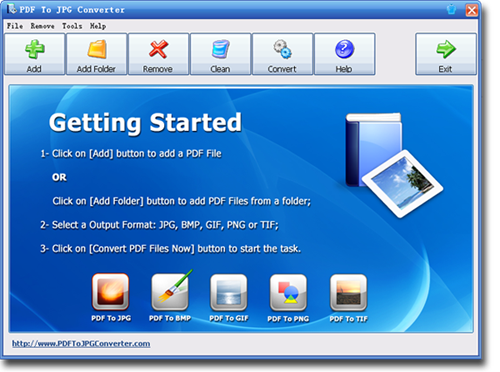
The vendor's screenshot of the main window: Add, Add Folder, Remove, Clean and Convert buttons, with the five output formats along the bottom. It shows an older Windows look.
Features
PDF To JPG Converter sets image quality by DPI
PDF To JPG Converter exports JPG from 60 to 900 DPI. Low settings give small files for the web, and high settings give large images for print or ads. You can also set the JPG quality level.
PDF To JPG Converter handles whole folders
PDF To JPG Converter's batch mode takes hundreds of PDFs from a folder or by drag and drop, and keeps each one's images in a separate folder.
PDF To JPG Converter outputs five image formats
PDF To JPG Converter saves to JPG, PNG for web use, uncompressed TIF, 24-bit BMP or GIF, so one tool covers web, print and archive needs.
PDF To JPG Converter converts page ranges
PDF To JPG Converter can convert only the pages you choose, which saves time and disk space on a long document.
Real-World Uses
- Presentations: turn a chart page into an image for a slide.
- Web sites: show a brochure page as PNG, with no PDF reader needed.
- Print and ads: export a page at high DPI for a large print.
- Confidential files: convert contracts or records without uploading them.
Who It's For, and Who Should Skip It
It suits designers, office staff and anyone who regularly converts many PDFs, or works with private documents, on Windows.
Skip it if you only convert the odd file: a free online tool, or a screenshot, will do, as long as the file isn't sensitive. Mac users need the separate PDF to JPG Converter For Mac. If you also want Word or Excel output, Reezaa's PDFZilla covers images too.
Usage Guide
- Install the program and open it. The Getting Started screen lists the steps.
- Click Add for one PDF, or Add Folder for many.
- Choose JPG, BMP, GIF, PNG or TIF.
- Set the page range, DPI and output path if the defaults don't suit you.
- Click Convert and check the output folders.
Where it falls short
- High DPI makes very large files, and on a big batch that adds up fast, so test one page first.
- The vendor's speed claims vary from page to page, "180% faster" and "200% faster", with no test behind them. Ignore them and time your own files.
- The interface looks like an older Windows program, as the screenshot shows.
What Users Say
We found little independent comment on this product.
MadDownload: easy and fast (January 2020)
Jason Delacey, when the program was free: "The UI is very straight forward and not complicated so that is a nice bonus." On output: "I never once noticed any degrading of the quality of any images that the PDF had."
He also says his wife ran whole folders through it at work, and that it "did it in mere seconds."
On the vendor's site
The vendor's page carries this testimonial from Frank Lewis, Marketing: "Very useful program, especially for PDF to JPG Conversion. It's much easier to convert pdf to image formats." Treat a vendor-chosen quote as marketing.
Comparisons
PDF To JPG Converter vs online converters
Free sites such as iLovePDF need no install and suit a one-off, but your file leaves your PC. PDF To JPG Converter works offline, with DPI control and large batches, for a yearly fee.
PDF To JPG Converter vs PDFZilla
PDFZilla, from the same vendor and at the same price, also exports images and adds Word and Excel. PDF To JPG Converter is the one with the DPI options listed in detail.
Editions and Pricing
| Licenses | Price each | Term |
|---|
| 1 | $29.95 | 12 months, renews at $29.95 |
| 2 to 4 | $27.95 | Vendor volume price |
| 5 to 9 | $24.95 | Vendor volume price |
| 10 or more | $22.95 | Vendor volume price |
The vendor's register page shows a $49.95 list price and advertises a PDF Converters Pack at $49.95 that includes this tool. We didn't check the pack at the order page.
FAQs
Does PDF To JPG Converter upload my files?
PDF To JPG Converter is a desktop program that converts on your own PC, so there's no upload step in its workflow.
What DPI should I use in PDF To JPG Converter?
PDF To JPG Converter goes from 60 to 900 DPI. As a rule of thumb, use around 150 for screens and 300 or more for print, then check the file size.
Is PDF To JPG Converter free?
PDF To JPG Converter isn't free now. It's a paid program with a free trial, at $29.95 on the order page. The vendor doesn't state the trial's limits.
Does PDF To JPG Converter renew?
PDF To JPG Converter renews by default at the order page: a 12-month cycle at $29.95 with automatic billing ticked. You can turn it off.
Can PDF To JPG Converter handle non-English PDFs?
PDF To JPG Converter lists support for PDFs in more than 50 languages, which makes sense since it renders pages as images.
Can PDF To JPG Converter open password-protected PDFs?
PDF To JPG Converter's pages don't mention protected files, so test one in the trial.
System Requirements
- Windows 7, 8, 10 or 11 (32 or 64-bit)
- 512 MB RAM, 1 GB recommended
- 100 MB of disk space
- Pentium 4 or better recommended
Conclusion
PDF To JPG Converter is worth it if you convert PDFs to images every month, or can't upload them. The one reason to buy is offline batch conversion with real DPI control. The main reason not to is that free web tools cover occasional use, and this one bills yearly. If you're in the first group, try it on a real folder; if you're in the second, save your money.
Download Free TrialBuy Now