Excel Merger PRO: Combine Excel, ODS, CSV and XML Files on Windows
Excel Merger PRO is a $29.95 Windows tool that merges XLS, XLSX, ODS, CSV and XML files into one file, without Microsoft Office or Excel installed. It suits anyone who keeps getting the same spreadsheet from ten branches, ten months or ten people and has to stitch them together.
A free version does the same merging, but it adds random text to the results and isn't licensed for business use. The Pro license is what makes the output usable at work.
Quick facts
- Developer: Reezaa (sold through PDFExcelConverter.com)
- Version: 1.8.2
- Runs on: Windows 11, 10, 8, 7, Vista, XP SP3 and Windows Server, 32-bit and 64-bit. No Mac version
- Merges and exports: XLSX, XLS, ODS, CSV and XML
- Needs Office? No
- Price: $29.95 for a single license
- Interface languages: 15, including English, French, German, Spanish and Japanese
What we checked: installer file version 1.8.2 (55.9 MB) read from the vendor's download, and an order page price of $29.95 with a 12-month renewal setting, both on November 5, 2026. We didn't merge a test set of files with it.
Before you buy
Try the free version on a copy of your own files first. Check that the merged sheet keeps the formatting and formulas you care about, because the vendor says nothing about either.
Look at the term on the order page too. Its data shows a 12-month renewal setting, so check whether your license renews before you pay.
Download Free TrialBuy Now
Overview
Excel Merger has one small window: a large drop area for your files, a Merge mode list, an Output format list, and a Start Merging Now button. You add files, pick how you want them joined, and choose a folder. There's no spreadsheet view, so you're working with whole files and sheet numbers instead of cells.
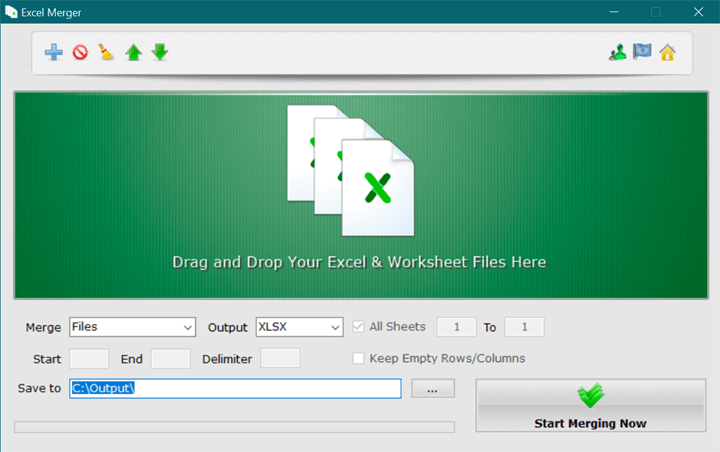
The Excel Merger window, with the Merge list on Files and the Output list on XLSX. Image from NirmalTV's write-up.
Features
Five merge modes
Excel Merger offers five ways to join data, chosen in the Merge list. Files puts several files into one file and leaves each worksheet as it is. Sheets combines the worksheets inside each file. Files & Sheets pours everything from all files into a single workbook. Rows and Columns join the rows or columns you specify.
Sheet ranges
Excel Merger lets you set a range so that only some worksheets are merged, not the whole file. That helps when each file has a summary sheet you want and a notes sheet you don't.
Bulk row and column merging
Excel Merger joins chosen rows or columns into the first one, across every file you added. You set the start, the end and the delimiter, which is a blank space by default, and choose whether to keep or remove the empty rows left behind.
Mixed formats
Excel Merger accepts XLS, XLSX, ODS, CSV and XML files in the same job and exports to any of those five. So a CSV export and an old XLS report can end up in one XLSX file.
Benefits
- Saves the copy and paste: a monthly consolidation can take a few clicks.
- Works on any office PC: no Excel license is needed on the machine doing the merging.
- No macros to maintain: you don't need VBA or a Power Query setup.
Real-World Uses
- Twelve monthly sales files become one workbook with twelve sheets.
- Regional CSV exports are combined into a single XLSX file for a manager.
- A folder of order forms gets each form's address rows joined into one row.
- A LibreOffice user merges ODS files with XLSX files sent by a client.
Who It's For, and Who Should Skip It
It fits office staff who merge files regularly and want a simple tool, and anyone on a PC without Excel.
Skip it if you have Microsoft 365 and don't mind learning Power Query, which can combine files and also clean them on the way in. Skip it if you need to match records by a key, because this tool joins files and sheets but doesn't look values up. It isn't for Mac users either.
Usage Guide
- Download and install Excel Merger. Enter your Pro details if you've bought a license.
- Drag your files onto the window, or click the Add button.
- Choose Files, Sheets, Files & Sheets, Rows or Columns in the Merge list.
- Choose the output format, which is XLSX by default.
- Set the Save to folder, plus the sheet range or rows if you need them.
- Click Start Merging Now.
Where It Falls Short
- No preview. You see the result only after the merge finishes.
- Thin documentation. The vendor's site is a single tutorial page, and its FAQ covers a different product.
- Dated details on the site. The product page calls this a 3 MB installer and also lists it at 56 MB. The real download is about 56 MB.
- Formatting and formulas are unaddressed. Nothing on the vendor's pages says how these are handled, so test yours.
What Users Say
Excel Merger gets short mentions from download sites and tech blogs rather than long reviews, so this section is brief.
MajorGeeks
Users there rate it 5 from 14 votes. The site lists version 1.8.1, dated December 27, 2022, as freeware.
"Excel Merger is a straightforward Excel file and workbook merging utility." MajorGeeks
NirmalTV
"The app has a dead simple interface where you can drag and drop your Excel and worksheets."
"Excel Merger is a free tool and extremely useful if you work with Excel sheets and files." NirmalTV, May 15, 2020. Note that this write-up covers the free version.
The recurring themes: reviewers like how simple it is. None of them tests large files or formatting, which is what you'd want to know before relying on it.
Comparisons
Excel Merger PRO vs the free version
Both have the same merge modes. Pro removes the random text from merged files, lifts the worksheet limits, allows commercial use and adds priority email support.
Excel Merger PRO vs Excel's Power Query
Power Query comes with current Excel and can transform data as it combines it. It takes time to learn and needs Excel. Excel Merger does less, but you can learn it in two minutes and run it without Office.
Editions and Pricing
| License | Price each |
|---|
| Single license | $29.95 |
| 2 to 4 licenses | $27.95 |
| 5 to 9 licenses | $24.95 |
| Over 10 licenses | $22.95 |
| Excel Tools Pack (other Excel tools, vendor's site) | $49.95 promotion |
FAQs
Does Excel Merger PRO need Excel installed?
No. Excel Merger PRO reads and writes spreadsheet files on its own, so neither Office nor Excel has to be on the PC.
What does the free version of Excel Merger add to my files?
The free version of Excel Merger adds random text to merged files and limits worksheet merging. The Pro license removes both.
Can I use the free Excel Merger at work?
No. Excel Merger's vendor asks commercial users to buy a Pro license.
Can Excel Merger PRO run on Windows Server?
Yes. Excel Merger PRO lists Windows Servers among its supported systems, along with 32-bit and 64-bit desktop Windows.
Does Excel Merger PRO work on a Mac?
No. Excel Merger PRO is Windows only.
Does Excel Merger PRO come in other languages?
Yes. Excel Merger PRO comes in 15 languages, including French, German, Spanish, Japanese, Korean, Russian and Chinese.
System Requirements
- Windows 11, 10, 8, 7, Vista or XP SP3, or Windows Server (32-bit or 64-bit)
- About 56 MB for the download
- Microsoft Office isn't required
Conclusion
Excel Merger PRO is worth $29.95 if you merge spreadsheets often, especially at work, and don't want to build a Power Query setup. The one reason to buy it is clean output with a commercial license, from a tool anyone can learn in minutes.
The main reason not to is that it's a basic joiner with no preview and little documentation. Run the free version on real files first, and check the formatting before you pay.
Download Free TrialBuy Now