PDF Fixer Pro: A Small Windows Tool That Tries to Rebuild PDFs That Won't Open
PDF Fixer Pro is a $29.95 Windows utility from PDFFixer.com that repairs corrupt PDF files by rebuilding their content and XREF table, for anyone stuck with a PDF that Acrobat or a browser refuses to open. The free download is the same program; the Pro license removes the watermark on repaired files and the repair limits.
You know the moment: a download stalls at 98%, a USB stick gets pulled too early, and the contract or manual you needed now throws "the file is damaged and could not be repaired". PDF Fixer is built for exactly that file. It's also a tiny, single-window tool with a mixed track record in user reports, so read the "Before you buy" note before paying.
Quick facts
- Version: 1.4 (listed by MajorGeeks in January 2022, unchanged since)
- Developer: PDFFixer.com, sold through Reezaa's 2Checkout store
- Platform: Windows XP, Vista, 7, 8, 10 and 11 (32/64-bit) and Windows Server. No Mac version.
- Download: 16 MB installer or a 19 MB portable ZIP
- Interface languages: English, French, German, Chinese, Spanish, Portuguese, Polish, Italian
- Price: $29.95 for one PC, with volume prices down to $22.95 a license
- Free edition: watermarks the repaired PDFs and limits repairs; no commercial use
- Needs Adobe Acrobat? No
- What we checked: installer version 1.4 (16.7 MB, digitally signed by Xi'an Expand Network Technology Co, Ltd.) downloaded from pdffixer.com, and the price on the order page: $29.95 for one license, renewing yearly at $29.95 with automatic renewal switched on by default, both on October 29, 2026. We didn't install it or run a repair on a damaged PDF.
Before you buy
- Try the free version on your own broken file first. The free download is the full program, so you can see whether PDF Fixer gets anything back from your PDF before you pay. Two users in a 2022 giveaway reported that it said "All files have been fixed successfully" yet produced blank pages.
- It's billed as a yearly subscription at checkout. The product pages say "Upgrade Now for $29.95" with no mention of a term, but the order page sets the license to renew every 12 months at $29.95, with auto-renewal ticked. Untick it on the order page if you only want one year.
- Support is by email only, through the address in your order confirmation. The website has no manual, FAQ or knowledge base.
Download Free TrialBuy Now
Overview
A PDF is a binary file with a table at the end, the XREF (cross-reference) table, that tells a reader where every object in the file starts. Cut the file short, or let a text editor or a bad transfer shift a few bytes, and that table points at the wrong places. Most readers then give up on the whole document, even when most of the pages are still inside it.
PDF Fixer reads through whatever data is left, reassembles the objects it can find, writes a new XREF table and saves the result as a new PDF in an output folder. The original file is left alone. There's no editor, no viewer window and no settings beyond two check boxes, so it's a one-job tool rather than a PDF suite.
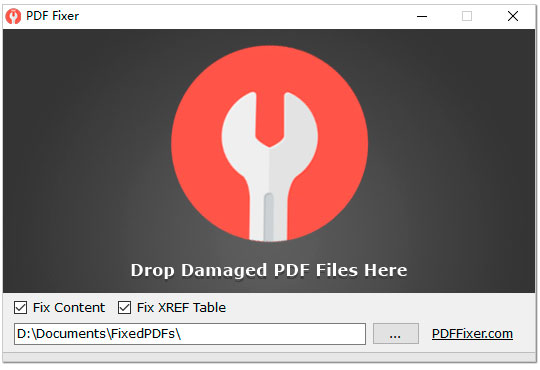
The whole program is this one window: a "Drop Damaged PDF Files Here" area, the Fix Content and Fix XREF Table check boxes, and the folder where repaired copies are saved.
Features
Content repair and XREF rebuilding
PDF Fixer Pro repairs two separate things, each with its own check box: the document content (it restructures the damaged data and rebuilds the objects) and the XREF table. The vendor's own demonstration uses a broken manual from the SoX audio project: PDFTK and Ghostscript, two free command-line tools with repair functions, both fail on it, while PDF Fixer produces a readable file.
Batch repair by drag and drop
PDF Fixer Pro repairs several damaged PDFs at once: drop a group of files on the window and it processes them together, saving each repaired copy to the output folder. It also flags which of the dropped documents are actually damaged.
Preview of the fixed content
PDF Fixer Pro shows a preview of the repaired content after a run, so you can see what came back before you go looking for the file. The finished dialog recommends opening the fixed PDF in Google Chrome.
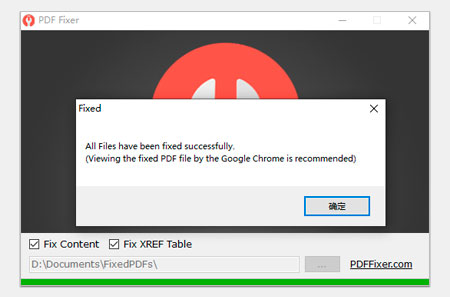
The "Fixed" dialog at the end of a run, recommending Google Chrome to view the repaired file. The progress bar along the bottom is full. (The OK button is labelled in Chinese in the vendor's own screenshot.)
Portable, with no Acrobat needed
PDF Fixer Pro runs on its own, without Adobe Acrobat or any other PDF software installed, and comes as a portable ZIP as well as an installer, so you can run it from a USB stick on a PC where you can't install programs.
Benefits
The main draw is speed and simplicity. There's nothing to learn: drop the file, wait, check the output folder. For someone who just needs a damaged invoice or eBook back, that beats installing a full PDF editor whose repair option is buried three menus deep. And because it writes a new copy, a failed attempt costs nothing but a few seconds.
The free edition also makes it a low-risk first step. You find out whether your particular file is recoverable before spending anything.
Real-World Uses
- An interrupted download. A large PDF manual came down incomplete and the original link is gone. PDF Fixer can rebuild the pages that did arrive.
- A file copied off a USB stick that was pulled too soon. The XREF table at the end of the file is the first thing lost, which is exactly what the Fix XREF Table option rebuilds.
- A folder of PDFs recovered from a failing drive. Drop the whole batch and let the tool sort out which files are damaged.
- A PDF someone "edited" in Notepad. Saving a compressed PDF as text shifts its offsets, a case the vendor names directly.
Who It's For, and Who Should Skip It
It's for Windows users with one or a handful of PDFs that won't open after a broken download or transfer, who want a quick, cheap attempt at getting them back and don't need anything else from the program.
Skip it if you're on a Mac or Linux (there's no version for either), if the file came off a drive that was overwritten or wiped (no repair tool can rebuild data that's no longer there), or if you need a full PDF editor. Businesses repairing critical documents regularly are better served by a dedicated file-repair suite with a manual, a published refund policy and phone or chat support; a PDF that only lost its XREF table can also be worth one try in free tools such as Ghostscript first.
Usage Guide
- Download the installer (16 MB) or the portable ZIP (19 MB) from the vendor and run it. The portable version only needs to be unzipped.
- Launch PDF Fixer. The single window opens with both repair options ticked.
- Pick the output folder for the repaired copies with the "..." button.
- Leave Fix Content and Fix XREF Table ticked, then drag one or more damaged PDFs onto the drop area (clicking the area opens a file browser instead).
- Wait for the "Fixed" dialog, then open the repaired copy from the output folder, ideally in Chrome as the program suggests.
- If the result looks good and you need it without a watermark, buy the Pro license and enter the code in the program.
Where it falls short
- "Fixed successfully" doesn't always mean fixed. More than one user reported that the program declared success and delivered a blank page or a 3 KB file. Always open the output before deleting anything.
- No diagnosis. PDF Fixer doesn't tell you what was wrong with a file or why a repair failed, so when it doesn't work you're left guessing.
- Data that's gone stays gone. A file that was overwritten with empty bytes, or only partly transferred, can only be rebuilt from the part that still exists.
- Bare interface. The window can't be resized and the program has no built-in help.
- No updates since 1.4. The version has stayed at 1.4 since early 2022.
What Users Say
Independent reviews of PDF Fixer are scarce. The most detailed hands-on reports come from the comments on Giveaway of the Day, where PDF Fixer Pro was given away on January 10, 2022 and drew 18 comments, most of them critical.
Giveaway of the Day (comments, January 2022)
The most upvoted comment (+28), from a user posting as "Giveaway User", described repeated failures: "It always states 'All files fixed successfully' but I keep ending up with two additional copies created by the program that are just a blank page. In the preview result, clicking on the zoom in or out gives an unhandled exception error each time. Tried on several documents with the same unhelpful result."
Peter Blaise had the same result on a damaged file: "For me, this results in 3 KB blank non-PDF file from ANY PDF input, there is NO 'fix" of any kind performed." On a second attempt with an undamaged PDF he found something unexpected: "it took a 200 MB PDF down to 30 MB, and the results seem ok, though the original was NOT broken to begin with." His request for the next version: "give an analysis of what's wrong with a PDF, ESPECIALLY if it can't be fixed."
Carl, replying in the thread, explained the limit: "PDF Fixer cannot fix or repair the PDFs which were corrupted badly, such as all data written by 0x0 empty. If a PDF file was damaged while transferring or downloading, PDF Fixer would fix the transferred part of the file."
Ant pointed at the free edition's restrictions: "Not free since it has limitations after fixing a PDF!" Chrisbee had a smoother registration: "My install also took me to payment page. I closed it. However, it also put up a box to input the reg code. So worked for me."
Belga noted that the giveaway build was out of date and English-only: "Where can you download the portable version of this old version (now 1.4). It's not multilingual as shown on the developer website."
MajorGeeks
MajorGeeks lists the free PDF Fixer 1.4 with a reader rating of 5 out of 5 from 11 votes. Its write-up says: "PDF Fixer provides straightforward usage with minimal clicks to repair your damaged PDF file. It supports drag n' drop and works relatively fast."
The pattern: people like how quick and simple it is, and the MajorGeeks voters rate it highly. The detailed reports, though, are mostly about files that came out blank while the program reported success, plus a bare interface with no help. Recovery depends heavily on how much of the file survived, so the free edition is the right place to find out whether it works on yours.
Comparisons
PDF Fixer Pro vs PDFTK and Ghostscript
PDFTK and Ghostscript are free command-line tools that can also repair PDFs. According to PDFFixer.com, PDFTK only repairs the document information and Ghostscript only regenerates the XREF table, so both fail when the content itself is damaged; on the vendor's sample file Ghostscript stops with "Unrecoverable error". PDF Fixer adds content reconstruction and a point-and-click window. If you're comfortable with a command line and the file only lost its index, the free tools cost nothing to try.
PDF Fixer Pro vs Corrupt PDF Viewer
Corrupt PDF Viewer is a separate tool from the same site. Instead of repairing in the background, it opens a damaged PDF and shows its pages directly, and can then save, print or export them to PNG images. If you mainly want to read or print what's left of a document, it's the more direct route; PDF Fixer suits batches of files you want saved as repaired PDFs.
Editions and Pricing
| Edition | Price | What you get |
|---|
| PDF Fixer (free) | $0 | Same program, watermarks on repaired PDFs, limited repairs, no commercial use |
| PDF Fixer Pro, 1 license | $29.95 (renews yearly at checkout) | No watermarks, no repair limits, commercial use, priority email support |
| PDF Fixer Pro, 2-4 licenses | $27.95 each | Same as Pro |
| PDF Fixer Pro, 5-9 licenses | $24.95 each | Same as Pro |
| PDF Fixer Pro, 10+ licenses | $22.95 each | Same as Pro |
| PDF Converters Pack | $49.95 | PDF Fixer Pro plus seven other PDF tools (PDF to Word, Excel and JPG converters, Batch Word to PDF Converter Pro, PDF Mixer Pro, PDF Password Remover, PDF OCR) |
The bundle is worth a look if you'd use even one more of its tools: at $49.95 it costs $20 more than PDF Fixer Pro alone.
FAQs
Is PDF Fixer Pro a one-time purchase or a subscription?
PDF Fixer Pro is set up as a yearly subscription on the order page: $29.95 now and $29.95 every 12 months, with automatic renewal ticked by default. You can untick automatic renewal before paying or turn it off later.
Can PDF Fixer Pro repair a PDF that opens as a blank page?
PDF Fixer Pro can only rebuild content that is still in the file. If the page data itself was lost or overwritten, the repaired copy will be blank too, which matches what two users reported. A file that was cut short during a download usually still holds its first pages.
Does PDF Fixer Pro work on a Mac?
No. PDF Fixer Pro runs only on Windows, from XP to Windows 11 and Windows Server.
Does PDF Fixer Pro change my original file?
No. PDF Fixer Pro saves repaired copies to a separate output folder that you choose and leaves the damaged originals where they are.
Can I use the free PDF Fixer for work documents?
For business use you need the Pro license. Commercial use is one of the things PDF Fixer Pro adds over the free PDF Fixer, along with watermark-free output and no repair limits.
Can PDF Fixer Pro open password-protected PDFs?
PDF Fixer Pro is a repair tool, not a password remover, and nothing on its site says it handles encrypted PDFs. The PDF Converters Pack includes a separate PDF Password Remover.
How do I get help if PDF Fixer Pro doesn't work on my file?
PDF Fixer Pro support is by email, through the support address in your order confirmation. Pro licenses come with priority email support; there's no phone line, chat or online manual.
System Requirements
- Windows XP, Vista, 7, 8, 10 or 11, or Windows Server (32-bit or 64-bit)
- About 16 MB for the installer, or 19 MB for the portable ZIP
- No Adobe Acrobat or other PDF software required
Conclusion
PDF Fixer Pro is a cheap, very simple way to take one shot at a PDF that won't open, and that's all it is. The one reason to buy it: if the free edition already rebuilds your file and you just need the watermark gone, $29.95 is a fair price to get your document back. The main reason not to: the user reports we found are mostly about blank results, the program can't tell you why a repair failed, and it hasn't been updated since early 2022. Try the free version on your file first, buy only if the output is good, and untick automatic renewal at checkout if you don't want to pay again next year.
Download Free TrialBuy Now