PDF Replacer PRO: Find and Replace Text Across Many PDF Files at Once
PDF Replacer PRO is a $29.95 Windows program that finds a word or phrase in PDF files and swaps it for new text, across a whole batch of documents, while keeping the layout. It's for offices that need to change a name, date or price in many PDFs and don't want to pay for a full PDF editor. Pro adds commercial use, removes the watermark and includes support.
Word has had find and replace forever, but PDFs aren't meant to be edited. Change a company name in 200 contracts by hand and you've lost your afternoon. PDF Replacer does one job, and that's the point of it.
Quick facts
- Version: 1.8.9.5 in the current installer
- Developer: Reezaa (sold through PDFReplacer.com)
- Runs on: Windows 11, 10, 8, 7 and Vista, 32-bit or 64-bit, and Windows Server
- Installer size: 50 MB
- Price: $29.95 at checkout, with a 12-month renewal set on the order
- Free version: personal and home use only
- Interface: 21 languages, including English, German, French, Spanish and Japanese
What we checked: file version 1.8.9.5 and size (50 MB) of the vendor's installer, dated June 23, 2025, and the price of $29.95 with a 12-month renewal on the order page, on November 6, 2026. We didn't run a replacement on our own PDFs.
Before you buy
- The order renews yearly. The vendor's own page doesn't mention a term, but the order is set to a 12-month renewal. Read the checkout page, and cancel if you want a single year.
- Scanned PDFs won't work. PDF Replacer needs real text in the file, and there's no OCR for image-only pages.
- Try the free version on your own PDFs. It's the best test of whether your fonts and layouts survive, and reviewers say it's watermarked only on longer files.
Download Free TrialBuy Now
Overview
PDF Replacer is a small window with a toolbar and a big drop zone. Drag in your PDFs, list the words to find and their replacements, and start the job. There's no document viewer or page editor here: it's a batch tool, closer to a search-and-replace script than to Acrobat.
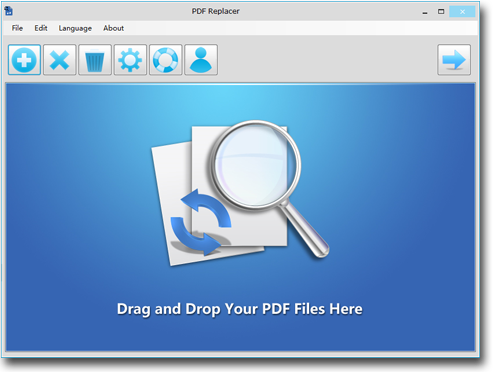
The main window, with its toolbar along the top and the drop zone for your PDF files.
Features
Replace text across a whole batch
PDF Replacer takes one PDF or a whole batch and replaces the specified word, phrase or sentence in every file. Leave the Replace With field blank and it deletes the text instead. You can also use a character such as an asterisk to mask sensitive words.
Run a list of many replacements
PDF Replacer works from a list of word pairs, so one run can make dozens of changes. Lists can be saved to CSV or TXT and loaded next time. That's useful when the same set of terms needs changing each quarter, and you can prepare the list in a spreadsheet.
Limit changes to certain pages
PDF Replacer's page range option restricts a replacement to selected pages. If the change belongs only on a cover sheet or the first page of each contract, the rest of the document stays untouched.
Change the look of the new text
PDF Replacer can set the font of the replaced text and add bold, italic, underline or strikethrough. Recent versions also highlight text and change its color across many files, and if you enter the same word in both fields, you get highlighting without any actual replacement.
Handle more than 50 languages
PDF Replacer works on PDFs in more than 50 languages, according to the vendor, including German and French. The vendor also says it handles restricted and locked PDF documents.
Benefits
- Hours of repetitive editing go away. A rebrand or a changed phone number takes one run, not one sitting per file.
- Layouts stay put. The tool analyzes each file's structure to keep the page as it was, which is why it isn't as fast as replacing text in a Word file.
- It's cheap for what it does. You aren't paying for the many editing tools you wouldn't use.
Real-World Uses
- After a rebrand, swap the old company name in every brochure and template.
- Before sharing documents, replace a person's name or a sensitive term with asterisks. Check the result, since this is text replacement and not certified redaction.
- When dates roll over, update a year or deadline across a set of forms.
- When reviewing, highlight key terms across dozens of reports.
Who It's For, and Who Should Skip It
PDF Replacer PRO fits small offices that routinely change the same few things across many text-based PDFs, and need a tool they can legally use at work.
Skip it if you need to edit a paragraph, move images or rework a page: a real PDF editor such as PDF-XChange Editor suits that better. Skip it for legal redaction, which needs a dedicated tool that removes hidden content. Scanned documents need OCR first. And there's no Mac version.
Usage Guide
- Download and install PDF Replacer, then open it.
- Drag your PDF files into the window, or use the add button.
- Enter the text to find and the replacement, adding more pairs if you need them.
- Open Settings for fonts, highlight, text color or page range.
- Click the arrow at the top right to run the job.
- Open a few output files and check them before you use them.
Where it falls short
- Speed. The vendor says processing may be slower than plain text search and replace, because each PDF's structure has to be analyzed.
- Exact matching matters. Text must match what's stored in the file. Tools like this can miss words split up inside a PDF, so check your results.
- A fixed-size page has its limits. A much longer replacement can't reflow paragraphs the way a word processor would, so keep replacements a similar length.
- Little outside feedback. We found how-to articles and listings, but no user ratings on the big review sites.
What Users Say
Independent write-ups
Reviewer coverage is thin and comes mostly from free-software blogs, so we won't pad this section.
- Trisha, TrishTech (July 2019): "PDF Replacer allows you to quickly replace text in multiple PDF documents at once in the batch mode." She adds that "it won't work in PDF documents containing only scanned images of documents."
- Other write-ups describe a free version that adds a watermark only to PDFs of more than 100 pages. The edition table on the vendor site just says Pro has no watermark.
The vendor's own page links to write-ups from SOSPC, Techulator, Sooftware, MadDownload and SoftLay. There are no customer ratings we could verify, so your own test on the free version counts for more than any score.
Comparisons
PDF Replacer vs a full PDF editor
A full editor lets you rewrite pages one at a time. PDF Replacer can't do that, but it changes the same words across hundreds of files in one run, and it costs a fraction of the price.
Editions and Pricing
Prices are from the vendor's upgrade page on November 6, 2026. The single Pro license at $29.95 is the one sold through the buttons on this page.
| Edition | Price | Use | Notes |
|---|
| Free | $0 | Personal and home use | Watermark on longer files, as reviewers report |
| Pro, 1 license | $29.95 | Personal and commercial | No watermark, technical support |
| Pro, 2-4 licenses | $27.95 each | Personal and commercial | Volume price |
| Pro, 5-9 licenses | $24.95 each | Personal and commercial | Volume price |
| Pro, 10+ licenses | $22.95 each | Personal and commercial | Volume price |
FAQs
Can I use the free PDF Replacer at work?
No. The vendor's free PDF Replacer is for personal and home use, and PDF Replacer PRO is the edition for commercial use.
Does PDF Replacer work on password-protected PDFs?
PDF Replacer's vendor lists support for restricted and locked PDF documents. Try your own file in the free version first, since protection types vary.
Does PDF Replacer work on a Mac?
No. PDF Replacer is a Windows program, and there's no Mac edition.
Can PDF Replacer change text in images?
No. PDF Replacer only changes real text in a PDF. Words inside pictures or scanned pages can't be reached.
Does PDF Replacer need Adobe Acrobat?
No. PDF Replacer works on its own, without Acrobat installed.
System Requirements
- Windows 11, 10, 8, 7 or Vista, or Windows Server, 32-bit or 64-bit
- About 50 MB for the download
- Text-based PDF files
Conclusion
PDF Replacer PRO is worth $29.95 if you repeatedly make the same text changes across many PDFs at work. The one reason to buy it is the batch word list, which turns an afternoon of edits into one run. The main reason not to is its narrow scope: it won't touch scans or rewrite a page, and the order renews yearly unless you cancel. Test your own documents in the free version first.
Download Free TrialBuy Now