AutoMouse PRO: A Small Auto Clicker and Mouse Recorder for Windows
AutoMouse PRO is a $19.95 Windows utility that clicks automatically at a set interval and records your mouse movements so it can replay them in a loop. It's for anyone stuck with repetitive clicking who doesn't want to learn a scripting tool.
The whole program fits on one small window and a 1.1 MB download. It handles the mouse only: no keystrokes, no conditions, no image recognition. If your job is "click here, drag there, repeat 500 times", that may be all you need.
Quick facts
- Version: 1.0.5 (file version of the installer)
- Developer: Reezaa, sold through AutoClose.net
- Platform: Windows 7, 8, 10 and 11 and Windows Server, 32-bit and 64-bit
- Price: $19.95 at checkout, no renewal on the order
- Download: 1.1 MB installer, 180 KB portable ZIP
- Languages: 16, including English, French, German, Spanish, Chinese, Japanese and Russian
What we checked: installer file version 1.0.5, 1.12 MB, digitally signed, file dated April 4, 2025, and a non-recurring $19.95 order on November 5, 2026. We didn't run the program or test its click speed.
Download Free TrialBuy Now
Overview
AutoMouse has two halves. The Auto Clicker presses the left or right button at the cursor's fixed position at an interval you set in milliseconds, from the default 1000 ms (one click a second) down to the millisecond range the vendor advertises. The Mouse Recorder captures your mouse tracks and clicks so they can be replayed once, on a delay or in a loop.
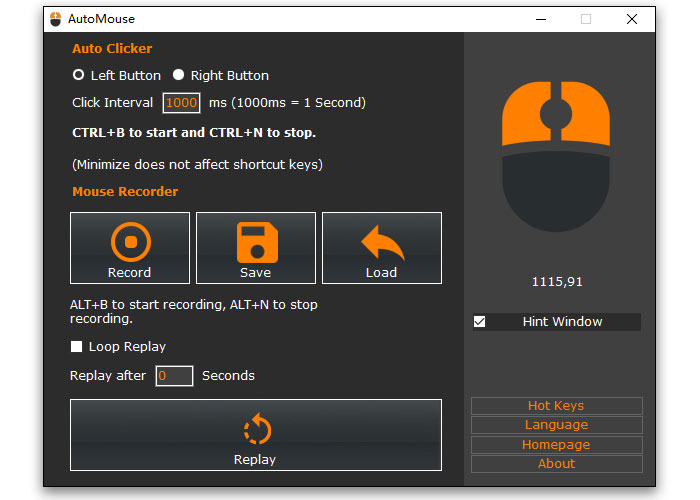
The single AutoMouse window: click interval at the top, Record, Save, Load and Replay below it, and the Hot Keys and Language buttons at the lower right.
Features
Fixed-position clicking at high speed
AutoMouse simulates left or right clicks at one screen position, with the interval set in milliseconds. Place the cursor over the target, press CTRL+B to start and CTRL+N to stop.
Record mouse actions and loop them
AutoMouse records your mouse tracks and clicks and replays them. Turn on Loop Replay and it repeats the sequence until you stop it with ALT+N. This is the part that handles real repetitive work rather than single-spot clicking.
Saved recordings you can reuse
AutoMouse saves a recording to an .arf file, so a sequence you set up today can be loaded and replayed next week without recording it again.
Delayed start
AutoMouse has a "Replay after" setting in seconds, which gives you time to switch to the target window before the replay begins.
Global hot keys you can change
AutoMouse uses global hot keys that work while it's minimized. Start clicking is CTRL+B, stop is CTRL+N, record is ALT+B, and stop recording or replay is ALT+N. The Hot Keys button remaps them if they clash with another program.
Benefits
- Almost nothing to learn. One window, a few buttons, four hot keys.
- Light on your PC. A 1.1 MB installer, or a portable ZIP you can run without installing.
- Spares your hand. Long runs of identical clicks no longer have to come from your finger.
Real-World Uses
- Clicking "Next" through a long series of screens or records.
- Repeating the same drag-and-click sequence in an older program with no batch option.
- Keeping a PC awake: the vendor's own tip is to record a small mouse jiggle and loop it, so the screen or a program doesn't time out.
- Simple repeat actions in a test, such as pressing the same button again and again.
Who It's For, and Who Should Skip It
AutoMouse PRO suits people with a simple mouse-only chore on a screen that doesn't change.
Skip it if your task needs typing, branching or waiting for something to appear. Replayed mouse tracks follow screen positions, so a moved window can throw them off. For that kind of job, look at a full automation tool such as RoboTask or AutoIt. Check the rules before using it in online games too, since auto clickers can break a game's terms.
Usage Guide
- Download the installer or the portable ZIP and start AutoMouse.
- To auto-click, pick the left or right button, set the Click Interval in milliseconds, hover over the target and press CTRL+B. Press CTRL+N to stop.
- To record, press Record or ALT+B, carry out the actions, then press ALT+N.
- Tick Loop Replay if you want it repeated, set "Replay after" for a delay, and press Replay.
- Press Save to keep the recording as an .arf file, and Load to use it again.
Before you buy
- Check what the free download does first. The vendor's page lists the license as "Free + PRO" but has no table of what PRO adds. A 2022 article called the program freeware, while a 2024 AlternativeTo user described a 7-day trial, so run it for yourself before paying.
- AutoMouse PRO is also one of six programs in the vendor's $49.95 Utilities Pack, with AutoClose PRO, ForceDelete PRO and Corrupt PDF Viewer PRO among them. If you need more than one, the pack is the better buy.
Where it falls short
- Mouse only. It doesn't record the keyboard, so forms and typed text are out.
- Position-based replay. There's no image or window detection in its feature list.
- Quiet development. The installer file on the vendor's server dates from April 2025, and the product page still shows version 1.0.
What Users Say
AutoMouse is a small tool with few independent reviews, so there isn't much to go on. There's no rating with a meaningful sample on any major review site.
Tech sites
"Overall, this is a lightweight and freeware for automating mouse actions." I Have A PC, September 30, 2022
"A visually pleasing app that is simple to operate even for the most novice use. Great for gaming, and any repetitive actions." Warp2Search
AlternativeTo
The single user review on AlternativeTo is about the license, not the program.
"7 day Trial ware .. makes it sound like freemium, but it isn't." TBayAreaPat, June 17, 2024
The pattern: the tech sites like how simple it is, and the one user complaint is about how the licensing is described.
Comparisons
AutoMouse PRO vs free auto clickers
Plenty of free clickers do fixed-position clicking. AutoMouse's case rests on the recorder: saved, loopable mouse sequences with a delayed start. If you only need one spot clicked, a free clicker will do.
FAQs
Is AutoMouse PRO a one-time purchase?
AutoMouse PRO was a single $19.95 order with no renewal term when we checked on November 5, 2026.
Does AutoMouse work on Windows 11?
Yes. AutoMouse is listed for Windows 7, 8, 10 and 11 or later, plus Windows Server, in 32-bit and 64-bit.
Is there a portable version of AutoMouse?
Yes. AutoMouse comes as a 180 KB portable ZIP as well as a 1.1 MB installer.
Can AutoMouse be used as a mouse jiggler?
Yes. In AutoMouse, record a small mouse movement, tick Loop Replay and press Replay. The mouse keeps moving until you press ALT+N.
Is there a Mac version of AutoMouse?
No. AutoMouse is a Windows program only.
System Requirements
- Windows 7, 8, 10, 11 or later, or Windows Server, 32-bit or 64-bit
- 1.1 MB for the installer download
Conclusion
AutoMouse PRO is a fair buy at $19.95 if a mouse-only job on a fixed screen is costing you time and the free download has shown it does what you need. Its best quality is simplicity.
The main reason not to buy is that it stops at the mouse. Anything with typing or decisions belongs in a real automation tool, and the unclear line between free and PRO means you should test first.
Download Free TrialBuy Now