Short answer: if you have Word on your desktop, open the PDF in Word first. It costs nothing and handles text-heavy files well. If Word scrambles the layout or you have many files, PDFZilla ($29.95 a year) is the cheapest way to convert batches of ordinary PDFs on Windows. For scanned PDFs you need OCR, so choose Readiris Pro 17 ($59 once) or ABBYY FineReader PDF Standard ($99 a year) on Windows, or Cisdem PDF Converter OCR for Mac ($69.99 once) on a Mac.
At a glance
| Word (free way) | PDFZilla | Readiris Pro 17 | FineReader PDF Standard | Cisdem for Mac |
|---|
| Price at checkout | Included with Word | $29.95 a year | $59 one-time | $99 a year | $69.99 one-time |
| Runs on | Windows and Mac desktop Word | Windows 7 to 11 | Windows 10, 11 | Windows 10, 11 (64-bit) | macOS 11 and later |
| Reads scanned PDFs (OCR) | ✗ Not a dedicated OCR tool | ✗ | ✓ 138 languages | ✓ 198 languages | ✓ |
| Batch conversion | ✗ | ✓ | ✗ Corporate edition only | Automatic folder conversion is Corporate only | ✓ |
| Trial limit | None | Half of each file | Free trial after a short form | 7 days, 100 pages of OCR saved | First 3 pages of a file |
| Output to Word | DOCX | DOC, RTF | Word | Word | DOCX, RTF |
How we picked
- We started from what people actually search for and cut the list to tools that are sold today and convert from PDF, not to it.
- We read each order page for today's price and whether it renews.
- We read each trial's limits, because the trial is how you find out if your own file converts properly.
- We took Microsoft's own list of what Word can't convert, and collected independent reviews for the rest.
What we checked: prices and renewal terms on the order pages and the trial links on November 9, 2026. We compared features, prices and trials from the vendors' pages and published reviews, and we didn't run our own conversions, so we make no accuracy ranking.
Try this free first: open the PDF in Word
Desktop Word converts PDFs on its own, and for a letter, report or contract that's mostly text it may be all you need. Microsoft says the conversion works best with files that are mostly text, such as business, legal and scientific documents.
- Open Word, choose File, then Open, and pick the PDF.
- Click OK when Word says it will convert the PDF to an editable document.
- Check the result against the PDF, then save it as a Word document under a new name.
Where Word's conversion goes wrong
Microsoft lists what doesn't come through well: tables with cell spacing, page colors and page borders, tracked changes, frames, footnotes that span more than one page, endnotes, and PDF bookmarks, tags and comments. If a page is mostly charts or graphics, Word may turn the whole page into a picture, so its text can't be edited.
A scan is the other limit. A scanned PDF holds pictures of pages, and a tool built for OCR is the right job for those.
Free web converters are the other option for an occasional file. The trade-off is that your document leaves your PC, which rules them out for contracts, medical records and anything else you shouldn't upload. Everything below runs on your own computer.
PDFZilla: the cheapest way to convert batches on Windows
PDFZilla
$29.95 a year at checkout | Windows 7 to 11 | Best for batches of ordinary, text-based PDFs

The PDFZilla 3 main window: a button for each job, including PDF to Word, PDF to Excel and PDF to Image.
PDFZilla converts PDFs to Word (DOC or RTF), Excel, text, HTML and images, a whole file or selected pages, in batches. You click one button, add files and start. It's a narrow tool at a low price, and it doesn't read scans, because nothing on the vendor's pages describes OCR.
What we like
- Lowest price here
- Batch conversion and page ranges
- Also covers Excel, images and basic merge, cut and rotate
Watch out for
- No OCR, so no scanned PDFs
- Output on complex layouts can break
- Order page renews yearly with automatic billing ticked, despite older reviews calling it one-time
- Last build dates from August 2023
What reviewers say
TechRadar's Stefan Ionescu: "It's not the most advanced PDF editor on the market right now, with some competing tools offering a much broader range of options. But it more than makes up for that with its clean, fast interface, and its intuitive design."
Sooftware is harsher: "Conversion quality, however, can be inconsistent. Converting to certain formats sometimes almost completely ruins the appearance of the document."
ExcelDemy's Mehrab Imtiaz was unimpressed: "At its core, PDFZilla is a simple PDF document converter. And honestly? It is not a very good one."
The demo converts half of each file, which is enough to see how your own layout comes out. Run it on your hardest PDF before you pay.
Download PDFZilla TrialBuy PDFZilla
Readiris Pro 17: one-time OCR for scans on Windows
Readiris Pro 17
$59 one-time at checkout (IRIS lists it at $99) | Windows 10 and 11 | Best for occasional scans, no subscription

The Readiris window with a two-page document loaded and page thumbnails on the left. This image shows the Corporate edition, which shares the interface.
Readiris Pro 17 reads scans, images and PDFs in 138 languages and saves them as Word, Excel, searchable PDF, HTML, TXT or ePub. You choose the document language, check the pages, and pick an output. At $59 once, it's the cheapest route here to OCR on Windows.
What we like
- One-time price with no renewal
- 138 OCR languages, including Asian, Arabic, Cyrillic and Hebrew
- Text zones can be adjusted before export
Watch out for
- Older line: the last build is from November 2023, and new work goes to Readiris PDF (from $129)
- Batch conversion needs the $199 Corporate edition
- Needs .NET Framework 3.5, which Windows 11 may have switched off
- About 470 MB to download
What reviewers say
Detailed reviews of this version are scarce. Capterra-network listings rate Readiris 17 at 4.0 out of 5 from 15 users and TrustRadius scores it 6 out of 10. Users praise its language handling, including Arabic, and report good accuracy on clean scans and trouble with complex layouts, handwriting and low-quality pages. The IRIS company page on Trustpilot scores 3.9 out of 5 from 439 reviews, covering all its products.
Download Readiris Pro 17 TrialBuy Readiris Pro 17
ABBYY FineReader PDF Standard: the strongest OCR for difficult documents
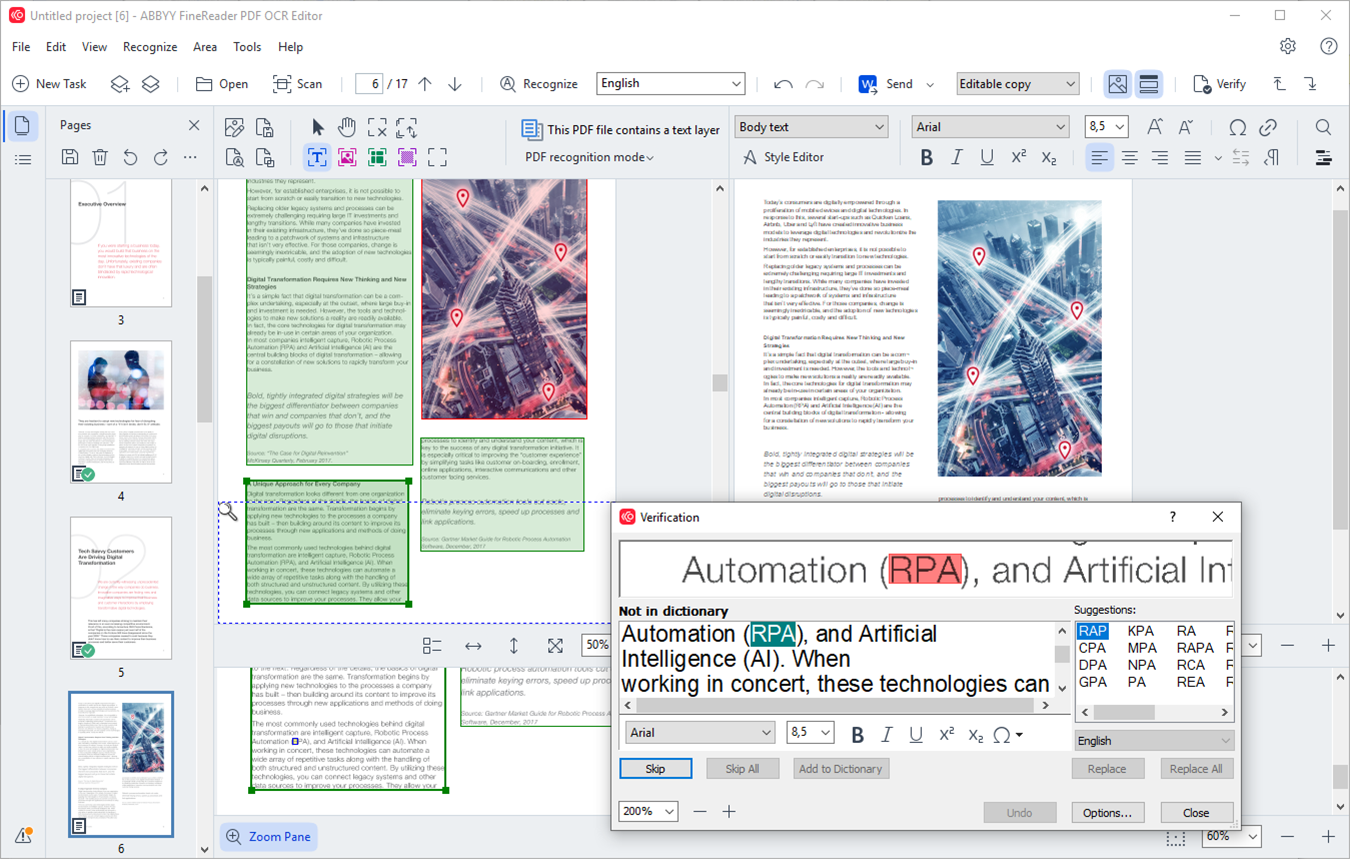
FineReader's OCR Editor: the page with its recognized zones, the editable text beside it, and a Verification dialog for checking uncertain words.
ABBYY FineReader PDF Standard is a full PDF editor built around OCR, and it can convert straight to Word from its start screen. For a difficult file, the OCR Editor lets you correct recognition line by line before exporting. It recognizes 198 languages, in any combination, and keeps editing, signing and redaction in one window.
What we like
- 198 recognition languages, 53 with dictionary support
- OCR Editor for checking difficult pages line by line
- Also edits, protects and signs PDFs
Watch out for
- Subscription only for individuals, and it renews automatically
- About 1.8 GB to install
- Automatic folder conversion (Hot Folder) is in Corporate ($165 a year)
- Trial runs 7 days and saves OCR results for up to 100 pages
What reviewers say
TechRadar's Krishi Chowdhary, updated February 27, 2026: "I absolutely loved its 'live text' feature. I scanned a document, and FineReader almost instantly recognized and highlighted the text in it." Its reasons to avoid: "No free plan" and "Older interface".
ABBYY's Trustpilot profile is small and critical, at 2.1 out of 5 from 11 reviews, most of them about billing. Wayne Dunn, 1 star, August 2026: "ABBYY charged me for an unwanted auto-renewal after I requested cancellation." Set a reminder if you only need it for a year.
Download FineReader PDF TrialBuy FineReader PDF
Cisdem PDF Converter OCR for Mac: the pick on macOS

The Converter tab: each file in the queue has its own page range and output, here OCR PDF, DOCX, XLSX, PPTX, Pages and Keynote.
Cisdem PDF Converter OCR for Mac detects a scanned file on import and offers to recognize it, then saves to DOCX, RTF, Excel, PowerPoint, or Apple's Pages and Keynote. Each file in the batch queue can have its own page range and output format. Version 10.0.0 came out on October 16, 2026, so it's the most recently updated tool in this guide.
What we like
- One-time price and a 30-day money-back guarantee
- Batch OCR on a Mac, working offline
- Outputs to Apple's iWork formats as well as Office
Watch out for
- Trial converts only the first 3 pages of a file
- Converts and creates, but can't edit the source PDF
- Less common languages can be a struggle, one reviewer says
What reviewers say
A marketing specialist on SourceForge, April 28, 2026: "Very fast conversion speed, even for large files" and it "keeps the original layout and formatting almost perfectly". The same reviewer adds: "Supports mainly common file languages, so it may struggle if you work with less regional files."
MacUpdate shows 4.0 out of 5 from 17 ratings, with older, split comments. Tsolak, January 26, 2021, 1 star: "A lot of things doesn't work as described in the users guide."
Download Cisdem PDF Converter TrialBuy Cisdem PDF Converter
Prices side by side
Price for one user at checkout (USD)
PDFZilla (per year)$29.95
Readiris Pro 17 (one-time)$59.00
Cisdem PDF Converter OCR for Mac (one-time)$69.99
ABBYY FineReader PDF Standard (per year)$99.00
Checkout prices checked on November 9, 2026. Yearly plans renew, so compare them over the years you expect to use them.
Which should you choose?
| Your situation | Pick | Why |
|---|
| One text-based PDF, and you own Word | Word itself | It's free, and it's built for mostly-text files |
| A folder of ordinary PDFs on Windows | PDFZilla | Batch conversion at the lowest price |
| Scans now and then, no subscription | Readiris Pro 17 | $59 once, 138 languages |
| Difficult scans, or several languages in one document | FineReader PDF Standard | 198 languages and a line-by-line OCR Editor |
| Scans or batches on a Mac | Cisdem PDF Converter OCR | Batch OCR, one-time price |
Who should skip these: skip PDFZilla if your PDFs are scans or have complex layouts. Skip Readiris Pro 17 if you want a product still getting new features. Skip FineReader PDF if you dislike subscriptions or only have a few files. Skip Cisdem if you need to edit inside the PDF.
What commonly goes wrong
- Using a plain converter on a scan. Without OCR, a scanned page has no text to convert. Check first: if you can't select a word in the PDF, it's a scan.
- Testing on the easy file. Every tool here does well on a plain page. Run the trial on your worst document, the one with tables, columns and footnotes.
- Expecting an identical copy. A PDF stores where things sit on the page, not how a document is built, so even good tools leave some cleanup. Cisdem says plainly that its output can't be 100% identical.
- Missing the renewal box. PDFZilla and FineReader PDF renew yearly. Cancel or untick renewal if you only need one year.
FAQs
How do I convert a PDF to Word for free?
Open the PDF in desktop Word and click OK when it offers to convert it. Word does this at no extra cost and works best on files that are mostly text. It won't keep every layout, and Microsoft lists tables with cell spacing, frames and page borders among the things that don't convert well.
Why does my PDF look wrong after converting to Word?
A PDF to Word conversion has to guess at columns, tables and text boxes, because a PDF stores positions on a page instead of a document structure. Word, PDFZilla and the OCR tools here can all leave cleanup on complex pages. Try a tool with an OCR or layout editor, such as ABBYY FineReader PDF, when the layout matters.
Can I convert a scanned PDF to Word?
A scanned PDF needs OCR software to become editable text. Readiris Pro 17, ABBYY FineReader PDF Standard and Cisdem PDF Converter OCR for Mac all do it, while PDFZilla doesn't. Accuracy depends heavily on the scan's quality.
What is the best PDF to Word converter for Mac?
Cisdem PDF Converter OCR for Mac is the pick in this guide, at $69.99 one-time with batch OCR. ABBYY sells a separate FineReader PDF for Mac, and Readiris 17 for Mac is Intel-only legacy software that we wouldn't buy.
Is PDFZilla a one-time purchase?
PDFZilla was set to renew at $29.95 every 12 months on the order page we checked, with automatic billing ticked. Older reviews describe a one-time payment. Untick renewal at checkout if you want one year only.
Is it safe to convert a PDF online?
A free web converter uploads your file to someone else's server, so it's a poor fit for confidential documents. PDFZilla, Readiris Pro 17, ABBYY FineReader PDF and Cisdem PDF Converter OCR all convert on your own computer.
Do I need Microsoft Word to use a PDF converter?
PDFZilla doesn't list Office as a requirement, but you'll want Word or a free alternative to open the DOC or RTF file it produces. The same goes for any converter that saves Word files.