Readiris Pro 17 for Windows: One-Time OCR and PDF Software for Scans
Readiris Pro 17 is OCR and PDF software for Windows from IRIS, a Canon group company, at $59 as a one-time purchase. It turns scans, images and PDFs into editable Word, Excel and searchable PDF files in 138 languages, for home users and small offices who don't want a subscription.
If you've got a pile of paper or a folder of scanned PDFs you can't search or edit, this is the job it does. It's also an older product, and you should know that before you buy.
Quick facts
- Version: 17.4.192 (installer dated November 21, 2023)
- Developer: I.R.I.S., part of the Canon group
- Runs on: Windows 10 and 11 per IRIS's current compare page. This listing is the Windows edition only.
- OCR languages: 138, including Asian, Arabic, Cyrillic and Hebrew
- Price: $59 at checkout, one-time license (IRIS's own store lists it at $99)
- Free trial: available after filling in a short form
What we checked: $59.00 with a lifetime term on the order page, the $99 list price and In stock status on IRIS's store, the 470.5 MB installer on IRIS's server, and IRIS's support note on installing it on Windows 11, all on November 6, 2026. We didn't run an OCR test.
Before you buy: this is the older line
- The last build is from November 2023. IRIS's newer product is Readiris PDF, from $129 on its store, and that's where new development goes. Readiris 17 is still sold and it works, but don't expect new features.
- The Mac edition isn't a safe buy. Readiris 17 for Mac is Intel-only legacy software, so this page only recommends the Windows edition.
- Windows 11 may need an extra step. Readiris 17 needs .NET Framework 3.5. On Windows 11 it may be switched off, and from version 26H1 on you have to download it from Microsoft. IRIS's help center explains how.
Download Free TrialBuy Now
Overview
Readiris works in a simple line: bring in a scan or a file, choose the document's language, then choose the output format. Between those steps you can check the pages, fix recognition and adjust text zones. The interface is an office-style ribbon with page thumbnails on the left and the current page in the middle.
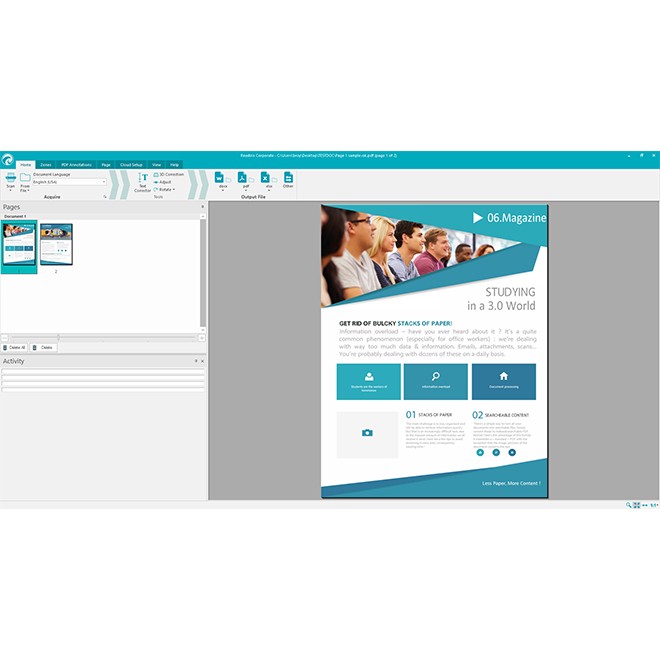
The main window with a two-page document loaded. This image comes from the Corporate edition, which shares the same interface.
Features
Scans into editable documents
Readiris Pro 17 recognizes the text and layout of an image, a PDF or a scanned page and turns it into Word, Excel, PDF, HTML, TXT or ePub. The 17.3 update brought an improved OCR engine and better Arabic recognition, and added Thai and Vietnamese.
PDF tools for everyday work
Readiris Pro 17 can create, merge and split multipage PDFs, protect and sign them, and add annotations such as highlights and sticky notes. It covers common office tasks, though it isn't a full replacement for Acrobat.
Heavy compression for archives
IRIS says Readiris Pro 17 compresses searchable PDFs up to 10 times, which helps if you archive or email large scanned files.
Documents you can listen to
Readiris Pro 17 converts a document into an MP3 or WAV audio file, so you can listen on a phone or a tablet. That's useful for language learners and for people who find long documents hard to read.
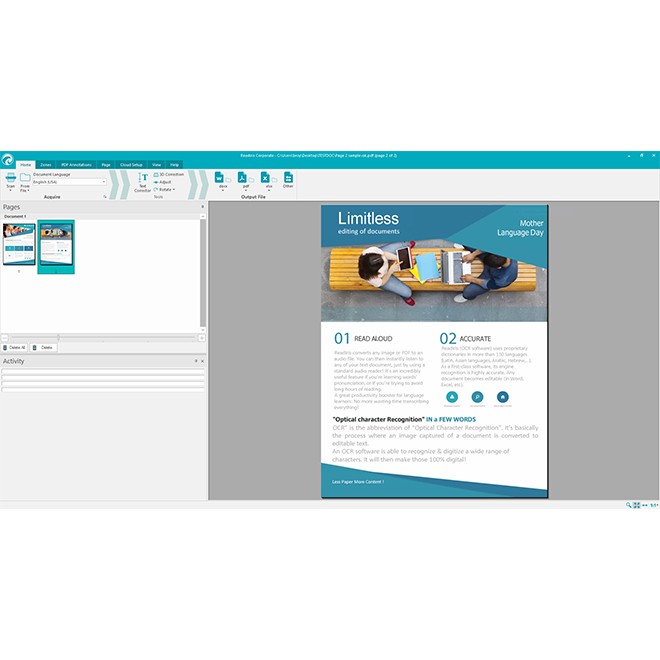
The ribbon with Scan, Text Correction and output format buttons, again from the Corporate edition.
Real-World Uses
- A small office turns paper contracts into searchable PDFs it can find again.
- A student converts photocopied book chapters into Word to quote from them.
- A home user scans old letters and shrinks the PDFs for storage.
- A translator gets a printed Arabic or Russian text into an editable file.
Who It's For, and Who Should Skip It
Readiris Pro 17 suits Windows users who want a one-time OCR tool for occasional scanning jobs at a low price, and who don't need the latest release.
Skip it if you use a Mac, or if you want a product that's actively developed: in those cases look at Readiris PDF. Skip it too if you process large volumes every day, because batch conversion and watched folders are in the Corporate edition, not Pro. If your documents are mostly handwritten or badly copied, expect to do a lot of correcting.
Usage Guide
- Fill in IRIS's trial form and download the installer, which is about 470 MB.
- If setup stops with a .NET error, install .NET Framework 3.5 and run it again.
- Activate with your key after buying. You need an internet connection for this.
- Click Scan, or open a file from the Home tab.
- Set the document language.
- Pick the output format and save.
Where it falls short
- Input quality matters. Users on review sites report good accuracy on clean scans and trouble with complex layouts, handwriting and low-quality pages.
- A large download. The installer is about 470 MB for a package that needs only 0.5 GB of disk.
- Mixed information. IRIS's store page still lists Windows 7, 8 and 10, while its compare page lists Windows 10 and 11. Use the trial to confirm it runs on your PC.
What Users Say
Ratings across the review sites
We found few detailed reviews we could read in full, so here's what the rating sites show. Capterra-network listings rate Readiris 17 at 4.0 out of 5 from 15 users, and TrustRadius scores it 6 out of 10. Users praise its language handling, including Arabic, and call the price somewhat high against other OCR software.
On Trustpilot, the IRIS company page scores 3.9 out of 5 from 439 reviews, covering all of its scanners and software. Andrea Rovere, 5 stars, April 2026, writing about the Corporate edition, says: "they do what Iris promises without problems."
Readiris Pro 17 vs Corporate 17
Corporate 17 costs $199 on IRIS's store and adds batch conversion, watched folders, recognition of up to five languages in one document, and export to FTP, SharePoint and Therefore. Pro is enough unless you automate conversion.
Readiris Pro 17 vs Readiris PDF
Readiris PDF is IRIS's current line and supports Windows 10 and 11 and current macOS, starting at $129 on its store. Pay the extra if you want the newer program or a Mac version. Stick with Readiris Pro 17 at $59 if OCR on Windows is the main job.
FAQs
Why does Readiris Pro 17 cost less at checkout than on IRIS's site?
Readiris Pro 17 came to $59 on the order page on November 6, 2026, while IRIS's store lists $99. The order page is the one behind the Buy Now button here.
Is Readiris Pro 17 a subscription?
No. Readiris Pro 17 is a one-time license with a lifetime term on the order page.
Do I need a scanner to use Readiris Pro 17?
No. Readiris Pro 17 also works on image files and PDFs you already have, so a scanner is only needed for paper.
How do I update Readiris Pro 17?
In Readiris Pro 17, open the Help tab and click Check for Update. If that fails, IRIS suggests removing the program and installing the full download.
System Requirements
- Windows 10 or Windows 11
- 1 GHz processor or faster
- 2 GB RAM
- 0.5 GB of disk space
- .NET Framework 3.5
- Internet connection to download and activate
Conclusion
Readiris Pro 17 is a fair buy at $59 if you're on Windows and want one-time OCR without a subscription. The best reason to buy is the price: $40 below IRIS's own list price. The main reason not to is its age, since the last build is from 2023 and IRIS's attention has moved to Readiris PDF. Run the trial on your own scans first, and if it installs and reads them well, it will do the job.
Download Free TrialBuy Now