ABBYY FineReader PDF Standard: Edit Scanned PDFs as Easily as Digital Ones
ABBYY FineReader PDF Standard is a $99-a-year Windows 10 and 11 PDF editor built around ABBYY's OCR: it opens, edits, converts, protects and signs PDFs, and turns scans and paper documents into searchable PDFs or editable Word and Excel files, in 198 recognition languages.
Most PDF editors are happy with a PDF that came out of Word. The trouble starts with a scanned contract, a photographed receipt or a 40-page report someone printed and scanned back in. FineReader is built for exactly those files: it recognizes the text in the background, so you can search, copy and correct a scan the way you would a normal document.
Quick facts
- Version: FineReader PDF 16, build 16.26.6.6004 (Release 2026.6.3)
- Developer: ABBYY
- Runs on: Windows 11 and 10, 64-bit only. FineReader PDF for Mac is a separate product.
- OCR: 198 recognition languages, 53 of them with dictionary support
- Price: $99 per year for 1 user (subscription, renews automatically). Monthly ($16) and 3-year ($267) plans too.
- Bonus: the order includes a free 1-year license of FineReader PDF for Mobile
- Free trial: 7 days, saves OCR results for up to 100 pages, then a basic PDF viewer mode
- Not in Standard: Compare Documents and Hot Folder automation (Corporate edition only)
What we checked: the Standard yearly plan at $99.00 on the order page, the other plan prices at checkout, and the 1.8 GB trial installer (build 16.26.6.6004, dated July 6, 2026), on October 26, 2026. We didn't install it or measure OCR accuracy ourselves.
Get the Free TrialBuy Now ($99/year)
Overview
FineReader PDF opens on a simple start screen: open a PDF to view, search and edit it, open the OCR Editor for careful conversions, scan from a TWAIN or WIA scanner, or convert a file straight to PDF, Word, Excel or another format. Inside a PDF, tabs across the top (Document, Organize Pages, Edit Content, Security, Form Editor) hold the tools, much like an Office ribbon.
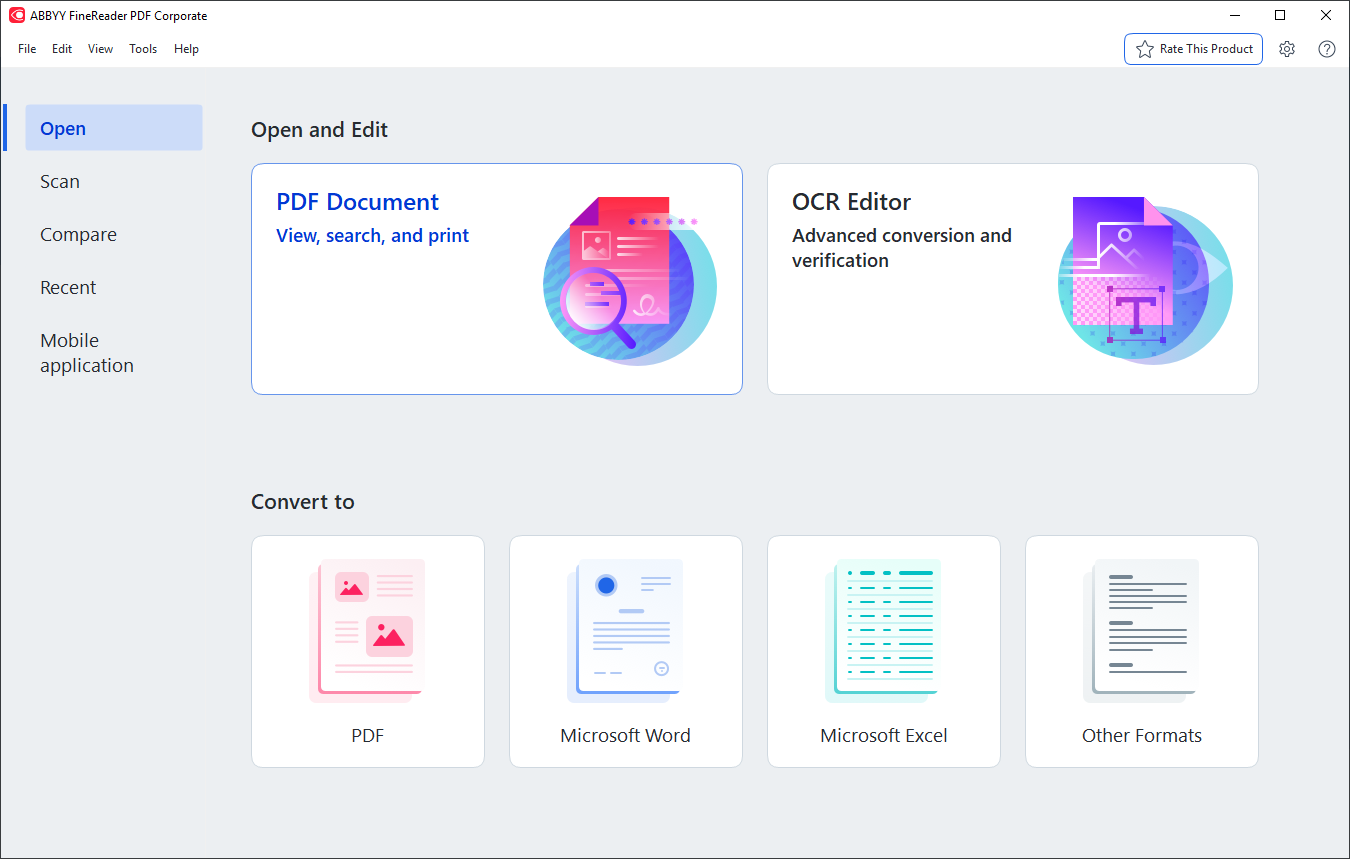
The FineReader PDF 16 start screen: Open, Scan, Compare, Recent and Mobile application on the left, PDF Document and OCR Editor, and Convert to PDF, Word, Excel or other formats. This screenshot shows the Corporate edition, whose Compare tab isn't part of Standard.
The OCR is the reason to choose it. When you open a scanned PDF, FineReader recognizes the text in the background, so the scan becomes searchable and editable without a separate conversion step. For tricky originals, the OCR Editor lets you correct recognition areas, check uncertain words and export to editable formats.
Features
Edit PDFs almost like a Word document
FineReader PDF Standard lets you rewrite whole paragraphs, edit text in tables, change fonts and alignment, add text and pictures, and adjust headers and footers, in digital PDFs and in scans alike. The Organize Pages tool merges files, rearranges, rotates and deletes pages, and adds Bates numbering and stamps.

The Edit Content tab: a selected text block in a PDF brochure with font, size, bold, italic and alignment controls, plus Header and Footer, Picture and Add Text tools.
Convert PDFs and scans into editable files
FineReader PDF Standard converts PDFs, scans and photos of documents into Word, Excel and other formats while keeping the layout, and extracts text and tables from any PDF in one click. Recognition covers 198 languages, including old European languages and gothic fonts, in any combination, so a bilingual contract comes out right.
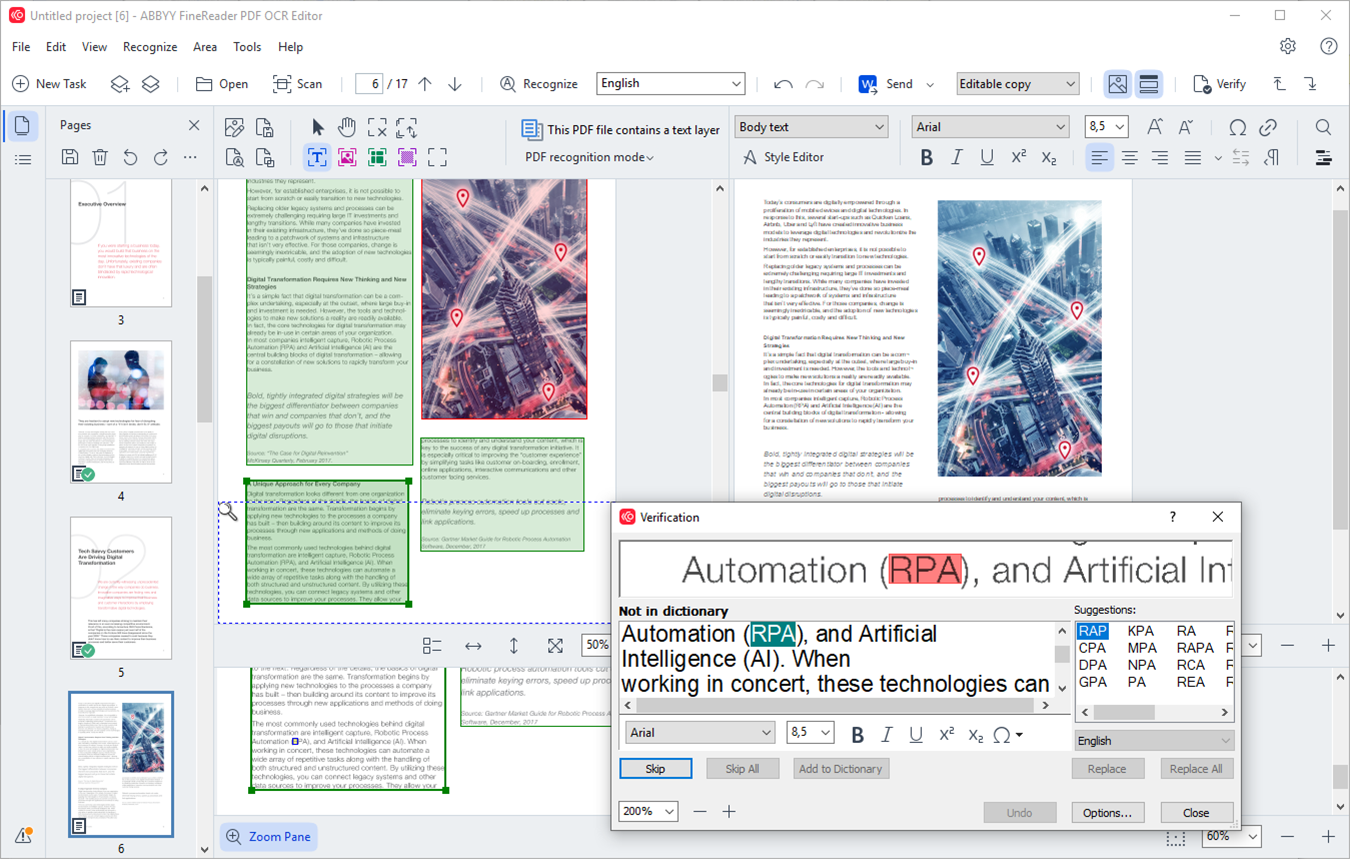
The OCR Editor: page thumbnails, the scanned page with marked recognition areas, the recognized text, and the Verification dialog suggesting corrections for a word not in the dictionary.
Protect, redact and sign
FineReader PDF Standard adds passwords and digital signatures, redacts sensitive text, adds watermarks, and deletes hidden data such as metadata, comments, bookmarks and attachments before you send a file.
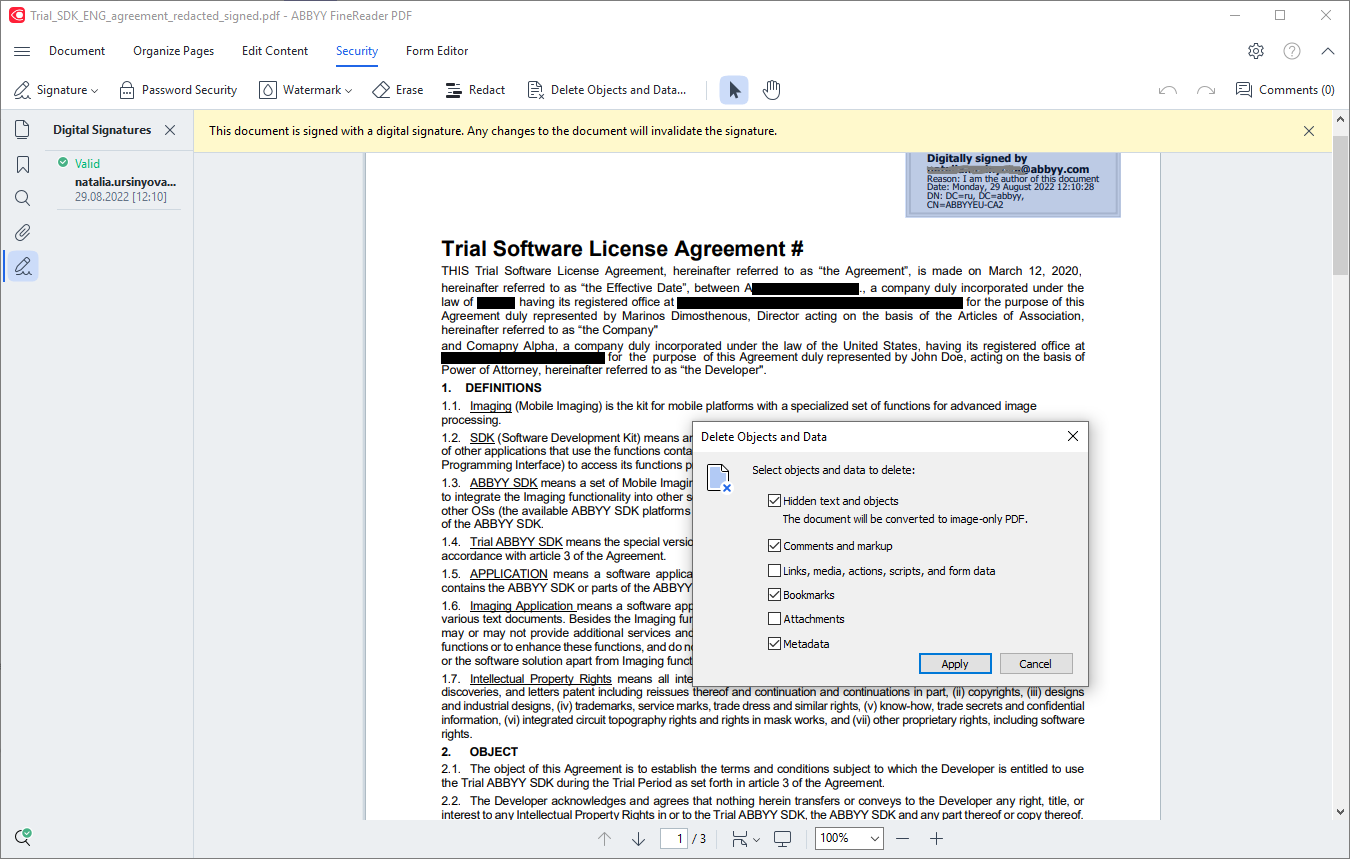
The Security tab: a digitally signed agreement with redacted names, and the Delete Objects and Data dialog for removing hidden text, comments, bookmarks and metadata.
Comment, collaborate and fill in forms
FineReader PDF Standard lets you comment on, annotate and mark up documents for review, fill out interactive PDF forms, and create PDFs from Microsoft Office files, scans and paper. It works with TWAIN- and WIA-compatible scanners and multifunction printers from Canon, Epson, Fujitsu, HP, Brother and others.
Benefits
The real gain is not having two tools. Without FineReader you'd typically run an OCR program, export to Word, fix the result and turn it back into a PDF. FineReader keeps scans and digital files in one workflow, so a scanned 1990s lease can be searched, quoted, redacted and signed in the same window as yesterday's invoice. At $99 a year it also costs well under Adobe Acrobat Pro, which ABBYY positions it against.
Real-World Uses
- A law office receives a scanned contract, makes it searchable, redacts personal details and signs it digitally before sending it back.
- A bookkeeper pulls the tables out of a stack of scanned bank statements straight into Excel instead of retyping them.
- A researcher converts old printed papers in German and French into editable Word documents, keeping the layout.
- A college accessibility office turns inaccessible scanned PDFs into searchable, tagged documents for screen-reader users.
- A small business merges scanned delivery notes into one PDF, numbers the pages and adds stamps.
Who It's For, and Who Should Skip It
FineReader PDF Standard is for people who handle scanned or printed documents every week: lawyers, accountants, researchers, admin staff and anyone digitizing paper archives on Windows. If you mostly work with PDFs exported from Office, a cheaper PDF editor will do.
Skip Standard if you need to compare two versions of a document or batch-convert folders automatically: those (Compare Documents and Hot Folder) are only in FineReader PDF Corporate ($165 a year). Skip it if you dislike subscriptions, since there's no one-time license for individuals, or if you're on a Mac, where FineReader PDF for Mac ($69 a year) is the product to buy.
Usage Guide
- Install and launch. Download the installer (about 1.8 GB), install it on 64-bit Windows 10 or 11, and enter your serial number. Activation needs an internet connection.
- Open a PDF. Choose Open > PDF Document. For a scan, wait a moment while background recognition makes the text searchable.
- Edit. Switch to Edit Content to change text, tables and pictures, or Organize Pages to merge, reorder and number pages.
- Convert. From the start screen, choose Convert to Microsoft Word, Microsoft Excel or Other Formats. Use the OCR Editor for difficult scans you want to check line by line.
- Protect and share. On the Security tab, redact, delete hidden data, add a password or sign the document, then save.
Before you buy
- It's a subscription that renews automatically. Several recent Trustpilot reviews complain about unexpected renewals, so if you only need it for one project, turn off renewal in your ABBYY Checkout account straight after buying.
- The trial is the Corporate edition. It includes Compare Documents and Hot Folder, which the Standard license doesn't, so don't plan your work around those during the trial.
- You can upgrade later. ABBYY lets you move from Standard to Corporate, or to a longer term, from your ABBYY Checkout account, paying the difference.
Where it falls short
- A heavy install. The installer is about 1.8 GB and needs 1.6 GB of disk plus another 1.6 GB free to run well, far more than lightweight PDF editors.
- The interface looks dated to some reviewers: TechRadar lists an "Older interface" among its reasons to avoid it.
- Scanner compatibility isn't universal. One recent Trustpilot reviewer found it didn't work with their Brother all-in-one printer, so test your scanner during the trial.
- Windows 7 and 8 aren't supported, and neither is 32-bit Windows.
What Users Say
TechRadar
TechRadar ranks ABBYY FineReader PDF among its best OCR software picks (Krishi Chowdhary, updated February 27, 2026). Its reasons to buy: "Recognizes 198 languages", "Directly converts screenshots into editable text", "Compares docs in different formats" and "Various licenses for business use". Its reasons to avoid: "No free plan" and "Older interface".
From the hands-on part: "I absolutely loved its 'live text' feature. I scanned a document, and FineReader almost instantly recognized and highlighted the text in it. This text can be easily copied and pasted elsewhere." And on languages: "I scanned several documents in French and Chinese, and Abbyy was able to convert the text into OCR in just a few seconds." Note that document comparison is a Corporate feature.
Customers quoted by ABBYY
Stephan Dharma, Consultant, SoCal Office Technologies: "I use ABBYY FineReader as a replacement for Adobe Acrobat Pro, simply because (of) the extensive values that FineReader has. I used it for professional and daily personal use. ABBYY FineReader has many languages choices, accurate OCR, and (an) intuitive interface, which make it easy to use."
Mathew Spinneberg, Alternative Media Specialist, Ventura County Community College: "My favorite feature FineReader offers is the ability to convert an inaccessible PDF into a universally accessible document or PDF/UA. I select batches of files, perform a right click, and in moments my PDF documents are tagged and ready to review with assistive technology."
Ray M., President, Government Relations: "I like FineReader because it's a very quick and easy way to edit PDF documents as well as view them. What I like the most is the compare documents function." (Compare Documents is in the Corporate edition.)
Trustpilot
ABBYY's Trustpilot profile is small and critical: 2.1 out of 5 from 11 reviews, most of them about billing rather than the software. These excerpts were read through a summarizer, so treat the wording as close but not guaranteed exact.
Wayne Dunn (1 star, August 2026): "ABBYY charged me for an unwanted auto-renewal after I requested cancellation."
Sam (1 star, June 2026): "they automatically charged me for another year, even though I never authorized them to do that."
Stephanie Woods (1 star, June 2026): "This program is totally incompatible with Brother all in ones"
On the positive side, John Kapusi (5 stars): ABBYY "provided excellent support by email."
The pattern is clear: reviewers who use FineReader praise its OCR accuracy, language range and Acrobat-like editing at a lower price, while the complaints are mostly about automatic subscription renewals, plus the occasional scanner that doesn't cooperate and an interface some find dated.
Comparisons
Standard vs Corporate
Both editions edit, convert, protect and OCR the same way. FineReader PDF Corporate ($165 a year) adds Compare Documents, which finds the differences between two versions even when one is a scan or in another format, and Hot Folder, which converts files dropped into watched folders automatically (up to 5,000 pages a month). If you don't need those, Standard saves $66 a year.
Windows vs Mac
FineReader PDF for Mac ($69 a year) has the same OCR but a smaller PDF feature set. ABBYY's comparison lists password protection after PDF creation only and PDF creation from scans and paper only on the Mac. The Standard license sold here is for Windows.
Editions and Pricing
| Edition |
Monthly |
Yearly |
3 years |
What it adds |
| FineReader PDF Standard (Windows) |
$16 |
$99 |
$267 |
PDF editing, conversion, OCR, protection and signing |
| FineReader PDF Corporate (Windows) |
$24 |
$165 |
$446 |
Compare Documents, Hot Folder automation |
| FineReader PDF for Mac |
Not available |
$69 |
$186 |
macOS version, smaller PDF feature set |
All prices are per standalone user, in USD at checkout on October 26, 2026, and renew automatically. Volume licenses (per seat, concurrent, remote user, site) are sold through ABBYY's sales team.
FAQs
Can I buy ABBYY FineReader PDF Standard as a one-time purchase?
No. ABBYY FineReader PDF Standard is sold to individuals only as a subscription: monthly, yearly ($99) or 3-year.
How do I cancel the FineReader PDF subscription?
ABBYY FineReader PDF subscriptions bought on ABBYY's site are managed in your ABBYY Checkout account, under the email you ordered with. Turn off automatic renewal there before the renewal date. If you bought from a reseller, contact the reseller.
Does FineReader PDF Standard work on Windows 7 or 32-bit Windows?
No. ABBYY FineReader PDF 16 requires 64-bit Windows 11 or Windows 10. Windows Server 2012 R2 to 2022 is tested for business deployments.
What happens when the FineReader PDF trial ends?
When the 7-day ABBYY FineReader PDF trial ends without a license, the program drops to a limited PDF Viewer mode with basic viewing, commenting and printing. Enter a serial number and it becomes the full version, with no need to reinstall.
Can I install FineReader PDF Standard on a second computer?
ABBYY FineReader PDF Standard is a standalone license for a single user on a workstation. For several computers, ABBYY sells per-seat, concurrent and site licenses through its business licensing.
Does FineReader PDF Standard work with my scanner?
ABBYY FineReader PDF supports TWAIN- and WIA-compatible scanners and multifunction printers from makers such as Canon, Epson, Fujitsu, HP, Brother and Kodak. Compatibility varies by model, so try your scanner during the free trial.
Is the FineReader mobile app included?
Yes, for the first year. An order of ABBYY FineReader PDF Standard on the order page includes a free 1-year license of FineReader PDF for Mobile.
System Requirements
- Operating system: Windows 11 or Windows 10, 64-bit
- Processor: 1 GHz x64 minimum, 1.5 GHz or faster Intel or AMD recommended
- Memory: 2 GB minimum (plus 512 MB per additional processor), 4 GB recommended
- Disk: 1.6 GB for installation plus 1.6 GB free for operation
- Display: 1024 x 768 or higher
- Internet: required to activate the serial number
- Office export: some features need Microsoft .NET Framework 4.5.2 or newer, or Microsoft Office or LibreOffice
Conclusion
ABBYY FineReader PDF Standard is worth $99 a year if scanned and printed documents are part of your daily work: its OCR makes scans searchable, editable and convertible in 198 languages, and it covers the PDF editing, redaction and signing most people buy Acrobat for, for less. The one reason to buy it is that OCR. The main reason not to is the subscription: if you only edit the odd digital PDF, or you need document comparison (Corporate only), look elsewhere. Run the 7-day trial on your own scans and scanner first, and turn off auto-renewal if you only need it for a while.
Get the Free TrialBuy Now ($99/year)