At a Glance
| |
FineReader PDF Standard |
FineReader PDF Corporate |
PDFelement |
SwifDoo PDF |
| Price | $99 a year | $165 a year | $129.99 once | $129 once |
| Future versions | ✓ while subscribed | ✓ while subscribed | ✗ tied to a version | ✓ lifetime updates |
| OCR languages | 198 | 198 | About 30 | Choose the document language (count not published consistently) |
| OCR in the free trial | ✓ 7 days, 100 pages | ✓ 7 days, 100 pages | Preview only (14 days) | ✓ 7 days, full |
| Edit text in a scan | ✓ (background OCR) | ✓ (background OCR) | ✓ after running OCR | ✓ after running OCR |
| Compare a Word file with a scan | ✗ | ✓ | Contract compare (digital) | ✗ |
| Batch processing | Manual | ✓ Hot Folder, scheduled | ✓ Batch PDFs | ✓ batch tools |
| Windows versions | 11, 10 (64-bit) | 11, 10 (64-bit) | 11, 10, 8, 7 | 11, 10, 8, 7 |
How we picked
- Limited the list to Windows PDF editors on our site that recognize text in scans and let you edit or convert the result, and that are still sold and updated.
- Compared each one's OCR features, languages, trial limits and license terms on the vendors' own sites and user guides.
- Checked every price on the order page, in US dollars.
- Read expert reviews (TechRadar, PCWorld, TheSweetBits) and user reviews (Trustpilot, Capterra, Product Hunt), complaints included.
What we checked: FineReader PDF Standard at $99 and Corporate at $165 a year, PDFelement's perpetual plan at $129.99 and SwifDoo's at $129.00 on the order page, PDFelement version 13.0.0 on Wondershare's version history and SwifDoo's 32.3 MB version 2.0.7.7 installer, on October 28, 2026. We compared features, prices and trials, and didn't run a side-by-side OCR accuracy test.
1. ABBYY FineReader PDF Standard: Best OCR for Scanned Documents
ABBYY FineReader PDF Standard: $99 a year ($16 a month, $267 for 3 years), Windows 11 and 10.
Best for: anyone whose PDFs are mostly scans, especially in more than one language.

FineReader PDF's OCR Editor: page thumbnails, a scanned page with text and picture areas marked, the recognized text on the right, and the Verification dialog suggesting corrections for a word not in the dictionary.
ABBYY FineReader PDF Standard treats OCR as the core of the program, not an add-on. Open a scanned PDF and it recognizes the text in the background, so you can search, copy and edit the scan straight away. For difficult originals, the OCR Editor lets you redraw recognition areas, check uncertain words and export to Word or Excel with the layout intact. Recognition covers 198 languages, 53 with dictionary support, in any combination.
It's also a full PDF editor: organize pages, add Bates numbers, create forms, redact and sign. The downsides are the subscription (no one-time option), an interface TechRadar calls dated, and ABBYY's weak Trustpilot score, which comes almost entirely from renewal complaints.
What we like
- 198 OCR languages, by far the most here
- Scans are editable as soon as they open
- OCR Editor for tricky layouts and tables
- Trial includes real OCR for 100 pages
Watch out for
- Subscription only
- Older-looking interface
- Auto-renewal complaints on Trustpilot
What reviewers say
TechRadar (Krishi Chowdhary, updated February 27, 2026): "I scanned several documents in French and Chinese, and Abbyy was able to convert the text into OCR in just a few seconds."
Capterra shows ABBYY FineReader PDF at about 4.7 out of 5 from 451 reviews, where users praise OCR accuracy and the price against Adobe Acrobat and complain about speed on large files and accuracy on complex layouts (read through a summarizer).
Download FineReader PDF TrialBuy FineReader PDF Standard
2. ABBYY FineReader PDF Corporate: Best for Offices That Scan Every Day
ABBYY FineReader PDF Corporate: $165 a year ($24 a month, $446 for 3 years), Windows 11 and 10.
Best for: offices that need scans converted automatically, and anyone checking signed copies against drafts.

ABBYY Hot Folder's Task Settings in FineReader PDF Corporate: a weekly task that opens every image and PDF file in a folder and its subfolders, recognizes them in several languages, and saves documents, images, OCR projects or files to SharePoint.
ABBYY FineReader PDF Corporate is FineReader Standard plus two tools for scanned paper at scale. Hot Folder runs OCR tasks on a schedule, picking up files from a folder, an FTP site or Outlook and saving searchable results without anyone opening the program, up to 5,000 pages a month. Compare Documents checks a scanned, signed copy against your Word draft and lists every changed word. See our guide to comparing a Word document with a scanned PDF for how it works.
The catch is the price: $66 a year more than Standard for two tools. Hot Folder only runs while that PC is on, and its monthly cap rules it out for very high volumes.
What we like
- Scheduled, unattended OCR
- Compares a Word file with a scan
- Saves to SharePoint
Watch out for
- Most expensive here over time
- Hot Folder capped at 5,000 pages a month
- One license per user
What reviewers say
Mathew Spinneberg, Alternative Media Specialist, Ventura County Community College, quoted by ABBYY: "I select batches of files, perform a right click, and in moments my PDF documents are tagged and ready to review with assistive technology."
Download FineReader PDF TrialBuy FineReader PDF Corporate
3. Wondershare PDFelement: Best All-Round Editor With a One-Time Price
Wondershare PDFelement: $129.99 once (perpetual plan), Windows 11, 10, 8 and 7.
Best for: people who edit PDFs every day, scan now and then, and want to pay once.
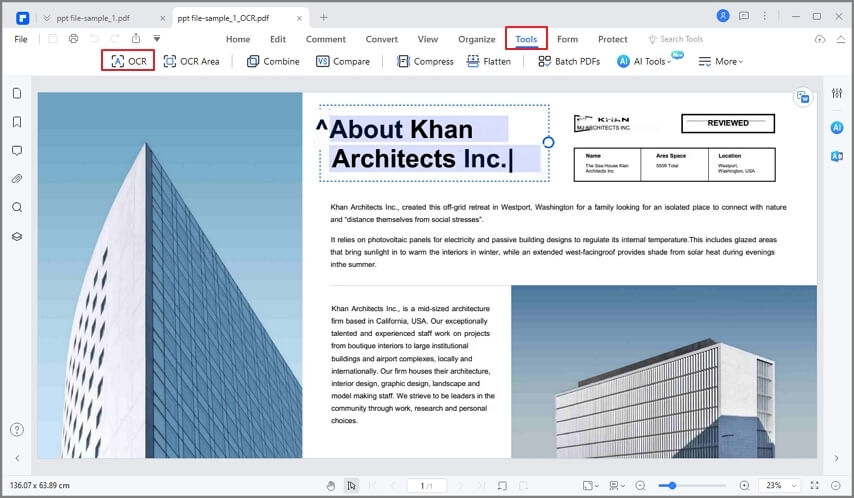
PDFelement's Tools menu open on a lab report: OCR, OCR Area and Enhance Scan at the top, then Combine, Compress, Compare, Batch PDFs, Flatten and Recognize Table.
Wondershare PDFelement is the most complete PDF editor of the four, with OCR as one tool among many. It detects scanned files and offers to run OCR, then gives you a searchable copy that keeps the original look or an editable one you can change, in about 30 languages. TechRadar found its OCR "tends to work better than most of the competing solutions on the market". Version 13 adds Agreement Compare for contract versions and an AI risk review.
Where it falls short for scans: the trial only previews OCR results, so you can't really test it on your documents before paying, and the perpetual license is tied to a version. It's sold as "V11" while the program is at version 13, and the most common Trustpilot complaint is from owners asked to pay again after a major release. AI features need a separate subscription.
What we like
- One-time price
- Widest set of editing tools
- 4.6 on Trustpilot from over 3,000 reviews
- Searchable or editable OCR output
Watch out for
- Trial OCR is preview only
- Perpetual license covers one major version
- Far fewer OCR languages than FineReader
What reviewers say
TechRadar gave it 4 out of 5 and called it "a PDF editor without any fancy bells and whistles, and it does its core job fine."
On Trustpilot (4.6 from 3,097 reviews, read through a summarizer), MrBill_NC: "Excellent product, easy to use, much cheaper than Adobe for what you pay." Chris Young: "Never buy the perpetual license, they do not honour it."
Download PDFelement TrialBuy Wondershare PDFelement
4. SwifDoo PDF: Best Value With Lifetime Updates
SwifDoo PDF: $129 once (perpetual, 1 PC, lifetime updates), Windows 11, 10, 8 and 7.
Best for: occasional scanning on a budget, and anyone who wants to test OCR fully before buying.
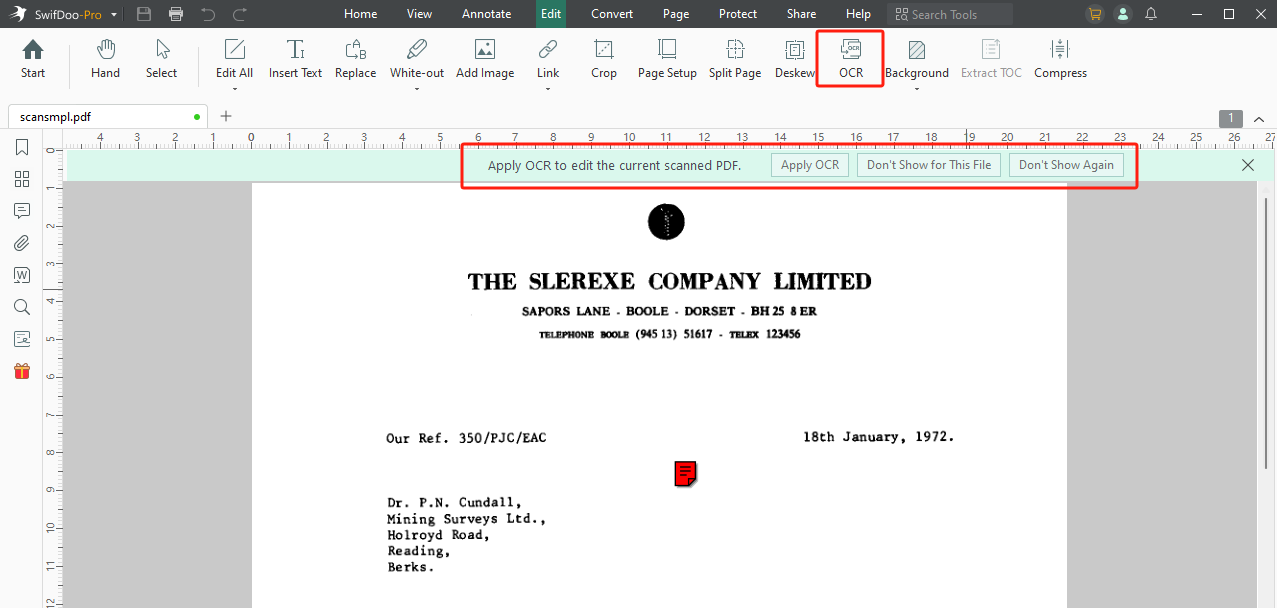
SwifDoo PDF with a scanned 1972 business letter open: the Edit tab's OCR button and Deskew tool, and the bar offering to "Apply OCR to edit the current scanned PDF."
SwifDoo PDF is the simplest of the four and the cheapest over time. When it opens a scan, a bar offers to apply OCR, and the result opens as an editable PDF in a new tab. A Deskew tool straightens crooked scans first, and conversion to Word or Excel can run OCR on the way. Its 7-day trial runs OCR fully, the best way to test a tool on your own scans. The $129 perpetual plan includes lifetime updates, which neither FineReader's subscription nor PDFelement's version-tied license matches over many years.
Where it falls short: two Product Hunt reviewers say its OCR struggles with complex layouts and handwriting, licenses are tied to a SwifDoo account that some owners must sign in to again regularly, and the company's Trustpilot rating is a middling 3.3.
What we like
- Lifetime updates for a one-time $129
- Full OCR in the 7-day trial
- Deskew for crooked scans
- Light 32 MB installer
Watch out for
- Weaker OCR on complex layouts
- Account sign-ins for the license
- 3.3 on Trustpilot from 80 reviews
What reviewers say
PCWorld gave it 4 out of 5 and called it "a full-featured, low-priced Acrobat alternative that should serve most users well."
On Trustpilot (read through a summarizer), Jim Stoddart: "It's a reliable and easy to use application and I've never encountered a pdf it could not handle." Dan Gomer: "I dislike having to re-log into the perpetual version of this program on a somewhat frequent basis."
Download SwifDoo PDF TrialBuy SwifDoo PDF
OCR Quality and Languages
ABBYY FineReader PDF has the strongest case on OCR: 198 recognition languages against PDFelement's roughly 30, background recognition that makes scans editable immediately, and an OCR Editor for correcting difficult pages. Reviewers' complaints about FineReader are about speed and price, not accuracy on clean scans. PDFelement's OCR also gets good marks from TechRadar, while SwifDoo's draws the most criticism on complex layouts. None of the four reads handwriting reliably.
Price Over Three Years
The one-time licenses are cheapest over three years, and FineReader's subscription buys you the better OCR. SwifDoo's $129 also includes every future version, while PDFelement's $129.99 covers the current major version only.
Cost for one user over three years (USD)
SwifDoo PDF (perpetual, lifetime updates)$129.00
Wondershare PDFelement (perpetual)$129.99
ABBYY FineReader PDF Standard (3-year plan)$267.00
ABBYY FineReader PDF Corporate (3-year plan)$446.00
Prices on the order page, checked on October 28, 2026.
Reputation
Wondershare PDFelement has by far the strongest Trustpilot record, and ABBYY the weakest, but for reasons unrelated to OCR. ABBYY's profile is small and dominated by auto-renewal complaints, while its software rates about 4.7 out of 5 from 451 reviews on Capterra.
Trustpilot company rating (out of 5)
Wondershare (3,097 reviews)4.6
Bar length is the rating out of 5. Ratings read on Trustpilot in October 2026. They rate the companies, not one product.
Which Should You Choose?
| Your situation |
Pick |
Why |
| Most of your PDFs are scans | FineReader PDF Standard | The strongest OCR and immediate editing of scans |
| Documents in many or rare languages | FineReader PDF Standard | 198 languages against about 30 |
| An office scanning every day | FineReader PDF Corporate | Hot Folder converts scans on a schedule |
| Checking signed copies against drafts | FineReader PDF Corporate | Compares a Word file with a scan |
| Daily PDF editing, occasional scans, pay once | Wondershare PDFelement | Most editing tools and a strong reputation |
| Tight budget, simple scans | SwifDoo PDF | $129 with lifetime updates and a full OCR trial |
Who should skip each one: skip FineReader if you won't pay a subscription. Skip Corporate unless you'll use Hot Folder or Compare Documents. Skip PDFelement if paying again for a future major version would annoy you. Skip SwifDoo if your scans have complex tables or layouts, or you dislike account sign-ins.
What commonly goes wrong
- Bad scans. Every OCR tool here works best on straight, sharp scans. Deskew crooked pages and rescan blurry ones before blaming the software.
- Wrong language. Recognizing a German page as English produces nonsense in all four. Set the document language first.
- Judging OCR from PDFelement's trial. Its trial only previews OCR results, so test your own documents in FineReader's or SwifDoo's trial if OCR quality is what matters.
- Expecting handwriting to work. None of these is built for handwritten notes.
- Misreading "perpetual". SwifDoo's covers future versions, PDFelement's doesn't.
FAQs
What is the most accurate OCR software for scanned PDFs on Windows?
Of the editors here, ABBYY FineReader PDF has the strongest OCR: 198 recognition languages, an OCR Editor for difficult pages and consistently good reviews for accuracy. We didn't run our own side-by-side accuracy test.
Is there a good OCR PDF editor without a subscription?
Yes. Wondershare PDFelement ($129.99) and SwifDoo PDF ($129) both sell perpetual licenses with OCR. SwifDoo's includes lifetime updates, while PDFelement's covers the current major version.
Can I edit the text of a scanned PDF directly?
Yes. ABBYY FineReader PDF recognizes the text in the background so you can edit a scan as soon as it opens, while PDFelement and SwifDoo PDF ask you to run OCR first and then edit the result.
Which of these lets me try OCR before buying?
ABBYY FineReader PDF's 7-day trial saves OCR results for 100 pages, and SwifDoo PDF's 7-day trial runs OCR fully. Wondershare PDFelement's 14-day trial only previews OCR results.
Do these OCR editors work on Windows 7?
Wondershare PDFelement and SwifDoo PDF list Windows 7 and 8 as supported. ABBYY FineReader PDF 16 needs 64-bit Windows 10 or 11.
Can these tools convert a scanned PDF to Excel?
Yes. ABBYY FineReader PDF and SwifDoo PDF run OCR as part of converting a scan to Excel, and Wondershare PDFelement has OCR and a Recognize Table tool. FineReader's OCR Editor gives the most control over how tables are recognized.
Is there a Mac version?
Yes for all three brands, each on its own license. ABBYY FineReader PDF for Mac is a converter rather than a full editor; see our FineReader PDF Standard vs Corporate vs Mac comparison.
Conclusion
For scanned documents, our pick is ABBYY FineReader PDF Standard. Its OCR is the reason to buy it: 198 languages, scans that are editable the moment they open, and the control to fix difficult pages. At $99 a year it costs more over time than a one-time license, and that's the trade.
Choose FineReader PDF Corporate if your office needs automatic conversion or document comparison. If you won't pay a subscription, Wondershare PDFelement is the better editor and SwifDoo PDF the better long-term value.
Download FineReader PDF TrialBuy FineReader PDF Standard