ABBYY FineReader PDF Corporate: The FineReader Edition That Compares Contracts and Converts Folders on Its Own
ABBYY FineReader PDF Corporate is a $165-a-year Windows 10 and 11 PDF editor and OCR app for office work: it does everything FineReader PDF Standard does, and adds Compare Documents, which shows what changed between two versions of a document even when one is a scan, and Hot Folder, which converts files from a folder, an FTP site or Outlook on a schedule, up to 5,000 pages a month.
Picture the contract that comes back from the other side as a signed, scanned PDF. Did they change anything from the Word draft you sent? Reading both side by side takes an hour and still misses a number. Corporate answers that in a minute, and the same edition can quietly turn every scan your copier drops into a shared folder into a searchable PDF overnight.
Quick facts
- Version: FineReader PDF 16, build 16.26.6.6004 (Release 2026.6.3)
- Developer: ABBYY
- Runs on: Windows 11 and 10, 64-bit only. FineReader PDF for Mac is a separate product without the Corporate tools.
- Adds over Standard: Compare Documents, Hot Folder automated conversion (up to 5,000 pages a month), and extended CLI-enabled volume licenses
- OCR: 198 recognition languages, 53 of them with dictionary support
- Price: $165 per year for 1 user (subscription, renews automatically). Monthly ($24) and 3-year ($446) plans too.
- Bonus: the order includes a free 1-year license of FineReader PDF for Mobile
- Free trial: 7 days with every Corporate feature, saves OCR results for up to 100 pages, then a basic PDF viewer mode
What we checked: the 1.8 GB trial installer (build 16.26.6.6004, dated July 6, 2026) on October 26, 2026, and the Corporate yearly plan at $165.00 on the order page and the current build on ABBYY's download page on October 28, 2026. We didn't install it, run a comparison or set up a Hot Folder task ourselves.
Download Free TrialBuy Now
Overview
FineReader PDF Standard and Corporate are the same program. You install one 1.8 GB package, and the license decides which tools are switched on. That means everything people buy FineReader for is here: editing scanned and digital PDFs, converting them to Word and Excel with ABBYY's OCR, redacting, signing, filling and creating forms, and organizing pages.
What the extra $66 a year buys is two separate applications that open from the FineReader start screen, ABBYY Compare Documents and ABBYY Hot Folder. On a Standard license, both stop with a message that they aren't available under that license. Corporate is also the edition ABBYY builds its larger volume licenses on, including licenses that can run FineReader from the command line.

The OCR Editor shared by both Windows editions: page thumbnails, a scanned page with marked text and picture areas, the recognized text on the right, and the Verification dialog suggesting replacements for a word not in the dictionary.
Features
Compare Documents: find every change, even between a Word file and a scan
ABBYY FineReader PDF Corporate's Compare Documents puts two versions of a document side by side and lists every added, deleted and edited piece of text, page by page. The two files don't need to be the same format: a DOCX draft against the scanned PDF that came back signed works, because FineReader runs OCR on scans before it compares.
You can step through the differences with the arrow buttons, then save them as a PDF with comments, a DOCX in Track Changes mode for either document, or a comparison report. It also separates changes in headers and footers from the body text, so a new page number doesn't bury the one clause that moved.

ABBYY Compare Documents with a DOCX agreement on the left and its PDF version on the right: 19 differences found, each listed as Text added, Text edited ("ninety (90)" to "one hundred twenty (120)") or Text deleted, and the Save menu offering PDF with Comments, DOCX in Track Changes Mode or a Comparison Report.
Hot Folder: scheduled OCR and conversion without anyone at the keyboard
ABBYY FineReader PDF Corporate's Hot Folder runs conversion tasks you set up once. A task picks up files from a folder (with its subfolders), an FTP site, Outlook or a saved OCR project, recognizes them in the languages you choose, and saves the results as documents, images or OCR projects, or straight to SharePoint.
Each task runs once or on a schedule (every minute, day, week or month at a set time), and you decide what happens to the originals: keep them, delete them or move them to another folder. Automated processing is capped at 5,000 pages a month, a limit that resets every 30 days and applies only to Hot Folder, not to the conversions you do by hand.

Hot Folder's Task Settings: a recurring task set for Wednesdays at 15:00, opening all image and PDF files from a folder and its subfolders, recognizing them in several languages, with Save document, Save to SharePoint, Save images and Save OCR project as the output choices.
The full Standard toolset: edit, convert, protect and sign
ABBYY FineReader PDF Corporate edits text, tables and pictures in digital and scanned PDFs, organizes pages, adds Bates numbering, comments and stamps, creates fillable forms, and converts PDFs and scans into Word, Excel and other formats with OCR in 198 languages. It also adds passwords and digital signatures, redacts sensitive text and removes hidden data such as metadata before a file goes out.
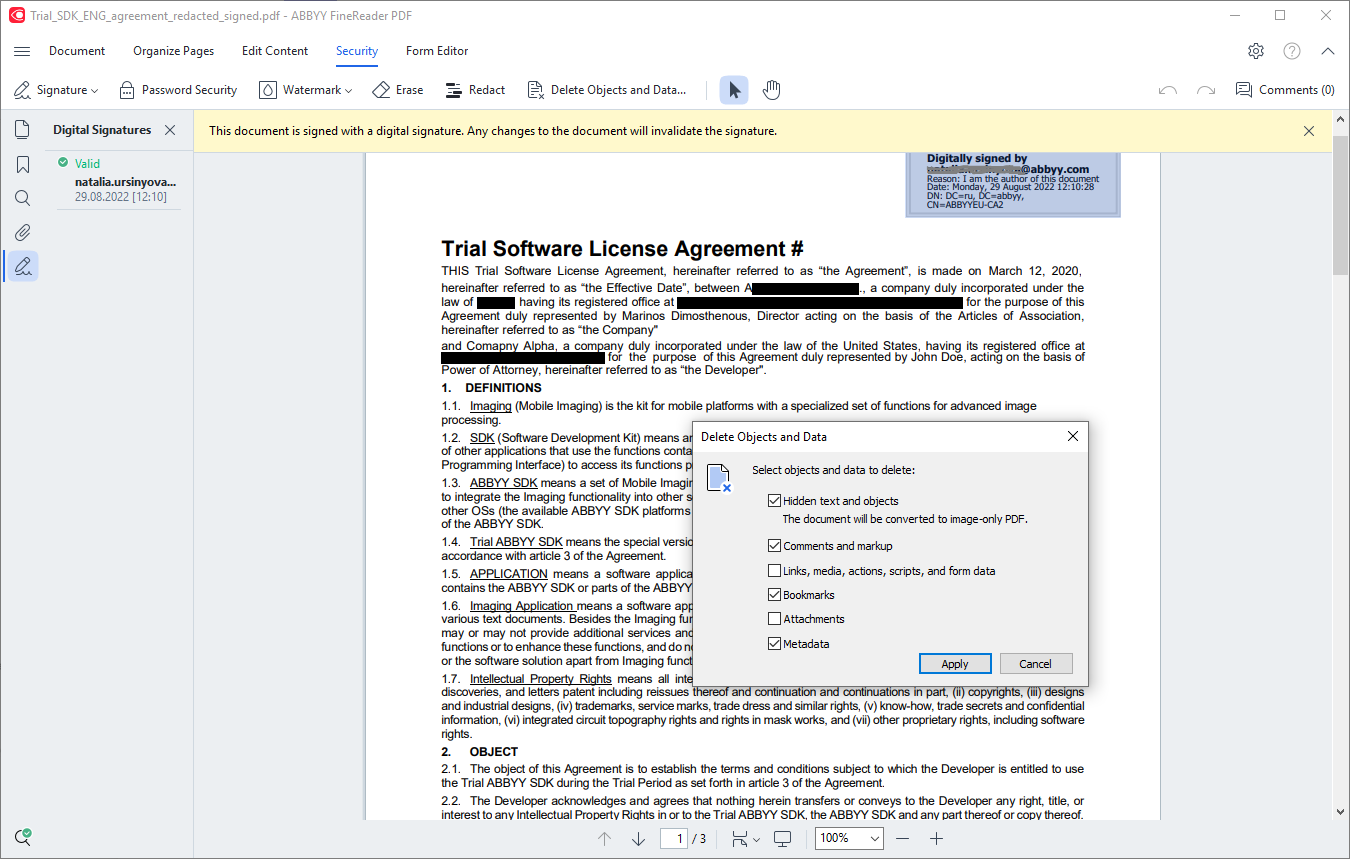
The Security tab: a digitally signed agreement with redacted names, and the dialog for deleting hidden objects and data such as comments, bookmarks and metadata.
Licensing that grows past one desk
ABBYY FineReader PDF Corporate is sold here as a standalone license for one user. ABBYY's sales team also sells it as per-seat, concurrent and remote-user licenses with automated deployment and central license management, and only Corporate gets the extended CLI-enabled licenses for running conversions from scripts. If your team outgrows one license, the upgrade path starts from this edition.
Benefits
- Fewer missed changes. A human proofreader skims. Compare Documents doesn't, and its Track Changes export drops the result straight into the workflow your lawyers already use.
- Paper stops piling up. Once a Hot Folder task is watching the scanner's output folder, scans become searchable PDFs without anyone opening FineReader.
- One tool instead of three. A PDF editor, an OCR program and a comparison tool usually cost three licenses. Here they're one $165 subscription.
- Works with what you already have. Sources include Outlook and FTP, outputs include SharePoint, and the scanner just needs to save to a folder.
Real-World Uses
- Contract review: compare the Word draft you sent with the scanned, signed copy that came back, and save the differences as a Track Changes DOCX for the file.
- Policy and manual updates: compare last year's employee handbook PDF with this year's to write the "what changed" memo.
- Mailroom digitization: point a nightly Hot Folder task at the copier's scan folder so every incoming letter is a searchable PDF by morning.
- Invoice intake: have a Hot Folder task collect PDF attachments from Outlook and save searchable copies to a SharePoint library.
- Accessible documents: convert batches of course materials into tagged PDF/UA files for screen readers.
Who It's For, and Who Should Skip It
Buy Corporate if you're in a law office, procurement, HR, compliance or any job where documents go back and forth in versions, or if you scan more paper than you want to convert by hand. It's also the right edition if you expect to move to volume or command-line licensing later.
Skip it if you only edit and convert PDFs yourself, one at a time: FineReader PDF Standard does all of that for $99 a year. Skip it if you're on a Mac, because neither Compare Documents nor Hot Folder exists in FineReader PDF for Mac. And if you need to convert far more than 5,000 pages a month automatically, look at ABBYY's server products rather than a desktop license.
Usage Guide
- Install and activate. Download the trial installer from ABBYY's trial page, install it on 64-bit Windows 10 or 11, and enter your Corporate serial number. A trial copy becomes the full version without reinstalling.
- Compare two documents. On the start screen, choose Compare, load the first version on the left and the second on the right, check the document language, and click Compare. Walk through the Differences list with the arrows.
- Save the result. Use Save to export a PDF with comments, a DOCX in Track Changes mode or a comparison report.
- Create a Hot Folder task. Open ABBYY Hot Folder, click New Task, choose Run once or Recurring and the schedule, pick the source (folder, FTP, Outlook or OCR project), the recognition languages and the output.
- Test it on a small folder first, then point it at the real one and leave it running.
Before you buy
- Hot Folder runs on the computer where FineReader is installed, so that PC has to be switched on for scheduled tasks to run.
- The yearly plan renews automatically. Turn off renewal in your ABBYY Checkout account if you only need it for a project.
- Already on Standard? ABBYY lets you upgrade a Standard subscription to Corporate from your ABBYY Checkout account, and the upgrade price takes your current plan into account.
Where it falls short
- Speed on big jobs. Reviewers on Capterra and TheSweetBits found processing slow on large files, and a full OCR pass on a long scan takes a while.
- Complex layouts. OCR accuracy drops on unusual fonts, special characters and busy layouts, so a converted document still needs a read-through.
- The interface. TechRadar lists an "Older interface" as a reason to avoid it, and new users report a learning curve.
- Billing. Most of ABBYY's Trustpilot complaints are about automatic renewals, not the software.
- No Mac version of the Corporate tools. A mixed Windows and Mac team can't share comparisons or Hot Folder tasks across both.
What Users Say
FineReader PDF's ratings are high where people review the software and low where they review the billing. Capterra shows about 4.7 out of 5 from 451 reviews, while ABBYY's small Trustpilot profile sits at 2.1 out of 5. Here's what reviewers say, with the Corporate features called out.
TechRadar
TechRadar's best OCR software guide (Krishi Chowdhary, updated February 27, 2026) includes ABBYY FineReader PDF. Among its reasons to buy: "Compares docs in different formats" and "Various licenses for business use", which are both Corporate strengths, alongside "Recognizes 198 languages". Its reasons to avoid: "No free plan" and "Older interface".
From the hands-on part: "I scanned several documents in French and Chinese, and Abbyy was able to convert the text into OCR in just a few seconds."
TheSweetBits: a Compare Documents test
Raymond Pon tested Compare Documents twice. With the same file on both sides: "We tried using the same document on both sides to compare, which it correctly recognized with 'No difference found'." After editing one copy: "This time too, the tool recognized all the changes made accurately."
His caveat was speed: "the processing time for documents was quite slow," which he put down partly to his test machine. He also noted the app "never lagged or crashed until the review was completed." These quotes were read through a summarizer.
Customers quoted by ABBYY
Ray M., President, Government Relations: "I like FineReader because it's a very quick and easy way to edit PDF documents as well as view them. What I like the most is the compare documents function."
Mathew Spinneberg, Alternative Media Specialist, Ventura County Community College: "My favorite feature FineReader offers is the ability to convert an inaccessible PDF into a universally accessible document or PDF/UA. I select batches of files, perform a right click, and in moments my PDF documents are tagged and ready to review with assistive technology."
Stephan Dharma, Consultant, SoCal Office Technologies: "I use ABBYY FineReader as a replacement for Adobe Acrobat Pro, simply because (of) the extensive values that FineReader has."
Capterra
Capterra reviewers mostly praise accurate OCR, flexible PDF conversion and the price compared with Adobe Acrobat. The recurring complaints are inconsistent accuracy on complex layouts or special characters, slower handling of large files, a learning curve, a license that installs on only one device, and a cost that feels steep for one person. The harshest review there sums itself up as "Editable but really bad OCR. Not worth the money." Capterra blocks direct reading, so this summary came through a summarizer.
Trustpilot
ABBYY's Trustpilot profile has 11 reviews and a 2.1 out of 5 score, mostly about renewals. Wayne Dunn (1 star, August 2026): "ABBYY charged me for an unwanted auto-renewal after I requested cancellation." Sam (1 star, June 2026): "they automatically charged me for another year, even though I never authorized them to do that."
On the positive side, John Kapusi (5 stars) said ABBYY "provided excellent support by email." These excerpts were read through a summarizer, so the wording is close but not guaranteed exact.
The pattern: people who use the comparison tool like it and find it accurate, OCR quality gets the most praise overall, and the complaints are about speed on big files, accuracy on messy layouts, a dated interface and automatic renewals.
Comparisons
Corporate vs Standard
FineReader PDF Corporate and Standard edit, convert, protect and recognize text identically. Corporate adds Compare Documents, Hot Folder and the extended CLI-enabled volume licenses for $66 more a year ($165 vs $99). If you never compare versions and never batch-convert unattended, Standard is the better buy.
Corporate vs FineReader PDF for Mac
FineReader PDF for Mac ($69 a year) has the same 198-language OCR and converts to the same main formats, but it can't edit PDF text, create forms, compare documents or run Hot Folder tasks. It's a converter, while Corporate is a full PDF editor with automation.
Editions and Pricing
| Edition |
Monthly |
Yearly |
3 years |
Compare and Hot Folder |
| FineReader PDF Corporate (Windows) |
$24 |
$165 |
$446 |
Yes |
| FineReader PDF Standard (Windows) |
$16 |
$99 |
$267 |
No |
| FineReader PDF for Mac |
Not available |
$69 |
$186 |
No |
Prices are per standalone user in USD at checkout and renew automatically. The yearly Corporate price was checked on October 28, 2026. Per-seat, concurrent and remote-user licenses are quoted by ABBYY's sales team.
FAQs
Can ABBYY FineReader PDF Corporate compare a Word file with a scanned PDF?
Yes. ABBYY FineReader PDF Corporate's Compare Documents compares documents in different formats, and runs OCR on a scan first, so a DOCX draft against a scanned, signed PDF is exactly the case it's built for.
What happens when Hot Folder reaches 5,000 pages in a month?
ABBYY FineReader PDF Corporate's Hot Folder limit covers only automated processing and resets every 30 days. Conversions you run by hand in FineReader aren't counted, so you can still process documents manually until the counter resets.
Can I upgrade from FineReader PDF Standard to Corporate?
Yes. A FineReader PDF Standard subscription bought on ABBYY's site can be upgraded to Corporate from "My Products" in your ABBYY Checkout account. The upgrade price is calculated from your current plan and most recent payment. Reseller purchases go through the reseller.
Does the FineReader PDF trial include Compare Documents and Hot Folder?
Yes. The 7-day ABBYY FineReader PDF trial runs with full Corporate functionality, so you can test both tools before choosing an edition. OCR results can be saved for up to 100 pages during the trial.
Can one FineReader PDF Corporate license be used by my whole team?
No. The yearly ABBYY FineReader PDF Corporate plan sold here is a standalone license for one user. Teams need per-seat, concurrent or remote-user licenses, which ABBYY sells through its business licensing and sales team, with volume discounts.
Does FineReader PDF Corporate run on Windows Server?
Yes. ABBYY FineReader PDF 16 is tested on Windows Server 2022, 2019, 2016 and 2012 R2, including Remote Desktop and RemoteApp, and on Citrix Virtual Apps and Desktops. On desktops it needs 64-bit Windows 11 or 10. Windows 7 and 32-bit Windows aren't supported.
Can I buy ABBYY FineReader PDF Corporate as a one-time purchase?
No. ABBYY FineReader PDF Corporate is sold to individuals as a subscription only: monthly, yearly ($165) or 3-year. Windows installations update automatically once a renewal is paid.
System Requirements
- Windows 11 or Windows 10, 64-bit
- 1 GHz x64 processor (1.5 GHz or faster Intel or AMD recommended)
- 2 GB RAM (4 GB recommended), plus 512 MB for each additional processor
- Display of 1024x768 or higher
- 1.6 GB of disk space for installation plus 1.6 GB free for the program to run
- Internet connection to activate the license
- Any TWAIN- or WIA-compatible scanner or multifunction printer for scanning
Conclusion
Worth it if your work involves versions or volume. ABBYY FineReader PDF Corporate is the same capable PDF editor and OCR app as Standard, and Compare Documents alone justifies the extra $66 a year for anyone who checks returned contracts, policies or specifications. Hot Folder is a real time-saver for an office that scans every day.
The reason to buy it: it catches changes between a Word draft and a scanned copy, which most PDF editors can't. The reason not to: if you never compare documents or automate conversions, you're paying for two tools you won't open, and Standard does everything else. Try both in the 7-day trial, which includes them.
Download Free TrialBuy Now