ABBYY FineReader PDF for Mac: Accurate OCR for Scans and PDFs, Not a Full PDF Editor
ABBYY FineReader PDF for Mac is a $69-a-year macOS app that turns scans, document photos and PDFs into searchable PDFs and editable Word, Excel and other files, using ABBYY's OCR in 198 languages. It's built for converting documents, not for editing PDF text, which the Windows editions do.
If your Mac's Preview can't search a scanned bank statement, or copying text out of a PDF gives you gibberish, this is the kind of app that fixes it. You drop in the scan, pick a format, and get back a file where the text is real text and the tables are still tables.
Quick facts
- Version: 15.2.14 (Release 5 Update 5), released January 31, 2024
- Developer: ABBYY
- Runs on: macOS 12 and later, including macOS 26 Tahoe. Intel Macs natively, Apple Silicon Macs through Rosetta 2.
- OCR: 198 recognition languages, 53 of them with dictionary support
- Saves to: searchable PDF, PDF/A, PDF/UA, DOCX, XLSX, PPTX, RTF, ODT, HTML, TXT, CSV, EPUB, FB2 and image formats
- Price: $69 per year for 1 user (subscription, renews automatically), or $186 for 3 years. No monthly plan.
- Bonus: the order includes a free 1-year license of FineReader PDF for Mobile
- Free trial: 7 days and up to 100 pages, after a short sign-up form
What we checked: the yearly plan at $69.00 on the order page, the 889 MB installer on ABBYY's download page (Release 5 Update 5), and version 15.2.14 with its January 31, 2024 release date in the Mac App Store listing, on October 28, 2026. We didn't install it or measure OCR accuracy ourselves.
Before you buy
- It's a converter with a PDF viewer. You can't edit the text of a PDF, build fillable forms or compare documents. For those you need FineReader PDF for Windows or another Mac PDF editor.
- The last update was version 15.2.14 in January 2024. ABBYY lists macOS 26 Tahoe as supported, but there have been no new features or bug fixes since, and some App Store reviewers say known crashes are still there.
- Not native on Apple Silicon. On M-series Macs it runs through Rosetta 2.
- Renewals need a new key. When the subscription renews, ABBYY sends a new license that you enter in the app (renewal inside the app opens two weeks before expiry).
Download Free TrialBuy Now
Overview
FineReader PDF for Mac opens on a small window with three choices. PDF Viewer opens and prints PDFs. Quick conversion takes files from your Mac or from an iPhone or iPad camera and turns them into a searchable PDF, Word, Excel, TXT, HTML or RTF file in one click. Advanced conversion opens an OCR editor where you can fix the image, adjust the recognition areas and check the text before you export.
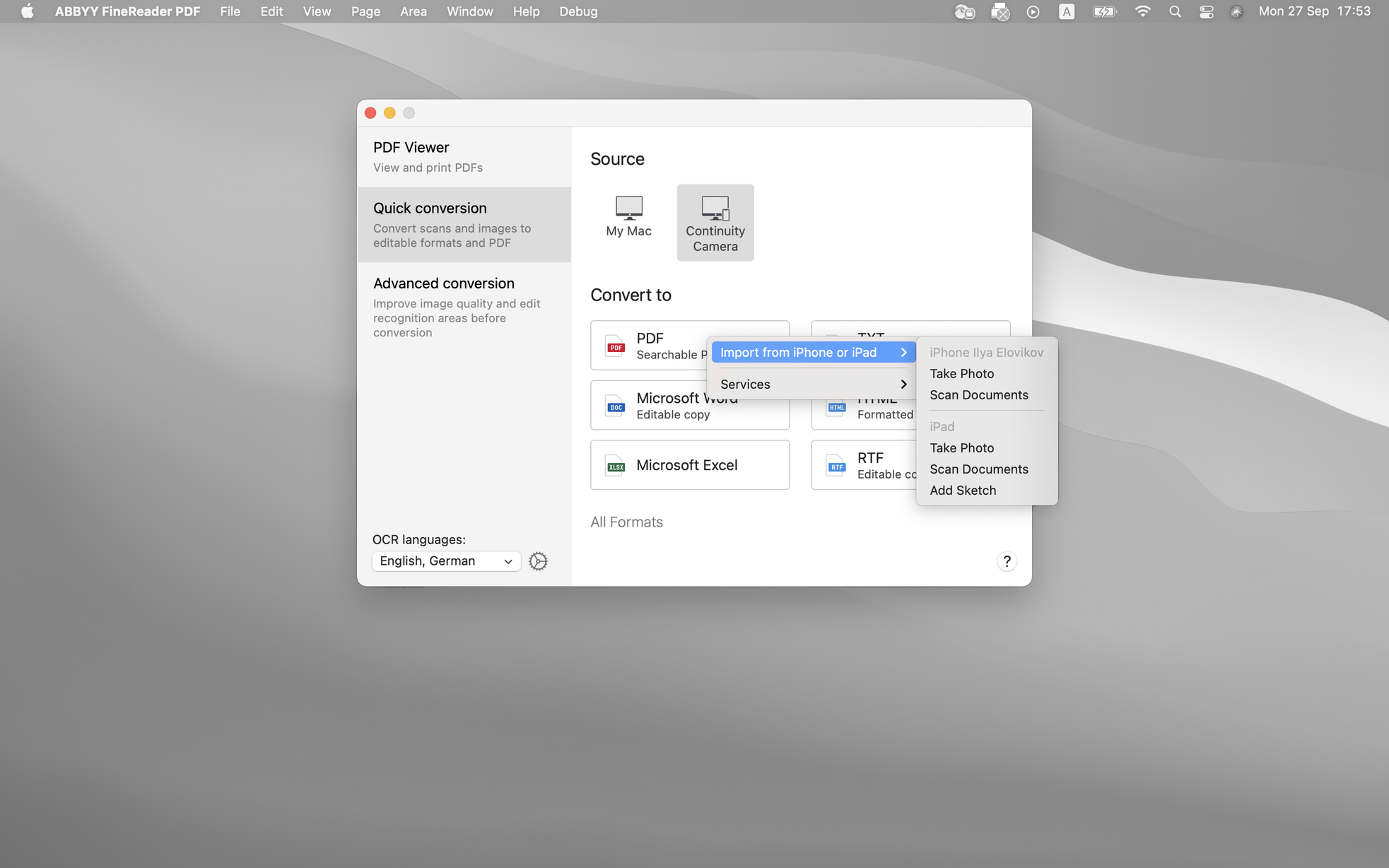
The start window: PDF Viewer, Quick conversion and Advanced conversion on the left, Continuity Camera chosen as the source, and the Import from iPhone or iPad menu offering Take Photo and Scan Documents.
The OCR engine is the same family as the Windows editions, which is why the app is worth considering at all. What's missing is everything around it: the Windows FineReader is a PDF editor, and the Mac one is a document converter with a viewer attached.
Features
Text recognition that keeps the layout
ABBYY FineReader PDF for Mac recognizes text, pictures and tables on each page and rebuilds them in the output, so columns, headings and tables come out in the right place. You can recognize documents in any combination of its 198 languages, and in Advanced conversion you can redraw text, picture and table areas when the automatic analysis gets a page wrong.
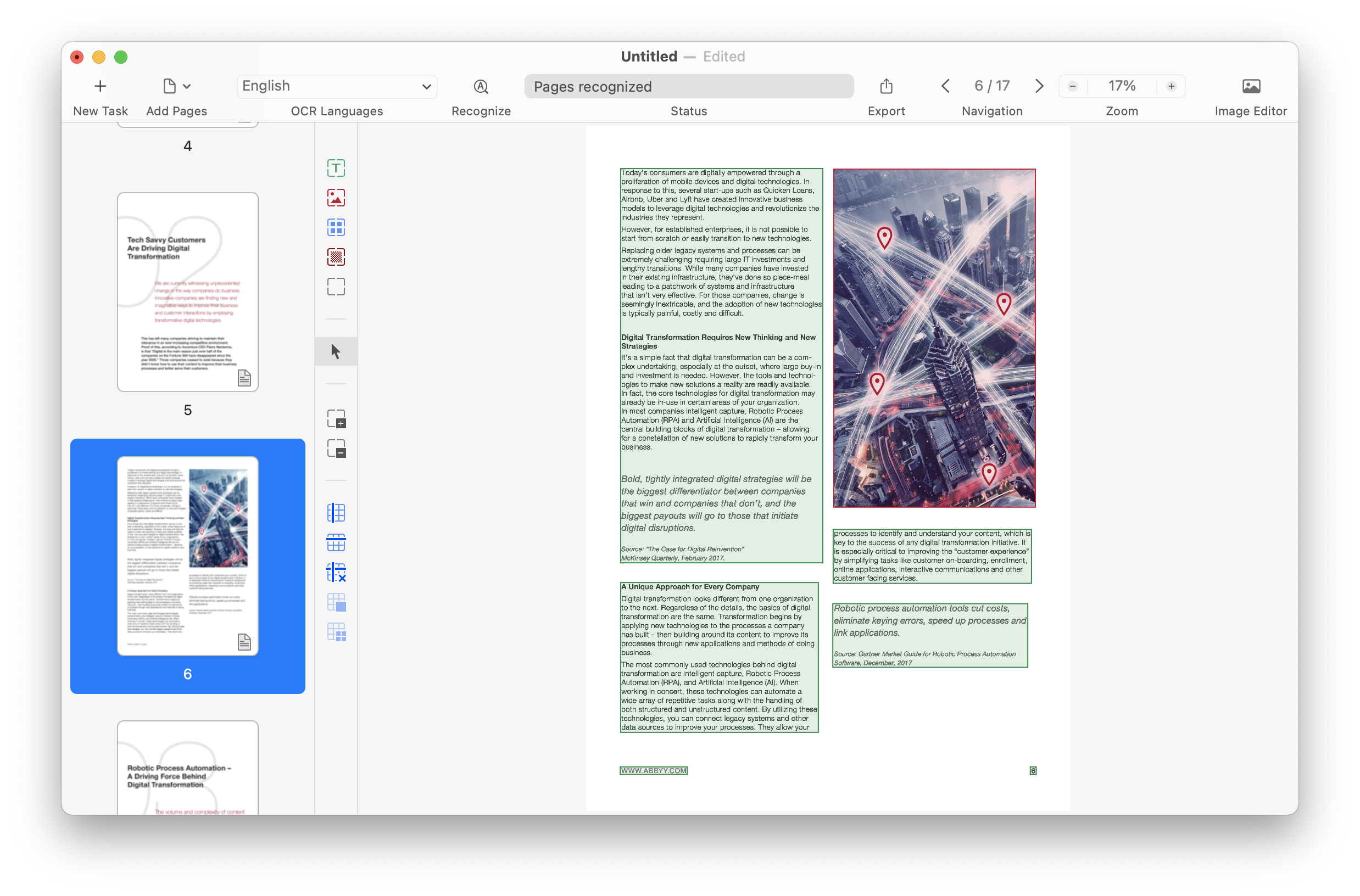
Advanced conversion on page 6 of a 17-page document: green text areas and a red picture area marked on the page, with tools for adding, removing and editing areas and tables on the left.
Export to a dozen formats
ABBYY FineReader PDF for Mac exports recognized documents to PDF (including archival PDF/A and accessible PDF/UA), Word, Excel, PowerPoint, EPUB, FB2, images, TXT, HTML, RTF, ODT and CSV. For Word you pick a layout such as Editable copy, and you can keep pictures, headers and footers, page breaks and text colors. It can also save each page as a separate file.
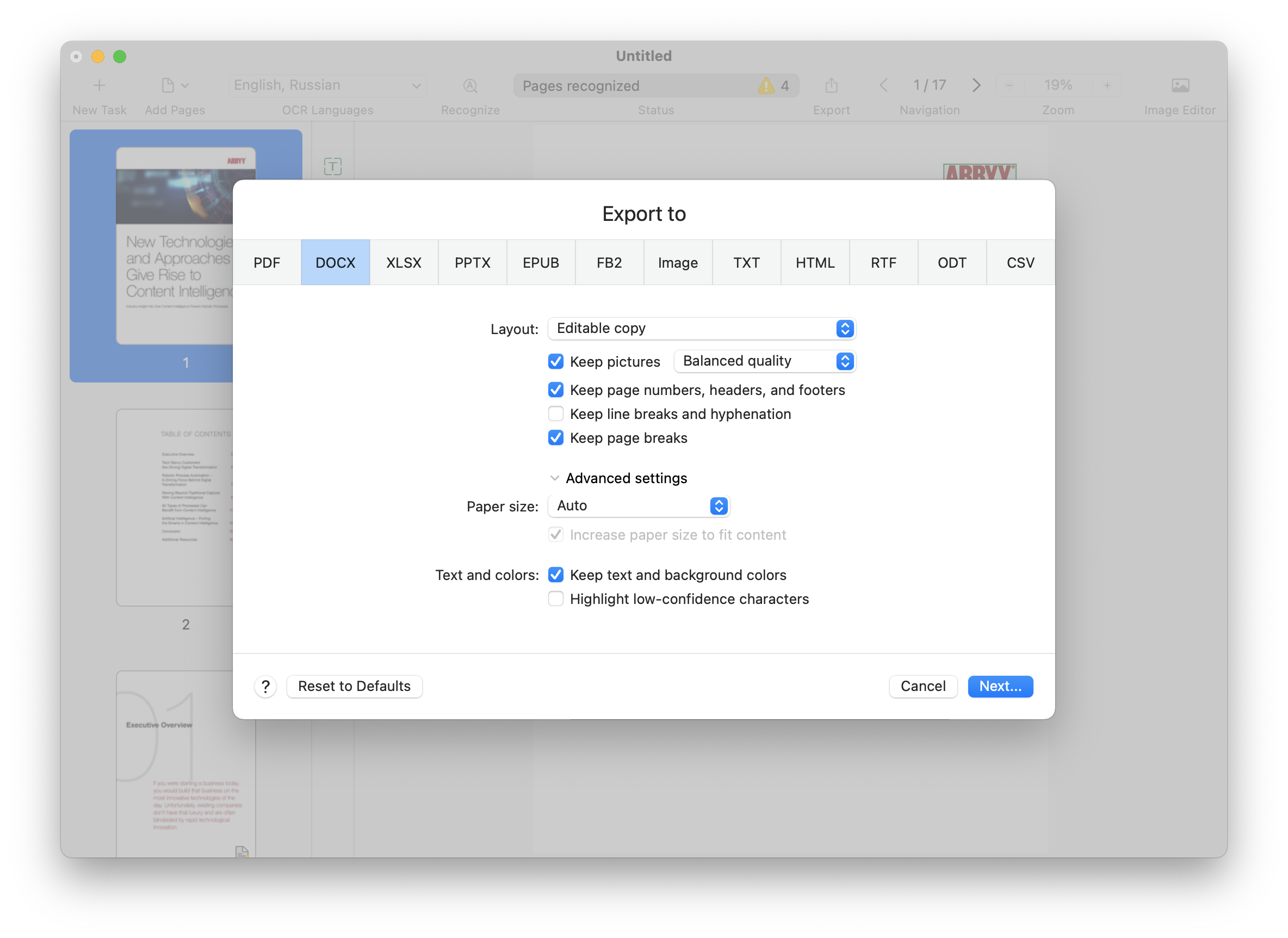
The Export to dialog with tabs for PDF, DOCX, XLSX, PPTX, EPUB, FB2, Image, TXT, HTML, RTF, ODT and CSV, and the DOCX options: Editable copy layout, Keep pictures, Keep page numbers, headers and footers, and Highlight low-confidence characters.
Scan with your iPhone, clean up the image
ABBYY FineReader PDF for Mac takes pages straight from an iPhone or iPad camera through Continuity Camera, or from any scanner or multifunction printer that works with macOS Image Capture. Its built-in Image Editor deskews, rotates, flips and crops pages and changes their resolution, which matters for crooked phone photos. A Split Facing Pages tool splits scanned book spreads into single pages.
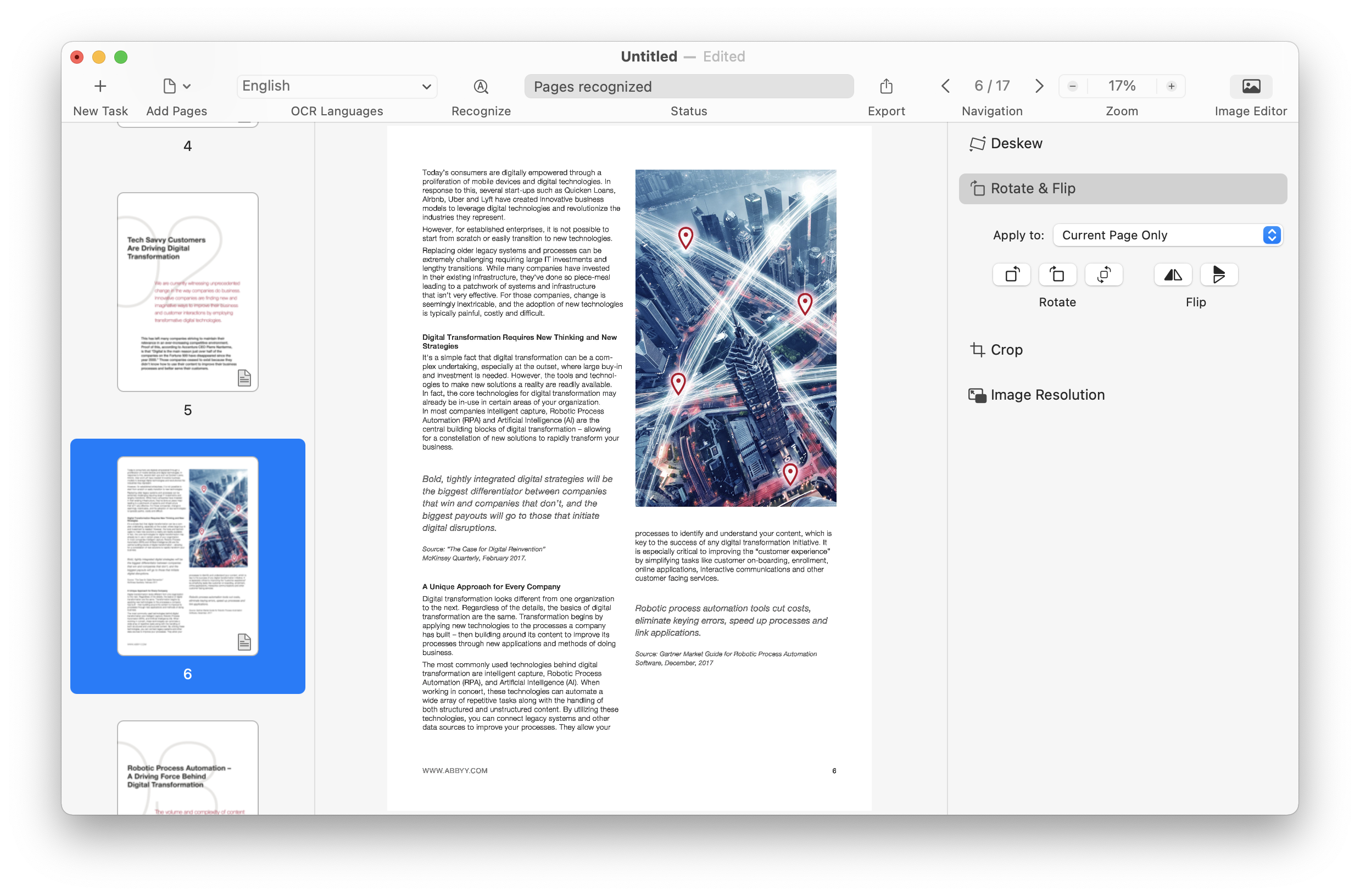
The Image Editor panel next to a scanned page: Deskew, Rotate and Flip (applied to the current page only), Crop and Image Resolution.
View, highlight and comment on PDFs
ABBYY FineReader PDF for Mac's PDF Viewer opens any PDF, makes image-only pages searchable with its OCR button, and lets you highlight text and add, edit and reply to comments and sticky notes. It can password-protect the PDFs it creates, and it supports macOS Dark Mode.
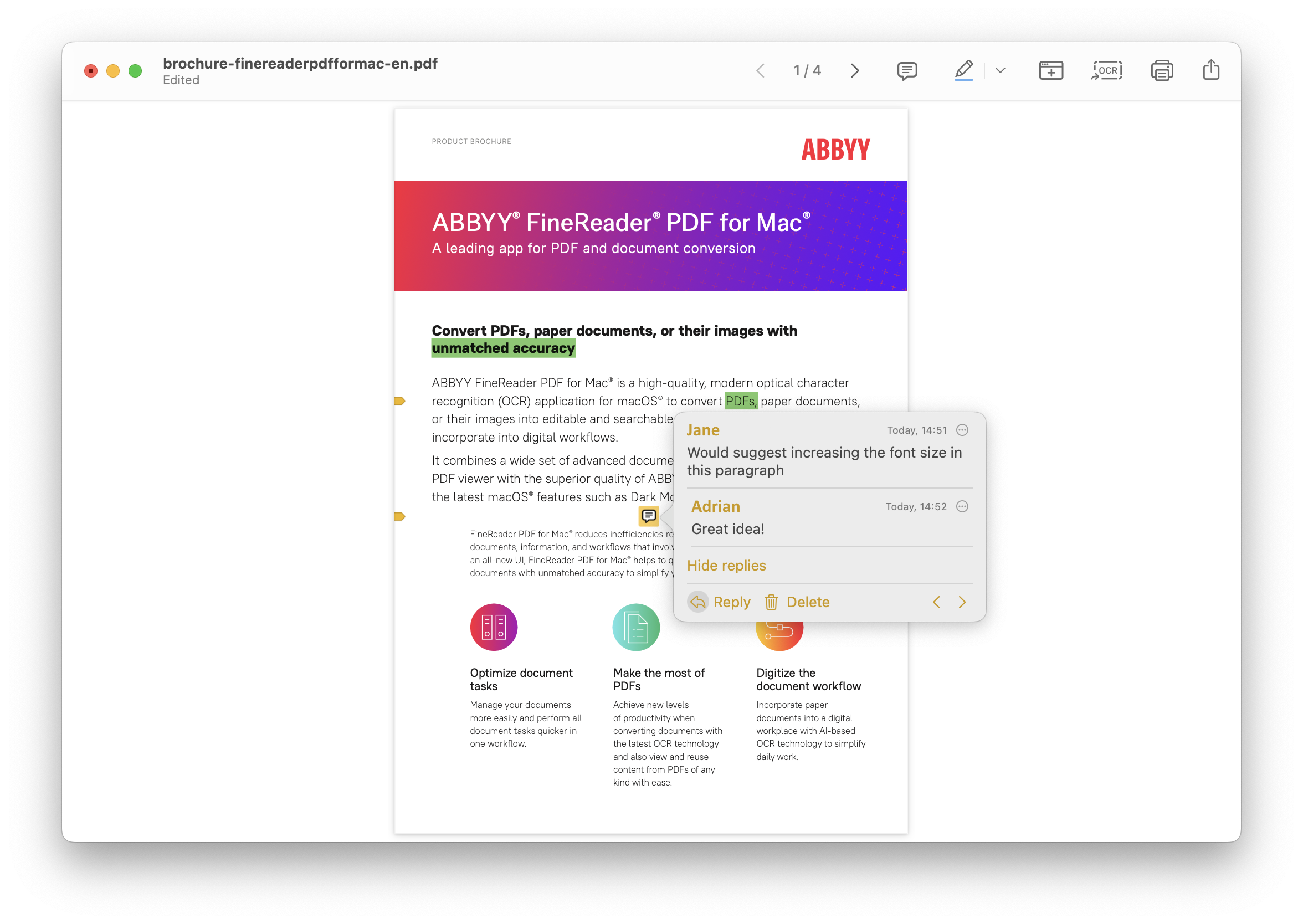
The PDF Viewer: a brochure with highlighted words and a two-person comment thread with Reply and Delete, and toolbar buttons for comments, highlighting, OCR, printing and sharing.
Benefits
- Less retyping. Tables in invoices and statements come out as real Excel cells, which is where reviewers say it beats most Mac OCR tools.
- Old and foreign documents become usable. With 198 languages, a letter in Czech or a mixed English-German report is no problem.
- Archives that last. PDF/A output is what libraries, courts and records offices ask for, and PDF/UA makes documents readable with screen readers.
- Cheaper than the alternatives with this OCR. At $69 a year it costs less than Adobe Acrobat Pro, though it does far less outside OCR.
Real-World Uses
- Bookkeeping: turn scanned bank statements and invoices into Excel sheets instead of typing the numbers.
- Family history: make decades of scanned letters and records searchable, as one reviewer did with nearly 16,000 documents.
- Study and research: photograph book pages with your iPhone, split the spreads, and export an editable Word file or EPUB.
- Office records: convert signed paper documents to PDF/A for long-term storage.
Who It's For, and Who Should Skip It
Buy it if you're on a Mac and your problem is getting text out of scans and image PDFs accurately: tables, statements, old documents, many languages. That's what it does well.
Skip it if you want to edit the text of PDFs, fill and build forms or compare versions: it can't, and a full Mac PDF editor will serve you better. Skip it if you need hands-off batch processing, which the Mac version doesn't have. If you also use Windows, FineReader PDF Standard ($99 a year) is the far more complete product. And if you'd rather not depend on an app that hasn't been updated since January 2024, test it carefully in the trial on your own Mac first.
Usage Guide
- Get the trial. Fill in the short form on ABBYY's Mac trial page and download the installer (about 889 MB), then drag the app to Applications.
- Activate. After buying, enter the serial number in the app. The trial becomes the full version without reinstalling.
- Quick conversion: choose the source (My Mac or Continuity Camera), set the OCR languages at the bottom left, and click the format you want, such as Searchable PDF or Microsoft Excel.
- Advanced conversion: open a difficult scan, fix it in the Image Editor, check the marked areas, click Recognize, then Export.
- Check the result. Turn on Highlight low-confidence characters in the export options to see which words to proofread.
Where it falls short
- Crashes and old bugs. Several Mac App Store reviews from 2024 to 2026 report crashes, especially in the image editing tools, and one from March 2026 complains of "Two years without bug fixes!"
- No automation. There's no Hot Folder or scheduled conversion, and one reviewer's large PDF-to-PDF batch finished with the output files missing.
- Handwriting and decorative fonts. MacHow2 says it isn't suitable for handwriting, and a reviewer found it struggles with ornamental fonts.
- Some scripts disappoint. One reviewer got no usable text from an Arabic document, so test your languages in the trial.
- Smaller limits than Windows. A reviewer notes the Mac version handles images up to 10,000 x 10,000 pixels, against 32,512 x 32,512 on Windows.
- Slow support. Support is by ticket and email, and one App Store reviewer complained of a reply that took a week and no phone support.
What Users Say
Opinion on FineReader PDF for Mac splits cleanly: almost everyone agrees the OCR is excellent, and the complaints are about stability, missing features and the subscription. Here's what reviewers and users say.
Macworld
Mahmoud Itani reviewed FineReader PDF for Mac for Macworld (July 17, 2024): "OCR is where FineReader PDF shines." His pros include "It offers a relatively accurate and reliable OCR functionality" and "It supports scanning and importing documents from iPhone."
His main criticism: "FineReader PDF doesn't let you edit the actual content." His cons are "Most similarly priced apps include superior PDF editing tools" and "No one-time purchase option." The verdict: "If you're dealing with a ton of physical documents that need digitalizing, then it'll likely be a perfect match. If you're seeking an all-in-one PDF solution, look elsewhere."
MacHow2
Nick Mead of MacHow2 scores it 80 and writes: "ABBYY FineReader PDF for Mac offers some of the highest OCR accuracy and text recognition on the market," and "The Mac version of ABBYY FineReader PDF consistently produces excellent results with very few errors to correct." His cons: "No automated or bulk OCR scanning in Mac version" and "Works on M1 Macs but only via Rosetta not natively." He also warns that it "is not suitable for recognizing handwriting." These quotes were read through a summarizer.
Mac App Store: the good
EdAppleUser68 (5 stars, "The BEST OCR for tables", December 2024): "This is the best OCR software for OCR of tables, invoices, bank statements, etc in MacOS. Many are accurate for normal document types PDFs, but few are good recognizing tables, invoices, bank statements accurately. I would like it to be faster, but I was looking for accuracy to save time and this does the job!"
jimbomorrison (5 stars, UK store, June 2024): "I'm scanning bad-quality photocopies of complex (pretty-layout) bank/card statements. The "Advanced" tool allows for quick drawing of useful areas of the document, great table-analysis..."
PFWS (5 stars, "Just Works", August 2024): "Have been struggling with a scan of a large document and this app recognized all the text first try."
Andy Nickless (5 stars, UK store, August 2025): "Fine Reader is an incredibly useful and versatile app. We're often surprised at it's ability to recognise text in old documents."
Mac App Store: the bad
mbbrrr (1 star, March 2026): "2026: Two years without bug fixes! Erase tool results in corrupted files. ... Still crashes frequently. I returned to this app because Adobe is overkill and expensive, but at least it works."
sdf70 (1 star, "Good at OCR, very buggy app, and ABBYY not interested in fixing", January 2025): "while it is quite solid at its basic function — OCR'ing pdfs — it crashes regularly when using the image edit functions."
Maha Isha (2 stars, UK store, April 2025): "OCR is OK although it really struggles with even slightly ornamental fonts, needing lots of checking afterwards. What I find quite upsetting is that the app is not at all optimised for the Mac."
AndyKirby (1 star, UK store, September 2024): "Not obvious how to scan straight from Epson scanner to OCR'd PDF. Seems you have to scan to a PDF and then convert it." He also reports a large batch whose "output files were nowhere to be found."
Customers quoted by ABBYY
On its Mac page, ABBYY quotes user reviews such as Lars Unplugged ("Easiest GUI of the PDF programs I have."): "Of the 4 PDF programs I use this one is the easiest to use. I like to be able to adjust the brightness/contrast on some scans, and this one has the easiest to use adjuster."
And Meeser3: "I've been using Fine Reader for some six years and have used it to scan and transcribe nearly 16,000 documents, dating from 1927 to 1980, that had been originally scanned as jpg files."
The recurring themes: the OCR, especially on tables, statements and old documents, wins praise from reviewers and long-time users alike. The complaints are crashes in the image tools, no updates since early 2024, no PDF text editing, no automation, and a yearly subscription for an app some people use only occasionally.
Comparisons
FineReader PDF for Mac vs FineReader PDF for Windows
ABBYY's own comparison table shows the gap. The Windows editions edit and organize PDFs, collaborate on them, create fillable forms, integrate with Microsoft Office and include ABBYY Screenshot Reader. The Mac version does none of those. For protecting PDFs the table says "Password protection after PDF creation only", and for creating PDFs "From scans and paper only". Compare Documents and Hot Folder are in the Windows Corporate edition only. The Mac version's one advantage is Dark Mode and Continuity Camera support.
FineReader PDF for Mac vs Adobe Acrobat Pro
Acrobat Pro is a full PDF editor, and FineReader for Mac is not. Where FineReader holds its own is recognition: one App Store reviewer prefers it for tables and statements, and another came back to it because Adobe was "overkill and expensive." If OCR is all you need, FineReader costs less. If you also edit PDFs every day, it won't replace Acrobat.
Editions and Pricing
| Edition |
Platform |
Yearly |
3 years |
PDF editing |
| FineReader PDF for Mac |
macOS |
$69 |
$186 |
No (view, highlight, comment) |
| FineReader PDF Standard |
Windows |
$99 |
$267 |
Yes |
| FineReader PDF Corporate |
Windows |
$165 |
$446 |
Yes, plus Compare and Hot Folder |
Prices are per standalone user in USD at checkout and renew automatically. The Mac yearly price was checked on October 28, 2026. There is no monthly Mac plan, and Mac business licenses are sold per seat only.
FAQs
Does ABBYY FineReader PDF for Mac run natively on Apple Silicon?
No. ABBYY FineReader PDF for Mac runs on M-series Macs through Apple's Rosetta 2 translation, which macOS installs the first time it's needed. It runs natively only on Intel Macs.
Does FineReader PDF for Mac work on macOS 26 Tahoe?
ABBYY lists macOS 12 and later, including macOS 26 Tahoe, as supported for FineReader PDF for Mac. The current version, 15.2.14, dates from January 2024, so try it on your Mac during the trial.
Can I use my FineReader PDF for Mac license on Windows?
No. ABBYY FineReader PDF for Mac and FineReader PDF for Windows are separate products with separate licenses. On Windows you need FineReader PDF Standard or Corporate.
Is FineReader PDF for Mac also on the Mac App Store?
Yes. ABBYY FineReader PDF for Mac is on the Mac App Store as "FineReader PDF: OCR Converter", a free download with an in-app subscription. The license sold on the order page here activates the version you download from ABBYY's site.
What happens when the FineReader PDF for Mac trial ends?
When the 7-day ABBYY FineReader PDF for Mac trial ends, or after 100 processed pages, you enter a serial number to keep using it in full mode. There's no need to reinstall.
Can my company test FineReader PDF for Mac on several Macs?
Yes. ABBYY offers a free business trial of FineReader PDF for Mac on up to 5 computers for 30 days, limited to 100 pages per device (500 in total).
Which scanners work with FineReader PDF for Mac?
ABBYY FineReader PDF for Mac works with scanners and multifunction printers that support Apple's Image Capture (ICA), and with cameras and iPhones or iPads through Continuity Camera. TWAIN-only scanners aren't listed, so check that yours appears in Image Capture.
System Requirements
- macOS 12 or later, including macOS 26 Tahoe
- A Mac with an Intel processor, or Apple Silicon using Rosetta 2
- 4 GB RAM
- 3 GB of disk space for a typical installation
- A scanner or MFP that supports Image Capture (ICA), a camera or a smartphone
- Interface languages: English, Chinese Simplified, Dutch, French, German, Italian, Portuguese (Brazilian) and Spanish
Conclusion
Worth $69 a year only if OCR is the job. ABBYY FineReader PDF for Mac turns difficult scans, statements and tables into clean, searchable and editable files better than most Mac apps, and reviewers from Macworld to long-time users agree on that.
The reason to buy it: accurate OCR on the Mac, with tables that come out as tables. The reason not to: it can't edit PDFs, hasn't been updated since January 2024, runs through Rosetta 2 on Apple Silicon, and some users report crashes. Use the 7-day trial on your own documents before you commit.
Download Free TrialBuy Now