ABBYY Screenshot Reader: Copy Text From Anything on Your Screen for $9.99
ABBYY Screenshot Reader is a $9.99 one-time purchase for Windows that turns any part of your screen into editable text, a table or an image, using ABBYY's OCR engine and more than 180 languages. It's for anyone who regularly needs text out of a picture, a video, a locked PDF or a dialog box that won't let you select it.
You know the moment: the words are right there on the screen, and you can't copy them. This tool does that one job and little else.
Quick facts
- Version: 11 (trial installer dated August 28, 2026)
- Developer: ABBYY, the maker of FineReader PDF
- Runs on: Windows 11, 10, 8.1, 8 and 7, and Windows Server 2008 R2 to 2016. No Mac version.
- Languages: recognizes more than 180, over 40 of them with dictionary support
- Price: $9.99, perpetual license
- Free trial: 15 days with full functionality
What we checked: $9.99 with no renewal on the order page, the 239.8 MB trial installer on ABBYY's download server, and the system requirements and save formats on ABBYY's specifications page, all on November 6, 2026. We didn't run the program or test its OCR accuracy.
Before you buy
- You may already own it. ABBYY Screenshot Reader installs by default with ABBYY FineReader PDF, so FineReader users don't need this purchase.
- Windows has free options. The Snipping Tool in Windows 11 and Microsoft PowerToys can pull text from the screen. Try those first if you only need this now and then.
- The trial sits behind a form, and the installer is about 240 MB, which is large for such a small tool.
Download Free TrialBuy Now
Overview
ABBYY Screenshot Reader is a tiny window with three choices: what to capture, which language it's in, and where to send it. You draw a box around part of the screen, and a moment later the result is on the clipboard or in Word or Excel. It works on web pages, presentations, PDFs, images and video.
Features
Text to wherever you need it
ABBYY Screenshot Reader sends recognized text to the clipboard, to Microsoft Word or to a file. Files can be DOC, RTF, TXT or ODT. Sending directly to Word needs Word installed.
Tables that arrive as tables
ABBYY Screenshot Reader can capture a table from an image and send it to the clipboard, Excel or a file (XLS or CSV), so you get rows and columns and not a block of text. This is the feature that sets it apart from simple text grabbers.
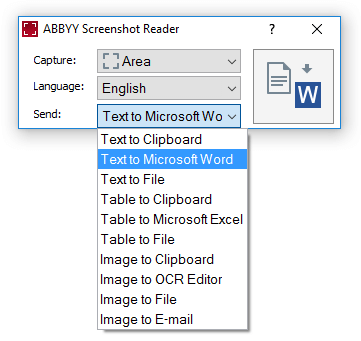
The whole program, shown at full size, with the Send list open: text, table and image destinations.
More than 180 languages
ABBYY Screenshot Reader offers more than 180 recognition languages, over 40 with dictionary support, and an Autoselect option. That breadth is what you're paying ABBYY for, and it's useful for students and translators collecting foreign words or phrases.
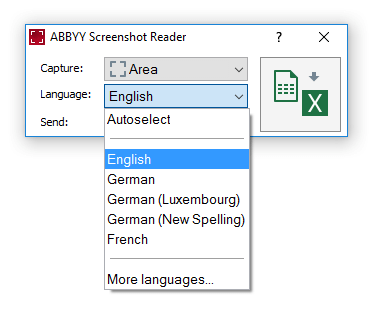
The Language list, with Autoselect at the top and a link to more languages.
Plain screenshots too
ABBYY Screenshot Reader can also save a capture as a JPEG, PNG or BMP image, copy it to the clipboard or attach it to an email. It's handy for a quick error message to send to support, though there are no editing or annotation tools.
Real-World Uses
- Copying a quote from a scanned PDF or a slide in a video lecture.
- Pulling a price table out of a brochure image into Excel.
- Saving vocabulary from a website into a spreadsheet when you're learning a language.
- Grabbing the exact wording of an error message that can't be selected.
Who It's For, and Who Should Skip It
Buy it if you do this several times a week, work in less common languages, or need tables and not just text. At $9.99 with no subscription, it pays for itself in a few saved minutes.
Skip it if you own FineReader PDF, since you already have it. Skip it on a Mac, where it doesn't run. And if you want to process whole documents, not bits of the screen, you need a full OCR program such as FineReader PDF.
Usage Guide
- Fill in the short form on ABBYY's trial page and download the installer.
- Install it and start the program. You can set it to launch with Windows so it's always ready.
- Open what you want to capture.
- In the Screenshot Reader window, choose the capture type, the language and the destination.
- Select the screen area and check the result where you sent it.
- To keep using it after 15 days, enter your serial number. You don't need to reinstall.
Where it falls short
- Old Office formats. It saves Word 97-2003 DOC and Excel 97-2003 XLS files, not DOCX or XLSX.
- A dated design. The product page still talks about Flash content and the system list stops at Windows Server 2016.
- Heavy for what it does. ABBYY asks for 700 MB of free disk space.
- Quality depends on the source. Very small text on screen is harder to recognize, as with any OCR tool.
What Users Say
AlternativeTo
Reviews of this small tool are scarce, and we could only find a few short ones. Three reviews on AlternativeTo, a software directory, each show five stars.
- Peter S. (February 2026) points out the competition: "It costs 10 bucks." He adds: "But if you calibrate the text size, there is no big difference from pot.exe (Windows OCR), DPScreenOCR and others."
- zavakz (May 2022), on getting the trial: "Trail software shouldn't be this time wasting."
- A removed user (March 2022) liked: "Features: offline use, very fast, custom destination format."
FAQs
Is ABBYY Screenshot Reader a subscription?
No. ABBYY Screenshot Reader is a perpetual license, paid once. The order we checked showed a lifetime term with no renewal.
Does ABBYY Screenshot Reader work offline?
ABBYY Screenshot Reader runs on your PC, and a reviewer lists offline use among its features, so captured screens don't have to go to an online service.
Does ABBYY Screenshot Reader need Microsoft Office?
Only if you want to send results straight into Word or Excel. ABBYY Screenshot Reader can otherwise use the clipboard or save to a file.
Which interface languages does ABBYY Screenshot Reader have?
ABBYY Screenshot Reader comes in 23 interface languages, including English, German, French, Spanish, Japanese, Korean and both forms of Chinese.
System Requirements
- Windows 11, 10, 8.1, 8 or 7, or Windows Server 2016, 2012, 2012 R2 or 2008 R2
- 1 GHz processor or faster, 1024 MB RAM
- 600 MB of disk space for installation, 700 MB free for best operation
- Display at 1024x768 or higher
Conclusion
ABBYY Screenshot Reader is worth $9.99 if you grab text or tables from the screen often. The one reason to buy is ABBYY's recognition in more than 180 languages, with tables, for the price of a sandwich. The main reason not to is that free tools already in Windows may be enough for occasional, English-only use. Try those first, then use the 15-day trial to see whether ABBYY does noticeably better on your own material.
Download Free TrialBuy Now