Wondershare PDFelement: Edit, Convert, Resize and Sign PDFs Like a Word Document
Wondershare PDFelement is a $129.99 one-time-purchase PDF editor for Windows (Mac, iOS and Android versions exist too) that edits text and images in place, converts PDFs to and from Office files, runs OCR on scans, changes page sizes and page boxes, fills and signs forms, and adds AI summaries and translation. It suits office workers, students and small businesses who want most of what Adobe Acrobat does without a subscription.
The typical moment you need it: a contract arrives with one wrong date, a scanned invoice needs its numbers in a spreadsheet, or a print shop sends back a file because the page size or bleed is wrong. A free PDF reader opens all of these and fixes none of them.
Quick facts
- Current version: 13.0.0, released September 3, 2026
- Developer: Wondershare
- Runs on: Windows 7, 8, 10 and 11 (separate Mac, iOS and Android apps)
- Price: $129.99 USD, one-time payment, single platform (sold as the "V11 Single-platform Perpetual Plan")
- Free trial: 14 days, with OCR limited to a preview and combine or batch jobs limited to 3 files within 20 MB
- Refunds: Wondershare's refund policy allows requests up to 30 days from payment for most products, 7 days for some
- Download: a 2.1 MB installer that downloads the full program (about 2.5 GB of free disk space needed)
- What we checked: on October 19, 2026, the order page price ($129.99, product name "Wondershare PDFelement V11 Single-platform Perpetual Plan"), the Windows installer (2,187,256 bytes from Wondershare's download server), version 13.0.0 on Wondershare's What's New page, and the Windows requirements on its tech spec page. We didn't activate a license or test which version the key activates.
Before you buy: what "perpetual" covers
The license sold here is named for version 11, while PDFelement's current release is 13. Wondershare's own store describes its $129.99 Perpetual Plan as "perpetual access to PDFelement 13", so the two may be the same product under an old name, but confirm which version your key activates before you rely on version 13 features. "Single-platform" means Windows or Mac, not both.
Why this matters: the most common complaint on Trustpilot comes from perpetual license owners who were pushed to pay again after a new major version. Install the trial and make sure the tools you need work before buying.
Download Free TrialBuy Now
Overview
PDFelement opens documents in tabs, like a browser. A vertical bar on the left switches between modes such as Home, Comment, Edit, Convert, Organize, Tools, Form and Protect, and each mode changes the toolbar across the top, so editing tools appear when you edit and conversion options when you convert. A panel on the right holds page thumbnails, bookmarks, comments, attachments and the AI assistant. Version 12 rebuilt the interface and lets you pin favorite tools to the top menu.
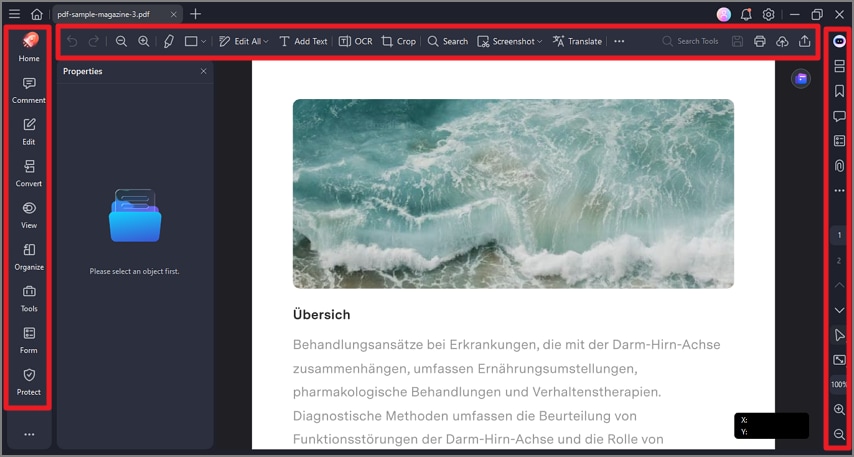
PDFelement for Windows, from Wondershare's user guide (an earlier layout than version 13): the mode bar on the left, the toolbar with Edit All, Add Text, OCR, Crop, Search, Screenshot and Translate, and the side panel on the right.
Features
Edit text and images on the page
PDFelement lets you click into a paragraph and type: change text, fonts and images directly on the page, add new text boxes and pictures, and adjust page margins. Version 12 added text-to-path editing and an annotation library for comments you reuse.
Change page size and set page boxes
PDFelement's Page Boxes dialog changes the size of PDF pages and sets the boxes that print workflows use. Open it from Organize > Crop > More > Page Boxes (older guides show it under the Page toolbar). In one window you can:
- choose which box to change: CropBox, TrimBox, BleedBox or ArtBox
- set the top, bottom, left and right margins in centimeters
- pick a fixed page size such as A4 or Letter, or enter a custom width and height
- center the content or offset it by an exact amount
- apply the change to all pages or a page range, with a live preview showing the new page size
For quick trims there's also a plain Crop tool: drag a rectangle or type exact margins, and apply it to many pages at once to remove white space from scans or invoices.
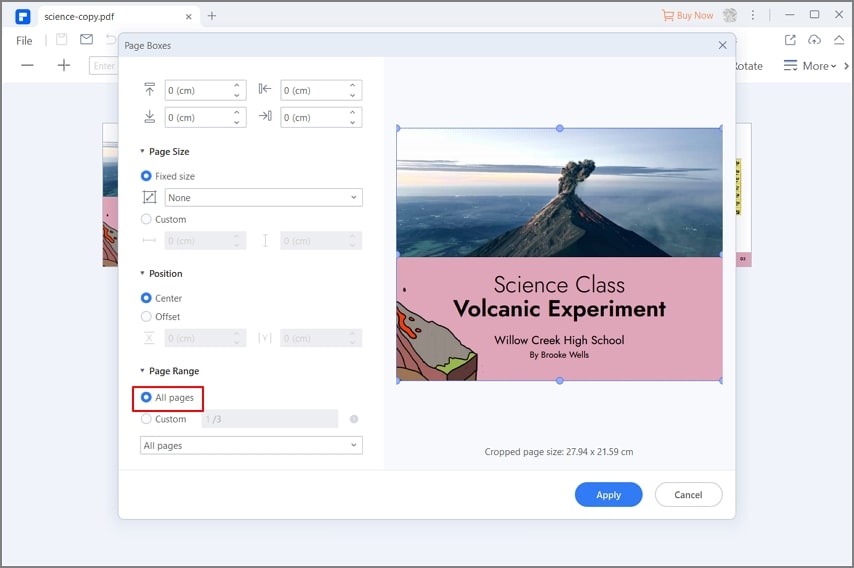
The Page Boxes dialog in PDFelement for Windows (from Wondershare's resize-to-A4 guide): margin fields at the top, Page Size with Fixed size or Custom, Position (Center or Offset), Page Range set to All pages, and a preview showing the cropped page size of 27.94 x 21.59 cm.
Convert to and from PDF
PDFelement turns PDFs into editable Word, Excel and PowerPoint files, images, EPUB, HTML, RTF, text and Markdown, and creates PDFs from those formats. Batch processing converts many files in one run, which TechRadar singled out as useful for anyone converting large volumes of files.
OCR for scanned documents
PDFelement's OCR reads the text in scanned pages so you can search, select, copy and edit it, in about 30 languages including English, French, German, Spanish, Chinese, Japanese, Arabic and Russian. TechRadar called its OCR "reliable" and better than most competing tools. In the trial, OCR only shows a preview of the result.
Forms, signatures and redaction
PDFelement fills existing forms, builds new fillable forms and manages form data. You can sign with certificate-based digital signatures, request signatures from others, and batch-sign several files. Passwords and permissions protect files, and smart redaction finds details such as names, ID numbers and bank accounts and blacks them out in bulk.
Organize, compress and compare
PDFelement merges, splits, reorders, rotates and extracts pages, adds page labels, Bates numbers, headers and footers, and shrinks files for email. Version 13's Agreement Compare puts two versions of a document side by side with additions, deletions and changes highlighted.
AI tools for long documents
PDFelement's AI assistant summarizes, translates and answers questions about a document. Version 13 adds Spaces, where you collect PDFs, slides, Word files, images and YouTube links, ask questions across all of them with links back to the source, and generate flashcards, quizzes, mind maps and reports. Agreement Copilot flags risky contract clauses and explains why, and side-by-side translation keeps each clause next to its translation. AI use is metered: Wondershare's plan table lists 50 AI uses on paid plans and 10 in the trial.
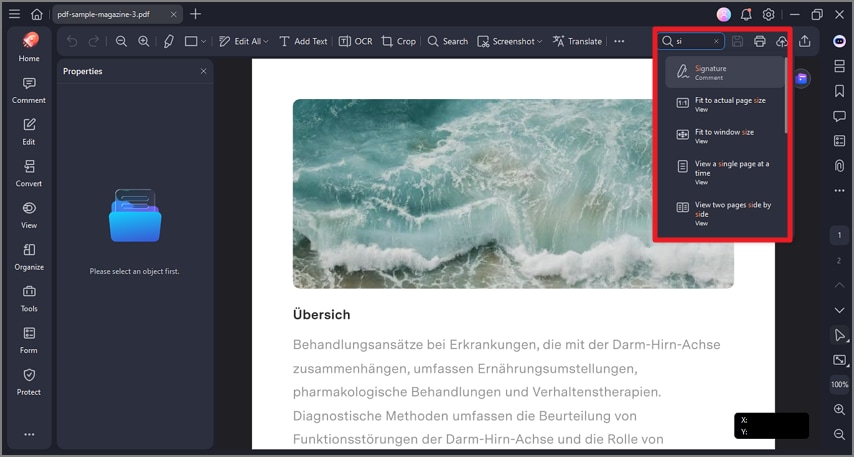
The tool search in PDFelement for Windows (from Wondershare's user guide): typing "si" lists Signature, Fit to actual page size, Fit to window size and other matching commands.
Benefits
The main win is one program instead of four. Editing, converting, OCR, resizing, signing and redacting usually means juggling separate tools. PDFelement does all of it in one window, with one way of working.
It's easy to pick up. The mode bar and tool search mean an occasional user can fix a document without training, which is the point reviewers keep coming back to.
And the one-time price matters to a lot of buyers. Several Trustpilot reviewers bought PDFelement precisely because it isn't a subscription.
Real-World Uses
- Fixing a print file. A Letter-size brochure needs to go out as A4: open Page Boxes, pick A4, center the content, apply it to all pages.
- Correcting a contract. Change a date and a name in the PDF, compare it with the previous draft, then sign it with a digital signature.
- Accounts paperwork. OCR a batch of scanned receipts, crop off the scanner margins, and convert the result to Excel.
- Sharing safely. Redact personal details and password-protect a file before emailing it.
- Studying. Put lecture PDFs and slides into a Space and generate flashcards and a summary.
Who It's For, and Who Should Skip It
PDFelement suits office workers, freelancers, small businesses and students who handle PDFs every week and want real editing, conversion and OCR for a single payment. Its agreement tools add value for anyone who reviews contracts.
Skip it if:
- you need it on both Windows and Mac: this license covers one platform, so a cross-platform plan from Wondershare fits better
- you only read, highlight and fill the odd form: a free PDF reader does that
- you prepare files for commercial printing and need preflight checks and automatic fixes: a dedicated prepress tool such as Enfocus PitStop Pro or Adobe Acrobat Pro is built for that job, while PDFelement's Page Boxes covers resizing and box settings
- you want every future major version included: that takes a subscription, not this perpetual plan
Usage Guide
- Install. Run the small installer, which downloads and installs the full program, then launch PDFelement.
- Activate. Sign in or enter your license from your order email inside the program.
- Open a PDF. Drag a file in or use Open Files on the Home screen. Each document gets its own tab.
- Pick a mode. Edit to change text and images, Convert to export, Organize to crop, resize and rearrange pages, Form to fill or build forms, Protect to sign, redact or encrypt.
- Change the page size. Organize > Crop > More > Page Boxes, choose a fixed size or Custom, set the page range, and click Apply.
- Save or export. Save the PDF, or export it to Word, Excel, PowerPoint or images.
Where it falls short
- Upsell prompts. Reviewers on Trustpilot describe frequent prompts to upgrade or buy other Wondershare products, including after a new major version comes out.
- Menu changes between versions. One reviewer found the redesigned version 12 menus "very hard to navigate" after upgrading.
- Metered AI. AI features run on a set number of uses per plan and need an internet connection, and TechRadar lists "AI tools need additional subscription" as a drawback.
- Speed. TechRadar found it "occasionally slow".
- Billing and support. Some subscription buyers report trouble cancelling auto-renewal and reaching a person in support. The one-time plan avoids renewals, but keep your order email.
What Users Say
Trustpilot: 4.6 out of 5 from 3,097 reviews
Most buyers are happy, and the praise centers on ease of use and the one-time price. The quotes below were read through a summarizing tool, so the wording may differ slightly from the originals.
Norman Sims, 5 stars (November 2025): "Wondershare PDF Element has always been my go to PDF editor. It is easy to use, no yearly subscriptions are required, plenty of tools and options."
MrBill_NC, 5 stars (October 2025): "Excellent product, easy to use, much cheaper than Adobe for what you pay."
Vicki Shacklock, 5 stars (September 2025): "This program works just as good as Adobe Acrobat professional and it is much cheaper to buy a license"
shmmee, 5 stars (August 2025): "I love the one time payment instead of the stupid subscription plans other pdf editors have."
Ad_lib, 5 stars (July 2025): "It is very simple to use and does everything I need to do pdfs - esp. converting to html."
Sofia Cid, 5 stars (December 2025): "Customer support was super helpful. Five stars!"
Trustpilot: the complaints
The negative reviews are mostly about licensing and upgrades, not about the editing itself.
Chris Young, 1 star (June 2026): "Never buy the perpetual license, they do not honour it."
Dinh-Van Nguyen, 1 star (updated March 2026): "Now they prevent me to save my edited pdf."
david williams, 2 stars (September 2025): "I received Version 10. 2 weeks later I get messages that I have to upgrade to version 12 for the same price I just paid."
Bob Eisenberg, 1 star (September 2025): "The latest revision has made the menus very hard to navigate. Everything is in a different location and hard to find."
A Rios, 2 stars (October 2025): "Wondershare keeps charging me to this day and it is impossible to cancel the plan even though i have cancelled it twice"
TechRadar: 4 out of 5
TechRadar's review (last updated October 4, 2024) sums it up as "a PDF editor without any fancy bells and whistles, and it does its core job fine." It praised the "easy to use interface", the "variety of useful features" and OCR that "tends to work better than most of the competing solutions on the market". Its reasons to avoid were "somewhat expensive", "occasionally slow" and "AI tools need additional subscription".
The pattern
People who use PDFelement for everyday editing, conversion and OCR like it and see it as a cheaper Acrobat. The unhappy reviews come mostly from perpetual license owners who felt pushed to pay again after a major release, and from subscription buyers who struggled to cancel. Judge the software on the trial, and buy the license knowing which version it covers.
Comparisons
Perpetual plan vs. subscription
Wondershare also sells PDFelement on quarterly, yearly and two-year plans, with mobile and web access and cloud storage while you pay. The perpetual plan is one payment with no renewals, but newer major versions may cost extra.
PDFelement vs. a free PDF reader
Free readers view, annotate and sometimes fill forms. PDFelement adds real text editing, conversion, OCR, page resizing and page boxes, form building, digital signatures, redaction and AI tools.
PDFelement vs. a prepress tool
Prepress plug-ins like Enfocus PitStop Pro work inside Adobe Acrobat and are built for print production. PDFelement is a stand-alone general editor: it sets CropBox, TrimBox, BleedBox and ArtBox and resizes pages, which covers most office and small-business print jobs.
Editions and Pricing
| Plan |
Price |
Term |
Platforms |
| Single-platform Perpetual Plan (sold here) |
$129.99 one-time |
Perpetual |
Windows or Mac |
| Quarterly, Yearly and 2-Year Plans (Wondershare's store) |
Recurring |
While subscribed |
Desktop plus mobile and web |
| Free Trial |
Free |
14 days, with limits |
Windows or Mac |
FAQs
Does the PDFelement perpetual license include future versions?
The PDFelement perpetual license is tied to a version. This one is named for version 11, while Wondershare's store describes its Perpetual Plan as access to version 13. Expect to pay again for a later major version, and check which version your key activates.
Can I use PDFelement on both my Windows PC and my Mac?
Not with this license. The PDFelement Single-platform plan covers Windows or Mac, so you need a cross-platform plan for both.
Does PDFelement still run on Windows Vista or 8.1?
PDFelement 13's tech spec lists Windows 7, 8, 10 and 11. Vista is no longer listed, so use a newer Windows version.
Can PDFelement set the bleed box and trim box for a print shop?
Yes. PDFelement's Page Boxes dialog sets the CropBox, TrimBox, BleedBox and ArtBox by margin, and can change the page to a fixed or custom size across a page range.
Does PDFelement work offline?
PDFelement's editing, conversion and OCR run on your PC, but activation, translation, cloud features and the AI assistant need an internet connection.
Can I get a refund on PDFelement?
Wondershare's refund policy allows refund requests up to 30 days from payment for most products bought directly from Wondershare, with a 7-day window for some. Read the policy before buying, and use the free trial first.
Which languages does PDFelement's OCR read?
PDFelement's OCR supports about 30 languages, including English, Spanish, French, German, Italian, Portuguese, Dutch, Russian, Polish, Turkish, Arabic, Chinese, Japanese, Korean, Thai and Vietnamese.
System Requirements
- Operating system: Windows 7, 8, 10 or 11
- Processor: Intel Pentium 4 or equivalent, or higher
- Memory: 512 MB RAM, 1 GB recommended
- Disk: 2.5 GB free space
- Internet: needed for activation, translation, cloud features and live updates
Conclusion
Worth it if you edit PDFs every week and want to pay once. For $129.99, Wondershare PDFelement gives you on-page editing, conversion, OCR, page resizing and page boxes, forms, signatures and redaction in one easy program. Users consistently call it a cheaper Acrobat that does the job.
The reason to hesitate is the license, not the software: this plan covers one platform, it's named for version 11, and Wondershare pushes paid upgrades when a major version arrives. Try the 14-day trial on your own files, confirm the version your key activates, and you'll get a capable PDF editor without a subscription.
Download Free TrialBuy Now