Wondershare MobileTrans for Mac: Switch Between iPhone and Android Without Losing Your Chats
Wondershare MobileTrans for Mac is a $49.99-a-year Mac app that moves data from one phone to another through your Mac, across iPhone and Android in either direction, and carries WhatsApp chat history between the two platforms. It's for Mac owners changing phones who want their messages, photos and WhatsApp conversations on the new one.
Inside the Apple world, a new iPhone copies itself from the old one. The trouble starts when one of the phones is Android, and it's worst for WhatsApp. MobileTrans plugs both phones into the Mac, lists what it can copy, and moves it in one pass, with nothing going through a cloud service.
Quick facts
- Developer: Wondershare
- Version: MobileTrans 5.0
- Platform: macOS 10.8 to macOS 15 (the Windows edition has its own license)
- Phones: iPhone and Android; Wondershare says it supports more than 6,000 devices
- Price: Full Features $49.99 per year, $64.99 perpetual or $29.99 for one month, for 1-5 phones on 1 Mac
- Free version: phone backups and device checks; phone-to-phone transfers and restores need a license
- Refunds: 7 days from payment, for technical faults only
- What we checked: the Mac download mobiletrans_full5794.dmg is a 3.0 MB web installer, and Wondershare's download page lists MobileTrans 5.0; the prices above were read from Wondershare's MobileTrans pricing page for Mac on November 21, 2026. We didn't run a transfer between two phones.
Before you buy
MobileTrans has a short 7-day refund window, and Wondershare's refund policy doesn't cover change of mind, only technical problems support couldn't solve. Plan the move first: install the free version, connect both phones and confirm MobileTrans detects them, then buy the license right before you transfer. A one-off phone switch is the use case the monthly plan exists for; the annual plan renews automatically unless you switch renewal off in your account.
Download Free TrialBuy Now
Overview
MobileTrans is Wondershare's transfer-only tool. Where Dr.Fone bundles recovery, repair and transfer, MobileTrans sticks to three jobs: phone transfer (phone to phone, and phone to computer and back), app transfer (WhatsApp, WhatsApp Business, LINE, Kik, Viber) and backup and restore. Version 5.0 organizes its window around those three areas, with a sidebar listing each one.
The Full Features license covers all three. If you only need WhatsApp moved, or only a phone-to-phone copy, a single-feature plan at $44.99 a year covers that one job; on the Mac the monthly plan is usually the cheaper route for a one-off move.
Features
Move WhatsApp chats between iPhone and Android
MobileTrans WhatsApp Transfer copies messages, photos, videos, documents, stickers and other WhatsApp data from an Android phone to an iPhone or the other way round, with both phones connected to the Mac. Transfer & Merge keeps the chats already on the new phone and adds the old ones, and Google Drive Transfer puts an Android WhatsApp backup from Google Drive onto an iPhone. WhatsApp Business, LINE, Kik and Viber have their own entries.
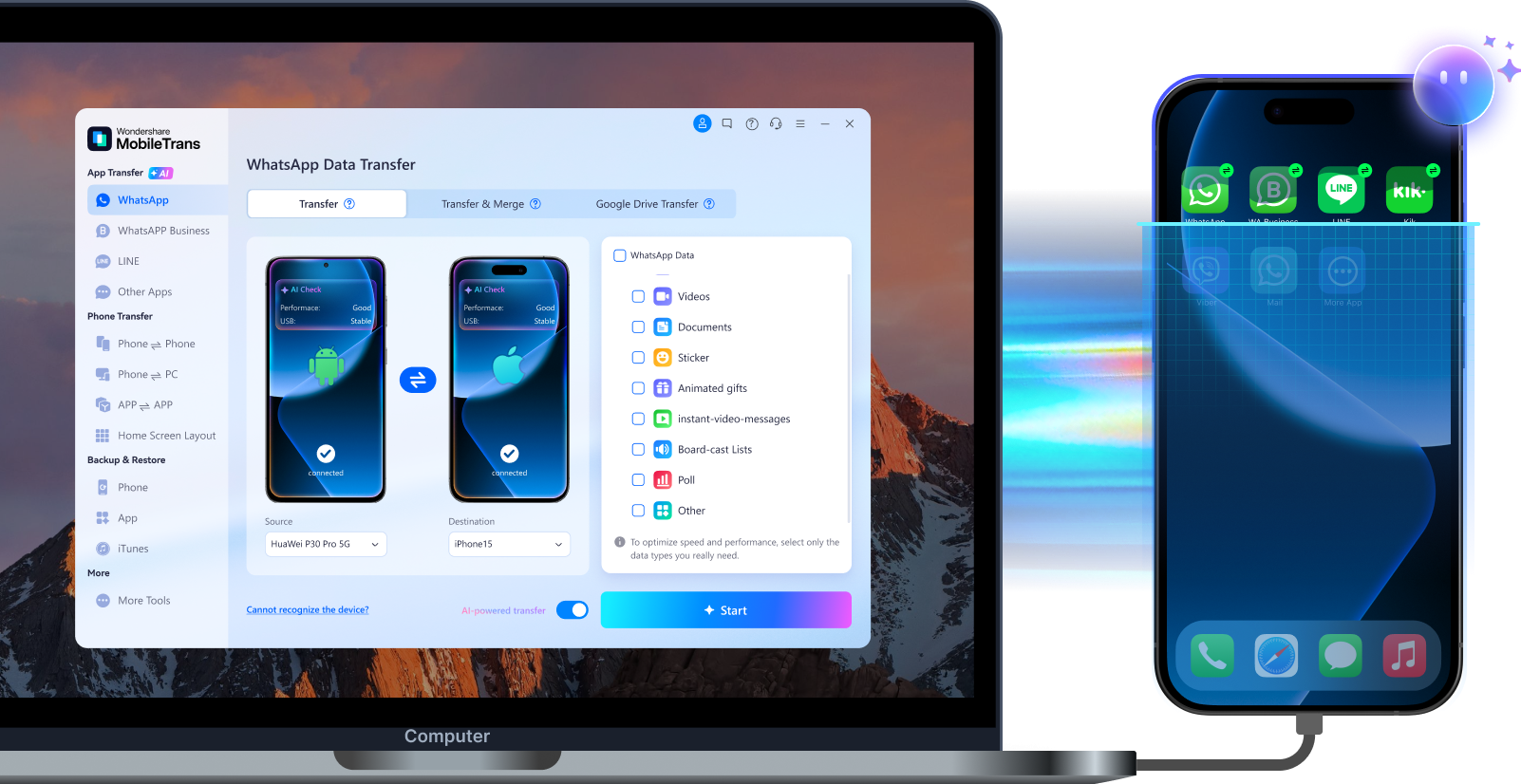
WhatsApp Data Transfer: a Huawei source and an iPhone 15 destination, with Transfer, Transfer & Merge and Google Drive Transfer tabs.
Copy a whole phone to a new one, across platforms
MobileTrans Phone Transfer moves up to 18 data types, such as contacts, messages, photos, videos, music, call logs, calendars and notes, from one phone to another, iOS or Android on either side. It can also move apps across platforms, copy an iPhone's home screen layout, and bring iCloud data straight to the new device.
Pick files to move between the phone and the Mac
MobileTrans Phone to PC & PC to Phone (the same screen on the Mac) shows the phone's photos (camera roll, screenshots, selfies, hidden and recently deleted albums), videos, messages, contacts, music and apps, and imports or exports what you select. It's a handy way to get photos off an Android phone onto a Mac, which a Mac doesn't make easy on its own.
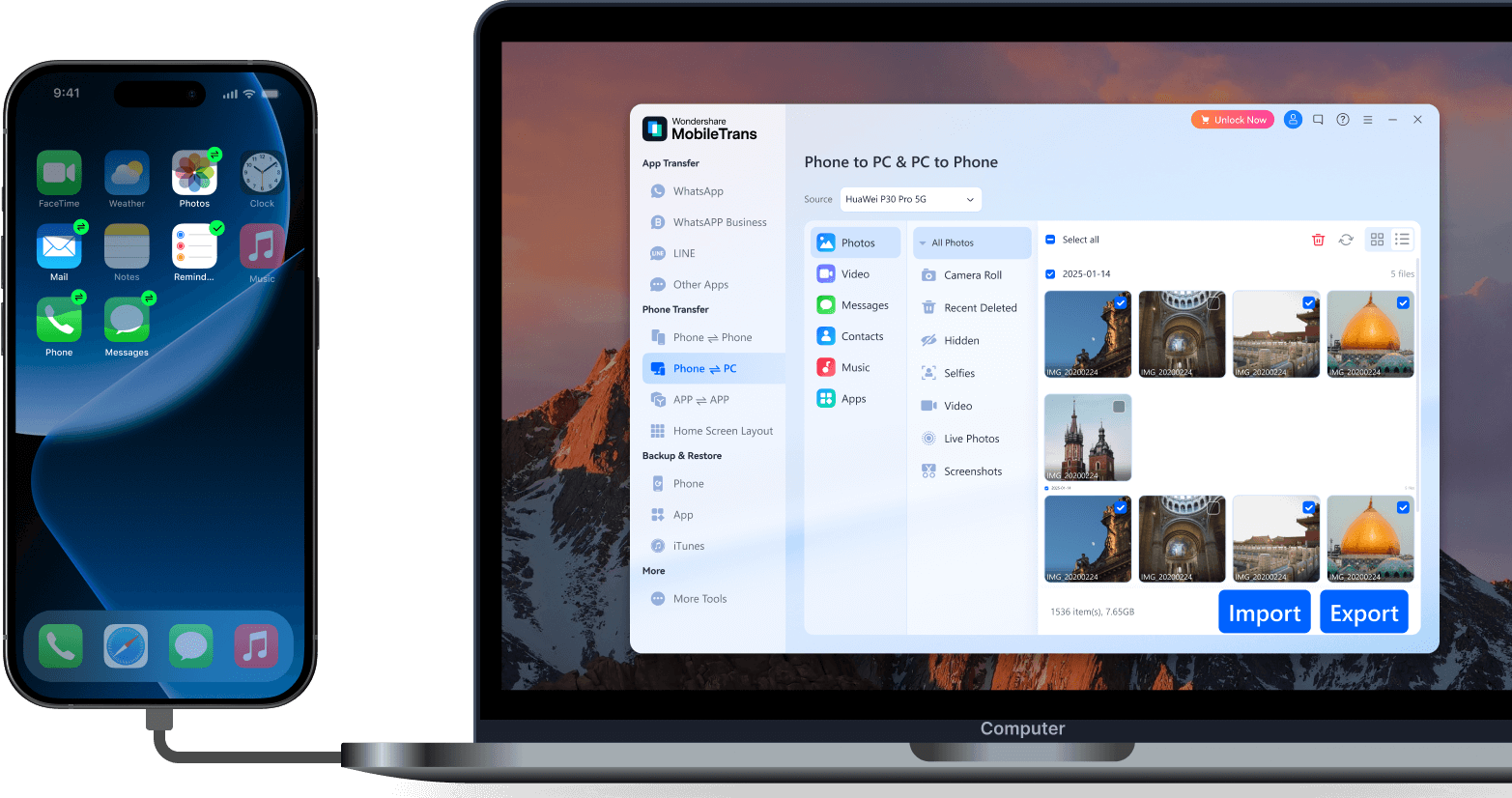
Phone to PC & PC to Phone: photo albums on the left, thumbnails to select, Import and Export at the bottom.
Back up a phone to the computer and restore it later
MobileTrans Backup & Restore saves 18+ data types and WhatsApp data to the Mac, and restores them to the same or a different phone, also from an iTunes backup. It can also bring back deleted WhatsApp and WhatsApp Business data to the phone.
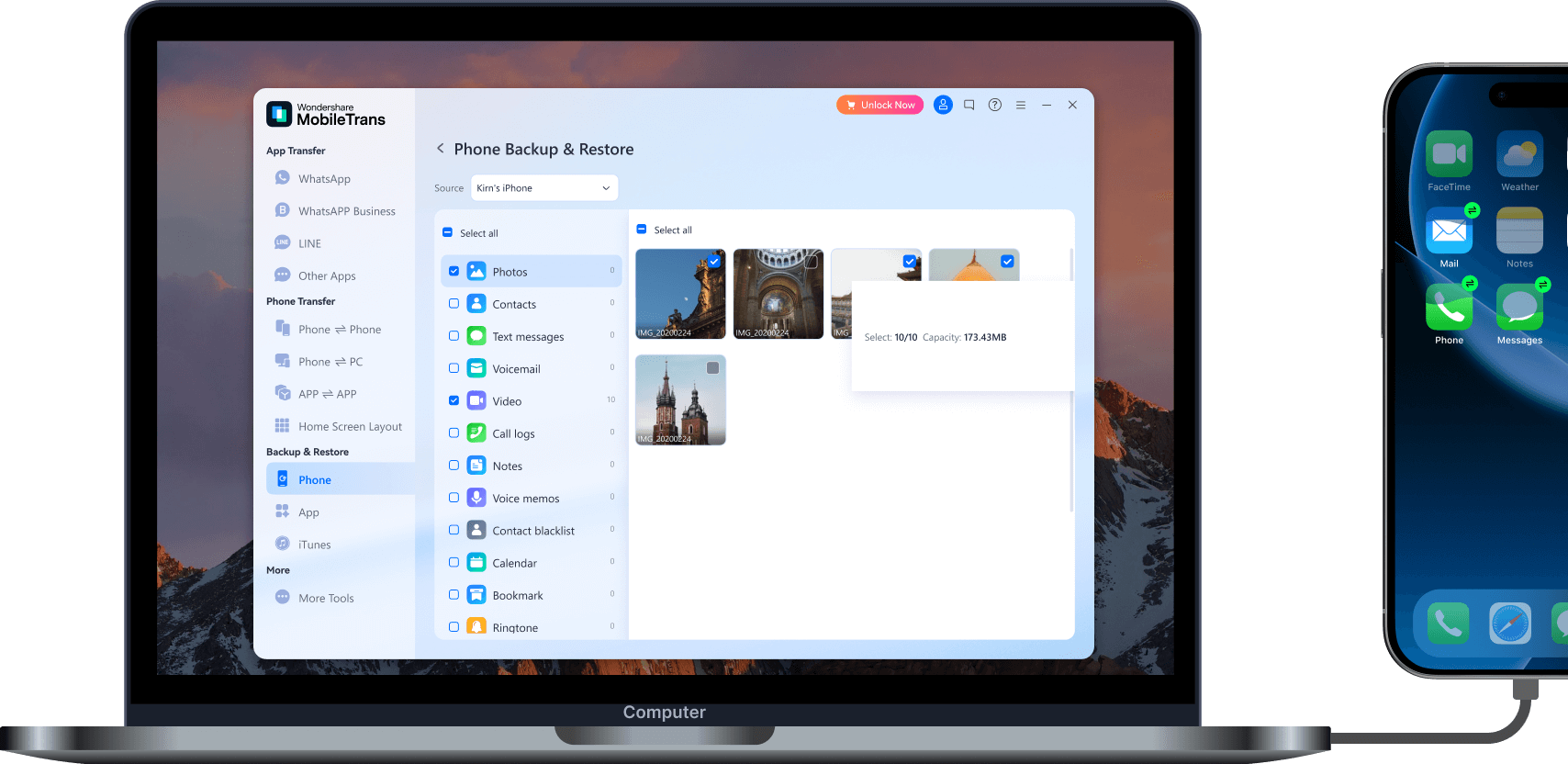
Phone Backup & Restore: tick Photos, Contacts, Text messages, Video, Call logs and other types, then back them up to the computer.
Benefits
- Cross-platform without the guesswork. The program shows pictures of which settings to change on each phone, which several users credit for getting a transfer done.
- Nothing goes through a cloud. Data moves over the cables via your Mac; Wondershare says no third party, MobileTrans included, can read it.
- Merging instead of overwriting. Old WhatsApp chats can be added to the ones already on the new phone.
- Cheap for a one-time job. One month of Full Features costs $29.99, less than the yearly plan.
Real-World Uses
- Samsung to iPhone: move contacts, photos and messages with Phone Transfer, then the WhatsApp history with WhatsApp Transfer.
- Back to Android after years on iPhone: merge an old Android WhatsApp history with the iPhone one, as one reviewer on Wondershare's site describes.
- An Android phone and a Mac: export photos and videos to the Mac and free space on the phone.
- Before a repair: back the phone up to the Mac so you can restore it afterwards.
Who It's For, and Who Should Skip It
MobileTrans suits people switching between iPhone and Android, especially with a long WhatsApp history, and households that move between phones every year or two.
Skip it if you're staying on the same platform: Apple's own iPhone setup and Samsung Smart Switch move most data for free. Skip it too if you need deleted data recovered or a broken phone repaired; that's what Dr.Fone does. And if the computer you'll use is a Windows PC, buy the Windows edition, which is $10 a year cheaper; a Mac license doesn't activate on Windows.
Usage Guide
- Download MobileTrans for Mac from the download page, open the .dmg and run the small installer, which fetches the full app.
- Open MobileTrans and choose the job in the sidebar: WhatsApp, Phone to Phone, Phone to PC, or Backup & Restore.
- Connect the phones with USB cables. Tap Trust on an iPhone; on Android, follow the on-screen pictures to turn on USB debugging.
- Check that the source and destination phones are the right way round, use the swap button if not, and tick the data types to copy.
- Buy a license when prompted, enter the code from the order e-mail, and start the transfer. Keep both phones connected until it finishes.
Where it falls short
- Big transfers can fail part-way. Trustpilot reviewers report transfers with lots of photos and videos needing several attempts, or only part of the data arriving.
- WhatsApp changes break the steps. One reviewer found the WhatsApp wizard pointing to menus that no longer exist in the current WhatsApp app.
- It takes time and attention. Users mention transfers of over two hours and a setup phase where the instructions have to be followed exactly.
- Little control inside a category. Fossbytes couldn't pick individual files inside a category during a phone-to-phone transfer.
- Refunds are hard to get. Several one-star reviews describe slow, partial or refused refunds after a failed transfer.
What Users Say
Trustpilot (4.5 out of 5, 1,790 reviews)
70% of reviews give five stars and 16% give one star. Positive reviews:
- Dave, "I was skeptical about this app" (November 7, 2026): "I was skeptical about this app, but it does work."
- Hashim, "Did what I wanted" (October 14, 2026): "It took a while, more than 2 hours but eventually the job was done."
- Osama Sartawi (November 3, 2026): "Great tool and very easy to use"
- Natcaasi (November 13, 2026): "It works after abit of exploration."
Critical reviews:
- Michael Hay, "Corrupted my iPhone backup" (November 15, 2026): "This software corrupted my iPhone backup, so when I had my old iPhone repaired, it could no longer be backed up."
- Chris Waters, "Does not work with current WhatsApp version" (September 5, 2026): "The application has "wizards" to step through a process, including WhatsApp transfer from Android to iPhone." The reviewer says the steps refer to WhatsApp menus that no longer exist.
- Labeeb Ferdous, "Got Scammed" (August 22, 2026): "Got Scammed, they use sneaky one time offers to lure you into monthly subscription."
- Ameer Adams, "Product Did Not Work - Struggled to Get an Immediate Refund" (August 20, 2026): "The software did not work properly."
Independent reviews
Fossbytes (Adarsh Verma, updated July 15, 2021): "As advertised, Wondershare MobileTrans works nicely and transfers your data quickly from one device to another." On backups: "It also comes with a handy option to create and restore backups that work just fine." The downside: "I wasn't able to select the particular file inside a category."
TheSweetBits: "Wondershare MobileTrans is an essential tool for anyone looking to transfer data between devices seamlessly." Its cons: "Backup and restore times may vary based on data size and device." and "The Mac version is priced slightly higher than the Windows version."
On Wondershare's site
"I was reticent AF but IT WORKED. Gave me error a few times because my disk was almost full, but once I cleared that up it worked perfectly. ... It's on the expensive side, but worth for having my Whatsapp data back."
A less glowing one, also published there: "bought 2 new iPhones and the vendor transferred everything from my Samsungs to the new iPhones. Not everything made it."
The pattern: most people get their WhatsApp history and phone data across, often after a retry or two and some patience. The bad experiences are failed large transfers, WhatsApp steps that lag behind app updates, and refund disputes afterwards.
Editions and Pricing
| Plan (Mac) | Yearly | Perpetual | Monthly | What it covers |
|---|
| Full Features | $49.99 | $64.99 | $29.99 | WhatsApp Transfer, Phone Transfer, Backup & Restore; 1-5 phones, 1 Mac |
| Single feature | $44.99 | $59.99 | $25.99 | One of the three, such as WhatsApp Transfer or Phone Transfer |
Prices are from Wondershare's MobileTrans pricing page for Mac on November 21, 2026, where the Full Features yearly plan shows a struck-through $69.99. The Windows edition costs $39.99 a year. The perpetual license includes updates within the version you buy (for example 5.1 to 5.9); a move to version 6 may cost extra. Business and education licenses are sold separately.
Choose a plan
FAQs
Is MobileTrans free?
MobileTrans is free to download, and phone backups and the device check work without a license. Moving data from one phone to another, and restoring backups, needs a paid plan.
Does a MobileTrans for Mac license work on Windows?
No. MobileTrans licenses are tied to the platform: a Mac license only activates on a Mac, and a Windows PC needs the Windows edition.
How many phones and Macs does a MobileTrans for Mac license cover?
A MobileTrans for Mac license activates on one Mac and works with up to five phones. More phones, or a second Mac, need another plan.
Can MobileTrans move WhatsApp from Android to iPhone without resetting the iPhone?
Wondershare says MobileTrans transfers WhatsApp data without a factory reset, and its Transfer & Merge option keeps the chats already on the iPhone. Back up both phones first anyway.
Can I cancel the MobileTrans subscription?
Yes. MobileTrans subscriptions renew automatically, and you can cancel renewal at any time in your Wondershare account; Wondershare e-mails a reminder 7 days before each renewal.
Can I get a refund for MobileTrans?
Wondershare accepts MobileTrans refund requests within 7 days of payment when there's a critical technical problem support couldn't solve in 7 days, a duplicate purchase or a similar case. Change of mind isn't covered. EU residents also have a 14-day withdrawal right.
System Requirements
- macOS 10.8 to macOS 15
- USB cables for the phones
- iPhone, iPad or Android phone
Conclusion
MobileTrans for Mac is worth paying for when you're switching between iPhone and Android and your WhatsApp history matters; for that job it's one of the few tools that works for most people, and one month at $29.99 is enough for a one-time move. The yearly plan at $49.99 makes sense only if you switch phones often or want regular backups to the Mac. The main reasons to hesitate are the failures some users hit with big transfers and the strict 7-day refund policy, so check that both phones are detected in the free version before you pay. If you're staying on one platform, the free tools from Apple or Samsung will do.
Download Free TrialBuy Now