Short answer: if your PDF has selectable text and you use Microsoft 365 on Windows, use Excel's own Data > Get Data > From File > From PDF. It's free and it handles ordinary tables. A scanned PDF needs OCR: Wondershare PDFelement ($129.99 once, Windows or Mac) is the one-payment pick, and ABBYY FineReader PDF Standard ($99 a year) is the one to choose when scanned tables come out misaligned and need fixing. SwifDoo PDF ($129 once) is the alternative for one Windows PC, and PDF To Excel Converter ($29.95 a year) is the cheap way to batch-convert clean, text-based PDFs.
At a glance
| Excel From PDF (free way) | PDFelement | FineReader PDF Standard | SwifDoo PDF | PDF To Excel Converter |
|---|
| Price at checkout | Included with Microsoft 365 | $129.99 one-time | $99 a year, renews | $129 one-time, 1 PC | $29.95 a year, renews |
| Runs on | Excel for Windows only | Windows or Mac (one platform per license) | Windows 10, 11 (64-bit) | Windows 7 to 11 | Windows 7 to 11 |
| Reads scanned PDFs (OCR) | ✗ | ✓ | ✓ 198 languages | ✓ | ✗ |
| Fix table structure by hand before export | Afterward, in Power Query | ✗ | ✓ OCR Editor | ✗ | ✗ |
| Many files in one run | ✓ Folder connector | ✓ Batch PDF | ✓ Several files per job | ✓ Batch | ✓ Batch |
| All pages on one sheet | Joins similar tables on consecutive pages | ✓ Setting | Per-page sheets optional | Not listed | ✓ Merge Sheets |
| Output | Excel worksheet | XLSX, XLS | XLSX, XLS | XLSX, CSV | XLSX, XLS, CSV, XML |
| Trial limit | None | 14 days after sign-up, saved files watermarked, OCR preview only | 7 days, 100 pages of saved OCR results | 7 days, every feature | Limits not published; a license converts all pages |
How we picked
- We started from the free route most people already own, because many PDFs never need a paid tool.
- We read each order page for today's price and whether it renews.
- We read each trial's limits, since the trial is how you find out whether your own table converts properly.
- We took the menu path, the version list and the import options from Microsoft's documentation, and the Excel settings from each vendor's user guide.
What we checked: the four order pages for price and renewal, and the SwifDoo PDF installer (version 2.0.8.0, 32.3 MB), on November 10, 2026. We compared features, prices and trials from vendor documents and published reviews. We didn't convert our own PDFs or run From PDF ourselves, so there's no accuracy ranking here.
First: is your PDF text or a scan?
That one question decides which route works. Open the PDF and press Ctrl+F, then search for a word you can see on the page. If the viewer finds it, or you can select single words with the mouse, the PDF holds real text and Excel can read its tables. If nothing is found and a click selects the whole page, the PDF is a picture of a page, and only OCR can turn it into numbers.
Try this free first: Excel's Get Data From PDF
Excel's PDF import is built on Power Query and lifts tables straight out of a text-based PDF into a worksheet. For a statement, report or price list made by a computer, it may be all you need.
- In Excel, select Data > Get Data > From File > From PDF.
- Select your PDF and click Open. The Navigator window lists the tables and pages Excel found.
- Click a table to preview it. Pick the one that looks right, or tick Select multiple items for several.
- Choose Load to put it straight on a sheet, or Transform Data to clean it up in Power Query first.
- Add a total to one numeric column and compare it with the PDF before you trust the import.
Where Excel's import falls short
- Your edition may not have it. Microsoft's list of data sources shows the PDF connector for Microsoft 365 on Windows and leaves it blank for the standalone Office 2016 and 2019 editions. It doesn't list Excel 2021 or 2024 at all, so if you own a one-time edition, look under Data > Get Data > From File to see whether From PDF is there.
- No Mac. Microsoft's list of data sources for Excel on Mac has no PDF entry, so From PDF isn't an option there.
- No OCR. A scanned or image-only PDF has no text for the connector to read, so the import comes back empty.
- "Requires additional components." That message means the PDF connector needs .NET Framework 4.5 or later installed on the PC.
- Files in a synced OneDrive folder may not load. Copy the PDF to a local folder and import it from there.
- Multi-line rows can split into several rows, which you then repair in Power Query with Fill Down or by grouping rows.
Three settings that fix most bad imports
Choose Transform Data, then edit the Source step in the formula bar. The import is a function called Pdf.Tables, and Microsoft documents options you can add to it:
Pdf.Tables(File.Contents("C:\sample.pdf"), [StartPage=2, EndPage=5, EnforceBorderLines=true])
- StartPage and EndPage limit the import to the pages you want, which is also Microsoft's advice for large PDFs that time out.
- EnforceBorderLines=true makes drawn grid lines count as cell boundaries, which helps when columns run together.
- MultiPageTables=false stops Excel joining similar tables on consecutive pages. Leave it on, the default, when one long table runs across pages.
Several PDFs with the same layout don't need several imports either: Microsoft's answer is Data > Get Data > From File > From Folder, then combining the files.
One scanned table, for free
Excel's Data from Picture reads a table out of an image, and it works in Excel on Windows and Mac. Screenshot just the table at high zoom, then select Data > From Picture > Picture From Clipboard, correct anything Excel flags, and choose Insert Data. On Windows it needs Windows 11 or Windows 10 version 1903 or later, and only some character sets are supported. If you'd rather keep whole pages as image files, our guide to converting a PDF to JPG or PNG covers that. This route suits one or two small tables. A ten-page scanned statement is where the paid tools start to earn their price.
A report with more words than numbers is a different job: see how to convert a PDF to Word instead.
Wondershare PDFelement
Wondershare PDFelement is a full PDF editor that converts to Excel with OCR built into the conversion settings. Price: $129.99 one-time at checkout, for one platform. Platforms: Windows 7 to 11, or Mac. Best for: scanned PDFs and batches, when you'd rather pay once.
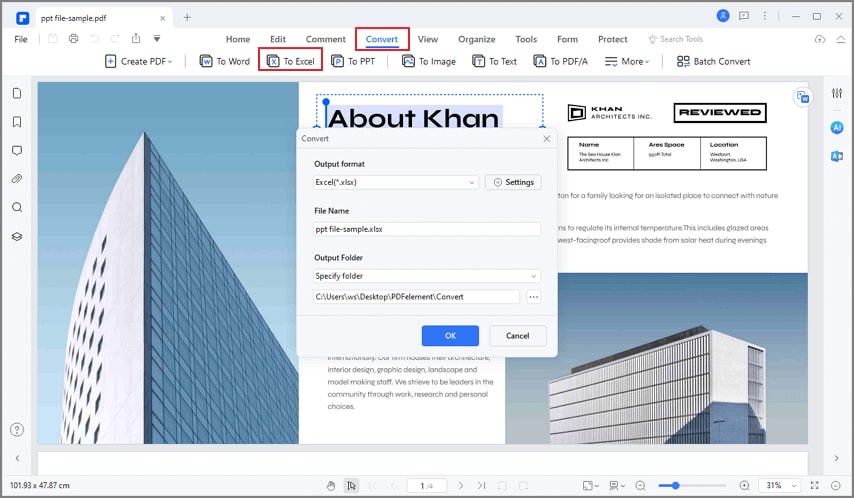
PDFelement's Convert tab with To Excel selected and the output format set to Excel (.xlsx). This shows an earlier version's layout.
PDFelement handles a PDF to Excel conversion from one place: open the file, choose Convert > To Excel, then open Settings. There you set the OCR page range, pick the document's language, and tick Combine all pages into a single Excel sheet, which is the setting you want for a long table that runs over many pages. For a folder of files, Batch PDF runs the same conversion on all of them.
On a Mac the path is File > Export To > Excel. That matters because Excel for Mac has no PDF import, and PDFelement is the only product here with a Mac version under the same plan. The download button below is the Windows installer, so Mac buyers should take the Mac installer from Wondershare.
The weak spot is the trial. It runs 14 days after you sign up, every file it saves carries a watermark, Recognize Table works 3 times, and OCR only shows a preview of its results, so you can't see a finished scanned table before you pay. Test a text-based PDF for layout, and treat scanned tables as the part you're taking on trust.
What we like
- OCR and the one-sheet option sit in the Excel settings
- One payment, no renewal
- Windows or Mac
- It's a full editor, so you can fix a PDF before converting it
Watch out for
- Trial files are watermarked and OCR only previews its results
- The order page names it a V11 plan while the current release is 13, so confirm which version your key activates
- One license covers one platform
TechRadar gave PDFelement 4 out of 5 in a review last updated in October 2024, calling its OCR something that "tends to work better than most of the competing solutions on the market", and listing "somewhat expensive" and "occasionally slow" among its reasons to avoid it.
Trustpilot showed 4.6 out of 5 from 3,097 reviews when we read it in October 2026, through a summarizing tool, so the wording may differ slightly. Norman Sims (5 stars): "It is easy to use, no yearly subscriptions are required, plenty of tools and options." Most complaints come from perpetual owners asked to pay for a new major version. Chris Young (1 star): "Never buy the perpetual license, they do not honour it."
Download PDFelement Free Trial Buy PDFelement
ABBYY FineReader PDF Standard
ABBYY FineReader PDF Standard is a PDF editor built around ABBYY's OCR, and the one here that lets you correct a table's structure before it reaches Excel. Price: $99 a year at checkout, renewing automatically. Platforms: Windows 10 and 11, 64-bit. Best for: difficult scans, poor copies and tables that keep coming out wrong.
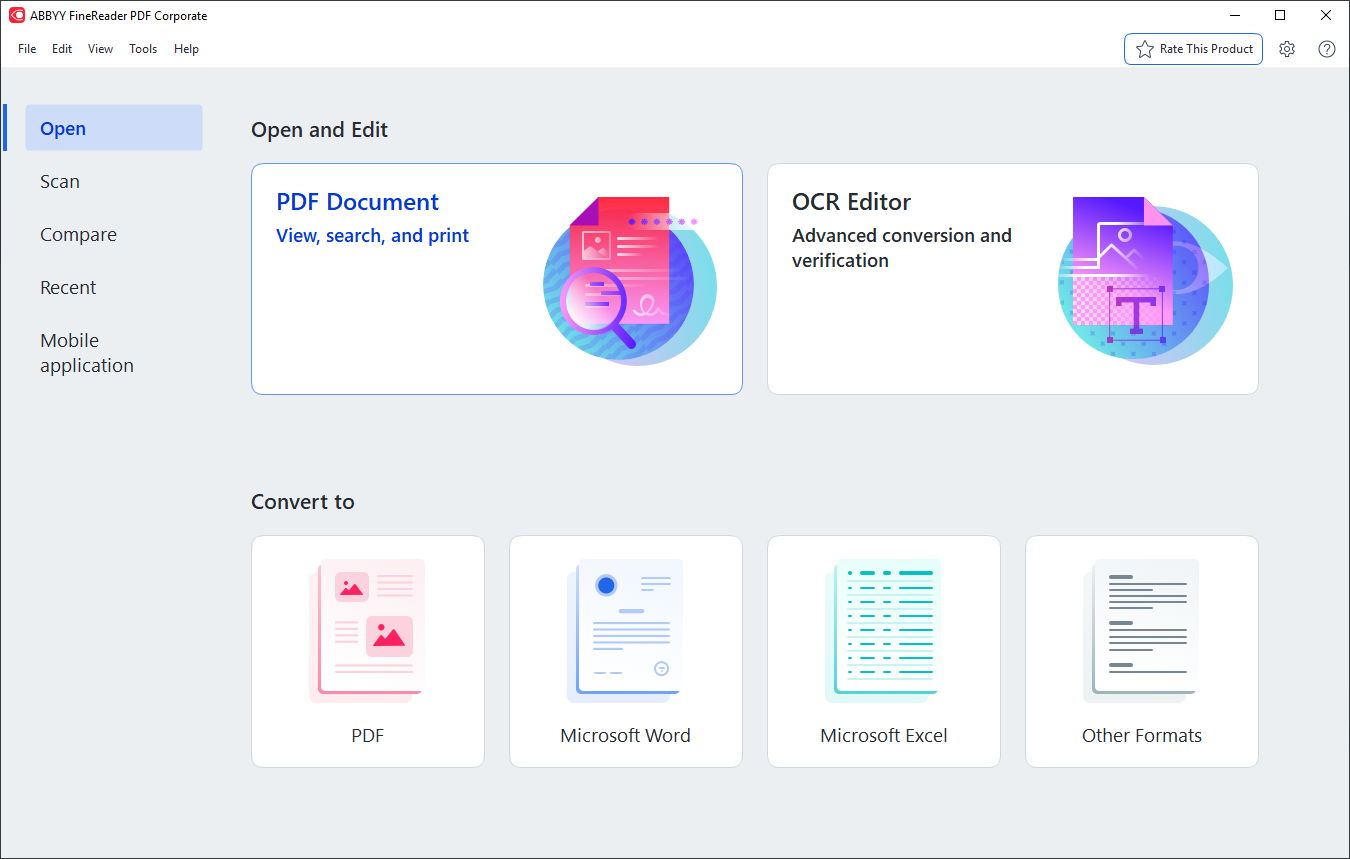
The FineReader PDF start screen, with OCR Editor at the top right and Microsoft Excel under Convert to. The title bar shows the Corporate edition, and the Compare tab isn't part of Standard.
FineReader PDF has two routes to a spreadsheet. The quick one is Open > Convert to Microsoft Excel: choose one or more files, set the OCR languages (198 are available), keep or drop the formatting, and optionally create a separate sheet for each page. It can also combine several source files into one workbook.
The route that earns the price is the OCR Editor. When a table isn't detected, you draw the area yourself with the Table tool and run Analyze Table Structure. When columns are wrong, you add or delete separators and merge cells, then recognize the table again and export. PDFelement and SwifDoo PDF give you OCR settings, not this kind of table-by-table correction. If you handle bank statements, old ledgers or faxed price lists, this is the difference between a small repair and retyping the page. The table-editing buttons for the text pane are hidden by default, so add them from the Customize Toolbars dialog.
Against the one-time products, the arithmetic runs the other way: three years at $99 comes to $297 if the price holds, against $129.99 once for PDFelement. Comparing OCR editors more widely? Our list of the best OCR PDF editors for scanned documents covers the wider field.
What we like
- Manual control over table areas, separators and cells
- 198 OCR languages, usable in combination
- The trial saves up to 100 pages of OCR results
Watch out for
- Subscription with automatic renewal
- Automatic Hot Folder conversion is Corporate only, and the trial is the Corporate edition, so don't plan around it
- This license is Windows only
TechRadar ranks FineReader PDF among its best OCR software picks (updated February 27, 2026). Its reasons to buy include "Recognizes 198 languages", and its reasons to avoid are "No free plan" and "Older interface".
ABBYY's Trustpilot profile is small and critical, at 2.1 out of 5 from 11 reviews when we read it in October 2026, through a summarizer, and most of those are about billing. Sam (1 star, June 2026): "they automatically charged me for another year, even though I never authorized them to do that." If you need FineReader for one project, turn off renewal straight after buying.
Download FineReader Free Trial Buy ABBYY FineReader PDF Standard
SwifDoo PDF
SwifDoo PDF is a Windows PDF editor with a PDF to Excel converter and an OCR switch in its settings. Price: $129 one-time at checkout, for 1 PC, with lifetime updates. Platform: Windows 7 to 11. Best for: one Windows PC, an everyday editor, and a full-feature trial to test with.
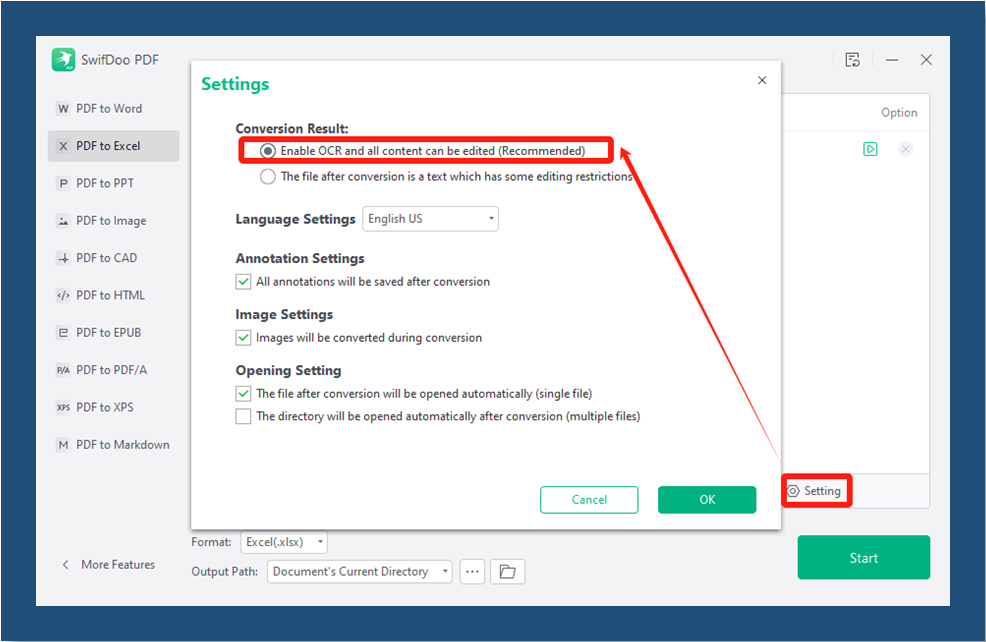
SwifDoo PDF's PDF to Excel screen with the Settings dialog open. "Enable OCR and all content can be edited" is selected, the language is English US and the format is Excel (.xlsx). The red marks are the vendor's.
SwifDoo PDF keeps the steps short. Drop in a PDF, choose Convert > PDF to Excel, open Setting, select Enable OCR and all content can be edited for a scan, and press Start. Add more files to the list and it converts them in one run. PDF to CSV was added in June 2026, which helps when the data is headed for another program rather than a spreadsheet.
Its trial is the easiest of the four to judge a product by: 7 days with every feature, so you can run a whole statement and not just a few pages. After that it only views PDFs. Choosing between this and PDFelement on more than Excel? Read our PDFelement vs SwifDoo PDF comparison.
What we like
- Full-feature 7-day trial
- One payment with lifetime updates
- Excel and CSV output
Watch out for
- The license is tied to an account you sign in to
- Covers one PC, and the Mac app is separate
- No one-sheet setting listed for multi-page tables
PCWorld gave SwifDoo PDF 4 out of 5 (updated February 3, 2025): "Swifdoo PDF is a full-featured, low-priced Acrobat alternative that should serve most users well."
Trustpilot showed 3.3 out of 5 from 80 reviews when we read it in October 2026, through a summarizer, so the wording may differ slightly. Jim Stoddart (5 stars): "It's a reliable and easy to use application and I've never encountered a pdf it could not handle." Dan Gomer (3 stars, June 2026): "I dislike having to re-log into the perpetual version of this program on a somewhat frequent basis."
Download SwifDoo PDF Free Trial Buy SwifDoo PDF
PDF To Excel Converter
PDF To Excel Converter is a small Windows program that does one job: it turns tables in text-based PDFs into spreadsheet files. Price: $29.95 at checkout, renewing every 12 months unless you turn that off. Platform: Windows 7 to 11. Best for: folders of tidy, computer-made PDFs, on a PC without Microsoft 365.
PDF To Excel Converter earns its place through batches and a low price. Add a folder of PDFs, pick an output folder, set a page range if you want one, and convert. Its Merge Sheets option either puts every page on one worksheet or gives each page its own, and output can be XLS, XLSX, XML or CSV. Excel doesn't need to be installed, which suits a PC that only prepares files for someone else.
Know its limits before you pay. PDF To Excel Converter has no OCR, so a scanned PDF is out. The installer hasn't changed since August 2024. The vendor's FAQ says outright that many PDF forms aren't standard, so the output is "NOT 100% same" as the original. If you have Microsoft 365, the free import in Excel does much of the same job on single files, so this product matters mainly for folders of PDFs or a PC without that subscription.
What we like
- Lowest price here by a wide margin
- Batch mode advertised for hundreds of files
- Four output formats, and no need for Excel
- 30-day money-back guarantee
Watch out for
- No OCR
- Renews automatically unless you untick it at checkout
- Few recent independent reviews
- Trial limits aren't published
MadDownload (April 2020) calls it "a comprehensive software that helps to convert PDF tables and data into Excel without disturbing the arrangements." DotTech's much older test of version 3.0 (December 2010) praised it as "Straightforward and easy to use" but listed "Poor conversion accuracy/output quality" as the main con. That test predates the current engine, so treat it as a reason to run the trial on your own file, which is the only evidence that counts here.
Download PDF To Excel Converter Free Trial Buy PDF To Excel Converter
Price at checkout for one license (USD)
Wondershare PDFelement, one-time$129.99
SwifDoo PDF, one-time, 1 PC$129.00
ABBYY FineReader PDF Standard, per year$99.00
PDF To Excel Converter, per year$29.95
Checkout prices read on November 10, 2026, before any tax.
Which should you choose?
| Your situation | Pick | Why |
|---|
| Text-based PDF, Microsoft 365 on Windows | Excel From PDF | Free, and you can repair the result in Power Query |
| One small scanned table | Excel Data from Picture | Free for a screenshot or two |
| Folders of clean PDFs, tight budget | PDF To Excel Converter | $29.95, batch mode, CSV and XML, no OCR needed |
| Regular scanned PDFs, want to pay once | Wondershare PDFelement | OCR plus a one-sheet option, one payment |
| On a Mac | Wondershare PDFelement | Excel for Mac has no PDF import and the others here are Windows licenses |
| Poor scans, tables that keep coming out wrong | ABBYY FineReader PDF Standard | You can correct the table structure before export |
| Scans on one Windows PC, want to test everything first | SwifDoo PDF | 7-day trial with every feature |
Who should skip each one: skip PDFelement if you need both Windows and Mac on one license, or expect free major upgrades. Skip FineReader PDF Standard if you dislike subscriptions or only have one job to do. Skip SwifDoo PDF if you work offline for long stretches, since the license depends on account sign-ins. Skip PDF To Excel Converter if your PDFs are scans, or if you already have Microsoft 365 and only convert the odd file.
What commonly goes wrong
- Testing the easy page. Every tool here handles a clean ruled table. Run the trial on your worst page: merged cells, a table split over two pages, a faint scan.
- Using a non-OCR tool on a scan. Excel's From PDF and PDF To Excel Converter can't read pictures of text. Do the Ctrl+F test first.
- The wrong OCR language. PDFelement, FineReader PDF and SwifDoo PDF all ask for the document's language, and leaving the wrong one set costs accuracy.
- Trusting the numbers. OCR can misread a 3 as an 8 without any warning. Sum a column and compare it with the printed total before you use the data.
- Forgetting the renewal. FineReader PDF Standard and PDF To Excel Converter renew automatically. Turn that off if you bought them for one project.
- Uploading private files. Free web converters mean sending your bank statement to someone else's server. Everything in this guide works on your own PC, apart from each product's activation.
FAQs
Can you convert a PDF to Excel for free?
Yes. Excel's Data > Get Data > From File > From PDF is free if you have Microsoft 365 on Windows, and it works on PDFs with real text. For a small scanned table, Excel's Data from Picture is also free.
Why is From PDF missing from my Excel?
Excel's From PDF option is missing on Mac because Excel for Mac doesn't include that connector. On Windows, Microsoft's list shows it for Microsoft 365 and not for the standalone Office 2016 and 2019 editions.
How do I convert a scanned PDF to Excel?
Wondershare PDFelement, ABBYY FineReader PDF and SwifDoo PDF all convert a scanned PDF to Excel by running OCR during the conversion. Set the document's language first. For poor scans, FineReader's OCR Editor lets you correct the table areas before you export.
How do I keep a table that spans many pages on one sheet?
Excel's From PDF joins similar tables on consecutive pages by default. In Wondershare PDFelement, tick Combine all pages into a single Excel sheet, and in PDF To Excel Converter use Merge Sheets.
Can I convert a PDF to Excel on a Mac?
Wondershare PDFelement for Mac exports a PDF to Excel through File > Export To. Excel's own Data from Picture also runs on a Mac for a single table, but From PDF doesn't.
Can I convert a PDF to Excel without having Excel?
PDF To Excel Converter runs without Microsoft Excel installed and saves XLS, XLSX, CSV or XML files. PDFelement, FineReader PDF and SwifDoo PDF are also separate programs, so the Excel import is the only route here that needs Excel itself.
Can I export several PDFs to Excel at once?
PDF To Excel Converter, Wondershare PDFelement and SwifDoo PDF each have a batch mode, and ABBYY FineReader PDF takes several files per job. Excel can do it too, using From Folder and then combining the files, when they share a layout.
Will the converted spreadsheet match the PDF exactly?
PDF To Excel Converter's own FAQ says no, because many PDF tables aren't standard, and the same goes for every converter. Expect to clean up merged cells and multi-line rows, and check the totals.
Conclusion
Start with Excel's From PDF if your file has real text, since it costs nothing. Pay when you have scans, or batches, or a Mac. Wondershare PDFelement is our pick for most of those buyers: OCR and a one-sheet option inside the Excel settings, one payment, and a choice of Windows or Mac. Its trial only previews OCR, so a scanned table is the one thing you can't fully test before buying. If your tables are badly scanned and keep coming out wrong, spend the $99 on ABBYY FineReader PDF Standard instead, because no other paid tool here lets you repair the table itself.
Download PDFelement Free Trial Buy PDFelement