Short answer: choose Wondershare PDFelement if you need print-ready page boxes, a longer 14-day trial, a better-reviewed company and the option of a Mac version. Choose SwifDoo PDF if you only use Windows, want lifetime updates included in your one-time payment, or convert PDFs to and from CAD drawings.
Both cost about $129 once, and both edit, convert, OCR, crop, resize and sign PDFs well enough to replace Adobe Acrobat for most office work. The real differences are in licensing and a handful of specialist tools.
At a Glance
| |
Wondershare PDFelement |
SwifDoo PDF |
| Price at checkout |
$129.99 one-time |
$129.00 one-time |
| License covers |
One platform (Windows or Mac) |
One Windows PC |
| Future major versions |
✗ Tied to a version (named V11) |
✓ Lifetime updates |
| Current version |
13.0.0 (September 3, 2026) |
2.0.7.7 (installer dated July 31, 2026) |
| Free trial |
14 days, OCR preview only, combine and batch up to 3 files within 20 MB |
7 days with every feature, then view-only with a trial watermark |
| Windows versions |
7, 8, 10, 11 |
7, 8, 10, 11 |
| Free disk space needed |
2.5 GB |
150 MB |
| Page Boxes (crop, trim, bleed, art box) |
✓ |
✗ (crop and page size only) |
| PDF to and from DWG/DXF |
✗ |
✓ |
| Contract tools |
✓ Agreement Compare and AI risk review |
✗ |
| Trustpilot rating |
4.6 / 5 (3,097 reviews) |
3.3 / 5 (80 reviews) |
How we compared them
- Read both vendors' product pages, tech specs, plan tables, release notes, user guides and refund policies.
- Opened the order page for each license to read the real price and the product name you're buying.
- Downloaded both Windows installers and checked their versions and sizes.
- Gathered user reviews from Trustpilot and Product Hunt, and expert reviews from TechRadar and PCWorld, keeping the complaints as well as the praise.
What we checked: on October 19, 2026, PDFelement's order page showed "Wondershare PDFelement V11 Single-platform Perpetual Plan" at $129.99, and SwifDoo's showed "SwifDoo PDF Perpetual (1 PC)" at $129.00 with no discount. The SwifDoo installer we downloaded that day is version 2.0.7.7 (32.3 MB, digitally signed by its developer). PDFelement's Windows download is a 2.1 MB installer that fetches the full program, and Wondershare's What's New page lists version 13.0.0.
We compared features, prices, trials and licensing, and didn't run timed tests or edit the same document in both programs.
Wondershare PDFelement
Wondershare PDFelement is the better-known of the two, a full PDF editor with Windows, Mac, iOS and Android apps and a growing set of AI tools.
- Price: $129.99 one-time, single platform
- Runs on: Windows 7, 8, 10 and 11 (Mac version on its own license)
- Best for: people who want the most complete toolset, print-ready page settings, or a Mac option
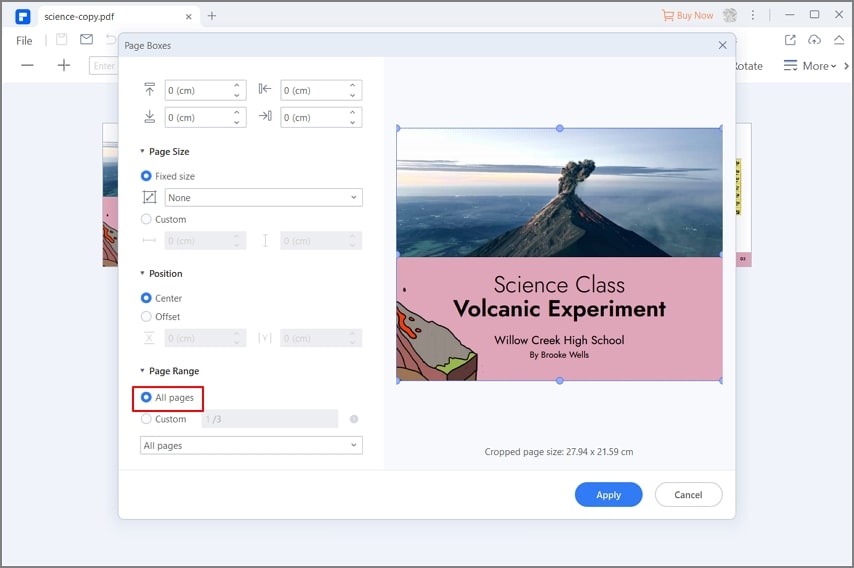
PDFelement's Page Boxes dialog (from Wondershare's resize-to-A4 guide): margins, Fixed size or Custom page size, Center or Offset position, the page range, and a preview of the new page size.
What PDFelement does well. PDFelement edits text and images directly on the page, converts to and from Word, Excel, PowerPoint, images, EPUB, HTML and Markdown, and runs OCR in about 30 languages. TechRadar found its OCR "tends to work better than most of the competing solutions on the market". Its Page Boxes dialog sets the CropBox, TrimBox, BleedBox and ArtBox and resizes pages to A4, Letter or a custom size across a page range, which is the tool you want when a print shop rejects a file. Version 13 adds Agreement Compare, which shows two versions of a contract side by side with the changes highlighted, an AI risk review for contract clauses, and Spaces for asking questions across a set of files.
Where PDFelement falls short. The perpetual license is the weak spot. It's sold under a version 11 name while the program is at version 13, and on Trustpilot the most common complaint comes from perpetual owners who were pushed to pay again after a major release. AI features are metered, and TechRadar lists "AI tools need additional subscription" among its reasons to avoid it, along with "occasionally slow".
What we like
- Page Boxes for print sizes, bleed and trim
- Agreement Compare and contract tools
- 14-day trial
- Mac, iOS and Android apps in the same family
- Strong ratings: 4.6 on Trustpilot from over 3,000 reviews
Watch out for
- Perpetual license tied to a version, with upgrade prompts
- Upselling inside the app, according to reviewers
- AI use is metered
- Needs 2.5 GB of disk space
What users say about PDFelement
Trustpilot rates PDFelement 4.6 out of 5 from 3,097 reviews (quotes read through a summarizing tool). MrBill_NC: "Excellent product, easy to use, much cheaper than Adobe for what you pay." Chris Young, on the other side: "Never buy the perpetual license, they do not honour it."
TechRadar gave it 4 out of 5 and called it "a PDF editor without any fancy bells and whistles, and it does its core job fine."
Download PDFelement Free TrialBuy Wondershare PDFelement
SwifDoo PDF
SwifDoo PDF is a lighter Windows PDF editor with a word-processor layout, a small footprint and a perpetual plan that includes every future update.
- Price: $129.00 one-time, 1 PC, lifetime updates
- Runs on: Windows 7, 8, 10 and 11 (Mac, iOS and Android apps sold separately)
- Best for: Windows users who want to pay once and never pay for upgrades, and anyone who works with CAD drawings
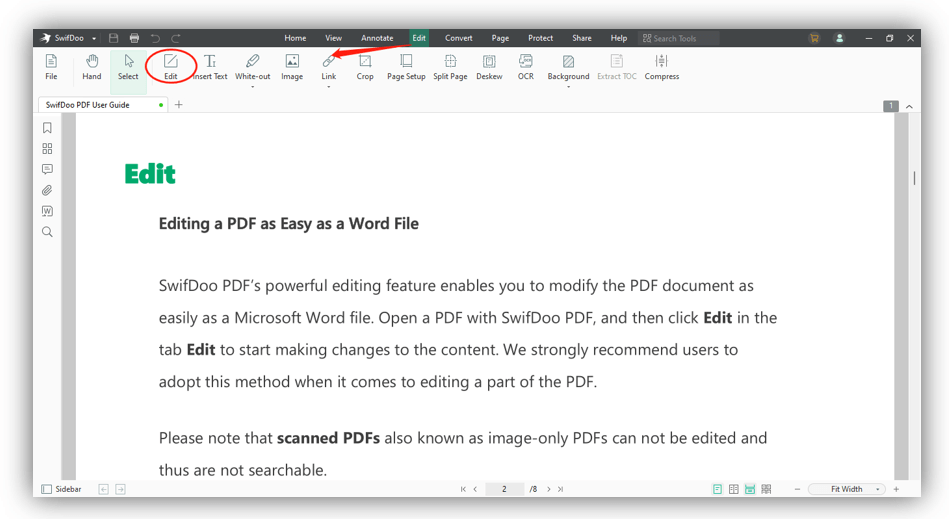
The Edit tab in SwifDoo PDF (from SwifDoo's user guide): Edit, Insert Text, White-out, Image, Link, Crop, Page Setup, Split Page, Deskew, OCR, Background and Compress above an open document.
What SwifDoo PDF does well. SwifDoo PDF covers the everyday jobs with less clutter: click-to-edit text and images, conversion to Word, Excel, PowerPoint, images, HTML, EPUB, PDF/A, Markdown and CSV, OCR with deskew for crooked scans, and batch tools that convert, merge, compress, print and encrypt whole folders. It also converts PDFs to and from DWG and DXF drawings, which PDFelement doesn't list. Page Setup changes the paper size to a standard or custom size, and Crop trims pages by exact margins across a page range. PCWorld gave it 4 out of 5 and called it "a full-featured, low-priced Acrobat alternative that should serve most users well."
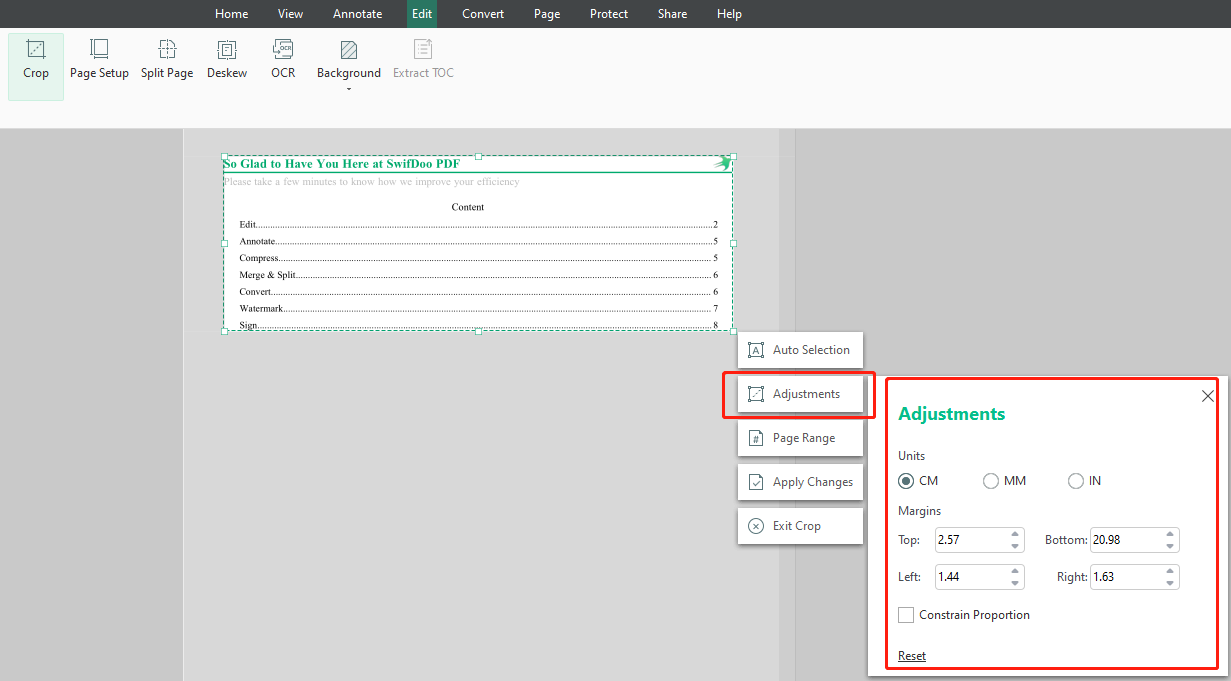
Cropping in SwifDoo PDF (from SwifDoo's guide): the crop box on the page, the Auto Selection, Adjustments, Page Range and Apply Changes buttons, and margins set in centimeters.
Where SwifDoo PDF falls short. SwifDoo licenses are tied to a SwifDoo account rather than a key, and perpetual owners on Trustpilot complain about being asked to sign in again regularly. Its company rating there is a middling 3.3 from 80 reviews, with complaints about files that open in Acrobat but not in SwifDoo and slow help with activation. The AI assistant isn't included in the perpetual plan, refunds are given only for bugs SwifDoo can't fix, and there's no bleed, trim or art box editing for print work.
What we like
- Lifetime updates in the one-time price
- PDF to and from DWG/DXF
- Small: 150 MB of disk space
- Clean, tabbed interface that's quick to learn
- Every feature works during the trial
Watch out for
- Account sign-ins, even on the perpetual plan
- Only 7 days of trial
- Refunds only for unfixed bugs
- AI assistant sold separately
- No print-production page boxes
What users say about SwifDoo PDF
Trustpilot rates SwifDoo 3.3 out of 5 from 80 reviews (quotes read through a summarizing tool). Jim Stoddart: "It's a reliable and easy to use application and I've never encountered a pdf it could not handle." Dan Gomer: "I dislike having to re-log into the perpetual version of this program on a somewhat frequent basis."
On Product Hunt it rates 4.9 out of 5 from 67 reviews, where Babar Khi notes that "The free version applies watermarks, which can be frustrating for casual users."
Download SwifDoo PDF Free TrialBuy SwifDoo PDF
Editing and Conversion
Tie for everyday work, with a different specialty each. Wondershare PDFelement and SwifDoo PDF both edit text and images in place, convert to and from the Office formats, images, HTML and EPUB, and batch-convert folders of files. PDFelement goes further with contract tools (Agreement Compare and an AI risk review). SwifDoo is the only one of the two that converts PDFs to and from DWG and DXF, which matters if you trade drawings with architects or engineers.
Page Size, Cropping and Print Files
PDFelement wins for print. Both programs crop pages by exact margins over a page range and change the paper size to A4, Letter or a custom size. Only Wondershare PDFelement sets the separate TrimBox, BleedBox and ArtBox that printers use to know where the page is cut and how far the artwork should extend. If a print shop has asked you for bleed or trim settings, PDFelement handles it. SwifDoo PDF is fine for turning a Letter report into A4 or trimming scanner margins. For full prepress work, such as preflight checks, neither replaces a dedicated print-production tool.
OCR for Scanned Documents
PDFelement has the edge on evidence. Both read scanned pages and turn them into searchable or editable text. PDFelement supports about 30 OCR languages and gets specific praise from TechRadar. SwifDoo PDF adds a deskew tool for crooked scans and lets you choose between three output types, but two Product Hunt reviewers say its OCR struggles with complex layouts and handwriting. Remember that PDFelement's trial only previews OCR results, while SwifDoo's 7-day trial runs OCR fully, so SwifDoo is easier to test on your own scans.
Price and Licensing
SwifDoo PDF wins on long-term cost. The two perpetual licenses cost almost the same, $129.99 for PDFelement and $129.00 for SwifDoo at checkout on October 19, 2026. The difference is what you get later. SwifDoo's perpetual plan includes lifetime updates. PDFelement's is tied to a version, so a future major release will likely mean paying again, and that's the most common complaint in its reviews. SwifDoo's own catch is the account sign-in, which some owners find annoying.
Refunds differ too. Wondershare accepts refund requests up to 30 days from payment for most products bought directly, under the conditions in its refund policy. SwifDoo refunds a perpetual license only when a bug reported in the first 30 days can't be fixed within 14 business days, and not because the software "is not what I need".
Free trial length (days)
Wondershare PDFelement (with limits on OCR, combine and batch)14
SwifDoo PDF (every feature)7
From each vendor's plan table, checked on October 19, 2026.
Reputation and Support
PDFelement has the stronger track record. Wondershare PDFelement's 4.6 rating comes from over 3,000 Trustpilot reviews, while SwifDoo's 3.3 comes from 80. Both companies' complaints are about licensing rather than the editing itself: upgrade pressure for PDFelement, sign-ins and slow activation help for SwifDoo. One SwifDoo reviewer did praise a fast reply on a Sunday morning, so support experiences vary.
Trustpilot rating (out of 5)
Wondershare PDFelement (3,097 reviews)4.6
SwifDoo PDF (80 reviews)3.3
Bar length is the rating out of 5. Ratings read on Trustpilot in October 2026.
Which Should You Choose?
| Your situation |
Pick |
Why |
| You send files to a print shop |
PDFelement |
Page Boxes sets trim, bleed and art boxes |
| You want to pay once and never again |
SwifDoo PDF |
Lifetime updates are included |
| You review contracts |
PDFelement |
Agreement Compare and AI risk review |
| You work with CAD drawings |
SwifDoo PDF |
PDF to and from DWG/DXF |
| You might switch to a Mac later |
PDFelement |
Its single-platform license can be Windows or Mac |
| An older PC with little disk space |
SwifDoo PDF |
150 MB against 2.5 GB |
| General office editing, no special needs |
PDFelement |
More tools, longer trial, better reviews |
Skip Wondershare PDFelement if upgrade prompts and paying again for a new major version would bother you. That's the complaint its reviews repeat most.
Skip SwifDoo PDF if you work offline for long periods (the license needs an account sign-in), need bleed and trim settings, or want the safety of a refund if it simply isn't a good fit.
What commonly goes wrong
- Buying before testing. SwifDoo only refunds for unfixable bugs, and PDFelement's refunds have conditions. Run each trial on your own hardest PDFs first.
- Expecting OCR to edit a scan straight away. In both programs, a scanned page is a picture until you run OCR, and PDFelement's trial only previews the OCR result.
- Assuming "perpetual" means every future version. True for SwifDoo, not for PDFelement.
- Buying the wrong platform. Both perpetual plans cover one platform. A Windows license won't activate the Mac app.
- Counting on the AI. SwifDoo's AI assistant isn't part of its perpetual plan, and PDFelement meters its AI uses, so buy either one for the editor.
FAQs
Is SwifDoo PDF as good as Wondershare PDFelement?
SwifDoo PDF matches Wondershare PDFelement on everyday editing, conversion and signing, and costs the same. PDFelement has more advanced tools (Page Boxes, contract comparison), a longer trial and much better reviews, while SwifDoo includes lifetime updates and CAD conversion.
Which is cheaper, PDFelement or SwifDoo PDF?
SwifDoo PDF is cheaper over time. Both perpetual plans cost about $129, but SwifDoo's includes lifetime updates, while Wondershare PDFelement's is tied to a version and a new major release may cost extra.
Which PDF editor can change the page size of a PDF?
Both can. Wondershare PDFelement uses its Page Boxes dialog, and SwifDoo PDF uses Edit > Page Setup, each with standard sizes like A4 and custom sizes. Only PDFelement also sets the trim, bleed and art boxes.
Do PDFelement and SwifDoo PDF work offline?
Both edit files on your PC, but both need the internet for activation and AI features. SwifDoo PDF also ties the license to an account sign-in, and some owners report being asked to sign in again regularly.
Can I use one license on Windows and Mac?
Not with either perpetual plan. Wondershare PDFelement's single-platform license covers Windows or Mac, and SwifDoo PDF's covers one Windows PC. Both companies sell other plans for more devices.
Which has the better free trial?
Wondershare PDFelement's trial is longer (14 days) but limits OCR to a preview and combine and batch jobs to 3 files. SwifDoo PDF's trial is shorter (7 days) with every feature working, then drops to view-only with a watermark.
Is either one a replacement for Adobe Acrobat?
For most office work, yes. PCWorld called SwifDoo PDF "a full-featured, low-priced Acrobat alternative", and Trustpilot reviewers often describe Wondershare PDFelement as a cheaper Acrobat. Neither offers Acrobat's print preflight tools.
Conclusion
Our pick for most people is Wondershare PDFelement. For the same $129-ish price it has more tools, the Page Boxes dialog print work needs, contract comparison, a 14-day trial and a much stronger reputation. Buy it knowing the perpetual license covers the current major version, not every future one.
Pick SwifDoo PDF instead if you're Windows-only and want one payment to cover every future update, if you convert CAD drawings, or if your PC is short on disk space. Try it for 7 days first, because its refunds are strict.
Download PDFelement Free TrialBuy Wondershare PDFelementDownload SwifDoo PDF Free TrialBuy SwifDoo PDF