SwifDoo PDF: A Low-Cost Windows PDF Editor for Editing, Converting, Cropping and Signing
SwifDoo PDF is a Windows PDF editor that edits text and images in PDFs, converts them to and from Word, Excel, PowerPoint and CAD, reads scanned pages with OCR, crops pages and changes the page size, and signs and protects documents. The license sold here is the Perpetual Plan for 1 PC at $129.00, a one-time payment with lifetime updates, and you can try every feature free for 7 days.
It's aimed at people who need to fix, convert or tidy PDFs every week but don't want to pay for Adobe Acrobat year after year: office staff, freelancers, students and small businesses.
Quick facts
- Current version: 2.0.7.7 for Windows
- Developer: SwifDoo (Chengdu Lightspeed Gravity Technology Co., Ltd.)
- Runs on: Windows 11, 10, 8 and 7. Mac, iOS and Android apps are sold separately.
- Price: $129.00, one-time, for 1 PC, with lifetime updates. The AI assistant isn't included in the perpetual plan.
- Free trial: 7 days with every feature. After that the free version only views PDFs and adds a trial watermark.
- Refunds: for a perpetual license, if a bug reported in the first 30 days can't be fixed within 14 business days. No refunds because the software "is not what I need".
- Download: 32.3 MB installer
- What we checked: the installer we downloaded from swifdoo.com on October 19, 2026 is version 2.0.7.7 (32.3 MB), digitally signed by Chengdu Lightspeed Gravity Technology. The order page showed "SwifDoo PDF Perpetual (1 PC)" at $129.00 on October 19, 2026, with no discount line. We didn't install it or test the features ourselves.
Before you buy
SwifDoo PDF ties your license to a SwifDoo account, not a license key: you sign in to use the paid features. Several Trustpilot reviewers who own the perpetual version say they have to sign in again every so often, which matters if you work offline for long stretches. The perpetual plan covers one Windows PC, and the AI assistant (chat, summaries, translation of whole documents) is a separate purchase. Use the 7-day trial on your own files before you pay, because SwifDoo only refunds for bugs it can't fix.
Download Free TrialBuy Now
Overview
SwifDoo PDF looks like a word processor. Tabs across the top (Home, View, Annotate, Edit, Convert, Page, Protect, Share and Help) each switch the toolbar underneath, so the editing tools appear when you click Edit and the page tools when you click Page. Documents open in tabs, a sidebar on the left holds thumbnails, bookmarks, comments and attachments, and a search box finds any tool by name. The welcome screen puts the common jobs one click away: Edit PDF, PDF to Word, PDF to Image, Merge PDF, Split PDF and Compress PDF.
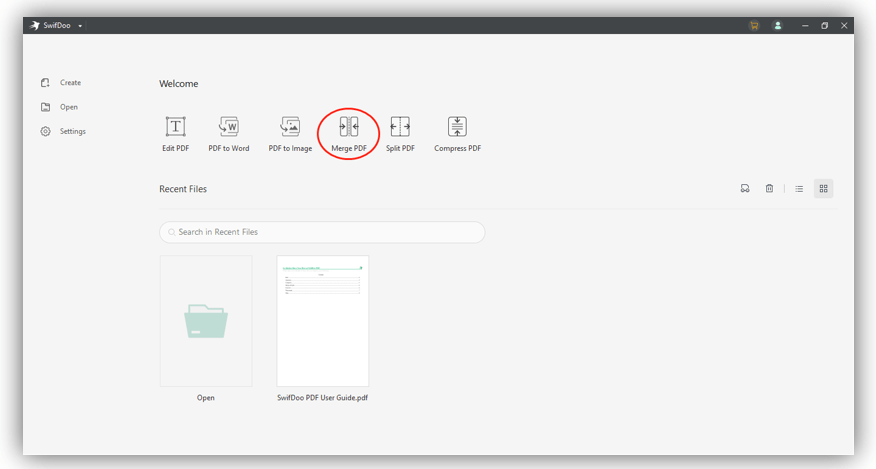
The SwifDoo PDF welcome screen, from SwifDoo's user guide: shortcuts for the most common jobs, with Merge PDF circled, and the recent files list below.
Features
Edit text, images and links on the page
SwifDoo PDF lets you click into a PDF's text and change it the way you would in Word, insert new text and text boxes, add, replace and adjust images, and add links to other pages, files or websites. White-out covers text you want gone, and you can add or remove page backgrounds, watermarks, headers, footers and page numbers. Scanned, image-only PDFs can't be edited until you run OCR on them.
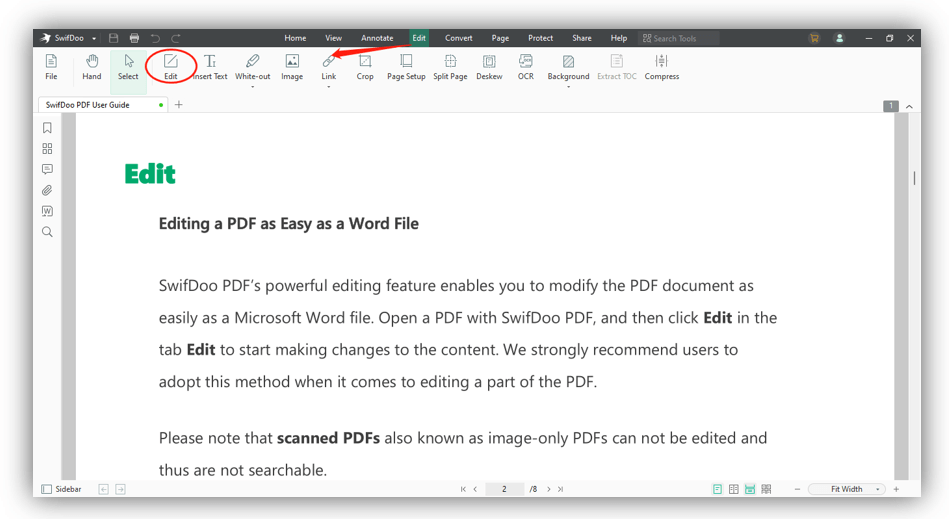
The Edit tab in SwifDoo PDF, from SwifDoo's user guide: Edit, Insert Text, White-out, Image, Link, Crop, Page Setup, Split Page, Deskew, OCR and Background tools above an open PDF.
Change the page size or crop the pages
SwifDoo PDF has two ways to resize pages. Edit > Page Setup changes the paper size to a standard size such as A4, A5 or B2, or to a custom width and height, and can change the orientation, for all pages or a page range. Edit > Crop outlines the visible page area in a box you drag, or trims it automatically with Auto Selection. Adjustments sets exact top, bottom, left and right margins in centimeters, millimeters or inches, and Page Range applies the crop to several pages at once. This is handy for trimming scanner margins, turning a Letter document into A4, or cutting a slide down to its content. It doesn't edit the separate print boxes (bleed, trim and art box) that prepress tools work with.
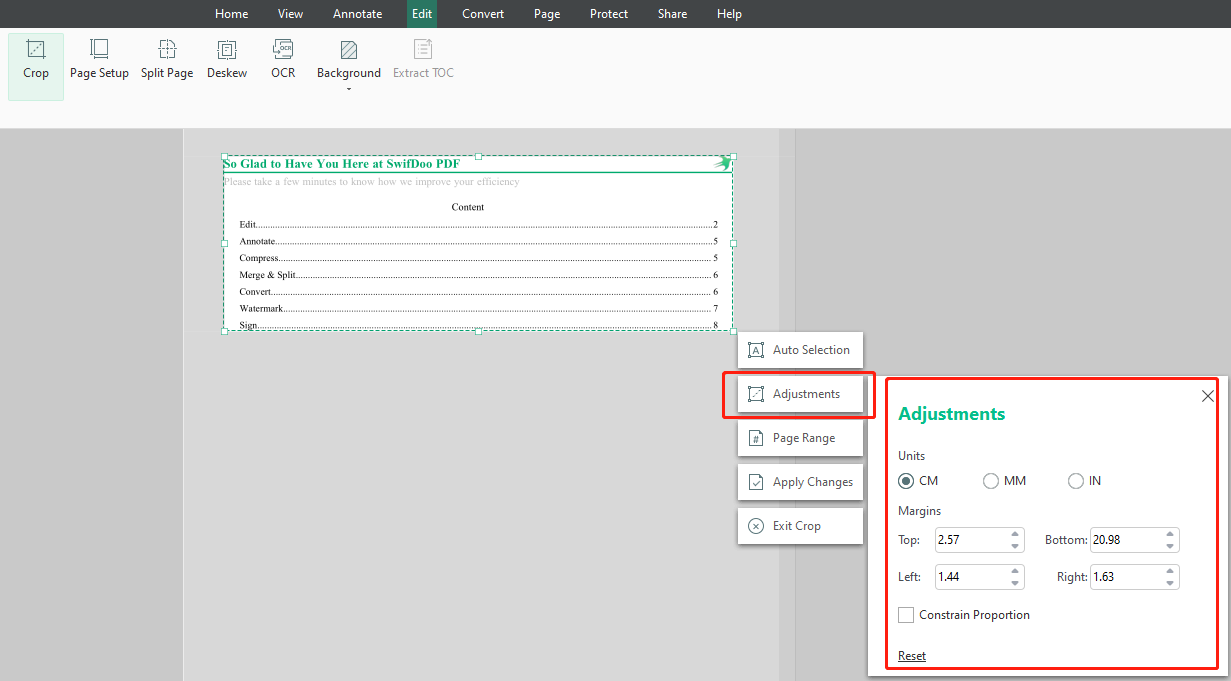
Cropping a page in SwifDoo PDF, from SwifDoo's guide: the crop box around the page, the Auto Selection, Adjustments, Page Range and Apply Changes buttons, and the Adjustments panel with top, bottom, left and right margins.
Convert PDFs to Office, image and CAD formats
SwifDoo PDF's converter turns PDFs into Word, Excel and PowerPoint files and back, and also handles JPG, PNG, BMP and TIF images, HTML, EPUB, TXT, XPS, PDF/A, Markdown and CSV. Less common for a tool at this price, it converts PDFs to and from DWG and DXF drawings. Batch mode converts a whole list of files in one run.
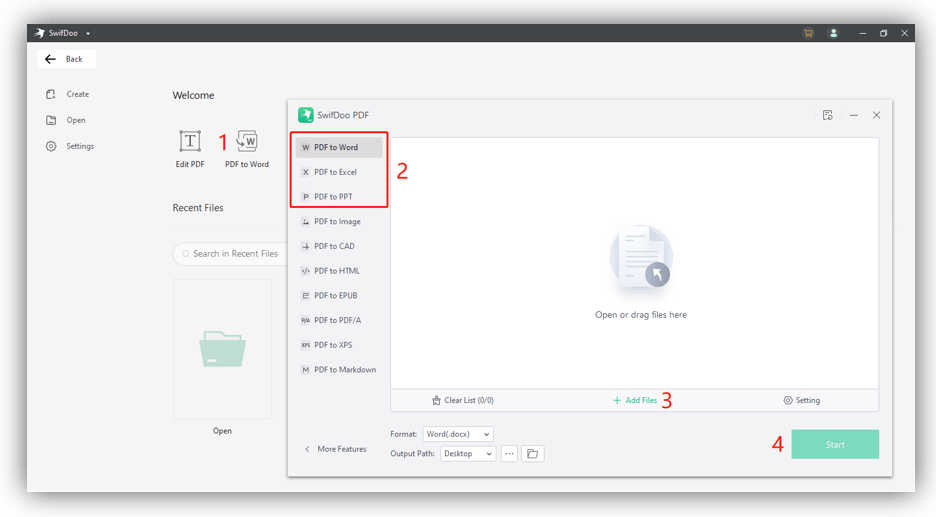
The SwifDoo PDF converter, from SwifDoo's user guide: the output formats on the left, a drop area for files, and the format and output folder settings at the bottom.
OCR for scanned documents
SwifDoo PDF's OCR reads the text in scanned and photographed pages. You pick the document language, then choose whether to get a document with text and images, text with the original formatting, or a searchable PDF that keeps the scan's look. It works on the current page, all pages or a range, and you can mark areas to skip. Deskew straightens crooked scans first.
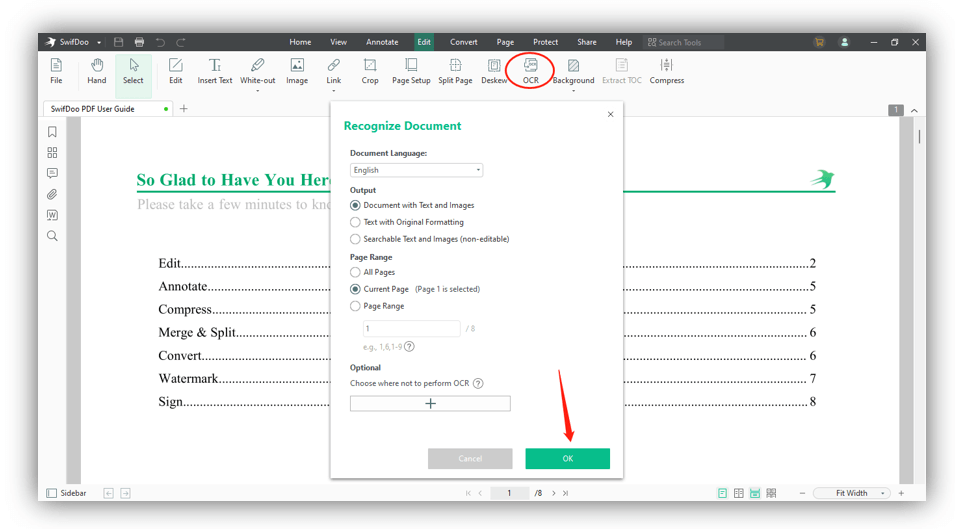
The OCR dialog in SwifDoo PDF, from SwifDoo's user guide: document language, three output types, the page range and an optional area to skip.
Organize, compress and batch-process
SwifDoo PDF merges files and images into one PDF, splits a PDF in several ways, and inserts, replaces, reorders, extracts, rotates and deletes pages. Compression lets you choose the level and image quality. The batch tools convert, merge, print, flatten, compress and encrypt many files at once, which saves real time when you have a folder of invoices or reports to process.
Annotate, fill forms, sign and protect
SwifDoo PDF has highlighters, underline and strikethrough, shapes, arrows, sticky notes, stamps, text boxes and attachments, plus a ruler and a measure tool. It recognizes and fills PDF forms (added in May 2026). You can sign with typed, drawn or image signatures, or with a digital signature, and protect files with an open password and a permissions password that blocks copying, editing or printing.
AI assistant (sold separately)
SwifDoo AI chats with a PDF and summarizes, translates, explains, proofreads and rewrites its text. It isn't part of the perpetual plan: SwifDoo sells it on top, and without the AI add-on you're limited to 3 files and 10 questions a month, 10 pages and 10 MB per file. Buy the perpetual license for the editor, not for the AI.
Benefits
The main reason to pick SwifDoo PDF is cost over time. One payment of $129 covers the editor on one PC with lifetime updates, where Acrobat-style subscriptions keep charging every year.
It's also quick to learn. The tabs and the welcome screen shortcuts put the common jobs in plain sight, and reviewers from PCWorld to Trustpilot single out how easy it is to find things.
Real-World Uses
- Resizing a document for printing. A US Letter report needs to go out on A4: Page Setup switches every page in one step.
- Cleaning up scans. Deskew a batch of crooked scanned receipts, crop off the scanner margins, then OCR them into a searchable PDF.
- Fixing a contract. Correct a typo and a date directly in the PDF, add a signature and password-protect it before emailing.
- Getting numbers out of a PDF. Convert a PDF bank statement or price list to Excel or CSV and work with the figures.
- Sharing drawings. Convert a PDF plan to DWG for a colleague who works in CAD, or a DWG to PDF for a client.
Who It's For, and Who Should Skip It
SwifDoo PDF suits Windows users who edit, convert or sign PDFs regularly and want a one-time purchase: home offices, freelancers, students, teachers and small businesses that can't justify an Acrobat subscription.
Skip it if you work offline for weeks at a time (the license needs an account sign-in), if you need one license for both a Windows PC and a Mac (the perpetual plan covers one PC), or if you do print production. SwifDoo crops pages and changes the paper size, but it doesn't set bleed, trim and art boxes or run preflight checks, so a prepress tool such as Enfocus PitStop Pro or Acrobat Pro is the better fit for print shops. If you only read and occasionally sign PDFs, a free reader is enough.
Usage Guide
- Install. Run the 32 MB installer and launch SwifDoo PDF. You can switch the language in the installer or later under Settings > General > Language.
- Sign in. Create a SwifDoo account or sign in. A purchase is linked to the account automatically, so there's no license code to type.
- Open a PDF. Click Open on the welcome screen or drag a file in. Each document opens in its own tab.
- Edit. Go to the Edit tab and click Edit, then click into the text you want to change. Insert Text, Image and Link add new content.
- Resize pages. Choose Edit > Page Setup for a standard or custom paper size, or Edit > Crop, then Adjustments and Page Range, and click Apply Changes.
- Convert. Click PDF to Word on the welcome screen (or the Convert tab), pick the output format, add files and click Start.
- Save. Save the PDF, or use Share to email it or upload it to Google Drive or Dropbox.
Where it falls short
- Account sign-ins. SwifDoo PDF checks your license through your account. Trustpilot reviewers who own the perpetual version complain about being asked to sign in again regularly, and one asks for an offline license key instead.
- Rough edges reported by users. One Trustpilot reviewer lists problems opening files that Acrobat handles and the lack of a "Print to PDF" printer driver. Another says the app asked for administrator rights at every Windows start. Another got blank sheets when converting a PDF to DWG in the desktop app.
- Support delays on activation. A perpetual 2-PC buyer on Trustpilot reports waiting for help activating the license, while another praises a fast Sunday reply, so experiences vary.
- Strict refunds. SwifDoo only refunds a perpetual license for a bug it can't fix within 14 business days of a report made in the first 30 days, so test before you pay.
- No print-production tools. There's no preflight, color separation or bleed/trim box editing.
What Users Say
PCWorld
PCWorld gave SwifDoo PDF 4 out of 5 in Michael Ansaldo's review, updated February 3, 2025. Its verdict: "Swifdoo PDF is a full-featured, low-priced Acrobat alternative that should serve most users well."
The reviewer liked the layout: "Swifdoo has a straightforward interface with nine tabs across the top. These are intuitively labeled according to function (Annotate, Edit, Convert, etc.) and each displays its own toolbar when selected." And in conclusion: "Without the complexity of many other high-priced apps, it allows users to jump right into its ample toolset and get to work."
PCWorld listed the pros as an "Intuitive tabbed interface", "Comprehensive PDF editing features" and "Affordable", and the cons as "Windows only" and "No mobile app". SwifDoo has since released Mac, iOS and Android apps, though they're separate from the Windows license.
Trustpilot: the praise
On Trustpilot, SwifDoo scores 3.3 out of 5 from 80 reviews, a mixed picture. These excerpts were read through a summarizer, so treat the wording as close but not guaranteed exact.
Jim Stoddart, 5 stars, March 2025, who renewed for two years: "It's a reliable and easy to use application and I've never encountered a pdf it could not handle."
Customer, 5 stars, April 2025: "Very happy with SwifDoo. Needed an alternative to brand X which is insanely expensive."
AGO, 4 stars, March 2025: "The functionalities are sometimes better than those of the competitors' much more expensive products." AGO adds that license code handling could be better.
Tony Jimenez, 5 stars, April 2025, after a license problem on two devices: "SwifDoo responded to my inquiry on a Sunday morning to resolve my issue!"
Robert Wasilewski, 3 stars, July 2025: "The product does everything I tried to include adding pages, editing text including adding, deleting and changing." The review takes stars off over concerns about the software's Chinese origin.
Trustpilot: the complaints
Dan Gomer, 3 stars, June 2026: "I dislike having to re-log into the perpetual version of this program on a somewhat frequent basis."
AZ Biker, 4 stars, November 2025, calls it a "Great PDF Editor" that does everything they need, but objects to having to sign in for the full features and would like an offline key.
Marc Y, 3 stars, July 2025: "Basic functionality is okay but I have a lot of issues, some are minor, others serious." The review lists problems with files that open in Acrobat, no Print to PDF driver, interface niggles and monthly sign-ins.
JFR, 1 star, April 2025: "The functionality of SwifDoo is mediocre, not worth the money."
Bruce G Kreeger, 3 stars, March 2025: "I have still not received assistance regarding the activation of my Perpetual two device purchase."
Product Hunt and the tech press
On Product Hunt, SwifDoo PDF rates 4.9 out of 5 from 67 reviews (read through a summarizer). Most are short and enthusiastic, such as Vijay's "SwifDoo is lightweight, fast, and incredibly user-friendly." The critical ones focus on the free version: Babar Khi notes that "The free version applies watermarks, which can be frustrating for casual users," and Andrea Burr that "some advanced features are locked behind a paid subscription". Two reviewers also say OCR struggles with complex layouts and handwriting.
SwifDoo's own review page quotes several tech sites, including Softpedia ("SwifDoo PDF is a smart program that lets you manipulate content in a variety of ways") and Windows Report ("SwifDoo will speed up your work and project efficiency, simplifying the process of making changes to PDF documents, as well as converting them into commonly-used MS Office formats"). These are excerpts the vendor picked, so they lean positive.
The pattern
People who like SwifDoo PDF like the price, the clean interface and that it handles everyday editing and conversion well. The complaints repeat too: account sign-ins on a perpetual license, occasional compatibility problems with unusual PDFs, and slow help with activation for some buyers. The editor reviews well. The licensing is where it loses stars.
Comparisons
SwifDoo PDF vs. Wondershare PDFelement
Both are mid-priced Acrobat alternatives with a one-time license at almost the same price ($129.00 for SwifDoo's 1-PC perpetual plan, $129.99 for PDFelement's single-platform perpetual plan). PDFelement adds a Page Boxes tool for page sizes, Mac and Windows versions on the same family of plans, and a better-known brand. SwifDoo adds DWG/DXF conversion, and its perpetual plan promises lifetime updates, where PDFelement's perpetual license is tied to a version. Both cover everyday editing, conversion, OCR and signing, so try both on your own files.
Editions and Pricing
SwifDoo sells the Windows editor on subscriptions and as a perpetual license. All plans include every editor feature, and the perpetual plans include lifetime updates. List prices from SwifDoo's pricing page:
| Plan |
List price |
Billing |
Devices |
| Monthly | $20 | Every month, renews automatically | 1 |
| Quarterly | $60 | Every 3 months, renews automatically | 1 |
| Yearly | $69 | Every year, renews automatically | 2 |
| 2-Year | $99 | Every 2 years, renews automatically | 2 |
| Perpetual (1 PC), sold here | $129 | One-time, lifetime updates | 1 PC |
| Perpetual (2-PC) | $159 | One-time, lifetime updates | 2 PCs |
SwifDoo often runs sales on its own store: on October 19, 2026 its pricing page showed the 1-PC perpetual plan at $96.75. The AI assistant is priced separately, and discounts for students, non-profits and education users are available on application.
FAQs
Does the SwifDoo PDF perpetual license include future updates?
Yes. SwifDoo says its perpetual 1-PC and 2-PC plans are one-time fees that include lifetime updates, so new versions of the Windows editor are covered.
Can I use SwifDoo PDF offline?
SwifDoo PDF edits your files locally, but the license is tied to your SwifDoo account, so you need to sign in to use the paid features. Owners report having to sign in again from time to time. The AI tools always need an internet connection.
Does the Windows license also work on a Mac?
No. The SwifDoo PDF perpetual plan sold here covers one Windows PC. SwifDoo PDF for Mac (macOS 10.13 or later) is a separate app with its own plans, and SwifDoo also sells cross-platform plans.
Can I move my SwifDoo PDF license to a new computer?
SwifDoo PDF licenses are linked to your SwifDoo account rather than a key, so you sign in with the same account on the new PC. The 1-PC plan covers one device, so if the old PC is still counted, SwifDoo support can help.
What happens when the SwifDoo PDF trial ends?
After 7 days, SwifDoo PDF drops to its free version: you can still view PDFs and take snapshots, but files get a trial watermark and the editing, conversion and OCR tools need a paid plan.
Can I get a refund if SwifDoo PDF isn't right for me?
Not just for changing your mind. SwifDoo refunds a perpetual license only when you report a bug within 30 days and support can't fix it within 14 business days. It also refunds a duplicate purchase in full.
Does SwifDoo PDF upload my documents?
SwifDoo says the Windows app processes your files locally on your computer and that it doesn't store your information, data or files. The AI assistant and SwifDoo Cloud, on the other hand, work online.
System Requirements
- Operating system: Windows 11, 10, 8 or 7
- Processor: 1 GHz or faster
- Memory: 1 GB RAM
- Disk space: 150 MB
- Internet: to sign in to your account and for the AI tools
Conclusion
SwifDoo PDF is worth $129 if you're a Windows user who edits, converts, crops or signs PDFs every week and wants to stop paying for a subscription. The one reason to buy it is that it handles the everyday PDF jobs well, with lifetime updates, for one payment. The main reason not to is the licensing: it needs an account sign-in, and owners complain about being logged out. Print shops and Mac users should look elsewhere. Run the 7-day trial on the PDFs you actually work with, check that sign-ins don't bother you, then buy.
Download Free TrialBuy Now