Wondershare Dr.Fone - Full Toolkit for Windows: Phone Recovery, Repair, Backup and Transfer in One Program
Wondershare Dr.Fone - Full Toolkit is a $99.95-a-year Windows program that connects to an iPhone, iPad or Android phone and handles the jobs a phone owner usually needs a separate app for: getting back deleted photos and chats, fixing a phone stuck on the logo, moving everything to a new phone, backing up, and wiping an old phone before selling it. It's for people who would rather fix a phone problem themselves from a PC than book a repair shop.
The typical moment you'd want it: a phone update failed overnight and the iPhone shows only the Apple logo, or you deleted a WhatsApp thread you now need. Dr.Fone puts each of these jobs behind its own button in one window, and the free download lets you see whether it detects your phone and what it can find before you pay.
Quick facts
- Developer: Wondershare
- Platform: Windows 11, 10, 8.1, 8 and 7 (a separate Mac edition is sold with its own license)
- Phones: iPhone, iPad and iPod touch, and Android 5.0 or later; Wondershare lists support for iOS 26 and Android 16
- Price: $99.95 per year, $115.95 perpetual, or $79.95 for one month (5 mobile devices)
- Free version: backups, a preview of recoverable data and a limited number of transfers
- Refunds: 7 days from payment, for technical faults only
- What we checked: the Windows web installer drfone_full3360.exe (2.4 MB), downloaded from Wondershare on November 21, 2026, reports Dr.Fone 14.0.0; the plan prices above were read from Wondershare's Dr.Fone pricing page on November 21, 2026. We didn't run a recovery or a repair on a real phone.
Before you buy
Wondershare's refund window for the Dr.Fone series is only 7 days, and its refund policy excludes change of mind: a refund needs a technical fault that support couldn't fix. So run the free version first. Connect your phone, let Dr.Fone scan it, and check that the photos or messages you want show up in the preview. The annual and monthly plans renew automatically; you can switch renewal off in your Wondershare account.
Download Free TrialBuy Full ToolkitBuy Dr.Fone Basic
Overview
Dr.Fone is a family of phone tools that Wondershare installs as one program. Wondershare's older phone utilities, such as MobileGo, TunesGo and SafeEraser, are no longer sold, and Dr.Fone's phone manager and Data Eraser cover the same jobs. One Windows installer contains everything; the license you buy decides which modules work.
The Full Toolkit license opens all of them: Dr.Fone Basic (phone manager, backup and restore, screen mirroring), Data Recovery, System Repair, WhatsApp Transfer, Phone Transfer, Data Eraser, the iOS Password Manager, Virtual Location and Screen Unlock. If you only need one job done, each module is also sold on its own, usually for $30 to $60 a year, which can be the cheaper buy.
Features
Get back deleted photos, messages and WhatsApp chats
Dr.Fone's Data Recovery module scans an iPhone directly, or an iTunes or iCloud backup, for deleted photos, videos, contacts, messages and WhatsApp chats, and shows what it finds before you pay. On Android it scans the phone without root, Google Drive backups, and some Samsung models with a black or broken screen. It can also bring back WhatsApp "View Once" media.
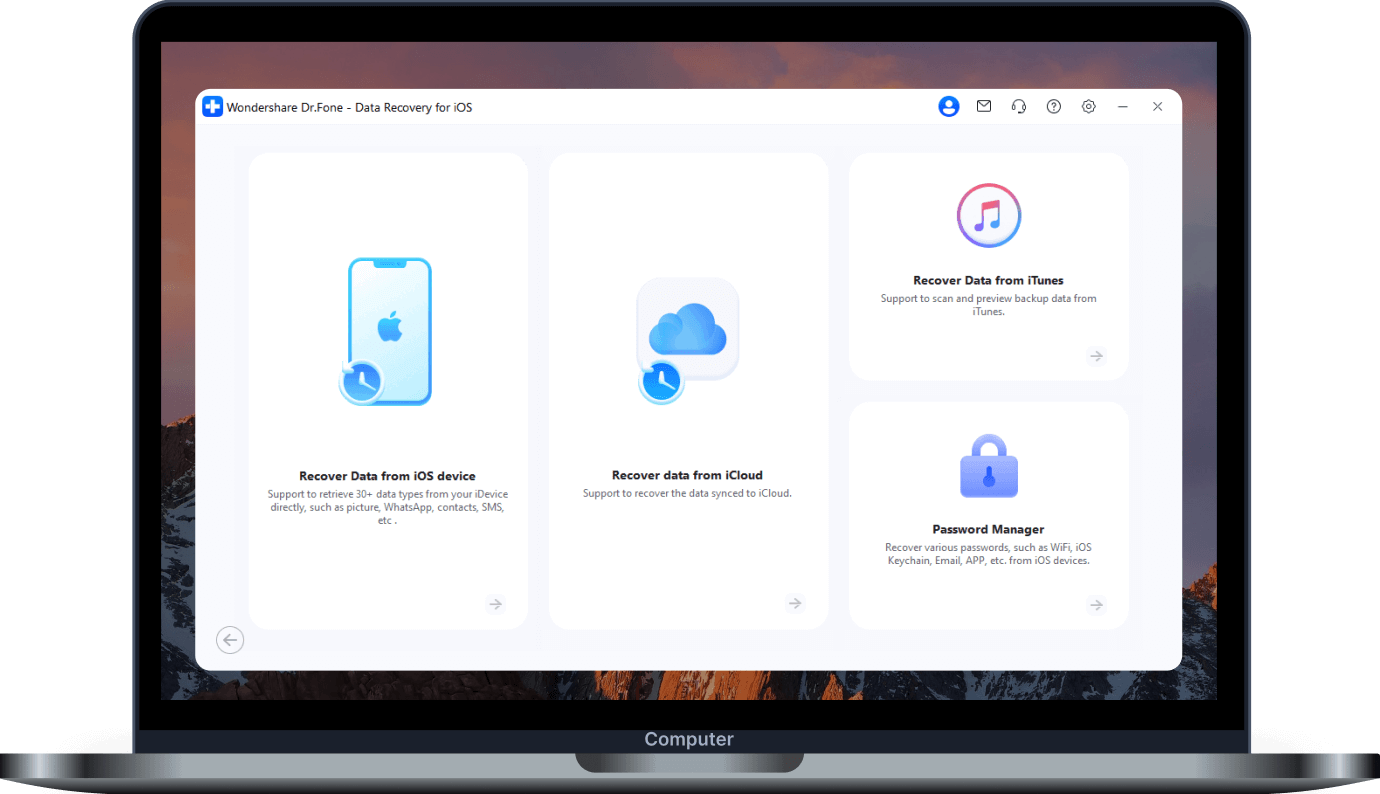
Data Recovery for iOS: recover from the iPhone itself, from iCloud, from iTunes and other backups, or recover WhatsApp and WhatsApp Business data.
Fix a phone stuck on the logo, in a boot loop or after a failed update
Dr.Fone System Repair reinstalls the phone's firmware to clear problems such as an iPhone stuck on the Apple logo, a recovery-mode loop, a black screen or iTunes errors 4013 and 1110. It can also move an iPhone between iOS versions, and entering or leaving Recovery Mode is free. The Android side handles boot loops, black screens and failed OTA updates, mainly on Samsung and other supported brands.
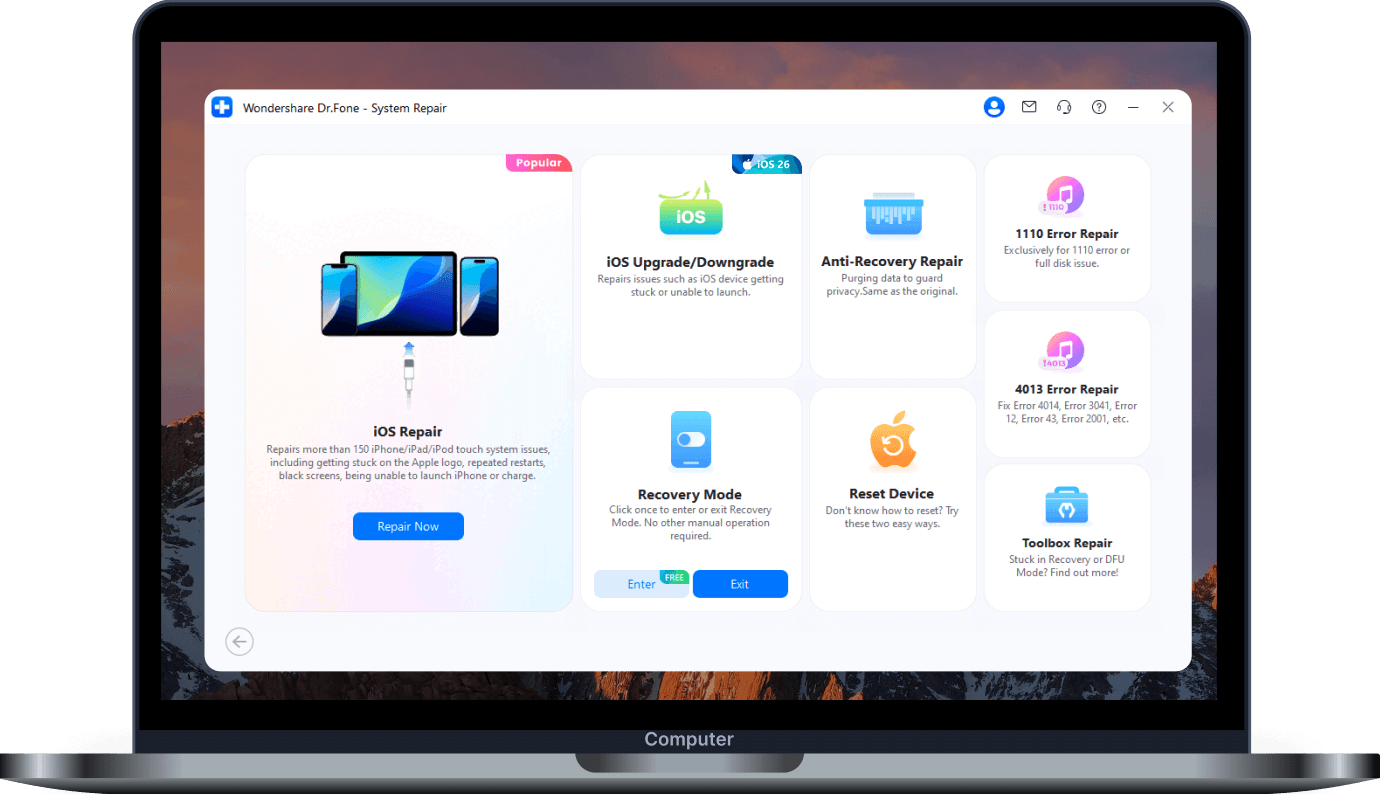
System Repair: iOS Repair, iOS Upgrade/Downgrade, Recovery Mode, Reset Device and fixes for errors 1110 and 4013.
Back up and manage the phone from your PC
Dr.Fone Basic backs up 24 types of data, over USB or Wi-Fi, and after the first run only copies what's new. You pick the data types (photos, messages, contacts, WhatsApp, LINE, Viber and so on) and restore them selectively to the same or another phone. The phone manager lets you browse and export photos, music, videos and messages, and screen mirroring shows the phone on your monitor with recording and screenshots.
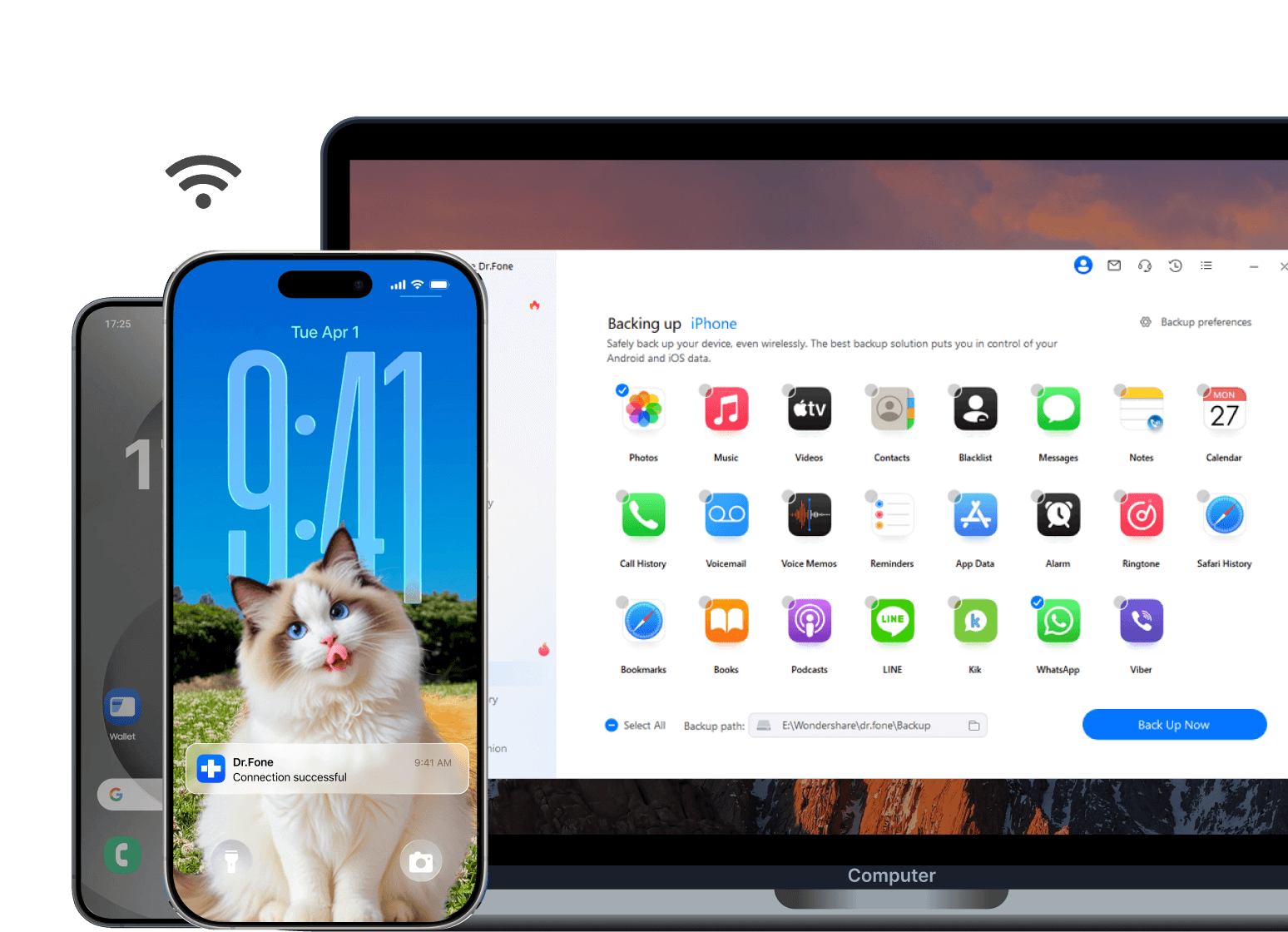
The backup screen: choose data types such as Photos, Messages, WhatsApp and Call History, set the backup folder, and click Back Up Now.
Move WhatsApp and everything else to a new phone
Dr.Fone WhatsApp Transfer moves chat history and attachments between iPhone and Android in either direction, and backs up WhatsApp, WhatsApp Business, LINE, Kik, Viber and WeChat to the PC. Phone Transfer copies contacts, messages, photos and other data from one phone to another in one pass, across iOS and Android.
Wipe a phone before you sell it, and the other modules
Dr.Fone Data Eraser permanently wipes a whole iOS or Android device, or only selected private data on an iPhone, so a buyer can't recover it. The Full Toolkit also includes the iOS Password Manager (shows saved Wi-Fi, app and website passwords), Virtual Location (sets the phone's GPS position) and a Screen Unlock module, which Wondershare sells for owners locked out of their own phone.
Benefits
- One program instead of five. Recovery, repair, transfer, backup and erasing share one window and one license, so you don't have to learn several vendors' tools in a stressful moment.
- You see results before paying. The scan and preview are free, which matters more than any feature list for data recovery.
- Your data stays on your PC. Wondershare says Dr.Fone processes phone data locally and doesn't upload it to the cloud.
- Works across iPhone and Android. Useful in a household with both, or when you switch platforms.
Real-World Uses
- Switching from Android to iPhone: WhatsApp Transfer carries years of chats across, a job where several reviewers say the phone makers' own tools failed them.
- A failed iOS update: the phone is stuck on the Apple logo; Dr.Fone System Repair reinstalls iOS and gets it starting again.
- Deleted holiday photos: scan the iPhone and its iCloud backup, preview what's recoverable, and pay only if your photos are there.
- Selling an old phone: back it up to the PC first, then run Data Eraser so the buyer gets an empty device.
Who It's For, and Who Should Skip It
Dr.Fone - Full Toolkit suits people who manage several phones, who switch between iPhone and Android, or who want one tool on hand for the next phone emergency. Families get good use from the 5-device license.
Skip the Full Toolkit if you have one specific job: a single module (for example Data Recovery for Android at $39.95 a year, or Phone Transfer at $29.95) costs much less. If you only want to move to a new phone, the free tools from Apple and Samsung, or Wondershare's own MobileTrans, may be enough. And Mac users need the separate Mac edition, since a Windows license doesn't activate on a Mac.
Usage Guide
- Download the Windows installer from the Download Center and run it. It's a small web installer that fetches the full program.
- Start Dr.Fone and connect your phone with a USB cable. On an iPhone, tap Trust; on Android, turn on USB debugging when Dr.Fone asks.
- Pick the tool from the toolbox: Data Recovery, System Repair, Phone Manager, WhatsApp Transfer and so on.
- For recovery, let the scan finish and check the preview. Buy a license only if what you need is listed.
- Enter the license code from the order e-mail to activate the module, then finish the recovery, repair or transfer.
Where it falls short
- Recovery isn't guaranteed. What Dr.Fone can find depends on the phone and on whether the deleted data has been overwritten, and a backup made before the deletion gives the best odds. Independent reviewers note occasional recovery errors.
- Some tools only fit some phones. Broken-phone recovery and parts of Android repair are limited to certain Samsung and other supported models. Mighty Gadget couldn't test System Repair on its non-Samsung phone.
- Cluttered. With a dozen modules, plus prompts to buy the ones you haven't licensed, the program can feel busy.
- Refund complaints. Several Trustpilot reviewers say refunds were refused or slow, which fits the 7-day, technical-fault-only policy.
What Users Say
Trustpilot (4.3 out of 5, 5,156 reviews)
69% of reviews give five stars and 19% give one star, so opinions split sharply. On the positive side:
- Crash, "Brought my phone back from the dead…" (November 20, 2026): "Brought my phone back from the dead when Apple Devices couldn't"
- pomdog, "really simple to use" (November 14, 2026): "really simple to use, a little more expensive than some others but it automates almost everything"
- taylor (November 18, 2026): "I can connect my phone directly to my computer with a USB cable and keep my data stored locally"
And the one-star side:
- abdulmasimgmail.com, "Third class software as it doesn't work…" (November 13, 2026): "Third class software as it doesn't work a littlebit. It's purely nonsense one."
- Caesar Cardo, "This company is very scammy" (October 29, 2026): "This company is very scammy. Be very careful with buying their products." The review describes a refused refund and another month charged after a cancellation problem.
- Anu Gupta (November 18, 2026): "Fraud company and application,not work and all positive reviews and star is fake so please don't trust anyone"
Independent reviews
Mighty Gadget (James Smythe, 75%): "Wondershare Dr.Fone has a useful range of tools for both Android and Apple iOS devices." The reviewer named screen mirroring as the favorite feature, but noted that "Some of the utilities are only useful for certain phones (mainly Samsung and Apple)".
TheSweetBits (updated November 18, 2025) tested on a OnePlus 13R and an iPhone: "Dr.Fone is a robust toolkit for anyone looking to manage their mobile devices effectively." It praised the "Easy-to-use interface with a modern design" and listed "Occasional errors in data recovery" as a con, rating WhatsApp Transfer highest and Android data recovery lowest.
On Wondershare's site
"For heavy WhatsApp - It's Much Better than Samsung Switch. I was frustrated using the SAMSUNG SWITCH to transfer WhatsApp from iPhone to Android. The Samsung Switch failed no matter what I did. My data was around 41GB. This DrFone did it in mere two attempts."
"The software was invaluable and enabled me to recover precious data from a phone that I thought was beyond repair, including recently taken photos that hadn't been backed up."
The pattern: people praise WhatsApp transfers between platforms, iPhone repairs after failed updates, and the ease of use. The complaints are about tools that didn't work on a particular phone and about refunds afterwards. That's the strongest argument for testing with the free version before paying.
Editions and Pricing
| License | Annual | Perpetual | Monthly | What it includes |
|---|
| Full Toolkit | $99.95 | $115.95 | $79.95 | Every module, 5 mobile devices |
| Dr.Fone Basic | $39.95 | $49.95 | $29.95 | Phone manager, backup and restore, screen mirroring; 5 devices, 2 PCs |
Prices are from Wondershare's pricing page on November 21, 2026, with struck-through list prices of $139.95 (Full Toolkit annual) and $55.95 (Basic annual) shown next to them. Single modules are sold too, for example Data Recovery (Android) at $39.95 a year, Data Recovery (iOS) at $59.95, System Repair (iOS) at $49.95, WhatsApp Transfer at $26.95, Phone Transfer at $29.95 and Data Eraser at $14.95. The perpetual license covers updates within its major version; a move to the next major version may cost extra. Team and business licenses for more devices are sold separately.
Buy Full ToolkitBuy Dr.Fone Basic
FAQs
Is Dr.Fone free?
Dr.Fone is free to download, and some tools stay free: phone backups with essential features, a preview of recoverable data, transfer of a limited number of items, a device check, and entering or leaving iOS Recovery Mode. Recovering the data, repairing the system and full transfers need a paid license.
Can I use my Dr.Fone Windows license on a Mac?
No. Dr.Fone licenses are tied to the platform, so a Windows license only activates on Windows PCs. Mac users need Dr.Fone (Mac) - Full Toolkit, which costs the same.
How many phones and computers does one Dr.Fone license cover?
The Full Toolkit license on the pricing page covers 5 mobile devices. Business licenses cover 6-10, 11-15 or more devices.
Can Dr.Fone recover data from an iPhone without a backup?
Dr.Fone can scan an iPhone directly, with no backup, for photos, WhatsApp chats, contacts, messages and more than 30 data types. How much it finds depends on the phone, so check the free preview; an iCloud or iTunes backup made before the deletion is another source it can read.
Does Dr.Fone support iOS 26 and Android 16?
Wondershare's tech specs list support for iOS 26 and Android 16, and for all iPhones, iPads, iPod touch models and Android devices from Android 5.0. Some features only work on specific models and OS versions, and Wondershare publishes per-model lists for them.
Can I get a refund for Dr.Fone?
Wondershare accepts refund requests for the Dr.Fone series within 7 days of payment, for cases such as a critical technical problem support couldn't solve in 7 days or a duplicate purchase. Change of mind isn't covered. EU residents also have a 14-day withdrawal right.
Does Dr.Fone send my phone data to Wondershare?
Wondershare says Dr.Fone scans and displays phone data locally on your computer and doesn't upload it to the cloud. Recovering from an iCloud or Google Drive backup does mean signing in to that account from the program.
System Requirements
- Windows 11, 10, 8.1, 8 or 7
- 1 GHz or faster Intel or AMD processor
- 1 GB of free RAM (2 GB or more recommended)
- 7 GB of free disk space
- iPhone, iPad or iPod touch, or Android 5.0 or later, plus a USB cable
Conclusion
Dr.Fone - Full Toolkit is worth $99.95 a year if you look after several phones, move between iPhone and Android, or want one tool ready for the next failed update or deleted chat. The one reason to buy it is breadth: recovery, repair, WhatsApp transfer, backup and erasing in one program that most people can use without a guide. The main reason not to is the short, strict refund policy combined with uneven results on some phones. If you need just one job done, buy that module alone, and in every case run the free scan before you pay.
Download Free TrialBuy Full ToolkitBuy Dr.Fone Basic