Wondershare PDFelement for Mac: Edit, Convert, OCR and Sign PDFs on macOS
Wondershare PDFelement for Mac is a full PDF editor for macOS: it edits text and images in place, converts PDFs to and from Office formats, runs OCR on scans in 27 languages, builds and fills forms, collects e-signatures, and adds AI tools for summarizing, translating and reviewing contracts. It runs on Intel and Apple silicon Macs with macOS 11 or later, and the Mac Yearly Plan costs $79.99 (a perpetual license is $129.99).
macOS Preview handles highlighting and signing, but it can't change the wording of a paragraph, turn a scanned contract into searchable text, or export a PDF to an editable Word file. That's the gap PDFelement fills, at a fraction of Adobe Acrobat Pro's subscription cost.
Quick facts
- Version: PDFelement 13 for Mac (13.0.0 released September 3, 2026; the Mac App Store build is 13.0.6)
- Developer: Wondershare
- Platforms: macOS 11 Big Sur to macOS 26, Intel and Apple silicon (M1 to M4). Windows, iPhone/iPad, Android and web versions exist
- Main tools: text and image editing, OCR in 27 languages, conversion, forms, e-signatures, redaction, compression, comparison, AI assistant
- Price: Mac Yearly $79.99, 2-Year $109.99, Perpetual $129.99; Cross-platform versions $10 more
- Free trial: saved files carry a watermark; OCR results are preview-only; batch and combine are limited to 3 files within 20 MB; many paid tools run for 7 days
- Guarantee: 30-day money-back guarantee, approved when the request meets Wondershare's refund policy
- What we checked: the Mac version history (13.0.0, September 3, 2026), the 3.3 MB Mac downloader on Wondershare's server, and all six Mac plan prices on the order page on November 21, 2026. We didn't test OCR accuracy ourselves.
Before you buy
The Yearly and 2-Year plans renew automatically; turn renewal off in your Wondershare account if you don't want that. The Perpetual license covers PDFelement 13 only: the next major version is a paid upgrade. The heavy AI features run on a separate allowance of AI uses (paid plans include 50 trial uses; more is a separate AI subscription), so don't buy PDFelement expecting unlimited AI. Each Buy button below orders that exact plan.
Download Free TrialBuy Yearly PlanBuy 2-Year PlanBuy Perpetual License
Overview
PDFelement for Mac opens to a home screen of Quick Tools (Batch Convert, Combine Files, Batch Split, Compress, Edit, Translate, Request eSign) and your recent files. Open a document and a left-hand rail switches between Comment, Edit, View, Convert, Organize, Tools, Form, Protect and AI, each with its own toolbar across the top. The AI assistant, named Lumi, sits in a panel on the right.
Version 13 added AI Spaces, which pulls PDFs, slides, Word files, images and YouTube links into one place to ask questions across them and generate flashcards, quizzes, mind maps or reports, and Agreement Copilot, which flags risky clauses, compares two versions of a contract and translates side by side. Version 12 brought a redesigned interface, smart redaction of sensitive data, batch signing and batch cropping.
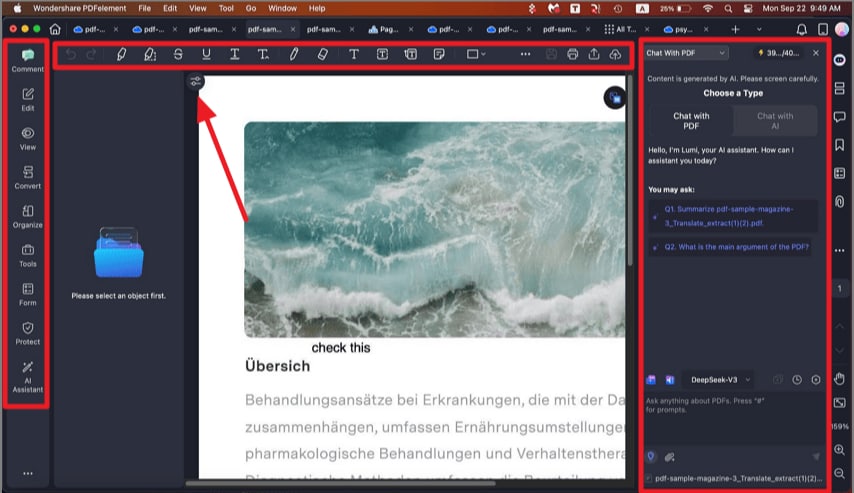
The main window on macOS: the tool rail on the left, the Comment toolbar on top, and Chat with PDF on the right.
Features
Edit text and images like a document
PDFelement for Mac lets you click into a paragraph and retype it, change the font, size, color, alignment and line spacing, and move or replace images by drag and drop. You can add links (including links to a page in the same file), audio, video, watermarks and backgrounds.
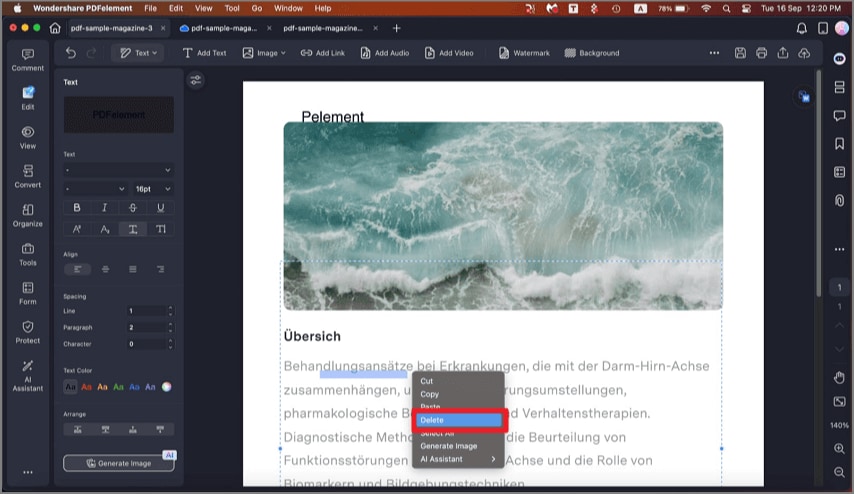
Edit mode: a text block selected, the font and spacing panel on the left, and a right-click menu with an AI Assistant entry.
OCR for scanned documents
PDFelement for Mac's OCR turns scanned pages into searchable, editable text in 27 languages, with automatic deskewing and batch OCR for many files at once. The OCR module is installed separately from inside the app the first time you use it.
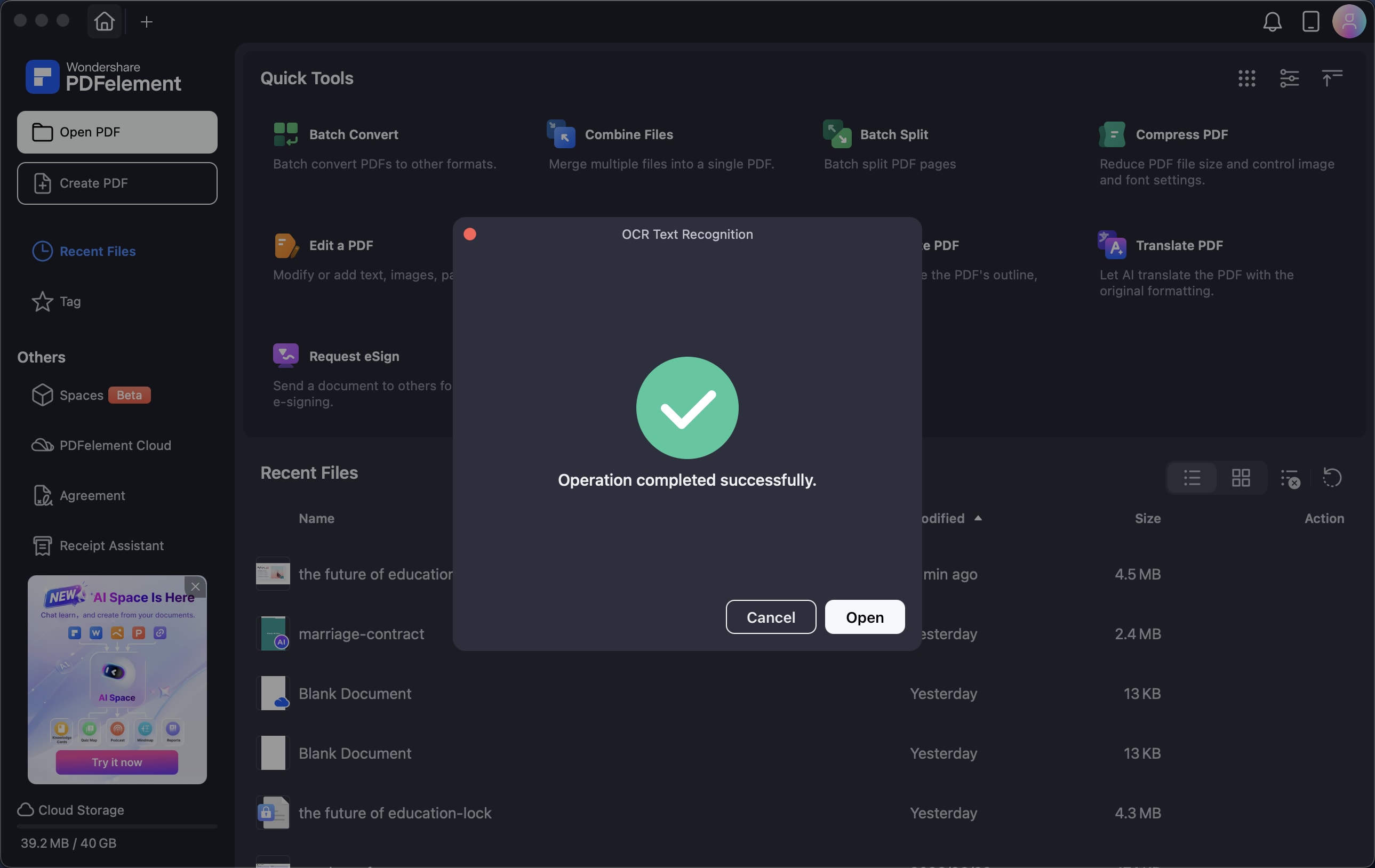
The PDFelement 13 home screen (dark mode) with Quick Tools and an OCR job just finished.
Convert to and from Word, Excel and PowerPoint
PDFelement for Mac exports PDFs to Word, Excel, PowerPoint, EPUB, HTML, RTF and images, one at a time or in batches, and creates PDFs from documents, images, web pages and screen captures. It can also save archive-grade PDF/A files.
Forms, e-signatures and redaction
PDFelement for Mac recognizes form fields in a flat PDF automatically, or lets you place text boxes, check boxes, radio buttons and drop-downs yourself. You can import and export form data, sign with a mouse, trackpad or image, and send a document to several people for e-signature and track who has signed. Search and Redact finds sensitive words and blacks them out across the file.
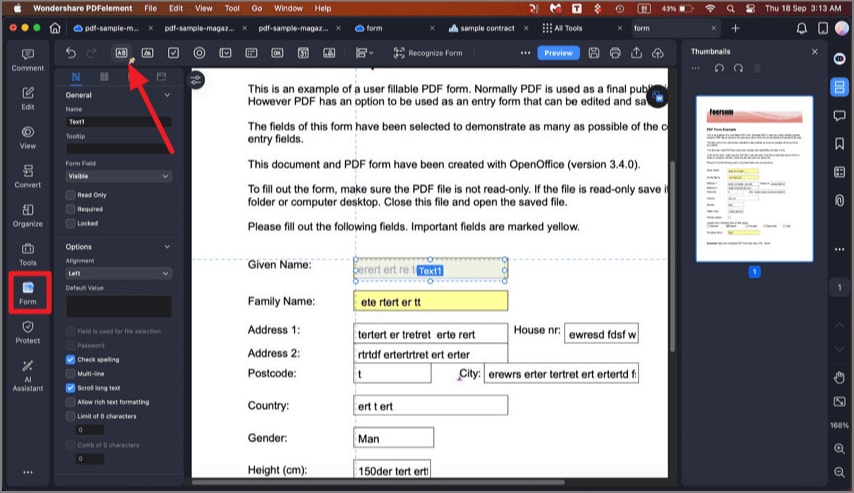
Form mode: a text field selected on a sample form, with its properties (name, tooltip, required, spell check) on the left.
AI tools: chat, summarize, translate and review contracts
PDFelement for Mac's AI assistant answers questions about the open PDF, summarizes, rewrites, proofreads and translates whole documents while keeping the layout. You can pick the language model (the Mac page names GPT-4o, DeepSeek and Gemini). Agreement Copilot's AI Risk Review lists risky clauses with a reason and a suggested change, and links each one to the text.
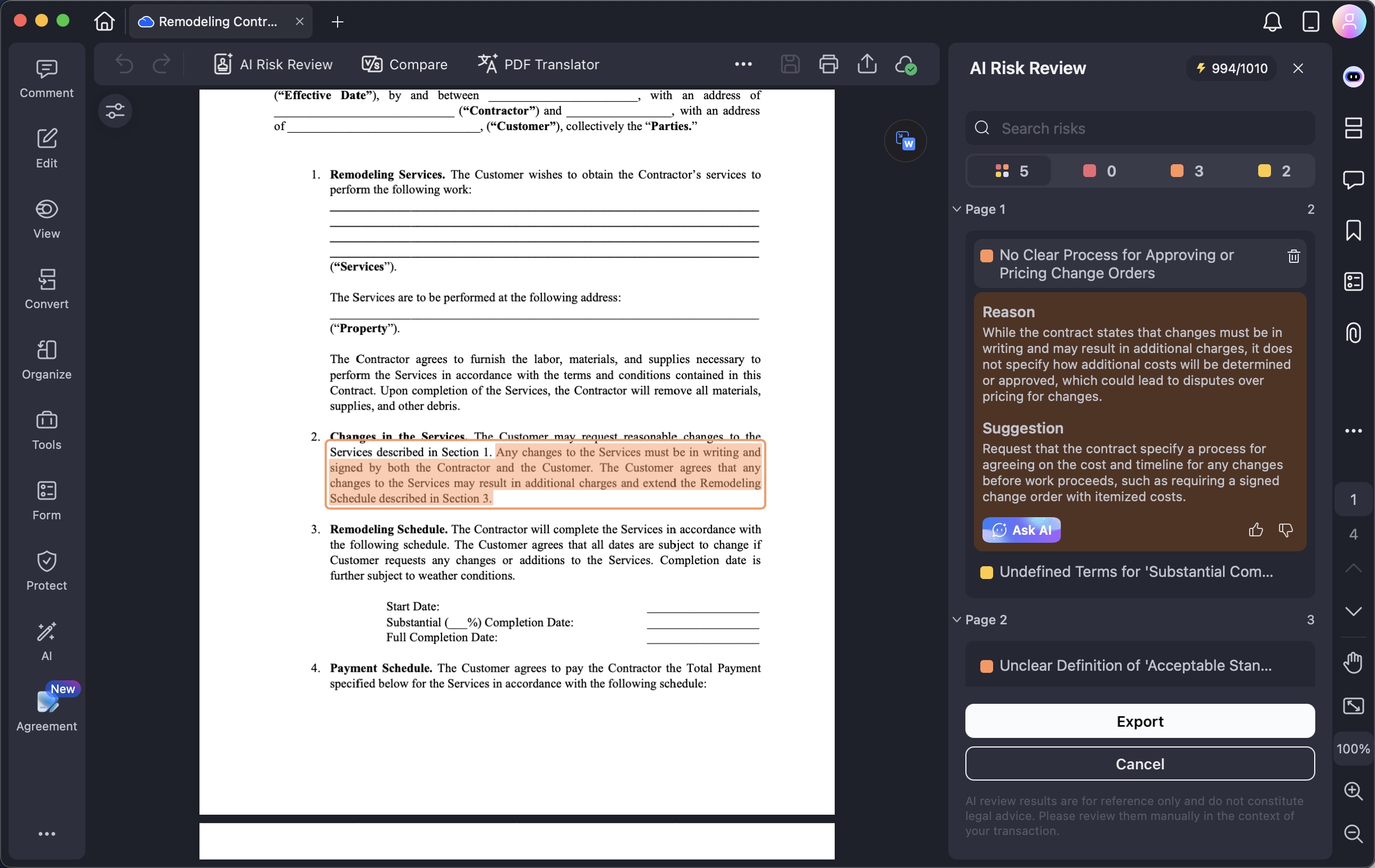
AI Risk Review on a contract: the flagged clause is highlighted, with the reason and a suggestion in the right panel.
Mac touches: Shortcuts, Siri and a measurement tool
PDFelement for Mac works with the macOS Shortcuts app for OCR, conversion, compression and merging, and with Siri for finding and opening PDFs. For drawings and floor plans, the measure tool reads distance, perimeter and area.
Benefits
- Acrobat-class editing without a forced subscription. The perpetual license is a one-time $129.99.
- Scans become usable. OCR makes old paper archives searchable and editable.
- One app for the whole workflow. Edit, fill, sign, send for signature and protect without switching tools.
- Works across your devices. Plans include the iPhone, iPad, Android and web apps and PDFelement Cloud storage.
Real-World Uses
- Fixing a typo in a signed-off brochure: the designer is away and the PDF is all you have. Edit mode changes the line in place.
- Digitizing a filing cabinet: scan the paper, run batch OCR, and search the whole archive by text.
- A landlord's lease: build a fillable lease once, send it to tenants for e-signature, and see when each has signed.
- Checking a contractor's agreement: run AI Risk Review to flag vague payment or change-order clauses before you sign. It's a second pair of eyes, not legal advice.
Who It's For, and Who Should Skip It
A good fit: Mac users who edit, convert or sign PDFs every week, small offices that want Acrobat-style tools without Adobe's subscription, and anyone with scanned documents to make searchable.
Skip it if: you only read, highlight and sign the odd PDF: macOS Preview already does that for free. Skip it too if you dislike upgrade prompts and account sign-ins, which are the most common complaint in user reviews, or if your workplace standardizes on Acrobat for prepress and accessibility checks.
Usage Guide
- Install. Download the free Mac version; the small downloader fetches and installs PDFelement.
- Sign in or activate. Log in with your Wondershare ID to activate a purchased plan.
- Open a PDF. Use Open PDF on the home screen, or drag a file onto the window.
- Pick a mode. Choose Edit, Convert, Form, Protect or AI from the left rail; the top toolbar changes to match.
- For scans, run OCR. Accept the OCR module download the first time, choose the document language and run it.
- Save or export. Save the PDF, or export it to Word, Excel or PowerPoint from Convert.
Where it falls short
- Upsell prompts. Trustpilot reviewers complain about repeated upgrade and AI-plan pop-ups and features moving behind paywalls.
- Activation trouble. Some perpetual-license buyers report activation failures or being told their license isn't valid, and slow human support.
- Refunds aren't automatic. The 30-day guarantee applies only within Wondershare's policy, and several reviewers say requests were refused.
- Forms outside the app. A Mac App Store reviewer found fillable forms built in PDFelement didn't behave the same in other PDF readers; test a form in Preview or Acrobat Reader before you send it out.
What Users Say
PDFelement (all platforms) is rated 4.6 out of 5 on Trustpilot from 3,098 reviews, with 77% five-star and 8% one-star ratings. Wondershare's Mac page shows 4.5 stars from 2.1K ratings.
Trustpilot: praise
- Ron West (5 stars, November 3, 2026), "Nice application full of functionality": "Nice application, full of functionality with relevant and timely upgrades."
- ross leondiou (3 stars, July 2, 2026), "Cut the sales pitch ---Wondershare": "It's simple, intuitive, and easy to use, which is why I've stuck with it."
- Sofia Cid (5 stars, December 6, 2025): "Customer support was super helpful. Five stars!"
Trustpilot: complaints
- Barry Hensley (1 star, November 10, 2026), "Cannot activate perpetual license. Worst customer service ever.": "The software normally works fine, but this company's version of customer support is the worst I have ever experienced."
- Client-followup (1 star, August 12, 2026), "This has become scam software": "It never lets you proceed without paying for this weeks upgrade..."
- Gabe Swank (1 star, June 23, 2026), "Wondershare Misrepresents Redaction Feature": "they denied the refund despite the lack of functionality they promise on their website"
- Sam (1 star, September 7, 2026), "Company Run by Bots Only": "I have requested a refund but the Bot says I have to purchase another package BEFORE they will refund!"
Mac App Store
The Mac App Store edition of PDFelement doesn't show an average rating, but its reviews mix praise and criticism:
- Manawalk8r, "A Cute and useful tool.": "I find this app very useful when wanting to edit a document in a PDF format."
- cdinca, "Limited Abilty to MAKE Fillable Forms": "But it doesn't work outside of its own app."
- Reaver Dirge, "Expensive, Inconsistent Performance": "I feel like I've wasted my money on something that doesn't live up to its promises."
The themes
Users who like PDFelement praise how easy it is and how much it does for the price. The complaints rarely concern the editing itself; they're about the company: upgrade prompts, AI features sold separately, perpetual-license activation problems, chatbot support and refused refunds. TechRadar's Mac PDF roundup makes the same point about tiers: the full feature set needs a paid plan.
Comparisons
PDFelement for Mac vs macOS Preview
Preview is free and fine for reading, highlighting, rearranging pages and adding a signature. PDFelement adds what Preview can't do: rewriting text in place, OCR, export to Office formats, real form building, redaction, e-signature requests and AI tools.
Yearly vs Perpetual
The Yearly Plan ($79.99) includes every update while it's active. The Perpetual license ($129.99) pays for itself in under two years but stays on PDFelement 13. If you'll keep the app for years and don't need each new version, take the Perpetual license.
Editions and Pricing
All plans are for one user and include the desktop app, the iPhone/iPad, Android and web apps, and PDFelement Cloud storage. The single-platform plans are the Mac plans; the Cross-platform versions of each plan cost $10 more.
FAQs
Does PDFelement for Mac run natively on Apple silicon?
Yes. PDFelement for Mac supports Intel and Apple silicon Macs, including M1 to M4, on macOS 11 or later.
Is PDFelement for Mac the same as the old PDFelement 6 for Mac?
PDFelement for Mac is the same product line, now at version 13 with a redesigned interface, AI tools and many more features.
Are the AI features included in a PDFelement license?
Partly. PDFelement's paid plans include a trial allowance of AI uses (50 in the store's comparison table); regular AI use is a separate subscription, which the store offers from $3.99 a month.
Can PDFelement for Mac replace Adobe Acrobat Pro?
For editing, converting, OCR, forms and signing, PDFelement covers what most people use Acrobat Pro for, at a lower price and with a perpetual option. Acrobat remains the standard for prepress checks and some enterprise workflows.
How do I stop a PDFelement subscription from renewing?
PDFelement's Yearly and 2-Year plans renew automatically until you cancel the subscription in your Wondershare account; cancelling stops the next charge and the plan runs until the end of the paid term.
Does the PDFelement trial add a watermark?
Yes. The PDFelement trial saves files with a watermark; removing it needs a paid plan. The trial also limits OCR to a preview and batch jobs to three files within 20 MB.
System Requirements
- macOS 11 Big Sur to macOS 26
- Intel or Apple silicon (M1, M2, M3, M4) processor
- 1 GB RAM or more
- 1.5 GB free disk space
- Interface languages: English, German, Spanish, French, Italian, Japanese, Dutch, Portuguese, Russian, Chinese (Simplified and Traditional), Korean
Conclusion
PDFelement for Mac is worth it if you work with PDFs every week and want Acrobat-style editing, OCR, forms and signing without Adobe's subscription. The $129.99 perpetual license is the best value for long-term use; the $79.99 Yearly Plan suits you if you want each new version. The one reason to buy it is how much it does well for the money. The main reason to hesitate is Wondershare's sales habits: expect upgrade prompts, treat the AI as a paid extra, and keep your receipt. Try the free version on your own documents first.
Download Free TrialBuy Yearly PlanBuy 2-Year PlanBuy Perpetual License