Cisdem Video Player for Mac: A Free Player With a $19.99 Conversion Add-On
Cisdem Video Player for Mac is a free video and audio player that opens MKV, AVI, WMV, FLV, RMVB and dozens of other formats on macOS 10.13 or later, with no codec packs and no ads. Playback costs nothing. The $19.99 one-time license sold here buys the Pro conversion feature for one Mac, which turns those files into MP4, MOV, MKV, MP3 and ready-made presets for iPhone, iPad and Android phones.
That split matters before you click Buy Now. If you only want QuickTime to stop refusing your MKV files, the free download already does the job, and you never have to pay. The license is for people who also want to move videos onto a phone, tablet or editing app that won't open the original format.
Quick facts
- Developer: Cisdem Inc.
- Version: 6.0.0 for Mac, released July 22, 2025 (added chapter playback and a new playback engine)
- Platform: macOS 10.13 High Sierra through macOS 26 Tahoe, Intel and Apple Silicon. A separate Windows edition exists with its own license
- Plays: 50+ video and audio formats, from MP4, MKV, AVI and WMV to MTS/M2TS, FLV, RMVB, DivX, ISO images, FLAC, APE and AC3, up to 8K
- Converts to (paid): MP4, MP4 HEVC, M4V, MKV, MOV, AVI, MP3, M4A and device presets
- Price: playback is free; the Conversion Feature license is $19.99 for 1 Mac, $27.99 for 2 Macs, $49.99 for 5 Macs, all lifetime
- Guarantee: 30-day money-back guarantee on the license
- What we checked: the Mac installer (cisdem-videoplayer.dmg, 24.6 MB, built July 15, 2025), the Mac App Store listing (version 6.0.0, free with in-app purchases), and the order page on November 4, 2026, which showed "Cisdem Video Player for Mac - Lifetime License" at $19.99 as a one-time purchase with no renewal. We didn't run the conversions ourselves.
Before you buy
- You don't need to pay to watch videos. Every playback feature on this page (formats, 4K/8K, subtitles, playlists, chapters, screenshots) works in the free download. The license only adds conversion.
- This license is for the Mac. The SKU behind our Buy Now button is the Mac lifetime license. Windows users need the Windows edition's own license.
- The App Store sells it differently. Inside the Mac App Store version, the Convert function is a $19.99 in-app purchase or a $9.99 yearly subscription that renews automatically. The license here is a single payment.
Download Free TrialBuy Now
Overview
macOS still ships with QuickTime Player, and QuickTime still turns away MKV, AVI, WMV, FLV and many camcorder files. Cisdem Video Player fills that gap with a small player (about 25 MB to download) that bundles its own decoders, so you don't install codec packs or plug-ins. You drag files or a whole folder onto the window, they land in a playlist, and playback starts.

The player window with the playlist (9 files) open on the right and the control bar with volume, audio track, screenshot, loop, mini-window and full-screen buttons.
Cisdem has kept the app going since 2014. The 5.x releases in 2021 added the remembered playlist and playback position, folder import, automatic subtitle matching, rotation, incognito mode and the separate-window layout. Version 6.0.0 in July 2025 replaced the underlying playback layer and added chapter navigation, and the release notes on Cisdem's own site haven't caught up with it yet.
Features
Plays the formats QuickTime won't
Cisdem Video Player opens more than 50 formats on its own: MKV, AVI, WMV, ASF, RM/RMVB, FLV/F4V, 3GP, MPEG, DVD ISO images, AVCHD (MTS/M2TS), DivX, raw H.264/H.265 streams, and audio such as FLAC, APE, WMA, OGG, AC3 and DTS. Hardware acceleration handles the decoding of 1080p, 4K, 5K and 8K files, so high-bitrate clips don't stutter on a recent Mac.
Playlist, chapters and a player that remembers where you were
Cisdem Video Player adds everything you open to a playlist that you can play in order, shuffle, loop, or loop a single file. It remembers the playlist and each file's position, so a lecture series or a TV season picks up where you stopped. Since version 6.0.0 it also reads chapter markers, which lets you jump past intros or straight to a section of a recorded webinar.
Subtitles and audio tracks
Cisdem Video Player shows embedded subtitles automatically and loads external SRT and ASS files, picking up a subtitle file with the same name in the same folder without you browsing for it. Files with several soundtracks, such as a film with original and dubbed audio, let you switch tracks from the control bar. There's no built-in subtitle search, so you supply the file yourself.
Window modes for a second screen
Cisdem Video Player switches between normal, full-screen and mini-window views, and a Separate Mode splits the video, the control bar and the playlist into three windows you can place anywhere. An incognito mode keeps a file out of the playback history, and a one-click screenshot saves the current frame as an image.
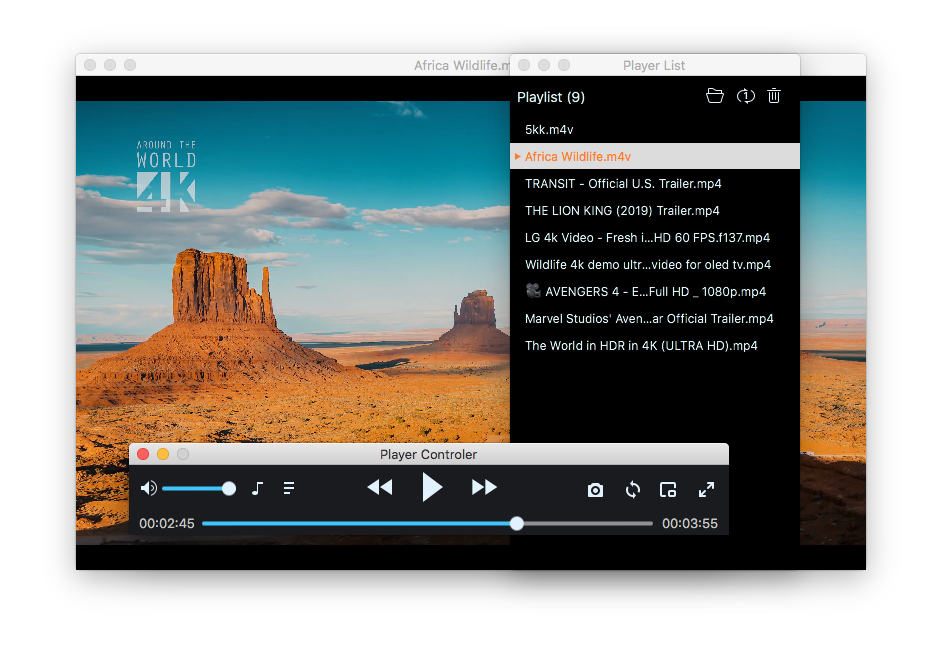
Separate Mode: the video, a floating "Player Controler" window and the "Player List" window, each movable on its own (shown in an older interface).
The paid part: convert for other devices
The Conversion Feature license turns on a Convert menu in Cisdem Video Player. You pick a format (MP4, HEVC MP4, MOV, ProRes MOV, MKV, HEVC MKV, WebM, M4V, AVI, XviD or DivX AVI), an audio format such as MP3 or M4A, or a device preset for Apple, Samsung, Huawei, Honor, Xiaomi, Google or Sony hardware, and the player writes a copy of the current file. The tech specs list iPhone 5 through iPhone 12 and Galaxy S4 through S9 by name, and generic Apple and Android profiles cover newer phones.
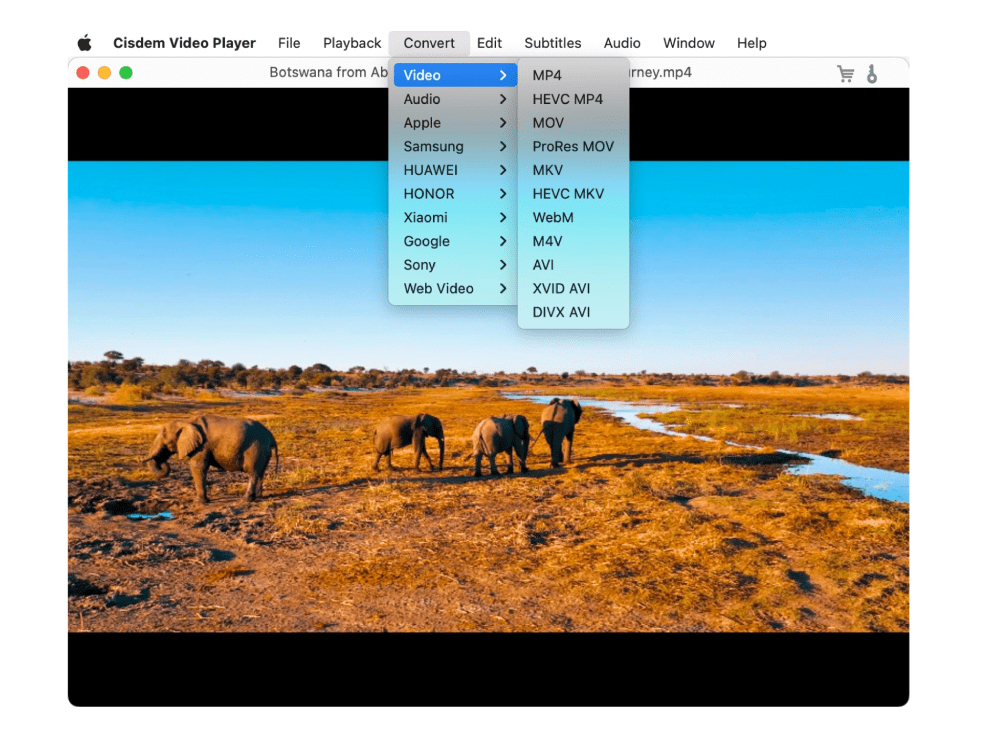
The Convert menu in the menu bar: Video, Audio, Apple, Samsung, HUAWEI, HONOR, Xiaomi, Google, Sony and Web Video, with the video formats expanded.
Real-World Uses
- An old download folder full of AVI and MKV files. Point the player at the folder, and the whole lot opens as one playlist with subtitles picked up automatically. Nothing to pay.
- Camcorder clips (MTS/M2TS) for a family video. The free player previews them; the license converts the keepers to MP4 or MOV so iMovie and Photos accept them.
- Lectures and webinars on a laptop. Remembered positions and chapter jumps make long recordings easy to work through over several sittings.
- Movies for a flight. Convert a WMV or MKV film with a device preset, copy it to the iPhone or Android phone, and it plays in the phone's own video app.
Who It's For, and Who Should Skip It
The free player suits any Mac user tired of "this file can't be opened" messages who wants something lighter and tidier than VLC. The $19.99 license suits people who regularly need a quick, no-settings conversion of the file they're already watching, especially for phones and tablets.
Skip the license if you only watch videos on the Mac, or if you need real conversion control: batch queues with bitrate, resolution and trimming options are the territory of a dedicated converter or the free HandBrake. Skip the player altogether if you want streaming from network shares, online subtitle download or Blu-ray menus; it plays local files and ISO images, and that's its scope.
Usage Guide
- Download cisdem-videoplayer.dmg, open it and drag Cisdem Video Player to Applications, then launch it.
- Drag a video, several files or a whole folder onto the window, or use File to open them. Everything goes into the playlist.
- Use the control bar for play/pause, stepping, volume, audio track, loop mode, screenshot, mini window and full screen. Keyboard shortcuts cover volume and stepping.
- For subtitles, keep the SRT or ASS file next to the video with the same name, or add it from the Subtitles menu.
- To convert, buy the license, enter the registration code in the app, then pick a format or device from the Convert menu while the file is open.
Where it falls short
- Conversion has few settings. You choose a format or a device and get a file. There's no visible quality, bitrate or trimming control in the menu, which is fine for phones and limiting for anything else.
- No online subtitles, no streaming. FileHorse's reviewer lists "No Streaming Support" and "No Subtitle Download" among the cons.
- The device list is dated. The named presets stop at iPhone 12 and Galaxy S9; newer phones rely on the generic profiles.
- Some full-screen hiccups. FixThePhoto mentions "Occasional lags in a screen mode", and the 5.6.0 release fixed a full-screen display issue.
- A gentle upsell. The free version shows a prompt for the paid conversion feature now and then, as one App Store reviewer notes below.
What Users Say
Mac App Store
The App Store listing doesn't have enough ratings yet to show an average, but its written reviews are specific. DJ Handsome Boy ("Better than other Apps I've tried", August 2, 2022): "I am using this App on a 2012 Macbook pro and so far it works as intended for watching WMV lecture videos in an educational program I am in. The free version is all I need at the moment. The only Ad Pop up is asking to join premium version, not annoying as other apps."
Christine_TB ("A light video converter", April 14, 2021) on the paid part: "Surprised to find out that there is an in-app purchased convert function,just like a light video converter,which includes all the popular formats and devices, it is totally enough for normal use."
Adriz Prometeo ("Amazing player", May 26, 2024): "Cisdem Video Player solves the problem of playing most of the video files and gives a fantastic visual experience. The paid version seems to be a light video converter, also works good and has the capability of supporting all types of devices."
Review sites
FixThePhoto rates it 4.5/5: "Cisdem Video Player is a free media player that you can use to watch and convert clips. This tool delivers excellent image and sound quality without any lags or shuttering." Its cons are "Restrictions in a free version" and "Occasional lags in a screen mode".
FileHorse (review by Sophia Jones) lists the pros "Wide Format Support – Plays almost any video format" and "No Ads or Bloatware – Clean and lightweight software", and the cons "Limited Free Features – Some features need a paid upgrade", "No Streaming Support – Cannot stream online videos", "No Subtitle Download – Lacks built-in subtitle fetching" and "Basic UI Design – Simple but lacks customization".
Cisdem's own Mac reviews page shows a 4.8 average from 46 user reviews.
Reviews posted on Cisdem's site
Amy (July 21, 2025): "I downloaded Cisdem Video Player for Mac mainly because I needed a lightweight, no-nonsense app to play MKV files. The recent update introduced chapter selection, and I couldn't be happier. … One minor wish: a dark mode option would be nice!"
Buff (July 16, 2025): "I use it mostly for watching TV series, and now I can skip intros or rewatch favorite scenes by jumping between chapters. Playback is smooth even for 4K files. Just wish that I can make and save more than one playlist."
Althea (September 24, 2025): "Plays everything I throw at it—MP4, MKV, AVI, even rare formats. Smooth playback, no ads, and it's totally free for watching. The conversion option is nice, but I just use it as my daily player."
The pattern across sources is consistent: people like that it opens awkward formats without ads or codec hunting, and most of them never pay. The paid converter gets described as "light", which is accurate in both directions: easy, but without fine controls. Complaints are small ones: a single playlist, no dark mode, no subtitle download and no streaming.
Comparisons
Cisdem Video Player vs VLC
Both are free for playback and both open nearly everything. VLC is open source, adds network streaming, and its Convert/Save dialog gives full codec control for free. Cisdem's player is more Mac-like and simpler, and its conversion is a one-menu job with device presets, but you pay $19.99 for it. If you're comfortable with VLC's settings, you don't need Cisdem's license.
Mac license vs App Store purchase
The App Store version sells the same Convert function for $19.99 or for $9.99 a year. The lifetime license here costs the same as the one-off in-app purchase, never renews, and comes in 2-Mac and 5-Mac packs as well.
Editions and Pricing
| Option | Price | Term | Macs | What you get |
|---|
| Free player | $0 | No expiry | Any | All playback features |
| Single User | $19.99 | Lifetime | 1 | Conversion feature |
| Double Pack | $27.99 | Lifetime | 2 | Conversion feature |
| Family Pack | $49.99 | Lifetime | 5 | Conversion feature |
Cisdem offers 30% off to owners of another Cisdem product and to academic buyers.
FAQs
Is Cisdem Video Player really free on Mac?
Yes. Cisdem Video Player plays video and audio for free with no time limit and no ads. Only the conversion feature is paid.
Does the $19.99 license renew every year?
No. The Cisdem Video Player for Mac license sold through our Buy Now button is a lifetime license, a single payment with no renewal. Only the App Store's $9.99 option is a yearly subscription.
Does the Mac license work on my Windows PC?
No. Cisdem Video Player has separate Mac and Windows editions with separate buy pages, and this license is the Mac one. The Windows edition needs Windows 10 or later.
Can Cisdem Video Player run on an older Mac?
Cisdem Video Player 6.0.0 needs macOS 10.13 High Sierra or later, on Intel or Apple Silicon, with 512 MB of RAM and 50 MB of disk space.
Can Cisdem Video Player play Blu-ray or DVD discs?
Cisdem Video Player opens DVD ISO image files, but Cisdem doesn't list disc menus or Blu-ray discs among its supported inputs. For Blu-ray movies you need a dedicated Blu-ray player app.
What if I'm not happy with the conversion feature?
The Cisdem Video Player license comes with a 30-day money-back guarantee, and you can test playback before paying since it's free.
Does Cisdem Video Player collect my data?
On its Mac App Store listing, Cisdem declares "Data Not Collected" for Cisdem Video Player.
System Requirements
- macOS 10.13 High Sierra, 10.14, 10.15, 11 Big Sur, 12 Monterey, 13 Ventura, 14 Sonoma, 15 Sequoia or 26 Tahoe
- Intel or Apple Silicon processor
- 512 MB RAM or more
- 50 MB free disk space for installation
Conclusion
As a free Mac player, Cisdem Video Player is an easy recommendation: it opens the files QuickTime rejects, has no ads, remembers where you stopped and now handles chapters. The $19.99 license is a narrower call. Buy it if you often need a quick, no-settings conversion of the file you're watching for an iPhone, iPad or Android phone, and you'd rather pay once than learn VLC's or HandBrake's options. Don't buy it if you only watch on your Mac, since the license adds nothing to playback, or if you need control over quality and trimming. Download the free player first and pay only if you find yourself wanting the Convert menu.
Download Free TrialBuy Now