Cisdem PDFMaster for Mac: A Pay-Once PDF Editor, Converter and OCR Tool
Cisdem PDFMaster for Mac is an all-in-one PDF app that edits text and images in PDFs, converts them to Word, Excel and PowerPoint with OCR for scans, fills and builds forms, signs, redacts and password-protects documents. The lifetime license for one Mac costs $89.99 on the order page, and it runs on macOS 11 Big Sur or later. It's aimed at Mac users who want Acrobat-style editing without a monthly bill.
Apple's Preview handles reading, highlighting and merging, but it can't change a typo in a contract, turn a scanned invoice into an editable Word file, or build a fillable form. That gap is what PDFMaster fills. The question is whether it fills it well enough for the way you work, and the reviews below are more divided than the vendor's page suggests.
Quick facts
- Developer: Cisdem Inc.
- Version: 7.5.0 for Mac, released April 29, 2026
- Platform: macOS 11 Big Sur through macOS 26 Tahoe, Intel and Apple Silicon; an older build is offered for earlier macOS versions
- Converts to: Word (DOCX, DOC), Excel, PowerPoint, TXT, RTF, CSV, HTML, JSON and images; OCR in 90+ languages for scanned PDFs
- Price: $89.99 lifetime license for one Mac on the order page; annual plan $59.99
- AI tools: summarize, rewrite, proofread, translate and DeepThink, sold separately as credits ($14.99 for 50)
- Trial: 7 days with every feature
- Guarantee: 30-day money-back guarantee
- What we checked: the Mac installer link (cisdem-pdfmaster.dmg, 546 MB, rebuilt August 7, 2026), and the order page on November 4, 2026, which showed "Cisdem PDFMaster for Mac - Lifetime License" at $89.99 as a one-time purchase with no renewal. We didn't install it or test the conversions ourselves.
Before you buy
- Cisdem's own store can be cheaper. On November 4, 2026, Cisdem's buy page listed the same lifetime license at a discounted $79.99 and the annual plan at $49.99, while the order page behind our Buy Now button charged $89.99 and $59.99.
- The AI features cost extra. A PDFMaster license doesn't include AI Summarize, Rewrite, Proofread, Translate or DeepThink. Those use credits bought separately.
- It's a big download. The installer is over half a gigabyte (546 MB), so allow time on a slow connection.
- The Mac App Store version is old. The App Store still lists PDFMaster 4.1.0 from 2021, sold module by module. Download from Cisdem to get version 7.5.
Download Free TrialBuy Now
Overview
The current interface puts tabs across the top of each open document: Annotate, Edit, Form, Fill, Convert, Protect and Tools. A sidebar on the left holds thumbnails, bookmarks, the outline, search and the AI panel. Several PDFs open in browser-style tabs, so you can copy a page from one into another without juggling windows.

The current interface (shown on a MacBook by Cisdem): the Edit tab with Text, Image, Link, Watermark, Background, Header & Footer, Bates Numbers and Crop tools, and a font bar over a selected paragraph.
Cisdem started PDFMaster as a converter-plus-tools bundle, and the version history shows steady work since: headers and footers and 25 OCR languages in 5.6 (January 2024), a new rendering layer in 6.5 (August 2024), the redesigned UI and AI DeepThink in 7.0 (May 2025), and faster loading of large files with more OCR languages in 7.5.
Features
Edit the text and images already in a PDF
Cisdem PDFMaster edits existing text in place, with font, size, color and alignment controls, and adds new text anywhere on the page. Images can be inserted, moved, rotated and resized, and links can point to a web page, another page in the document or an email address. The same tab adds watermarks, backgrounds, headers and footers, Bates numbers for legal files, and crops pages.
Convert PDFs and scans into editable files
Cisdem PDFMaster converts whole files or page ranges to Word, Excel, PowerPoint, RTF, CSV, HTML, TXT, JSON and image formats, in batches. Turn on OCR Recognition and pick the document's language, and scanned pages become editable text or a searchable PDF. Going the other way, it creates PDFs from images, blank pages, web pages, the clipboard or a scanner.
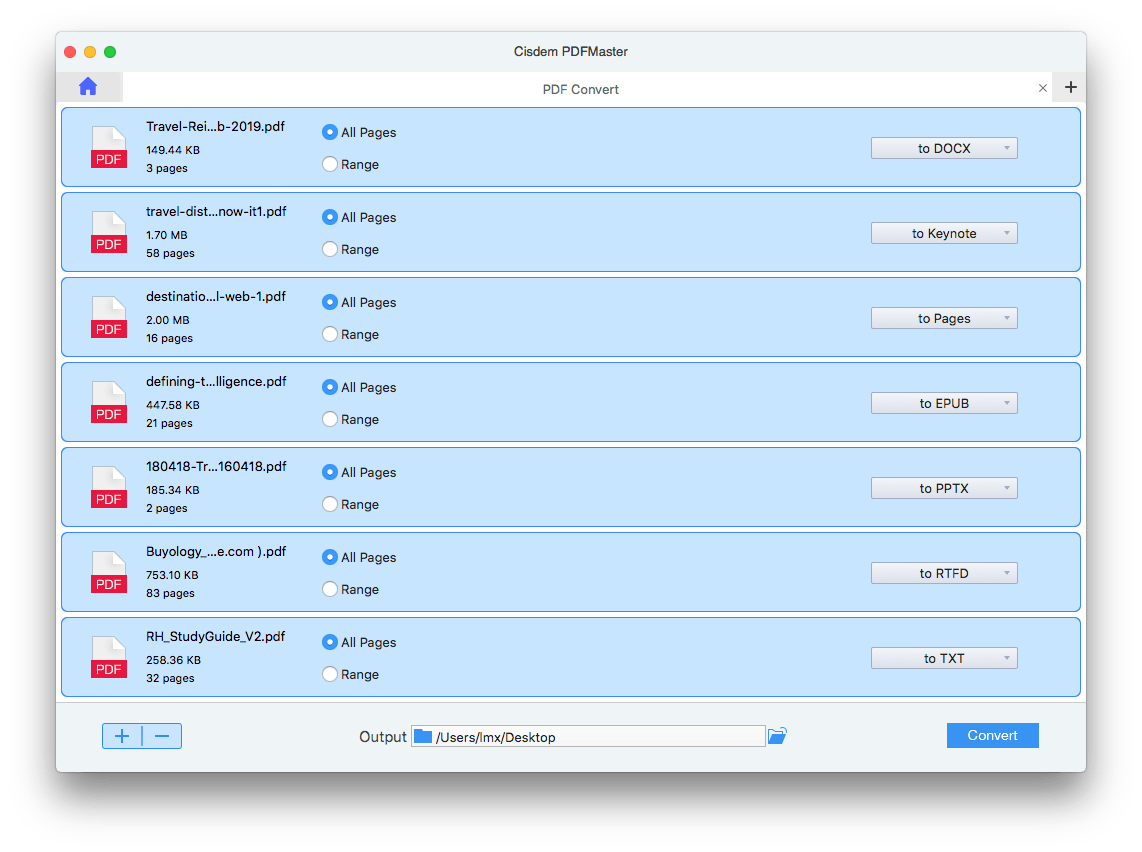
Batch conversion in an earlier PDFMaster version: seven PDFs queued, each with All Pages or a page Range and its own output format.
Annotate, sign and fill forms
Cisdem PDFMaster highlights, underlines, squiggles and strikes through text, adds notes, text boxes, shapes, freehand drawings, stamps and measurement lines, and exports your annotations as PDF, TXT, RTF, RTFD or FDF. It fills interactive forms, lets you place fields on flat ones, and builds fillable forms with text fields, checkboxes, radio buttons, list and combo boxes and signature fields. Signatures can be typed, drawn, inserted as an image, or applied as a digital signature with a digital ID.
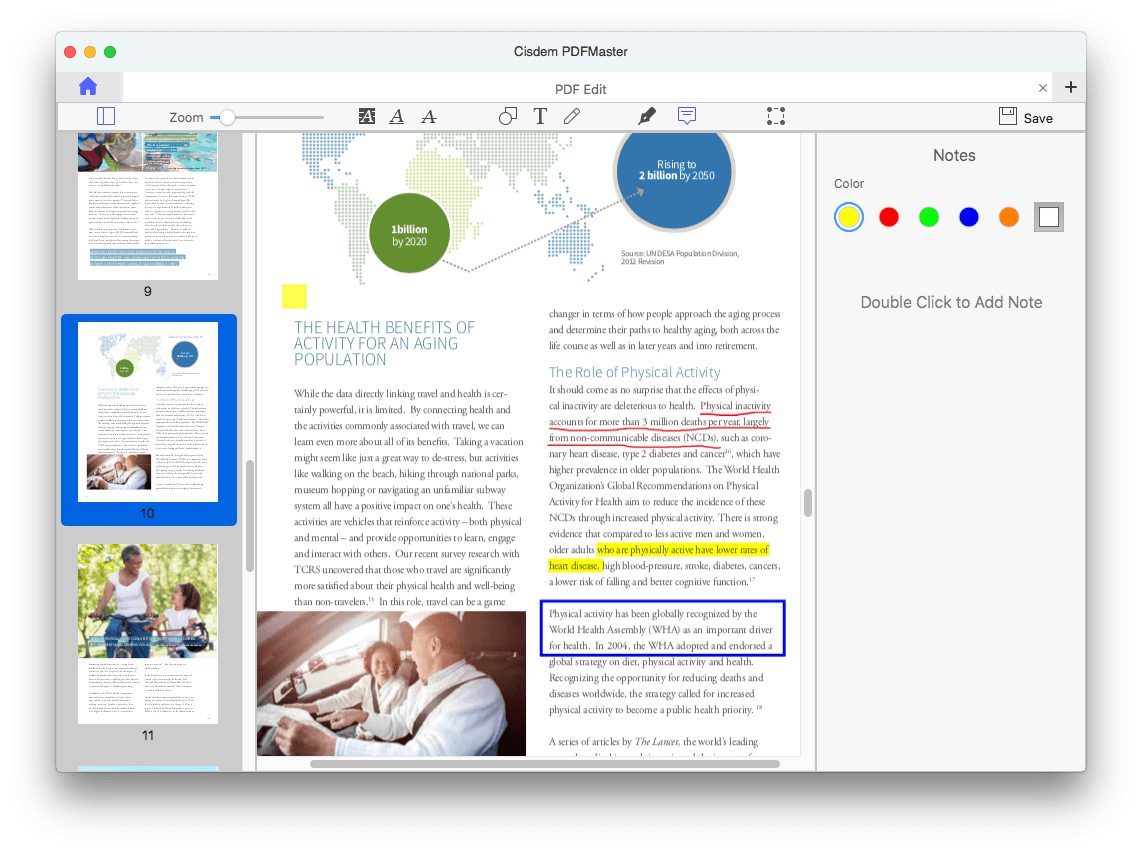
Annotation in an earlier version: yellow highlight, red underline, a blue rectangle and a sticky note, with the note colour picker on the right.
Protect, redact and compare
Cisdem PDFMaster sets an open password and a permissions password that blocks printing, editing or copying, with 128-bit or 256-bit AES or 128-bit RC4. Its Redact tool permanently removes sensitive text, and Decrypt removes restrictions from files you have the password for. Compare shows two versions of a PDF side by side or overlaid, checking text, images or both.
Page tools, compression and reading modes
Cisdem PDFMaster merges and splits PDFs and inserts, extracts, replaces, rotates, reorders and deletes pages. It compresses at three levels, in batches, and edits metadata and outlines. For reading, there are single, two-page, book and read modes, background themes such as sepia and dark, and text-to-speech in 50+ languages.
Optional AI tools
Cisdem PDFMaster has an AI panel with Summarize, Rewrite, Proofread, Translate and DeepThink (which uses DeepSeek to analyze a document). These run on credits bought separately from the license.

The AI Tools sidebar, magnified by Cisdem, with a My AI Credit button and the five AI features.
Benefits
- No subscription. The lifetime license is a one-time payment, which several users name as the reason they chose it over Acrobat.
- One app instead of four. Editing, conversion, OCR and forms usually mean separate tools; here they share one window and one license.
- Batch jobs. Conversion, OCR, compression, watermarks, headers and footers and Bates numbering all run on many files at once.
Real-World Uses
- Fixing a signed-off document: correct a date or a misspelled name in a PDF contract without going back to the original Word file.
- Turning paper into data: OCR a stack of scanned invoices and convert them to Excel for your bookkeeping.
- Your own intake form: build a fillable PDF with text fields, checkboxes and a signature field and email it to clients.
- Sending statements safely: redact account numbers, add a watermark and a password, then send.
Who It's For, and Who Should Skip It
It's a good fit for home-office users, freelancers and small businesses on a Mac who edit, convert and sign PDFs regularly and would rather pay once. Macworld's reviewer put it well: it suits people making "minor tweaks to personal documents" or annotating other people's work.
Skip it if you edit PDFs professionally all day, such as prepress work, accessibility tagging or complex layouts: Macworld found it lacking for pros. If you need the same app on an iPad or iPhone, there isn't a mobile version. And if you only read, highlight and merge, Preview already does that for free.
Usage Guide
- Install: download the DMG (about 546 MB), drag Cisdem PDFMaster to Applications and open it. The 7-day trial starts with every feature.
- Activate: choose Cisdem PDFMaster > Enter License, or click the key icon, paste your code and click Activate.
- Choose your default viewer: in Preferences > General you can make PDFMaster the default PDF app, or leave Preview as it is.
- Edit: open a PDF, pick the Edit tab, click into the text you want to change and adjust the font in the floating bar.
- Convert with OCR: in Convert, add files, pick the output format and page range, switch on OCR Recognition for scans and set the language, then click Convert.
- Protect: use the Protect tab to redact, then add a password. Open the saved file afterwards to check the password is asked for.
Where it falls short
- Password protection didn't stick in one test. Macworld's October 2024 review found that "exporting a PDF after password-protecting it didn't actually secure it". Always reopen a protected file to confirm.
- Some layouts resist editing. A MacUpdate user (July 2025) wrote that "certain text boxes inside tables just won't let me make changes."
- It may take over as your PDF viewer. A MacUpdate reviewer complained it "sets your default PDF reader to itself, without asking". The current version has a Preferences switch for this.
- Speed on large files. One older MacUpdate review called it "quite slow (on a M2 MacBook Pro)"; version 7.5 lists faster opening of large PDFs as a fix.
- Confusing branding. EaseUS sells the same app as EaseUS PDF Editor for Mac at different prices, which Macworld flagged as misleading.
What Users Say
Macworld (Mahmoud Itani, October 2024)
Macworld listed the pros as a simple interface, "Fluid performance with minimal lags" and both one-time and recurring payment options, and the cons as misleading branding, "Some functionalities don't always work reliably" and no iOS or iPadOS version. The verdict:
- "Cisdem PDFMaster for macOS is a decent app for those looking to make casual adjustments to their documents, although it lacks features for professionals."
- "If you edit PDF files professionally, Cisdem's solution may be somewhat lacking."
MacUpdate: 4.0 out of 5 from 5 ratings
- "I used Cisdem PDFMaster to edit text in my PDF reports and found its header and footer tool especially helpful." (RyanSSm, 5 stars, May 2026)
- "For some reason, certain text boxes inside tables just won't let me make changes." (paulineochs, 4 stars, July 2025)
- "Amazed to find that this sets your default PDF reader to itself, without asking, every time it's launched." (bdikkat, October 2024)
- "For a PDF app, being able to open PDFs would be a good start." (Zebadee, April 2024)
Press and users quoted by Cisdem
Cisdem's own review page shows 5.0 out of 5 from 27 Mac user reviews and quotes these:
- "Taking all things into consideration, Cisdem PDFMaster proved itself to be an all-round and dependable PDF utility..." (Vladimir Ciobica, Softpedia)
- "PDFMaster gives you a surprising number of tools, and even if you don't need them all, you'll be glad you have them just in case." (Kraig Becker, AppleGazette)
- "I didn't want to pay a subscription for Adobe Acrobat, so I gave PDFMaster a try. It has editing, annotation, form filling, and file conversion — basically everything I need — without ongoing monthly fees." (Billy, February 2026)
- "Adding watermarks, annotations, and rearranging pages is so easy... If it could be used on all my devices, Windows, Mac and iPad, that will be fantastic!" (Luis, May 2026)
- "I bought it to create a fillable form, it offers all the tools that I need to use. Although I've met some issues with those tools, Cisdem support team resolved my issues in a minute." (Cody, September 2025)
Independent reviewers and users agree on the breadth of tools and the value of a one-time price. The criticism is about reliability at the edges (a password that didn't apply, table text that won't edit) and the app's habit of claiming the default viewer. Quotes from Macworld and MacUpdate were read through a page summarizer.
Comparisons
PDFMaster vs Apple Preview
Preview is free and covers reading, highlighting, simple signatures, merging and rotating pages. PDFMaster adds what Preview can't do: editing the existing text, OCR, conversion to Word, Excel and PowerPoint, building fillable forms, redaction, comparison, Bates numbering and batch processing.
PDFMaster vs Adobe Acrobat
Acrobat's full editing and conversion are sold as a subscription, and it remains the more complete tool for professional prepress and accessibility work. PDFMaster covers the everyday editing, OCR and forms jobs for a one-time $89.99, which is the reason most of its users give for choosing it.
Mac version vs Windows version
Cisdem sells PDFMaster for Windows separately, with its own license. The license on this page covers one Mac.
Editions and Pricing
| Plan | Order page price | Cisdem store price | Term |
|---|
| Lifetime (1 Mac) | $89.99 | $79.99 | One-time |
| Annual (1 Mac) | $59.99 | $49.99 | Renews yearly |
| Business (1 Mac) | $119.99 | $99.99 | One-time, for company use |
| AI Tools credits | $14.99 | $14.99 | 50 credits, add-on |
Prices checked on November 4, 2026. The Buy Now button on this page opens the lifetime license.
FAQs
Does Cisdem PDFMaster work on older Macs?
Cisdem PDFMaster 7.5 needs macOS 11 Big Sur or later and runs on Intel and Apple Silicon. Cisdem offers an older build from the product page for Macs on earlier macOS versions.
Does the PDFMaster license include the AI features?
Cisdem PDFMaster's license covers the standard editing, conversion, OCR and forms tools. The AI tools need credits bought separately and activated with their own code.
Can PDFMaster convert a scanned PDF to Word?
Cisdem PDFMaster converts scanned PDFs to Word and other editable formats when you turn on OCR Recognition and choose the document's language. Cisdem says it supports 90+ OCR languages.
Can one license activate an older PDFMaster version?
Cisdem PDFMaster licenses have activated older versions for some buyers: one user on Cisdem's review page says support confirmed his license worked with both version 5.6 and version 6.
Is PDFMaster available for iPad or iPhone?
Cisdem PDFMaster is a Mac and Windows app; there's no iOS or iPadOS version.
Is EaseUS PDF Editor for Mac the same app?
Cisdem PDFMaster is also sold by EaseUS as EaseUS PDF Editor for Mac, according to Macworld's review. Prices and license terms differ by seller, so compare before you buy.
System Requirements
- macOS 11 Big Sur, 12 Monterey, 13 Ventura, 14 Sonoma, 15 Sequoia or 26 Tahoe
- Intel or Apple Silicon processor
- 1 GB RAM or more
- 200 MB free disk space for installation (the download itself is about 546 MB)
- Opens PDF (including scanned) and BMP, PNG, GIF, JPG and TIFF images
Conclusion
Cisdem PDFMaster for Mac is worth it if you want Acrobat-style editing, OCR conversion and form building for a one-time price and your PDF work is everyday rather than professional. The reason to buy: one license covers editing, converting, OCR, forms, signing and redaction, with no subscription. The reason to hesitate: independent reviewers found rough edges in reliability, so it's not the tool for high-stakes professional output, and Cisdem's own store was $10 cheaper on the day we checked. Use the 7-day trial on your own hardest PDFs, the scanned ones and the table-heavy ones, before you pay.
Download Free TrialBuy Now