CloudMounter for Mac: Your Cloud Accounts as Drives in Finder
CloudMounter for Mac is a $74.99 one-time macOS app from Electronic Team (formerly Eltima) that mounts Google Drive, Dropbox, OneDrive, Amazon S3, FTP, SFTP, WebDAV and more as drives in Finder, for anyone who juggles several cloud accounts or a small MacBook SSD.
The usual way to use three cloud services is three sync apps, three folders and a disk that keeps filling up. CloudMounter drops the sync. Each account shows up in the Finder sidebar like an external disk, files stay in the cloud, and you open them when you need them.
Quick facts
- Version: 4.18, released June 18, 2026
- Developer: Electronic Team, Inc. (the company formerly known as Eltima)
- Platform: macOS 12.4 and later, Apple silicon and Intel
- Connections: Google Drive, Dropbox, OneDrive, Amazon S3, Box, Backblaze B2, MEGA, pCloud, OpenStack Swift, FTP, SFTP, WebDAV
- Price: $74.99 for a Lifetime Personal License on 1 Mac
- Free mode: first Google Drive, Dropbox and OneDrive account only, everything else read-only
- Installer: 97 MB DMG
- What we checked: checkout price $74.99, plan name "Lifetime Personal License for 1 Mac", the $14.99 add-on the order page puts in the cart, and the 102,131,406-byte installer on the vendor's server, on November 6, 2026. We read the vendor's help pages and terms, but we didn't buy a license or run the Mac app.
Before you buy
- Remove the add-on if you don't want it. The order page adds a $14.99 "Lifetime upgrades guarantee" line on its own, which makes the total $89.98. It has a Remove box. The vendor's own store sells the lifetime license for $74 with no such line, so most buyers can drop it.
- There's a yearly option too, but not here. The vendor sells a $29-a-year plan with a 7-day trial on its own store. This order page sells the lifetime license only.
- Start in free mode. One Google Drive, one Dropbox and one OneDrive account work fully for free, so you can test speed on your own files before paying.
Download Free TrialBuy Now
Overview
CloudMounter is a mounting tool, not a sync client. Connect an account from the menu bar icon and it appears in Finder as a volume. You can open, copy, rename, move and delete files there as you would on a local disk. Files stay in the cloud, apart from a cache the app keeps while it works.
The app dates from 2016, and the Mac and Windows editions are sold separately. Electronic Team shipped version 4.18 in June 2026.
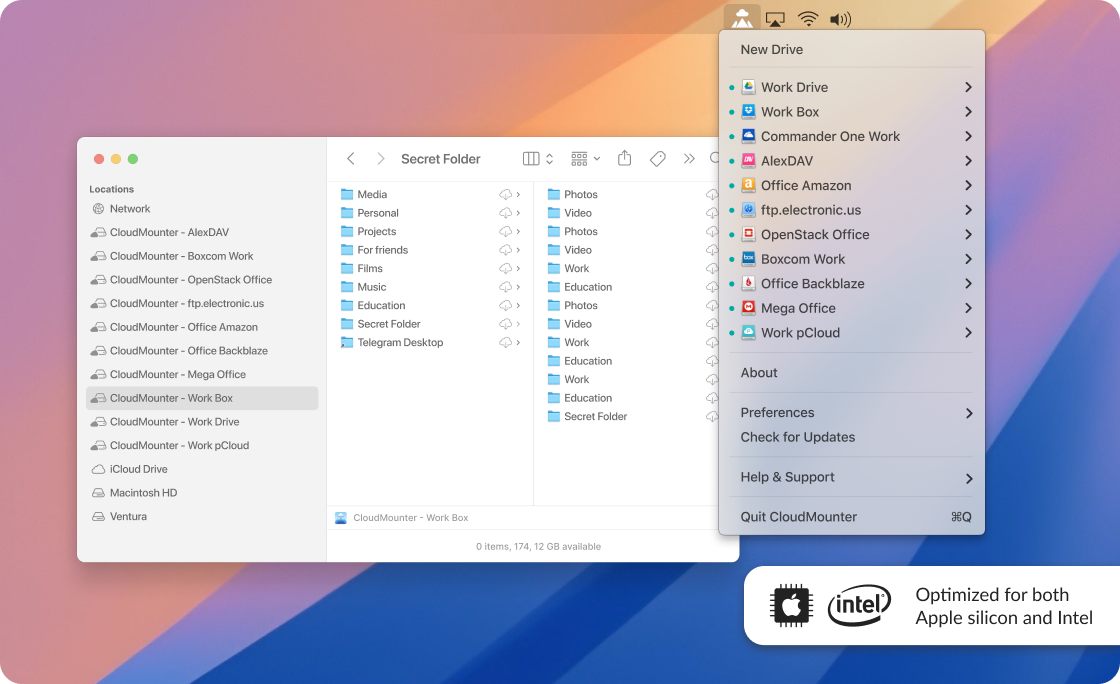
CloudMounter's menu bar list of connections next to Finder, where each mounted account has its own sidebar entry.
Features
Mount any account as a Finder drive
CloudMounter for Mac gives every connection its own entry in the Finder sidebar. You rename, move, copy and delete files through Finder, with status icons on files showing their upload state.
Twelve kinds of connection
CloudMounter connects to Google Drive, Dropbox, OneDrive (personal and business), Amazon S3, Box, Backblaze B2, MEGA, pCloud, OpenStack Swift, FTP, SFTP and WebDAV. S3-compatible services connect through the Amazon S3 option; the vendor documents this for Google Cloud Storage.
Unlimited accounts per service
CloudMounter mounts as many accounts as you own at once, including two Google Drives or a personal and a work Dropbox, with no logging out and back in.
Client-side encryption
CloudMounter encrypts files with AES-256 before they leave your Mac, so the storage provider holds only scrambled data. You encrypt by folder and can hide the file names too.
Cloud-to-cloud file moves
CloudMounter lets you drag files from one mounted account to another, with no need to download them and upload them again yourself.
Offline work on macOS
CloudMounter for Mac can keep working with files when you lose your connection, a feature the vendor lists as "coming soon" for Windows.
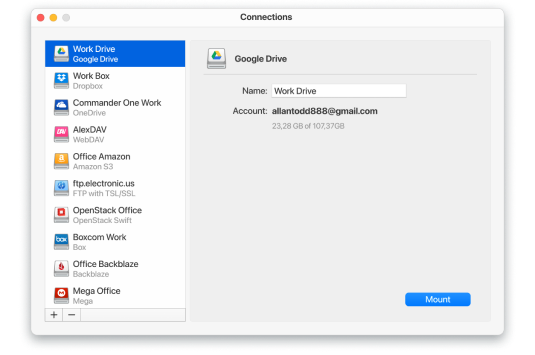
The connections window: every saved account in a list, with its name, account and free space.
Benefits
- Your SSD stays free. A 2 TB Drive doesn't need 2 TB of laptop.
- Fewer background apps. App Store reviewers report preferring it to the providers' own clients.
- Your passwords stay local. Credentials sit in macOS Keychain, not on the vendor's servers.
- One license covers every service. There's no per-account fee.
Real-World Uses
- Freelancer with client drives: mount each client's Google Drive or Dropbox under its own name and drop deliverables in without switching browser profiles.
- Web developer: open an SFTP site in Finder and edit a file in your own editor.
- Photographer on a small MacBook: keep the archive on Backblaze B2 or S3 and browse it only when a client asks for an old shoot.
- Moving providers: mount the old and new accounts and drag folders across.
- Sensitive documents: encrypt one folder in Dropbox so the provider can't read it.
Who It's For, and Who Should Skip It
It suits Mac users with several accounts or several providers, people short on disk space, and anyone who reaches S3 or SFTP servers often enough to want them in Finder.
Skip it if you use one cloud service, since its own free app already does the job. Skip the lifetime license if you'll only need it for a project or two: the yearly plan at the vendor's store costs less to start. It's also the wrong tool for phones and tablets (it's desktop only), and for backups, because a mount gives you remote access, not a second copy of your data.
Usage Guide
- Download the DMG, open it and drag CloudMounter to Applications.
- Launch it. The icon appears in the menu bar.
- Click the icon, choose New Drive and pick a service.
- Sign in or enter the server details, then click Mount. Your login is saved in Keychain.
- Open the drive from the Finder sidebar and work as usual.
- If you encrypt folders, keep the encryption setting off for drives where you don't use it. The vendor warns that it can slow folder listings.
Where it falls short
- Speed depends on your connection. Large files take as long as your line needs. Macworld's tester found that "smaller files behave more reliably than larger ones" in 2018.
- Cache can fill the system disk. With many or large files CloudMounter can raise a "Low space" warning. You can point the cache at another disk.
- Provider limits still apply. The vendor lists Dropbox at 375 GB per file, OneDrive at 250 GB, Google Drive and S3 at 5 TB, OpenStack at 5 GB, and WebDAV usually at 50 MB. Box caps files at 250 MB on free accounts.
- Encrypted folders have rules. You can't create or rename files in a locked folder, or move files between it and an unencrypted one.
- Backblaze renames are limited. Renaming or moving a file over 10 MB, or a folder holding more than 10 files, gives an error.
- Google Docs stay in the browser. They open online, because they aren't real local files.
- All sales are final. Electronic Team's terms offer a refund or replacement only for a malfunction its support can't fix within a 14-day grace period, so use the free mode first.
What Users Say
CloudMounter's ratings are good but come from small samples on review sites: 4.5 out of 5 from 22 reviews on Capterra, 3.8 from 6 on G2, and 92% positive from 1,041 ratings on Setapp. The vendor's page shows 4.5 from 255 reviews.
Mac App Store users
nekomachen, "Lightweight and Seamless" (August 19, 2026): "I've tried ExpanDrive and Mountain Duck as well. Mountain Duck is capable, but it feels heavier on my Mac, while uninstalling ExpanDrive turned into a real headache. CloudMounter has been much easier to use and maintain."
21danielhan, "Strong Recommendation" (July 16, 2026): "No network drops, and uploads/downloads work flawlessly. It feels just like plugging an external drive into my Mac. I have Dropbox, OneDrive, and even my personal NAS all mounted and working smoothly."
Lilobell, "Works better than ever!" (July 13, 2023): "I've been using this app for a few years now. It was sluggish and would frequently loose connection. But I stuck with it because it made sense with the type of work I do for my clients. After the recent updates, the performance has gone through the roof!"
Mehrdude (UK store, September 21, 2024): "There's no better app to manage you cloud drives then the CloudMounter."
BoffinBoy (UK store, August 15, 2025): "easily preferring CloudMounter to the apps provided by their creators for Google Drive, OneDrive, and Dropbox."
Critical voices
Dagza (UK App Store, August 22, 2018): "It did crash once and a lot of files were shown as uploaded but were corrupted." The same reviewer "would prefer to buy an app (and subsequent versions) rather than to follow a subscription model."
Valmontian (UK App Store, December 9, 2020): "Some very small niggles, but I use it all the time and it does the job well."
J.R. Bookwalter, Macworld (May 21, 2018): listed "Occasional reliability, connectivity issues" among the cons of an early version, while concluding "CloudMounter can finally be considered a worthwhile contender to ExpanDrive."
Reviewers and other sites
Jon Jacobi, PCWorld: "I loved CloudMounter's super-clean interface. I could get picky about a couple of things as with the competition, but I'll let them go because of the overall excellence. CloudMounter features the cleanest interface of any of the utilities. That said, I'd like a bit more in the way of visible options such as S3-compatible."
Nolen Jonker, XDA Developers: "By mounting cloud drives as local disks, eliminating the need for multiple apps, and offering top-notch encryption, it simplifies how you manage your cloud files."
Laura-ann Burgess, SFTP To Go: "CloudMounter delivers exactly what it promises: quick cloud and remote server access without the baggage of slow syncing." The review lists one con, "No mobile version (desktop-only solution)." SFTP To Go's own service pairs with the app, so read it as a friendly source.
David M., Capterra (September 5, 2025): "It is simple to use and does exactly what its name implies. I can access my files from anywhere in the world from a central location without having to log into any browser just to access my files."
Richard P., SourceForge (January 25, 2025): "Was able to mount my Google Drive effectively. It did as it claimed without any downsides to it."
The themes repeat. People like the Finder integration, the light system load and no longer needing the providers' sync apps. The complaints are mostly older ones about dropped connections, plus an interface that hides some options; a long-time user says reliability has improved since.
Comparisons
CloudMounter vs the Google Drive, Dropbox and OneDrive apps
The official apps are free and built around their own service. CloudMounter costs money but puts every account in one place, adds S3 and server connections, and encrypts on your side. If you only use one service, stay with its app.
CloudMounter vs Mountain Duck and ExpanDrive
These tools also put remote storage on your Mac as drives. In the user reviews above, CloudMounter wins on being lighter and easier to remove, but that's opinion from people who chose it, so try each on your own files.
CloudMounter for Mac vs CloudMounter for Windows
The Windows edition costs $29.99, lacks offline work and connects to fewer services (no Backblaze, pCloud or OpenStack). The two need separate licenses.
Editions and Pricing
| Plan | Price | Macs | Where sold |
|---|
| Lifetime Personal | $74.99 once | 1 | This order page |
| Lifetime Personal | $74 once | 1 | Vendor store |
| 1-year Personal | $29 a year, 7-day trial | 1 | Vendor store |
| Lifetime Team | $249 once | 5 | Vendor store |
| 1-year Team | $99 a year, 7-day trial | 5 | Vendor store |
Personal licenses are for personal use only, while Team licenses cover business and personal use. A Team license can't be shared with Windows PCs.
FAQs
Is CloudMounter for Mac a subscription?
CloudMounter for Mac is sold both ways. The license on this order page is a one-time lifetime purchase with no renewal, while the vendor's store also has a yearly plan.
Can I use CloudMounter for free?
CloudMounter has a free mode with full access to your first Google Drive, Dropbox and OneDrive accounts. Further accounts, Dropbox Business and Google shared drives are read-only.
Do I need to install FUSE for CloudMounter?
CloudMounter doesn't need FUSE to work. Installing it adds options on the direct-download version, such as disabling file previews and showing mounts to other users. The Mac App Store version can't use it.
Does CloudMounter work on Apple silicon Macs?
CloudMounter for Mac runs on both Apple silicon and Intel Macs, on macOS 12.4 or later.
Where does CloudMounter keep my passwords?
CloudMounter stores your logins in macOS Keychain and doesn't keep them on its servers.
Can I mount a NAS with CloudMounter?
CloudMounter reaches a NAS through FTP, SFTP or WebDAV if the device offers one of them. SMB isn't on its connection list.
Does one CloudMounter license work on a second Mac?
The Personal license covers 1 Mac. For more you need another license, or the Team license for 5.
System Requirements
- macOS 12.4 or later
- Apple silicon or Intel Mac
- 97 MB download, plus free disk space for the cache
- An internet connection
Conclusion
CloudMounter for Mac is worth $74.99 if you work across several cloud accounts or servers and want them all in Finder without sync folders eating your disk. Against the $29 yearly plan, the one-time price pays off in the third year.
The best reason to buy it is the single place for every account. The main reason not to is simple needs: with one cloud service, its free app is enough. Test the free mode first, since refunds are limited, and remove the $14.99 add-on at checkout unless you want it.
Download Free TrialBuy Now