DoYourData Super Eraser for Windows: Shred Files and Wipe Drives Before They Leave Your Hands
DoYourData Super Eraser is a $49 per year Windows program that permanently destroys selected files, whole drives or the free space on a drive, using overwrite standards from one pass up to 35. It is for anyone selling, donating or recycling a PC or disk who wants the old data gone for good.
Deleting a file and emptying the Recycle Bin only removes the pointer to it, which is why recovery software works at all. To stop a buyer of your old laptop from reading your tax returns, the data itself has to be overwritten.
Quick facts
- Version: 8.3
- Developer: DoYourData
- Platforms: Windows 11, 10, 8.1, 8, 7, Vista, XP, 2000 and Windows Server 2008 to 2025
- Erasure methods: eight, from 1-pass NIST 800-88 to 35-pass Gutmann
- Price: $49.00 for the 1 Year License, which covers 2 PCs
- Trial: free download, with full use requiring a license code
- Guarantee: 30 days, money back
- What we checked: installer version 8.3.0.0 (17 MB) downloaded from the vendor and checkout price $49.00, both on November 9, 2026. We did not run a recovery test on erased data.
Before you buy
- Erasure cannot be undone. Back up anything you might want first, and read the drive letter twice before you click Wipe Now.
- On an SSD, overwriting is less certain. SSDs move data around internally, so for a drive you are giving away, the maker's own Secure Erase tool is worth using as well.
- Turn off any VPN when you activate. Activation needs a network connection.
Download Free TrialBuy Now
Overview
Super Eraser has a plain left-hand menu with three erasure modes at the top and three extras below them: Disk Manager, Uninstaller and Internet Cleanup. You choose a mode, choose the target and press one button. A history view records what was erased.
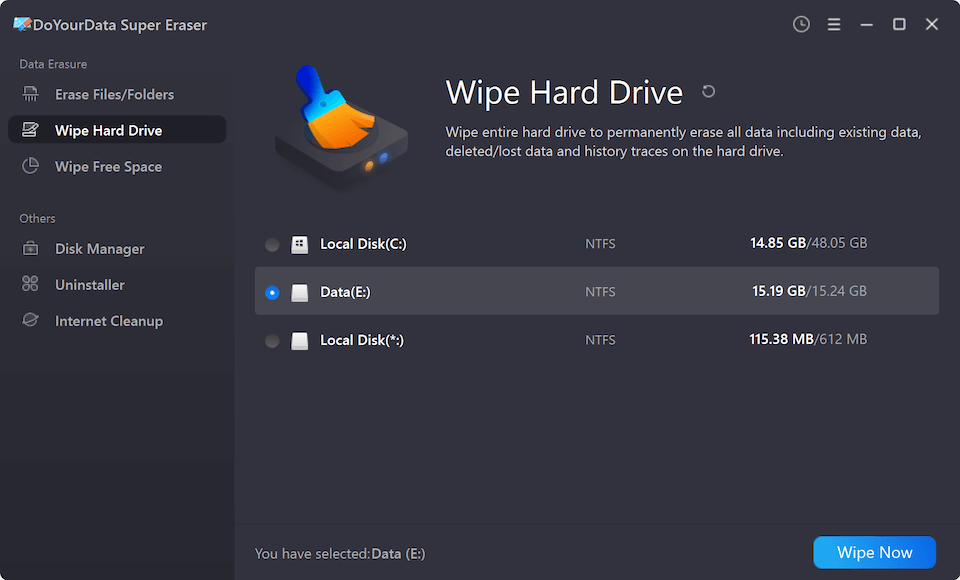
Wipe Hard Drive mode, with a data partition selected and the Wipe Now button at the bottom right.
Features
Erase Files/Folders for targeted shredding
DoYourData Super Eraser overwrites only the files and folders you add to its list, leaving everything else alone. It suits a few sensitive documents on a computer you are keeping.
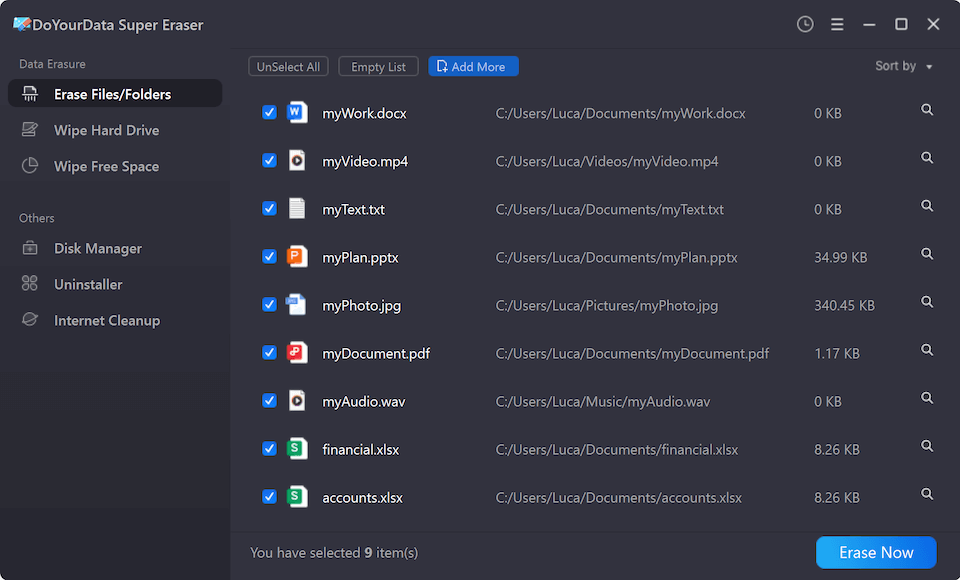
Erase Files/Folders mode with a list of selected documents, photos and spreadsheets.
Wipe Hard Drive for whole partitions and devices
DoYourData Super Eraser removes everything on a selected partition or external device, including earlier deleted data. It can also wipe the C drive or system partition without a bootable CD.
Wipe Free Space for files you already deleted
DoYourData Super Eraser overwrites only the unused space on a drive, so files you deleted months ago become unrecoverable while your current files stay put.
Eight overwrite standards
DoYourData Super Eraser offers HMG Infosec Standard 5, NIST 800-88 and its own DYD Secure Erase at one pass, Gutmann at 2 passes, DoD 5220.22-M and U.S. Army AR380-19 at 3, DoD 5220.22-M ECE at 7, and Gutmann at 35. More passes take longer, and for most home users one or three are plenty.
Extras in the same program
DoYourData Super Eraser adds a Disk Manager for logical errors and formatting, an Uninstaller that clears program leftovers, and an Internet Cleanup tool for browsing history, cookies and caches.
Benefits
You get one tool for the three situations that actually come up: a few private files, a whole disk before it leaves the house, and old deletions that are still sitting in free space. Using the same license on your next PC, after the old one is gone, is a practical plus.
Real-World Uses
- Wiping a laptop's data partition before selling it.
- Clearing a USB stick or memory card you are lending or throwing away.
- Overwriting free space on a work PC after deleting client files.
- Shredding a folder of scanned IDs while keeping the rest of the disk.
Who It's For, and Who Should Skip It
Good fit: home users and small offices that hand on hardware now and then and want a simple graphical tool with named standards.
Skip it if you only wipe a drive once in a long while and do not mind a technical tool, since free programs can overwrite disks too. Companies that need erasure across many machines should look at the Business edition instead, and Mac users need the separate Mac version.
Usage Guide
- Install the program and open it. To activate, click Unlock Full Version and enter your license code.
- Pick a mode: Erase Files/Folders, Wipe Hard Drive or Wipe Free Space.
- Add the files, or select the partition or device.
- Choose an erasure standard from the list.
- Click Erase Now or Wipe Now and let it finish.
Where it falls short
- Multi-pass methods get slow on large drives, and the 35-pass option adds time without a practical gain on modern disks.
- Most press coverage describes the program rather than testing it, so few outside checks confirm the claim that erased data is unrecoverable.
- One Trustpilot reviewer strongly warns against it, so run the trial on a spare USB stick first.
What Users Say
Feedback is limited and mostly comes from the vendor's own page, so treat it as a small sample.
Trustpilot: 3.2 out of 5 from 7 reviews, for DoYourData as a company
“I STRONGLY advice against it.” Jerzy, 1 star, November 2023, on Super Eraser
“they make it very very complicated for you to cancel your subscription.” Don Rottman, 1 star, May 2023, product not named
Make Tech Easier
“Super Eraser is a simple and no-nonsense software” and “the user interface is minimal and has all the options you need.” Vamsi Krishna, updated May 2022. The article carries links that can earn its publisher a commission.
iGeeksBlog, on the Mac version
“DoYourData does exactly what it is designed for and promises.” Mehak Siddiqui
Quoted on the vendor's page
“Before selling my old laptop, run Super Eraser wipe the hard drive partitions. When is is completed, I download a data recovery to scan the erased partition. Nothing found. All data is gone forever. Highly recommended.” Kong Hhut
“An easy-to-use data wiping tool. The Wipe Hard Drive mode helps me wipe my USB flash drive. Very easy, open it, select the USB flash drive, and wipe it.” Morie
“DoYourData Super Eraser is a lightweight application that enables you to securely wipe files and folders on your drives and overwrite the free space so that the deleted data cannot be recovered.” Softpedia
Reviewers agree that it is simple to use. The negatives are short on detail, and the billing complaint is about the company rather than this program.
Editions and Pricing
| Edition | Price | Term | PCs |
|---|
| Standard 1 Month | $29.00 | 1 month | 2 |
| Standard 1 Year | $49.00 | 1 year | 2 |
| Standard Lifetime | $69.00 | Lifetime | 2 |
| Business 1 Year | $199.00 | 1 year | Unlimited, within a company |
| Business Lifetime | $299.00 | Lifetime | Unlimited, within a company |
FAQs
Can DoYourData Super Eraser wipe the Windows system drive?
DoYourData Super Eraser can erase the C drive or system partition without a bootable CD, though you should back up first because the process cannot be reversed.
Can I move a DoYourData Super Eraser license to a new computer?
DoYourData Super Eraser lets you transfer the license code to a new computer after you sell or donate the old one.
Which DoYourData Super Eraser method should I choose?
DoYourData Super Eraser's one-pass NIST 800-88 or three-pass DoD 5220.22-M options are sensible for most home users. The 35-pass Gutmann method mainly adds time.
Does DoYourData Super Eraser work on USB drives and memory cards?
DoYourData Super Eraser works on USB flash drives, memory cards, external disks and digital cameras as well as internal HDDs and SSDs.
What is the refund period for DoYourData Super Eraser?
DoYourData Super Eraser is sold with a 30-day money-back guarantee. Support is at support@doyourdata.com.
System Requirements
- Windows 11, 10, 8.1, 8, 7, Vista, XP or 2000, or Windows Server 2008 to 2025
- NTFS, exFAT, FAT12/16/32, ReFS and EXT2/3/4 volumes
- Network connection for activation
Conclusion
A good value if you hand on hardware. DoYourData Super Eraser puts three useful erasure modes and a solid list of standards behind a simple interface. The reason to buy is that one program handles files, whole drives and old deletions. The reason not to is thin independent testing, so check the result on a spare drive if the stakes are high.
Download Free TrialBuy Now