Short answer
Short answer: for most Windows users, Kernel File Shredder is the best value: $29 a year covers two PCs, and it shreds files, the Recycle Bin and free space with 11 methods, a scheduler and a password lock. Pick east-tec Eraser ($39.95 a year) if you also want browser and app history cleaned on a schedule, EaseUS BitWiper if you need to wipe whole drives (its free edition wipes one disk), and Stellar File Eraser for Mac or DoYourData Super Eraser for Mac on a Mac. iReaShare Data Wipe is the cheapest at $14.95 a year.
Try the free way first: Windows can already overwrite a drive's free space with one command, and a full reset with drive cleaning wipes a PC you are giving away. A shredder earns its price when you want to erase chosen files and keep using the computer.
At a glance: seven file shredders
| Kernel File Shredder | east-tec Eraser | Stellar File Eraser | EaseUS BitWiper | DoYourData Super Eraser | iReaShare Data Wipe |
|---|
| Price (1 year) | $29, 2 PCs | $39.95, 1 PC | $29.99, 1 PC or Mac | $39.95, 1 PC | $49, 2 PCs or Macs | $14.95, 1 PC |
| One-time licence | ✗ (Technician $299) | ✗ | ✗ | ✓ $59.95 | ✓ $69 | ✓ $24.95 |
| Windows / Mac | ✓ / ✗ | ✓ / ✗ | ✓ / ✓ (separate app) | ✓ / ✗ | ✓ / ✓ (separate app) | ✓ / ✗ |
| Shred files and folders | ✓ | ✓ | ✓ | ✓ | ✓ | ✓ |
| Wipe free space | ✓ | ✓ | ✓ | ✓ | ✓ | ✓ |
| Wipe a whole drive or partition | ✗ | USB and memory cards | ✗ | ✓ several at once | ✓ | ✓ data partitions |
| Browser and app traces | Temp and internet files | ✓ 300+ programs | ✓ | ✗ | ✓ Internet Cleanup | ✗ |
| Scheduler | ✓ | ✓ | ✓ | ✗ | ✗ | ✗ |
| Wipe methods | 11 | Several levels, up to Gutmann | 3 | 8 | 8 | 2 |
| Free trial | All features, 30 days | Fully functional, 15 days | Free download to try | Free edition: 1 disk, 5 files | Free download; full use needs a code | Free download to try |
| Refund window | 30 days | See East-Tec's terms | 30 days, trial first | 30 days, technical faults only | 30 days | 7 days, listed cases only |
How we picked
- We started from the secure-erase programs listed on this site that are still sold and updated, and left out old shredders whose last version is years old.
- For each one we compared what it can erase (files, free space, whole drives, traces), the wipe methods, platforms, scheduling, trial limits, licence terms and refund rules, from the vendor's product pages, manuals and installers.
- We collected independent reviews and Trustpilot comments, including the complaints.
- What we checked: on November 29, 2026, the prices on East-Tec's store ($39.95 for the Eraser Plan) and EaseUS's BitWiper order page ($29.95 a month, $39.95 a year, $59.95 lifetime), and the order-system prices for the others: Kernel File Shredder Home $29, Stellar File Eraser $29.99 (Windows and Mac), DoYourData Super Eraser $49 (Windows and Mac) and iReaShare Data Wipe $14.95, all in USD for one year.
We compared features, prices and trials. We didn't shred a test drive with each program and then run recovery software on it, so the "can't be recovered" claims are the vendors'.
The free way first
Windows and macOS already cover some of this, and it's worth knowing what before you pay.
- Windows, free space: the built-in command
cipher /w:C:\ (run in a Command Prompt) overwrites the free space on drive C:, which destroys files you already deleted. It's one fixed method with no file list, scheduler or log, and it can take hours on a large drive.
- Windows, a PC you are giving away: Settings, System, Recovery, Reset this PC, Remove everything, then turn on the option to clean the drive. That wipes the whole system drive, which a file shredder running inside Windows can't do.
- Mac: on a Mac with Apple silicon or a T2 chip, and on any Mac with FileVault turned on, the internal drive is encrypted, and Erase All Content and Settings wipes it securely. macOS no longer has a Secure Empty Trash option, so there's no built-in way to shred single files.
- SSDs: for an SSD you are getting rid of, the drive maker's own Secure Erase tool is the most thorough option, because an SSD decides where data physically lands.
So a paid shredder makes sense when you want to erase chosen files and folders while you keep using the computer, clean up deleted files on external drives and USB sticks, or run the job on a schedule.
Prices compared
One year of use (USD)
iReaShare Data Wipe (1 PC)$14.95
Kernel File Shredder Home (2 PCs)$29.00
Stellar File Eraser (1 PC or Mac)$29.99
east-tec Eraser Plan (1 PC)$39.95
EaseUS BitWiper Pro (1 PC)$39.95
DoYourData Super Eraser (2 PCs or Macs)$49.00
Prices checked on November 29, 2026. Every yearly plan here renews automatically unless you turn renewal off.
Buy once, keep it (USD)
iReaShare Data Wipe Lifetime (1 PC)$24.95
EaseUS BitWiper Pro Lifetime (1 PC)$59.95
DoYourData Super Eraser Lifetime (2 PCs)$69.00
Vendor price lists, November 2026. Kernel, east-tec and Stellar sell only time-limited licences for home users.
Wipe methods offered
EaseUS BitWiper (free + Pro)8
From each vendor's manual or product page. More methods isn't more safety: one pass already defeats recovery software on a hard disk. east-tec uses security levels rather than a fixed list, so it isn't charted.
1. Kernel File Shredder: best value on Windows
- Price: $29 a year for the Home licence on two PCs; Corporate $99 (20 systems, 2 years), Technician $299
- Runs on: Windows 11, 10, 8.1, 8, 7 and Windows Server 2022 back to 2003
- Version: 25.0 (September 2026)
- Best for: home users and small offices who want a simple shredder with scheduling and a password lock
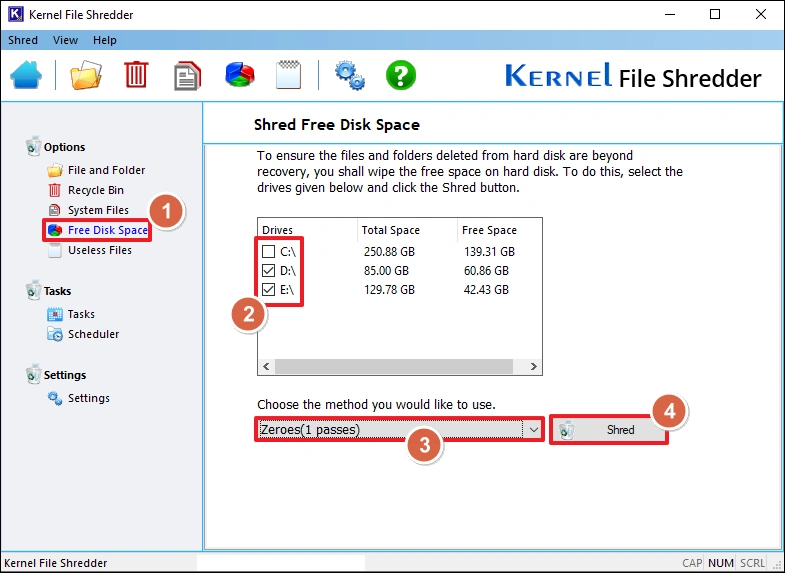
Kernel File Shredder's Shred Free Disk Space screen: tick the drives, choose a method (here Zeroes, 1 pass) and press Shred.
Kernel File Shredder has five targets in its sidebar: File and Folder, Recycle Bin, System Files, Free Disk Space and Useless Files. You queue files of any type, pick one of 11 overwrite methods (from one pass of zeroes to the 35-pass Peter Gutmann method) and press Shred. Jobs can be saved and run daily, weekly or monthly, and a log records when each one ran. The first time you open it, it asks you to set a password, which stops someone else from opening it and wiping something by accident.
Kernel File Shredder is the only tool here whose cheapest licence covers two PCs for under $30. It looks dated next to modern Windows apps, it has no Mac version, and like every tool that runs inside Windows it can't wipe the Windows drive itself.
What we like
- $29 covers two PCs for a year
- 11 methods, scheduler and a log of every job
- Password lock against accidental use
- Full-featured 30-day trial
Watch out for
- Old-style interface
- Windows only
- Yearly licence for home users; no one-time option below the $299 Technician licence
- Few independent reviews of this program
Reviews of Kernel File Shredder are mostly on the vendor's own site, which shows 4.9 out of 5 from 441 reviews. One of them, from Steven Green:
"The tool really works. It easily shreds hundreds of my confidential bank transactions in just a few seconds. I also loved the option to create and schedule a task, it saved a lot of my time."
Steven Green, review on Kernel's product page
On Trustpilot, the company holds 4.9 out of 5 from 166 reviews, nearly all about its email migration tools.
Download Kernel File Shredder Free TrialBuy Kernel File Shredder
2. east-tec Eraser: best for clearing browser and app history too
- Price: $39.95 a year (Eraser Plan, one PC, with a year of updates and support)
- Runs on: Windows 11, 10, 8, 7, Vista and XP; NTFS, exFAT and FAT drives
- Version: 15.0.0 (August 2026)
- Best for: people who share a PC and want their tracks cleaned on a schedule
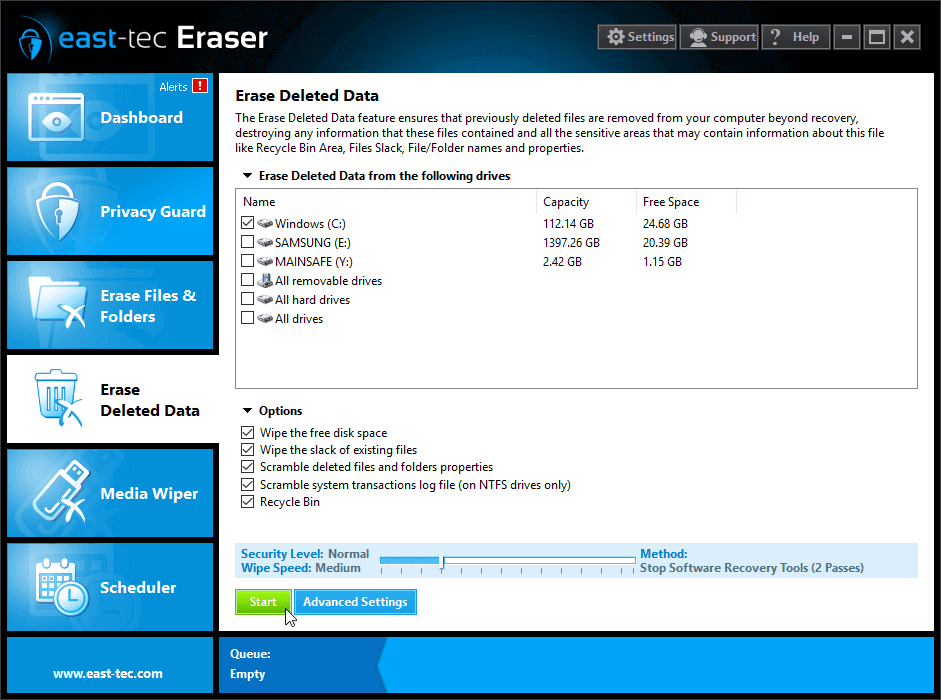
east-tec Eraser's Erase Deleted Data module: pick the drives, then the options (free space, file slack, deleted file names, the NTFS log and the Recycle Bin).
east-tec Eraser is more of a privacy suite than a plain shredder. Its Privacy Guard erases history, cookies and caches from Chrome, Firefox, Edge, Opera and Safari and the traces of over 300 programs, and its Erase Deleted Data module wipes free space, file slack, deleted file names and the NTFS transaction log. It also shreds chosen files, wipes USB sticks and memory cards with its Media Wiper, and runs any job on a schedule.
east-tec Eraser has the longest track record here (East-Tec has sold privacy software since 1997), and reviewers agree it wipes thoroughly. The complaints are a dated interface, very slow high-security wipes, and slow support.
What we like
- Cleans browsers and 300+ programs, not just files
- Wipes file slack and deleted file names as well as free space
- Scheduler for every job
- 15-day fully working trial
Watch out for
- Yearly plan only
- The 35-pass method can take more than a day
- Recent Trustpilot reviews complain about support
- One reviewer reported problems on exFAT drives
"While east-tec Eraser might look dated, it's a very strong program."
AppTrap (Baron Yeung), September 2025, rating it 9 out of 10
"East-tec Eraser won't work properly with exFAT"
Finn Johansen, 3 stars on Trustpilot, January 2025
East-Tec's Trustpilot page showed 2.8 out of 5 from only 7 reviews on October 31, 2026, mostly about support.
Download east-tec Eraser Free TrialBuy east-tec Eraser
3. Stellar File Eraser: the simplest, on Windows and Mac
- Price: $29.99 for one year on one PC or one Mac (separate licences)
- Runs on: 64-bit Windows 11, 10, 8.1, 8 and Windows Server 2019-2012; macOS 10.13 and later, Intel and Apple silicon
- Version: 6.0 (Windows September 2026, Mac October 2026)
- Best for: beginners who want a guided eraser that can't touch system files
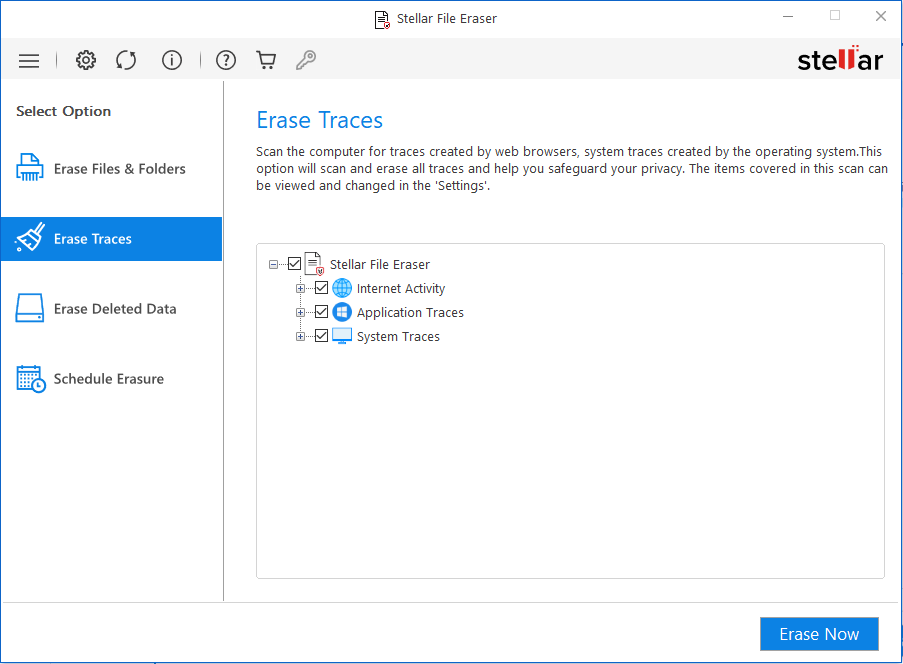
Stellar File Eraser for Windows: Erase Deleted Data overwrites the free space on the drives you tick and leaves existing files alone.
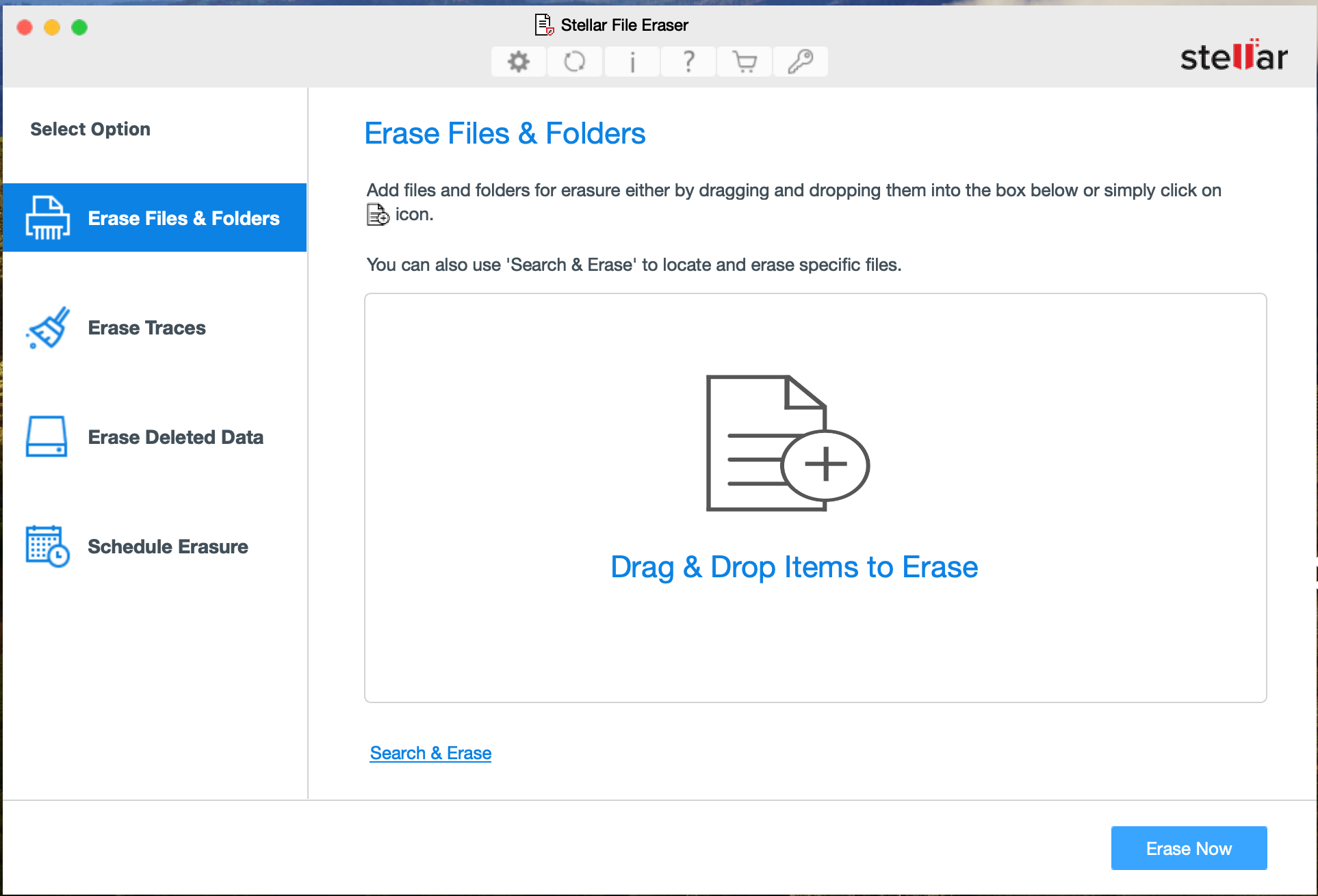
Stellar File Eraser for Mac: the same four modes, with a drop box for files and a Search & Erase button.
Stellar File Eraser has four jobs down the left side: Erase Files & Folders, Erase Deleted Data, Erase Traces and Schedule Erasure. Each opens one panel with an Erase Now button. It offers three methods (one pass of zeroes, one pseudo-random pass and the three-pass DoD 5220.22-M) and never erases operating system files, so a beginner can't break Windows with it. Stellar File Eraser for Mac works the same way on a Mac, including external drives, SD cards and USB sticks, and clears Safari, Chrome, Firefox, Opera and Edge traces.
Stellar File Eraser is the only pick with a matching app on both platforms at the same price. It's a yearly subscription with no one-time licence, it doesn't produce an erasure certificate, and Stellar's support notes that a recovery scan can still list the names of erased files on FAT, exFAT and NTFS drives, even though the contents are gone.
What we like
- Very simple four-step layout
- Protects system files from accidental erasure
- Windows and Mac versions at the same price
- Scheduler on both
Watch out for
- Only three wipe methods
- Yearly subscription only
- Erased file names can still show up in a recovery scan
- Stellar refunds only if you tried the trial first
"It's relatively easy to erase the contents of a drive on a Mac with Stellar File Eraser."
Macworld, quoted on Stellar's product page
"While I like the feel and purpose of Stellar, it still makes me incredibly nervous to use this type of application. I feel as though the software does its job."
Mac Sources, quoted on Stellar's product page
Stellar holds 4.8 out of 5 on Trustpilot from over 5,600 reviews, but nearly all of them are about its recovery and repair tools, not this eraser.
Download Stellar File Eraser (Windows) Free TrialBuy Stellar File Eraser (Windows)
Download Stellar File Eraser for Mac Free TrialBuy Stellar File Eraser for Mac
4. EaseUS BitWiper: best for wiping whole drives
- Price: Pro $39.95 a year or $59.95 lifetime (one PC); $29.95 a month; Technician $99.90 a year
- Free edition: one disk wipe and five file shreds
- Runs on: Windows 11, 10, 8 and 7
- Best for: clearing old hard drives and SSDs before you sell, donate or recycle them
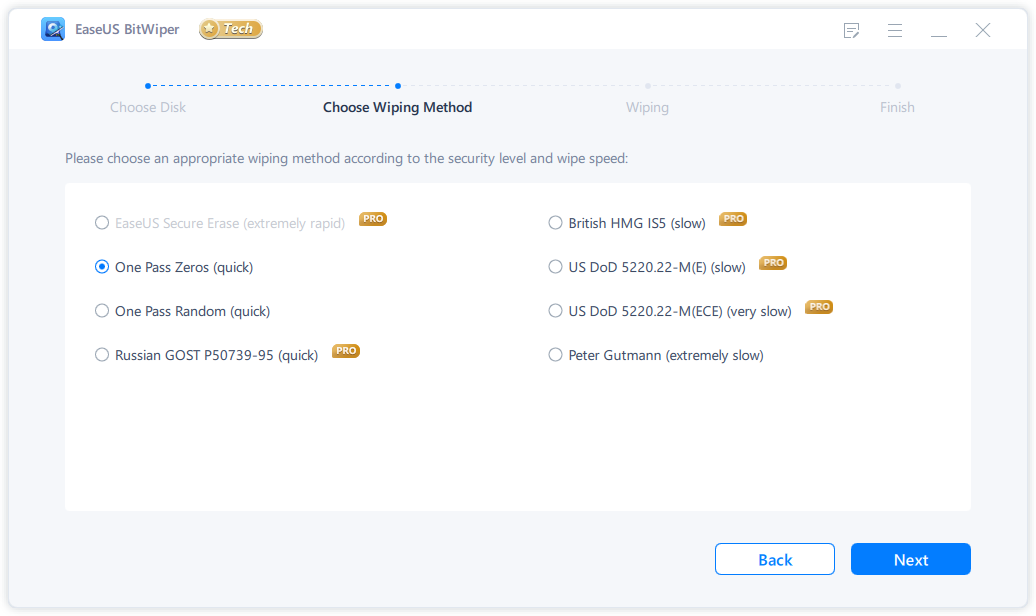
EaseUS BitWiper's wipe method step: quick one-pass methods on the left, slower DoD, HMG IS5 and Gutmann on the right; methods marked PRO need a licence.
EaseUS BitWiper is built around three wizards: Wipe Disk, Wipe Partition and File Shredder. It can wipe several disks or partitions at the same time, wipe only the free space on a partition, and force-shred files Windows won't delete. The Pro edition adds EaseUS Secure Erase for SATA, M.2 and NVMe SSDs, which is the right choice on an SSD rather than a multi-pass method.
EaseUS BitWiper is the only tool here with a genuinely useful free edition: one full disk wipe may be all you need for a single old drive. It has no scheduler and no browser cleaning, and its 30-day guarantee covers technical faults support can't fix, not a change of mind.
What we like
- Free edition wipes one whole disk
- Wipes several drives at once
- SSD Secure Erase mode in Pro
- $59.95 lifetime option
Watch out for
- No scheduler or trace cleaning
- Multi-pass wipes of big drives are slow
- No erasure certificate
- Refunds only for unfixable technical problems
"Wiping large drives may take time, especially with advanced algorithms."
TrishTech review, May 2025
EaseUS as a company scores 4.9 out of 5 on Trustpilot from about 39,800 reviews, mostly about its recovery and backup products; one buyer there in November 2026 noted that "the pricing is on the higher side only."
Download EaseUS BitWiper Free TrialBuy EaseUS BitWiper
5. DoYourData Super Eraser: two machines, with a lifetime option
- Price: $49 a year for two PCs (or two Macs); $69 lifetime; $29 a month
- Runs on: Windows 11 back to XP and Windows Server 2008-2025; macOS 10.12 and later, Intel, T2 and Apple silicon
- Version: 8.3 (Windows), 8.6 (Mac)
- Best for: households and small offices that wipe drives now and then and want a lifetime licence
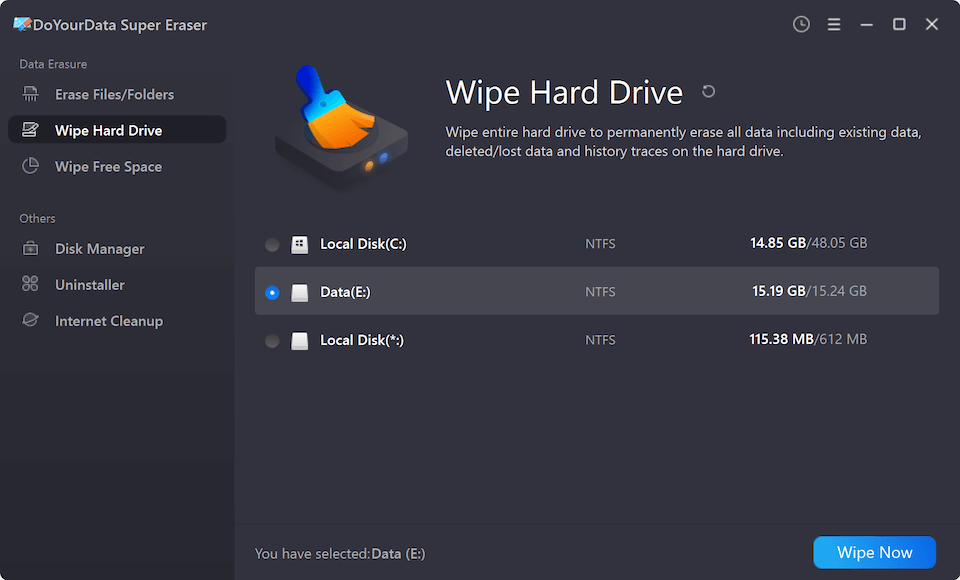
DoYourData Super Eraser for Windows in Wipe Hard Drive mode, with a data partition selected and the Wipe Now button.
DoYourData Super Eraser for Windows has three modes: Erase Files/Folders, Wipe Hard Drive and Wipe Free Space, with eight overwrite standards from one-pass NIST 800-88 to 35-pass Gutmann. It adds a Disk Manager, an Uninstaller and an Internet Cleanup tool in the same window. The Mac version works the same way and can export a report of what it erased (a record from the program, not a third-party certificate).
DoYourData Super Eraser is the most expensive yearly plan here, but each licence covers two machines and the $69 lifetime licence is a fair deal if you keep it for years. Feedback is thin and mixed. Buy the Mac version from the vendor's site: App Store reviewers report that the store build only shreds files.
What we like
- Files, whole drives and free space in one program
- Two machines per licence; lifetime option
- Mac version exports an erasure report
- Windows version can wipe the system partition
Watch out for
- Highest yearly price here
- Few independent tests
- A Trustpilot reviewer complained that cancelling the subscription was hard
- Activation needs an internet connection
"Super Eraser is a simple and no-nonsense software"
Make Tech Easier (Vamsi Krishna), May 2022
"I STRONGLY advice against it."
Jerzy, 1 star on Trustpilot, November 2023, about Super Eraser
DoYourData scored 3.2 out of 5 from 7 reviews on Trustpilot.
Download Super Eraser for Windows Free TrialBuy Super Eraser for Windows
Download Super Eraser for Mac Free TrialBuy Super Eraser for Mac
6. iReaShare Data Wipe: the cheapest
- Price: $14.95 a year or $24.95 lifetime (one PC); $9.95 a month
- Runs on: Windows 11, 10, 8 and 7
- Version: 2.0.32 (March 2026)
- Best for: a low-cost way to shred files and clean external drives
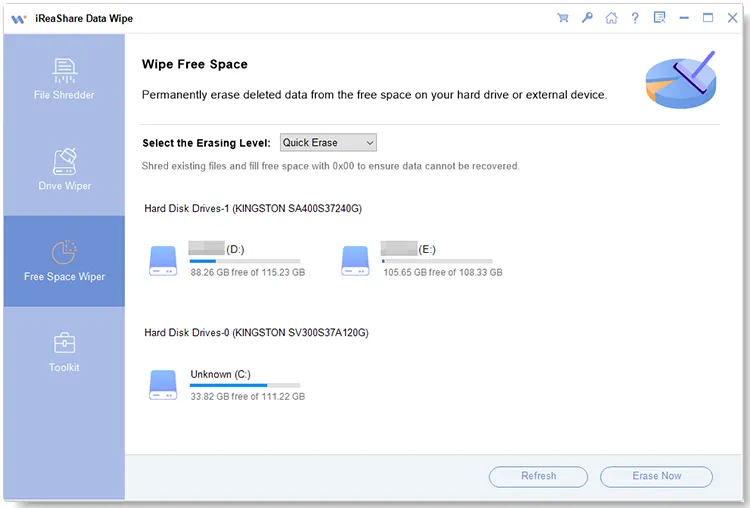
iReaShare Data Wipe's Free Space Wiper: choose Quick Erase or Deep Erase, then the drive.
iReaShare Data Wipe keeps it short: File Shredder, Drive Wiper and Free Space Wiper, with two levels, Quick Erase (one pass of zeros) and Deep Erase (DoD 5220.22-M(E), several passes). The installer is about 6 MB. The Drive Wiper lists data partitions and external drives, not the Windows drive, so it isn't a tool for wiping a whole PC.
iReaShare Data Wipe is the cheapest licence here and the only one under $25 for life. It's also the newest (on sale since early 2026), with almost no reviews, no scheduler, and a refund window of only 7 days for listed technical problems.
What we like
- $14.95 a year, $24.95 lifetime
- Small, simple program
- Free-space wiping includes the C: drive
Watch out for
- Only two erase levels
- Can't wipe the Windows drive
- 7-day refund window, technical problems only
- Almost no user reviews yet
"Wipe speed is fastest I have seen. I had my SSD wiped in an hour- (free space)"
JE, comment on Giveaway of the Day, August 2026
Download iReaShare Data Wipe Free TrialBuy iReaShare Data Wipe
Which should you choose?
| Your situation | Pick | Why |
|---|
| Shred files on one or two Windows PCs, on a schedule | Kernel File Shredder | $29 for two PCs, 11 methods, scheduler and a password lock |
| Also clear browser and program history every week | east-tec Eraser | Privacy Guard covers 300+ programs and runs on a schedule |
| Erase files on a Mac you're keeping | Stellar File Eraser for Mac | Simple, same app as on Windows, works on external drives and USB sticks |
| Wipe an old hard drive or SSD before selling it | EaseUS BitWiper | Whole-disk wiping, SSD Secure Erase, and the free edition wipes one disk |
| Pay once and keep it | DoYourData Super Eraser | $69 lifetime for two machines, on Windows or Mac |
| Lowest price | iReaShare Data Wipe | $14.95 a year or $24.95 for life |
Who should skip each one
- Kernel File Shredder: Mac users, and anyone who wants a one-time licence.
- east-tec Eraser: anyone who only needs a file shredder and doesn't care about browser traces; the cheaper tools do that part.
- Stellar File Eraser: anyone who needs more than three wipe methods or an erasure certificate.
- EaseUS BitWiper: anyone who wants scheduled shredding or history cleaning; it does neither.
- DoYourData Super Eraser: anyone who only needs one quick wipe; the free BitWiper edition or Windows' own tools are enough.
- iReaShare Data Wipe: anyone who wants to wipe the Windows drive itself or needs a long refund window.
What commonly goes wrong
- Expecting a shredder to wipe the running system. Tools that run inside Windows or macOS can't erase the drive they're running from. For a whole computer, use Reset this PC with drive cleaning, Erase All Content and Settings on a Mac, or a bootable wiper.
- Picking 35 passes. The Gutmann method was designed for old hard disks. Reviewers who chose it waited more than a day, and one pass already defeats recovery software on a modern hard disk.
- Trusting file-level shredding on an SSD. An SSD remaps writes, so overwriting a file through the file system can leave old copies in cells the computer can't see. Encryption (BitLocker, FileVault) plus the maker's Secure Erase is the stronger answer for an SSD you're giving away.
- Forgetting the files you already deleted. Shredding today's files doesn't touch what you deleted last year. Run a free-space wipe once after installing any of these tools.
- Wiping the wrong drive. There is no undo. Read the drive letter twice, and test the trial on a spare USB stick first.
- Forgetting the auto-renewal. Every yearly plan here renews automatically. If you only need the tool once, turn renewal off after you buy, or choose a lifetime licence.
FAQs
What is the best file shredder for Windows 11?
Kernel File Shredder is the best value for Windows 11: $29 a year covers two PCs and it includes 11 wipe methods, free-space wiping and a scheduler. east-tec Eraser is the better pick if you also want browser and app history erased on a schedule.
Is there a free way to securely delete files on Windows?
Yes. Windows' built-in cipher /w command overwrites a drive's free space, which destroys files you already deleted, and the free edition of EaseUS BitWiper shreds five files and wipes one disk. Paid tools add file lists, schedules and more methods.
Can shredded files be recovered?
Not with recovery software, if the shredder overwrote them. All the tools here overwrite the data itself rather than just removing the file's entry. On SSDs the guarantee is weaker, because the drive can keep old copies in cells the operating system can't reach.
How many passes do I need to securely erase a file?
One pass is enough on a modern hard disk; Stellar's own support notes that NIST considers a single pass sufficient. Multi-pass methods like DoD 5220.22-M (3 passes) exist for policies that require them, and the 35-pass Gutmann method mostly costs you time.
What is the best file shredder for Mac?
Stellar File Eraser for Mac ($29.99 a year) is the simplest Mac shredder, with file, free-space and trace erasing and a scheduler. DoYourData Super Eraser for Mac ($49 a year for two Macs, or $69 lifetime) can also wipe whole external drives and export a report of what it erased.
Do I need a file shredder if I'm selling my PC?
Not necessarily. Reset this PC with the clean-drive option wipes the whole Windows drive for free. A tool like EaseUS BitWiper helps when you are wiping extra or external drives, and a file shredder helps when you are keeping the PC and only want certain files gone.
Do file shredders work on USB sticks and SD cards?
Yes. east-tec Eraser has a Media Wiper for USB drives and memory cards, and Stellar File Eraser, DoYourData Super Eraser and iReaShare Data Wipe all wipe external drives and cards. Flash media remap writes like SSDs, so a full-device wipe is more reliable than shredding single files.
Which file shredder has a lifetime licence?
iReaShare Data Wipe ($24.95), EaseUS BitWiper ($59.95) and DoYourData Super Eraser ($69 for two machines) sell one-time licences. Kernel, east-tec and Stellar sell yearly licences for home users.
Deleted something by mistake rather than on purpose? See Best Data Recovery Software for Windows PCs and RAID Arrays.