iReaShare Data Wipe: Shred Files, Wipe Drives and Clean Free Space on Windows
iReaShare Data Wipe is a $14.95-a-year Windows program that permanently erases data so recovery software can't bring it back. It does three jobs: shredding selected files and folders, wiping a whole drive or USB stick, and overwriting a drive's free space so files you deleted earlier are gone for good. It's for anyone selling, donating or recycling a drive, or deleting sensitive files they don't want recovered.
Pressing Delete and emptying the Recycle Bin only removes a file's entry; the contents stay on the disk until something overwrites them, which is why free recovery tools can find "deleted" photos and documents. Data Wipe does the overwriting on purpose.
Quick facts
- Version: 2.0.32 (installer dated March 19, 2026)
- Developer: iReaShare
- Runs on: Windows 11, 10, 8 and 7 (no Mac version)
- Erases: files and folders, whole partitions and external drives, and free space
- Erase levels: Quick Erase (one pass of zeros) and Deep Erase (US DoD 5220.22-M(E), multiple passes)
- Price: $14.95 per year for 1 PC; also monthly ($9.95) and lifetime ($24.95) licenses
- Refunds: 7-day money-back guarantee (eraser products get the shorter window)
- What we checked: the installer, version 2.0.32 (6.0 MB, signed by Shenzhen Qixingshi Technology Co., Ltd), downloaded from ireashare.com on November 8, 2026, and the 1-year, 1-PC license at $14.95 on the order page, renewing every 12 months, on November 8, 2026. We didn't wipe a drive or test recovery afterwards.
Download Free TrialBuy Now
Overview
Data Wipe is a small, single-window program with a sidebar of four entries: File Shredder, Drive Wiper, Free Space Wiper and Toolkit. Each tool follows the same pattern: choose what to erase, pick an erase level where it applies, click Erase Now and confirm a warning that the data can't be recovered. The installer is only about 6 MB.
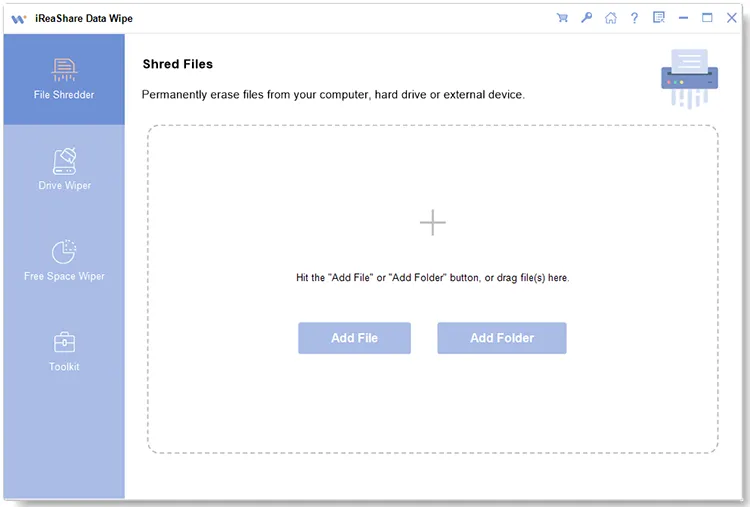
The File Shredder start screen: Add File, Add Folder or drag files in; the other tools are in the left sidebar.
Features
Shred individual files and folders
iReaShare Data Wipe's File Shredder permanently erases the files and folders you add, of any file type, from the computer or an external drive. The list shows each item's name, size, path and date, so you can remove anything added by mistake before you click Erase Now.
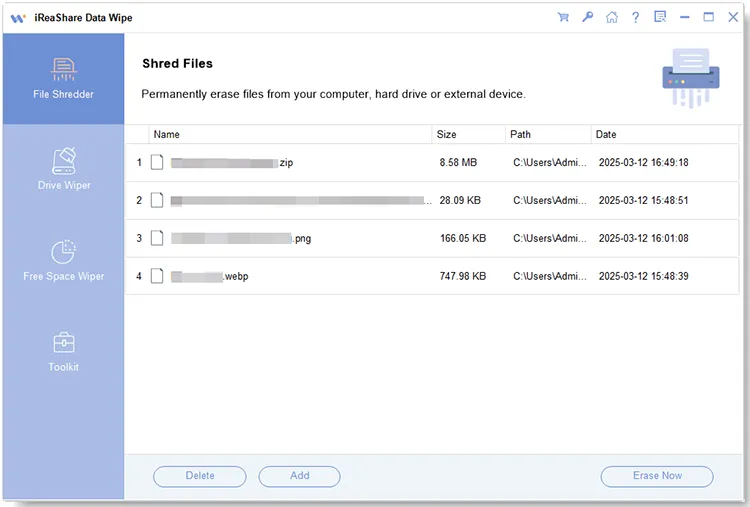
Four files queued in File Shredder with their size, path and date, and the Delete, Add and Erase Now buttons.
Wipe a whole drive or USB stick
iReaShare Data Wipe's Drive Wiper erases every file on a hard drive partition or an external device such as a USB flash drive or SD card. Drives are listed by physical disk and model, with free and total space, so it's easy to see which one you're about to erase.
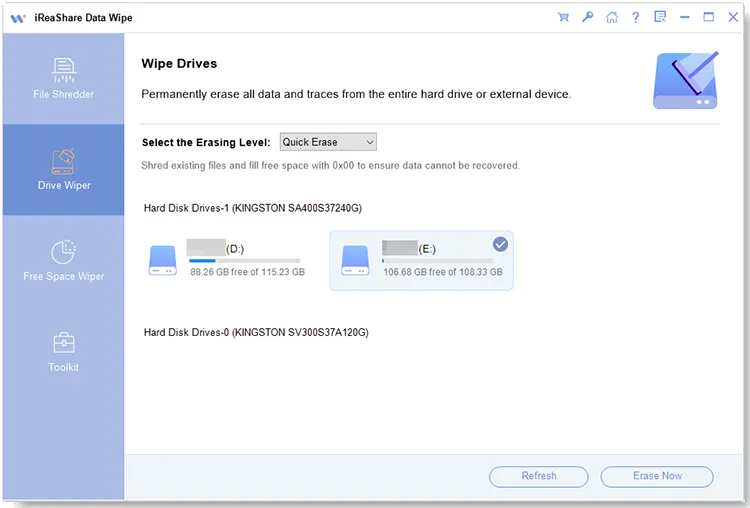
Drive Wiper with Quick Erase selected and partitions D: and E: of a Kingston SSD listed; E: is ticked for erasing.
Erase what you already deleted
iReaShare Data Wipe's Free Space Wiper overwrites only the empty space on a drive, which is where the remains of previously deleted files sit. Your current files aren't touched, so you can run it on the Windows drive after deleting something sensitive the normal way.
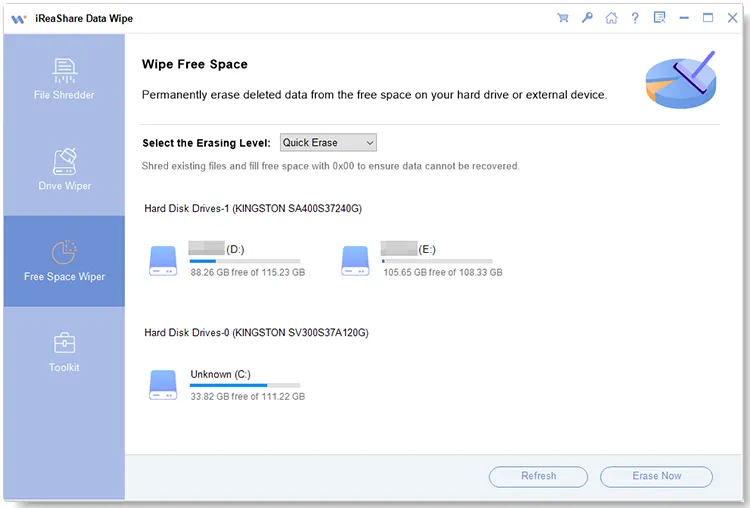
Free Space Wiper lists every partition, including the system drive (C:), with its free space.
Two erase levels
iReaShare Data Wipe offers Quick Erase, which overwrites with zeros (0x00) in a single pass and is fine for everyday privacy, and Deep Erase, which follows the US DoD 5220.22-M(E) standard with several overwrite passes for the most sensitive data. Deep Erase takes several times longer.
Benefits
- Peace of mind when a drive leaves your hands. Selling a PC, returning a work laptop or recycling a USB stick no longer means handing over your old files.
- Three tools in one small program. You don't need a separate shredder, drive eraser and free-space cleaner.
- Low cost. $14.95 a year, or $24.95 once for a lifetime license.
- Simple choices. Two clear erase levels instead of a long list of algorithms you have to research.
Real-World Uses
- Selling an external hard drive. Run Drive Wiper with Deep Erase before you list it.
- Getting rid of tax returns and ID scans. Drop the folder into File Shredder rather than the Recycle Bin.
- Cleaning up after a careless delete. You deleted private photos the normal way months ago; Free Space Wiper makes sure they can't be recovered.
- Reusing SD cards and USB sticks. Wipe a card before passing it to someone else.
Who It's For, and Who Should Skip It
Data Wipe suits home users and small offices on Windows who want an easy way to destroy files and drives without learning a command-line tool. Skip it if:
- You need to wipe the Windows drive itself. In the vendor's screenshots, Drive Wiper only lists data partitions, not C:. For a whole system disk you need a bootable eraser or Windows' own "Reset this PC" with drive cleaning.
- You need an erasure certificate. It doesn't produce a report or certificate for compliance or a company audit; business erasure tools provide those.
- You use a Mac. It's Windows only.
- You need phone erasing. iReaShare sells separate Android and iPhone Data Eraser programs.
Usage Guide
- Download the installer from ireashare.com, install it and launch iReaShare Data Wipe.
- Files and folders: choose File Shredder, click Add File or Add Folder (or drag and drop), check the list, then click Erase Now and OK.
- A whole drive: choose Drive Wiper, pick Quick Erase or Deep Erase, select the drive, then click Erase Now and OK.
- Deleted files only: choose Free Space Wiper, pick an erase level, select the drive, then click Erase Now and OK. A progress bar shows the percentage and time elapsed, and you can stop it.
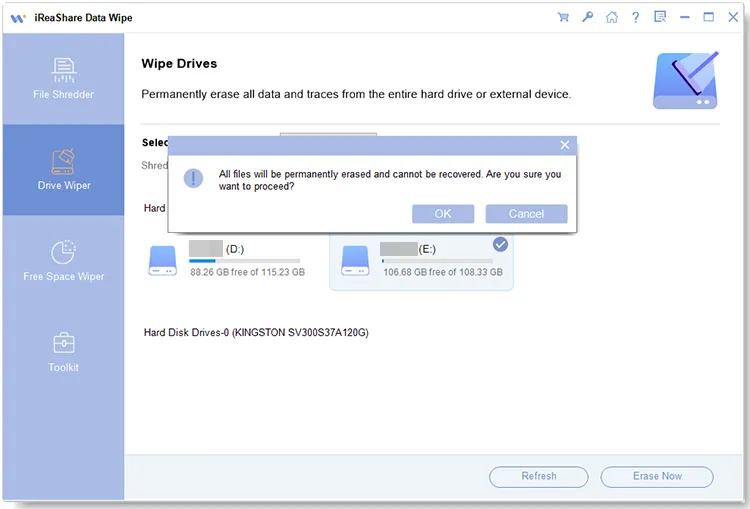
The last check before a drive wipe: "All files will be permanently erased and cannot be recovered. Are you sure you want to proceed?"
Before you buy
- Only 7 days to ask for a refund. Eraser products get iReaShare's shorter guarantee, and only for listed cases such as a critical technical problem support can't fix, not a change of mind. Test the trial on a spare USB stick first.
- The yearly plan renews automatically and renewals aren't refunded. If you only need it once, the $24.95 lifetime license is just $10 more; otherwise turn off auto-renewal in your 2Checkout (Verifone) account.
- Double-check the drive letter before you click Erase Now. A wipe can't be undone, by you or by any recovery tool.
Where it falls short
- Overwriting has limits on SSDs. SSDs spread writes across spare cells the operating system can't see, so any software that overwrites files, this one included, can leave fragments behind there. For an SSD you're giving away, the drive maker's secure-erase tool is the more thorough option.
- No bootable media. Everything runs inside Windows, which is why the system drive can't be wiped completely.
- No proof of erasure. Its three tools don't include a verification pass, an erasure report or a certificate you can keep.
- Little independent track record. iReaShare has no Trustpilot reviews yet, and Data Wipe has only been around since early 2026.
What Users Say
Data Wipe is new, and real user feedback is almost nonexistent. It was given away on Giveaway of the Day on August 30, 2026, and the only user comment there is short. Trustpilot had no reviews of iReaShare when we looked.
Giveaway of the Day, version 2.0.32
JE: "Wipe speed is fastest I have seen. I had my SSD wiped in an hour- (free space)"
One positive comment on speed is all there is so far, so judge Data Wipe by the free trial rather than by reviews.
Editions and Pricing
| License |
1 PC |
5 PCs |
10 PCs |
| 1 Month (auto-renews) | $9.95 | $19.95 | $29.95 |
| 1 Year (auto-renews) | $14.95 | $24.95 | $34.95 |
| Lifetime (one payment) | $24.95 | $34.95 | $44.95 |
All licenses include updates and support for their term, and all have the 7-day refund window. Prices exclude sales tax or VAT.
FAQs
Can files erased with iReaShare Data Wipe be recovered?
No, not by recovery software. iReaShare Data Wipe overwrites the data rather than just removing the file entry, so recovery tools find nothing to restore. On SSDs, see the note above about spare cells.
Should I use Quick Erase or Deep Erase?
For everyday privacy, iReaShare Data Wipe's Quick Erase (one pass of zeros) is enough on a hard drive. Use Deep Erase (DoD 5220.22-M) when a drive held financial, medical or business data and is leaving your hands, and allow much more time.
Does Free Space Wiper delete my current files?
No. iReaShare Data Wipe's Free Space Wiper only overwrites unused space, so your existing files stay as they are; only traces of previously deleted files are destroyed.
Can iReaShare Data Wipe erase my C: drive before I sell my PC?
Not completely. iReaShare Data Wipe runs inside Windows, and its Drive Wiper lists data partitions rather than the system drive. You can shred personal folders and wipe C:'s free space, but for a full system-disk wipe use Windows' "Reset this PC" with "Clean the drive", or a bootable eraser.
Does iReaShare Data Wipe work on USB sticks and SD cards?
Yes. iReaShare Data Wipe's Drive Wiper and Free Space Wiper work on external devices such as USB flash drives, SD cards and external hard drives connected to the PC.
Is there a Mac version?
No. iReaShare Data Wipe is Windows only (Windows 11, 10, 8 and 7).
System Requirements
- Windows 11, 10, 8 or 7
- About 6 MB for the installer
- Internal hard drives or SSDs, and external USB drives or SD cards to erase
Conclusion
iReaShare Data Wipe is good value if you want a simple Windows tool to shred files, wipe external drives and clean free space: the $24.95 lifetime license is a modest one-off cost, and the three tools cover what home users need. The reason to buy is that ease and price. The reason to look elsewhere is a full system-disk or SSD wipe with a certificate, which needs bootable or business-grade software. Try it on a spare USB stick during the trial, and remember the refund window is only 7 days.
Download Free TrialBuy Now