iReaShare iPhone Manager: An iTunes Alternative for Moving and Backing Up iPhone Data on Windows
iReaShare iPhone Manager is a $29.95-a-year Windows program (a Mac version is a separate download) that shows your iPhone, iPad or iPod touch as folders of contacts, messages, notes, photos, videos, music and more, so you can export them to the PC, import some back, and make or restore full iTunes-style backups without opening iTunes. It's for iPhone owners on Windows who find iTunes clumsy for anything beyond a full sync.
The everyday problem it solves: you want your text messages or notes saved on the computer, or a few hundred videos moved off a 128 GB phone, and Windows only shows you the camera roll. iPhone Manager reads the rest.
Quick facts
- Version: 2.1.26 for Windows (installer dated August 24, 2026)
- Developer: iReaShare
- Runs on: Windows 11, 10, 8 and 7; a Mac version for Mac OS X 10.9 or higher
- Devices: iPhone, iPad and iPod touch, on most iOS versions including iOS 27
- Connection: USB cable only (no Wi-Fi mode)
- Price: $29.95 per year for 1 PC; also monthly ($19.95) and lifetime ($39.95) licenses
- Trial: free download for Windows and Mac
- Refunds: 30-day money-back guarantee on yearly and lifetime licenses, 7 days on monthly ones
- What we checked: the Windows installer, version 2.1.26 (35.1 MB, signed by Shenzhen Qixingshi Technology Co., Ltd), downloaded from ireashare.com on November 8, 2026, and the 1-year, 1-PC license at $29.95 on the order page, renewing every 12 months, on November 8, 2026. We didn't connect an iPhone or run a backup ourselves.
Download Free TrialBuy Now
Overview
Plug the iPhone in, tap Trust on the phone, and iPhone Manager opens on a Summary screen with the model, iOS version, battery health (charge cycles), sales region and a storage bar split into apps, photos, music, videos, books and other. The left sidebar groups the data into Info (Contacts, Messages, Notes, Calendars, Bookmarks), Media (Music, Videos, Photos, Books) and Apps. Each category opens as a table with Export, Import, New, Edit, Delete and Refresh buttons. The Super Toolkit tab holds iTunes Backup & Restore.
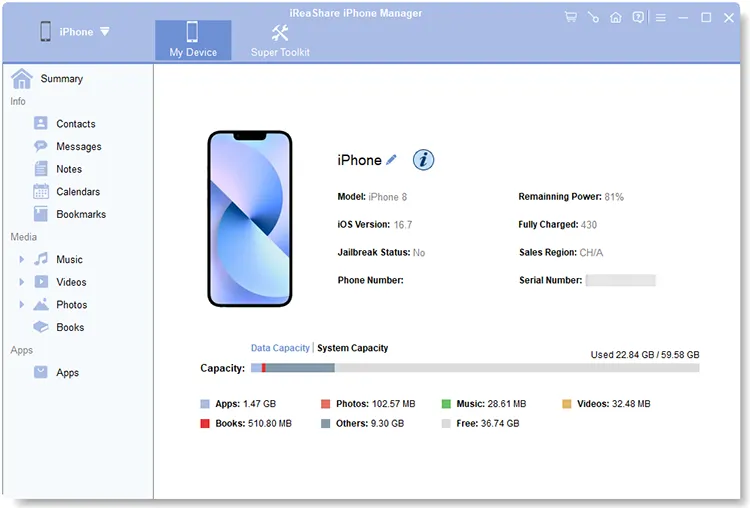
The Summary screen with an iPhone 8 on iOS 16.7: model, battery charge cycles, sales region and storage use by type.
Features
Save iMessages and texts to the PC
iReaShare iPhone Manager lists every conversation with its message count and date, shows the thread on the right, and exports the ones you tick to the computer. For messages, notes and voice memos the phone asks for its screen passcode first, since iOS protects that data.
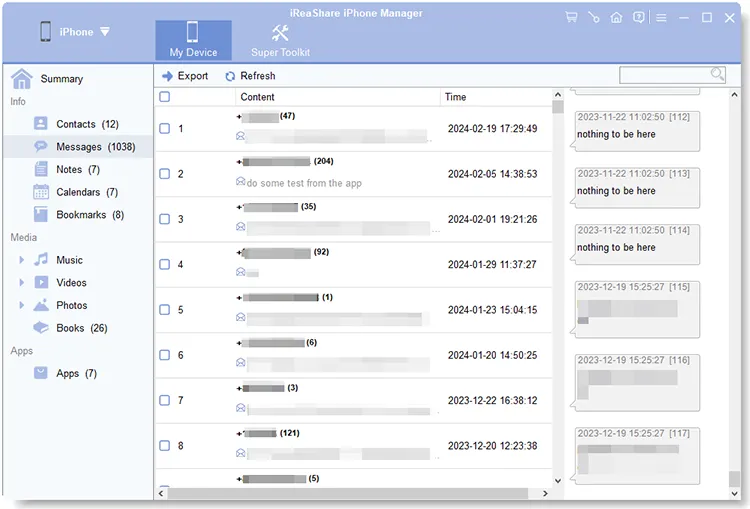
Messages (1,038 here): conversations with their message counts and dates, and the selected thread on the right.
Manage contacts, calendars, notes and bookmarks
iReaShare iPhone Manager lets you add, edit, delete and export contacts (CSV, VCF or XML), and import contacts, calendars, bookmarks and books from the PC. You can write new notes on the computer and save them to the phone, delete old ones in bulk, and export Safari bookmarks as XML or HTML.

The Notes category: each note's title, the start of its text and the time it was changed.
Export photos, videos and music at full quality
iReaShare iPhone Manager breaks media into the same groups the phone uses: Songs, Voice Memos, Tones, Movies, TV Shows, Music Videos, Photos and Albums (including Screenshots and Videos). The photo list shows thumbnails, size, format and date, and files are copied without being recompressed. You can also create photo albums and music playlists.
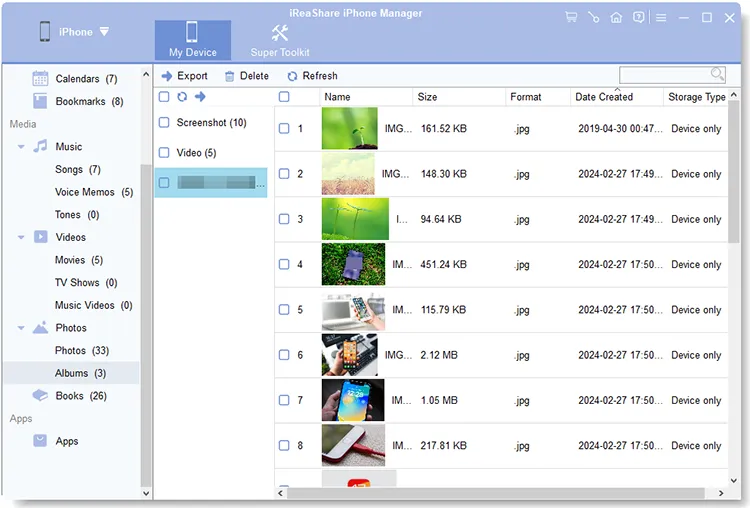
Photos by album, with each picture's size, format, creation date and storage type, and the media groups (Songs, Voice Memos, Movies and so on) on the left.
Full backups without the iTunes window
iReaShare iPhone Manager's iTunes Backup & Restore tool backs up the whole device to the default iTunes backup folder or any folder you choose, restores a backup to any connected iPhone or iPad, imports backup files from other folders, and deletes old backups to free disk space. Because the backups use the iTunes format, you aren't locked into the program to use them.
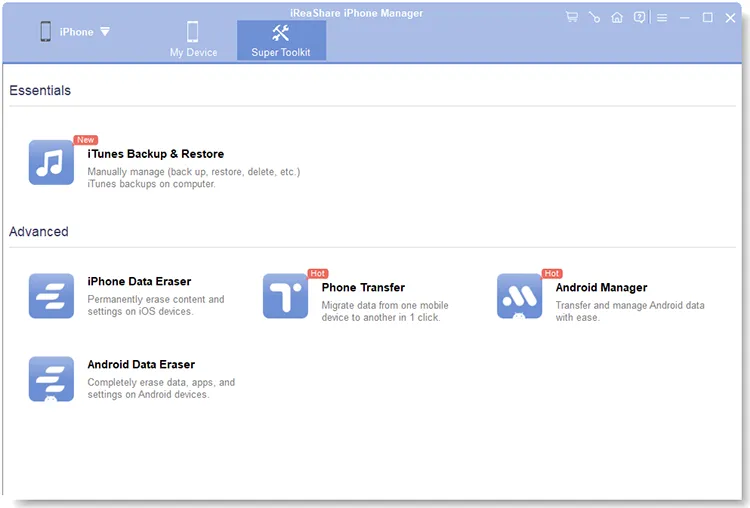
The Super Toolkit tab: iTunes Backup & Restore, plus shortcuts to iReaShare's other tools (sold separately).
Remove many apps at once
iReaShare iPhone Manager lists your installed apps so you can tick a batch and uninstall them in one step, instead of long-pressing them one by one on the phone.
Benefits
- You decide what to copy. iTunes and Finder back up everything or nothing; here you can export one conversation, one album or one note.
- Data you can open. Exported contacts, messages and bookmarks land as ordinary files on your PC, so you can read them without the program.
- No cloud needed. Useful when your iCloud storage is full or you don't want personal messages on someone else's server.
- Familiar backup format. Backups stay iTunes-compatible, so Apple's own tools can still restore them.
Real-World Uses
- Clearing a full phone. Export the biggest videos to the PC, check they opened, and delete them from the iPhone.
- Keeping a record. Save a text exchange with a contractor or a lawyer to the computer before deleting it from the phone.
- Moving contacts between platforms. Export iPhone contacts as VCF or CSV for an Android phone or an email program.
- Backing up before an iOS update. Make a full backup to an external drive with a couple of clicks.
- Helping a relative. Copy an older family member's photos and notes off an old iPad before it's handed down.
Who It's For, and Who Should Skip It
iPhone Manager fits Windows users who want to browse and copy iPhone data by category, and who dislike the iTunes interface. It's especially handy for saving messages, notes and contacts, which Windows can't reach on its own.
Skip it if:
- You're happy with iCloud. If everything already syncs to iCloud and you have the space, you may not need a desktop tool.
- You only move photos. The Windows Photos app imports camera-roll pictures for free.
- You want wireless transfers. This program only works over USB.
- You need WhatsApp chats. They aren't in its category list; iReaShare sells a separate WhatsApp transfer tool.
- You use Android. iReaShare's Android Manager is the Android counterpart.
Usage Guide
- Download the Windows installer from ireashare.com, install it and launch iReaShare iPhone Manager.
- Connect the iPhone, iPad or iPod touch with an Apple USB cable and tap Trust on the device. If no prompt appears, click "Can't see this popup?" in the program; if the device still isn't recognized, use "Device still not recognized?".
- Pick a category on the left. For Messages, Notes and Voice Memos, enter your screen passcode on the phone when asked.
- Tick the items and click Export to save them to the PC, or Import to add contacts, calendars, bookmarks or books from the PC.
- For a full backup, open Super Toolkit > iTunes Backup & Restore, choose Back up, pick a location and click OK. Restore works the same way from the Restore menu.
Before you buy
- The 1-year plan renews automatically every 12 months and renewals aren't refundable; turn off auto-renewal in your 2Checkout (Verifone) account if you only need it once.
- The money-back guarantee covers listed cases such as critical technical problems support can't fix or a duplicate purchase, not a change of mind, so test the trial with your own iPhone first.
- Sales tax or VAT is added on the order page for your country.
Where it falls short
- It still relies on Apple's drivers. The program talks to the phone through Apple's mobile device driver, which comes with iTunes or Apple Devices. iReaShare's support says iTunes "may be required" for some setups, and one user's iPhone was never recognized because of a driver error (see below).
- The vendor's screenshots are dated. They show an iPhone 8 on iOS 16.7, while the product page lists support up to iOS 27, so the current version may look slightly different.
- Little independent track record. iReaShare has no Trustpilot reviews yet, and most coverage comes from giveaway sites.
What Users Say
There's very little independent feedback on iReaShare iPhone Manager. It has been given away on Giveaway of the Day three times (versions 1.0.5 in November 2024, 2.1.23 in April 2026 and 2.1.26 in October 2026), and the user comments there are the best real-world evidence available. Trustpilot had no reviews of iReaShare when we looked.
Giveaway of the Day, version 1.0.5
Ebgb: "I was looking forward to trying this software. Software downloaded, installed and registered with ease but won't recognize iPhone. "Apple mobile device driver failed." Tried different cables, different USB ports, rebooted computer, rebooted iPhone. Same error message. Opened and updated iTunes, Apple and Windows operating systems are up to date... I even attached an older iPhone 10 with same issue"
iReaShare's support team replied by pointing Ebgb to support@ireashare.com.
Christopher Anderson praised the giveaway's setup rather than the program itself: "One of those boss Giveawayoftheday releases that has the name and license code INSIDE the Readme text file, instead of forcing you to give them your email on a website and sign up for some obnoxious account you will never use."
Giveaway of the Day, version 2.1.26
Kalmly asked: "Judging from the screen shots, it seems iTunes is required for this program to work. Is that correct?" The vendor answered that "iTunes may be required for certain functions or for your computer to recognize your iPhone, depending on your system and setup."
Sara wrote: "Thanks very much for an alternative to itunes. I really don't like that program at all." She asked whether she'd lose access to transferred files if she stopped using the program; the answer is no, exported files stay on the PC as ordinary files.
The pattern: people want an iTunes alternative and like the idea, but the one hands-on complaint is about the iPhone not being detected, which comes down to Apple's driver on the PC. Try the free version with your own iPhone before paying.
Editions and Pricing
| License |
1 PC |
5 PCs |
10 PCs |
Refund window |
| 1 Month (auto-renews) | $19.95 | $29.95 | $39.95 | 7 days |
| 1 Year (auto-renews) | $29.95 | $39.95 | $49.95 | 30 days |
| Lifetime (one payment) | $39.95 | $49.95 | $59.95 | 30 days |
All licenses include free updates and support for their term. The lifetime 1-PC license is only $10 more than a year, so it's the better value if you'll keep using it.
FAQs
Do I need iTunes installed to use iReaShare iPhone Manager?
Not to use its interface, but iReaShare iPhone Manager relies on Apple's mobile device driver to see the phone, and iReaShare says iTunes may be needed on some PCs for that. If the iPhone isn't detected, installing iTunes or Apple Devices from Microsoft Store usually supplies the driver.
Can iReaShare iPhone Manager connect over Wi-Fi?
No. iReaShare iPhone Manager only connects over a USB cable; the vendor recommends a compatible Apple cable for a stable connection.
Why does iReaShare iPhone Manager ask for my iPhone passcode?
iOS protects messages, notes and voice memos, so iReaShare iPhone Manager asks you to enter the screen passcode on the phone before it can read them. Other categories don't need it.
Will I lose my exported files if I stop paying?
No. Files that iReaShare iPhone Manager has exported are ordinary files on your PC and stay there after the license ends; you just can't run new transfers with the full version.
Can I copy music from the PC to my iPhone?
iReaShare iPhone Manager's guide lists import for contacts, calendars, bookmarks and books. For music it shows export, playlist creation and management, so check the trial if adding music from the PC is your main reason to buy.
Does iReaShare iPhone Manager work with iPads?
Yes. iReaShare iPhone Manager supports iPhone, iPad and iPod touch on most iOS and iPadOS versions.
How do I cancel the automatic renewal?
Log in to your 2Checkout (Verifone) MyAccount with the email you ordered with, open the order and choose "Stop automatic subscription renewal", or email support@ireashare.com. Do it before the renewal date, since renewals aren't refunded.
System Requirements
- Windows 11, 10, 8 or 7 (the Mac version needs Mac OS X 10.9 or higher)
- iPhone, iPad or iPod touch on most iOS versions, including iOS 27
- An Apple USB cable, and Apple's mobile device driver on the PC
- About 35 MB for the installer
Conclusion
iReaShare iPhone Manager is worth it for Windows users who want to pull messages, notes, contacts and media off an iPhone by category and keep iTunes-format backups without the iTunes window. The reason to buy is the selective export of data Windows can't reach on its own. The reason to hold back is detection: it depends on Apple's driver, and the brand has very few independent reviews yet. Run the trial with your own iPhone; if it connects, the $39.95 lifetime license is a better deal than paying $29.95 every year.
Download Free TrialBuy Now