iReaShare Phone Transfer: Copy Your Data to a New Phone Through Your PC
iReaShare Phone Transfer is a $29.95-a-year Windows program (a Mac version is a separate download) that copies contacts, messages, call logs, photos, music, videos, documents and apps straight from your old phone to your new one while both are plugged into the computer. It handles Android to Android, iPhone to iPhone, and both directions between Android and iPhone, though the cross-platform moves carry fewer data types.
It's built for the day you unbox a new phone: rather than juggling a cloud account, a vendor's switch app and a pile of manual exports, you connect both phones, tick what you want and click Start Copy.
Quick facts
- Version: 3.0.22 for Windows (installer dated November 4, 2026)
- Developer: iReaShare
- Runs on: Windows 11, 10, 8 and 7; a Mac version for Mac OS X 10.9 or higher
- Phones: Android 6.0 or later (up to Android 17) and iOS 5.0 or later (up to iOS 27)
- Directions: Android to Android, iPhone to iPhone, Android to iPhone, iPhone to Android
- Connection: USB for every combination; Wi-Fi only for Android to Android
- Price: $29.95 per year for 1 PC; also monthly ($19.95) and lifetime ($39.95) licenses
- Refunds: 30-day money-back guarantee on yearly and lifetime licenses, 7 days on monthly ones
- What we checked: the Windows installer, version 3.0.22 (50.7 MB, signed by Shenzhen Qixingshi Technology Co., Ltd), downloaded from ireashare.com on November 8, 2026, and the 1-year, 1-PC license at $29.95 on the order page, renewing every 12 months, on November 8, 2026. The cross-platform data types below come from the vendor's own guide screenshots; we didn't run a transfer between two phones ourselves.
Download Free TrialBuy Now
Overview
Phone Transfer has a single, three-column window: the Source phone on the left, the Destination phone on the right, and a list of data types with item counts in the middle. A Flip button swaps the two phones if they landed on the wrong sides. Data types the chosen direction can't carry are greyed out with a warning icon, so you see the limits before you start rather than after.
It's a direct phone-to-phone copy. Nothing is kept on the PC in between, so it isn't a backup tool: if you want a copy on the computer as well, you need a separate manager or backup program.
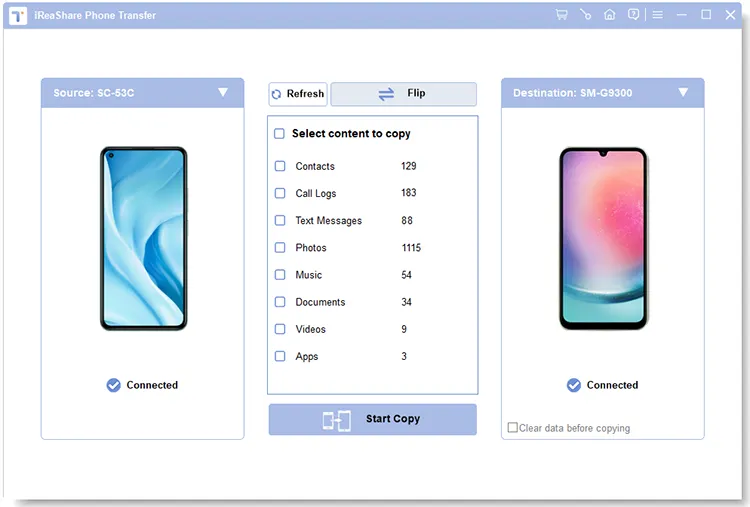
Android to Android: a Galaxy S9 as the source, a Xiaomi phone (model 2201123C) as the destination, and eight data types with their counts, all ticked.
Features
Everything moves between two Android phones
iReaShare Phone Transfer copies all eight Android data types (contacts, call logs, text messages, photos, music, documents, videos and apps) from one Android device to another, at original quality. A Clear data before copying box wipes those categories on the receiving phone first, so you don't end up with duplicate contacts. Between two Android phones you can also connect over Wi-Fi instead of cables.
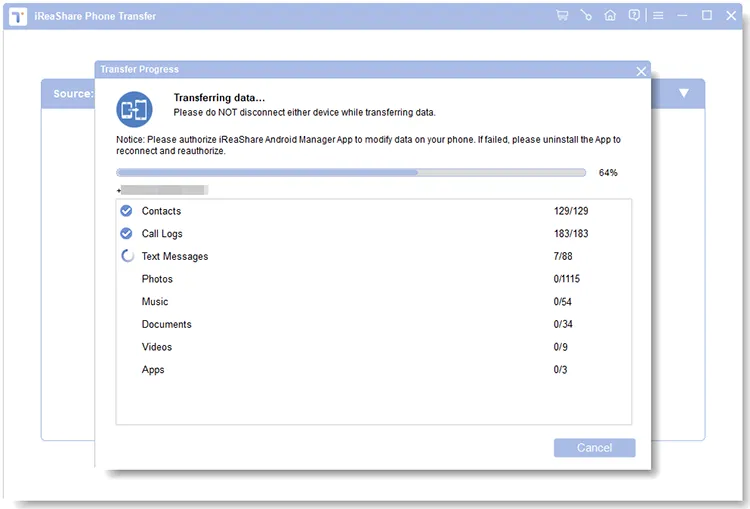
The transfer in progress: contacts (239) and call logs (837) done, text messages under way, with a note to keep the helper app open on the phone.
iPhone to Android: most of what matters
iReaShare Phone Transfer moves contacts, text messages, books, music, videos and photos from an iPhone to an Android phone. Calendars and Safari bookmarks are greyed out in that direction.
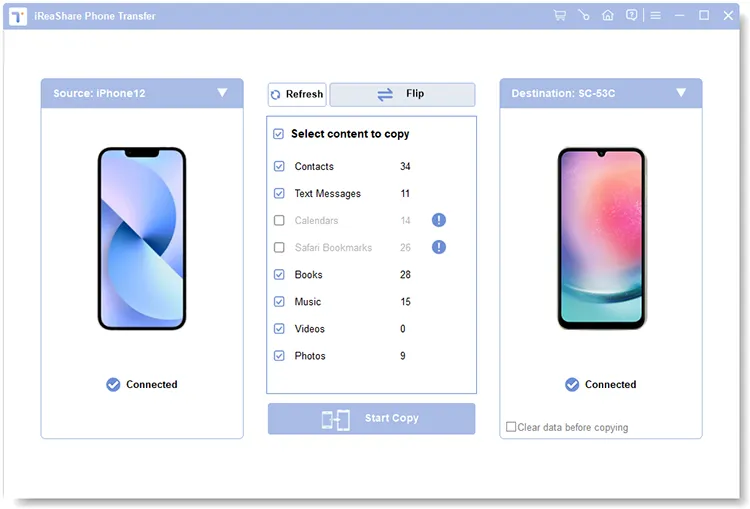
iPhone 12 to Android: contacts, text messages, books, music, videos and photos available; calendars and Safari bookmarks greyed out.
Android to iPhone: contacts and documents only
iReaShare Phone Transfer is most limited going from Android to iPhone: only contacts and documents can be copied. Call logs, text messages, photos, music, videos and apps are greyed out. For photos and videos in that direction you'll need another route, such as Apple's Move to iOS app or a computer copy.
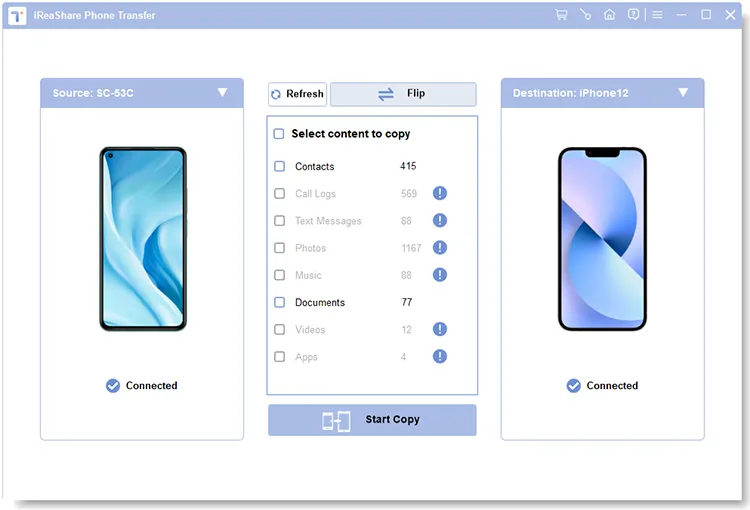
Android to iPhone 12: contacts (1,263) and documents (43) can be copied; the other six types are greyed out with a warning icon.
iPhone to iPhone
iReaShare Phone Transfer copies data such as contacts, calendars, Safari bookmarks and books between two iOS devices, which is useful when you want those without restoring a whole iCloud or iTunes backup onto the new phone.
Read-only on the source phone
iReaShare Phone Transfer only reads from the source device, so the old phone keeps all its data after the copy. Nothing is uploaded to a server, and the program shows no ads.
Benefits
- One tool across brands. Samsung, Xiaomi and Google each have their own switch apps that mostly work toward their own phones; this one doesn't care which brand is on either side.
- No cloud account. Your data goes cable to cable through your own PC.
- You see what's possible up front. Greyed-out types tell you exactly what won't come across before you start.
- Call logs and SMS between Androids. Things that often get left behind when you switch phones come along.
Real-World Uses
- Upgrading from an old Samsung to a new Pixel or Xiaomi. Copy everything, including apps, call history and text messages, in one pass.
- Leaving iPhone for Android. Bring contacts, texts, photos, videos and music across without an iCloud export.
- Setting up a phone for a parent. Move their contacts and photos from the old handset at your desk, with the clear-data option for a clean start.
- Handing down an iPad. Copy contacts, calendars and bookmarks to the new device first.
Who It's For, and Who Should Skip It
Phone Transfer is best for Android-to-Android and iPhone-to-Android switches, where it carries nearly all personal data. It's a one-off job for most people, so the monthly or lifetime license usually makes more sense than the yearly plan.
Skip it if:
- You're moving from Android to iPhone. Only contacts and documents come across; Apple's free Move to iOS app carries more.
- You need app data or WhatsApp chats. It copies apps, not their data or settings; iReaShare sells a separate WhatsApp Transfer tool.
- You're staying within one brand. Samsung Smart Switch and Apple's Quick Start are free and also move settings.
- You want a backup on the PC. It doesn't keep a copy on the computer.
Usage Guide
- Download the Windows installer from ireashare.com, install it and launch iReaShare Phone Transfer.
- Connect an Android phone with a USB cable, choose "File transfer" or "MTP", turn on USB debugging and allow the prompts on the phone. For an iPhone, unlock it, tap Trust and enter the passcode.
- For two Android phones without cables, click "Troubleshooting or Wi-Fi connection?", then "Connect via Wi-Fi", allow the program through the Windows firewall, install the helper app on each phone and scan the QR code.
- Check the old phone is on the Source side (click Flip if not), tick the data types, optionally tick "Clear data before copying" on an Android destination, and click Start Copy.
- Keep both phones connected and unlocked until the progress window says the copy is complete.

The Connect via Wi-Fi window for Android phones: a QR code to scan with the helper app and the firewall prompt to allow.
Before you buy
- Check the direction you need. Run the free trial with both phones connected and look at which data types are greyed out before paying.
- The 1-year plan renews automatically every 12 months and renewals aren't refundable. For a one-time switch, the $19.95 monthly license (7-day refund window) or the $39.95 lifetime license is the better fit; cancel auto-renewal in your 2Checkout (Verifone) account if you buy a subscription.
- The money-back guarantee covers listed cases such as critical technical problems support can't fix, not a change of mind. Sales tax or VAT is added for your country.
Where it falls short
- Android to iPhone is thin. Two data types out of eight.
- No app data or settings. One user who moved between two Samsung phones confirms it (see below).
- The Android helper app must stay open. The progress window warns that if the transfer fails, you should uninstall the app, reconnect and authorize it again.
- Little independent track record. iReaShare has no Trustpilot reviews yet, and most coverage comes from giveaway sites.
What Users Say
Independent feedback on iReaShare Phone Transfer is limited to a handful of comments on giveaway sites; Trustpilot had no reviews of iReaShare when we looked.
WinningPC
Miwa (3.6 out of 5, October 2024): "Tried to transfer data from my old Samsung phone to the new one. It worked well. Data including contacts, text messages, call logs, music, videos, photos, eBooks, and apps are successfully transferred. But the app data, setting data, etc. can not be transferred."
Chisanupong V (November 2024) first wrote: "I try this one. And it didn't work." A day later: "OK. I try it again. It's work now."
Giveaway of the Day, version 1.0.4
jugem: "It seems like very nice program for the iPhone and Android. Is this program able to transfer data between Android and iPhone? Or same device only?" iReaShare answered that it works in all four directions and that "it can't keep a data on PC, then later transfer the data to the phone of the user's choice. It focuses on a phone-to-phone data transfer directly."
The theme: it does what it says between Android phones, with the expected gap in app data and settings, and buyers should understand it's a live phone-to-phone copy rather than a backup.
What Each Direction Copies
| Direction |
Data types |
Connection |
| Android to Android | Contacts, call logs, text messages, photos, music, documents, videos, apps | USB or Wi-Fi |
| iPhone to Android | Contacts, text messages, books, music, videos, photos | USB |
| iPhone to iPhone | Contacts, calendars, Safari bookmarks, books | USB |
| Android to iPhone | Contacts, documents | USB |
Editions and Pricing
| License |
1 PC |
5 PCs |
10 PCs |
Refund window |
| 1 Month (auto-renews) | $19.95 | $29.95 | $39.95 | 7 days |
| 1 Year (auto-renews) | $29.95 | $39.95 | $49.95 | 30 days |
| Lifetime (one payment) | $39.95 | $49.95 | $59.95 | 30 days |
FAQs
Can iReaShare Phone Transfer move WhatsApp chats to a new phone?
No. iReaShare Phone Transfer copies apps but not their data, so WhatsApp chats stay behind. iReaShare sells a separate WhatsApp Transfer program for that.
Can iReaShare Phone Transfer save my old phone's data on the PC and copy it later?
No. iReaShare Phone Transfer copies directly from one connected phone to another; it doesn't store a copy on the computer. Use a backup or phone manager program if you need that.
Will iReaShare Phone Transfer erase the data on my new phone?
Only if you ask it to. iReaShare Phone Transfer has a "Clear data before copying" option for Android destinations; leave it unticked and the copied data is added to what's already there.
Does iReaShare Phone Transfer delete anything from the old phone?
No. iReaShare Phone Transfer works in read-only mode on the source phone, so everything stays on it after the copy.
Can I use Wi-Fi to transfer from Android to iPhone?
No. iReaShare Phone Transfer's Wi-Fi mode only works when both phones are Android; any transfer involving an iPhone or iPad needs USB cables.
Which license should I buy for a one-time phone switch?
For a single move, the iReaShare Phone Transfer monthly license ($19.95, 1 PC) is the cheapest, but it renews monthly until you cancel it. The $39.95 lifetime license avoids renewals altogether and is worth it if you switch phones every year or two.
System Requirements
- Windows 11, 10, 8 or 7 (the Mac version needs Mac OS X 10.9 or higher)
- Android 6.0 or later, iOS 5.0 or later
- Two USB cables and free USB ports, or Wi-Fi for two Android phones
- About 51 MB for the installer
Conclusion
iReaShare Phone Transfer is worth buying if you're moving between two Android phones of different brands, or from an iPhone to Android: it carries contacts, messages, call logs and media in one pass, with no cloud account. The main reason not to buy it is the Android-to-iPhone direction, where only contacts and documents come across. Check your direction in the free trial, and for a single switch pick the monthly or lifetime license over the auto-renewing yearly plan.
Download Free TrialBuy Now