iReaShare Android Data Eraser: Wipe an Android Phone and Overwrite Its Storage Before You Sell It
iReaShare Android Data Eraser is a Windows program that wipes an Android phone or tablet before you sell, trade in or give it away. It erases your contacts, messages, photos, accounts and app data, walks you through the phone's factory reset, then overwrites the storage so deleted files can't be brought back, and saves a PDF erasure report. It costs $14.95 for a year (renews automatically) or $24.95 for a lifetime license, each for one PC.
It's for people who don't fully trust a plain factory reset on an older Android phone, or who want a written record that the device was wiped before it changed hands.
Quick facts
- Price: 1-year license $14.95 (auto-renews yearly); lifetime license $24.95 (one-time). Both for 1 PC; 5- and 10-PC versions are also sold.
- Developer: iReaShare (ireashare.com)
- Version: 2.1.28 for Windows; a Mac version is sold separately
- Runs on: Windows 11, 10, 8 and 7
- Phones: Android 6.0 and later (Samsung, Xiaomi, OPPO, vivo, Motorola, OnePlus, Huawei and other brands), connected by USB or Wi-Fi
- Erase levels: Low (no overwrite), Medium (1 overwrite pass, recommended), High (3 passes, based on the U.S. DoD 5220.22-M standard)
- Trial: free download that connects to the phone; erasing needs a license
- Refund: 7-day money-back guarantee for eraser products (30 days for most other iReaShare tools)
- What we checked: the installer from the download link (ireashare-android-data-eraser.exe, 41 MB, validly signed by Shenzhen Qixingshi Technology Co., Ltd., the publisher that signs iReaShare's other installers, file dated November 5, 2026) and the prices on the order page (1-year license $14.95 for one PC, lifetime license $24.95, 5-PC and 10-PC versions $24.95 to $44.95) on November 28, 2026. We didn't wipe a phone ourselves.
Before you buy
- A factory reset already protects most modern phones. Android phones that shipped with Android 10 or later encrypt storage by default, and a reset throws away the key. iReaShare's tool includes that reset as one of its steps and then adds overwrite passes. The extra value is biggest on older or unencrypted phones, and in the report.
- Remove your Google account first. If you don't, the next owner can hit Factory Reset Protection and need your password.
- Back up first. Everything on the phone is gone for good.
- You'll set an app as the default SMS app. To delete text messages, the tool asks you to make its iReaShare Android Manager app the phone's default messaging app for the job.
- The 1-year license renews automatically. For a one-off wipe the lifetime license costs $10 more, or turn off renewal in your 2Checkout account after buying.
- Short refund window. iReaShare gives 7 days, not 30, for its eraser products.
Download Free TrialBuy 1-Year LicenseBuy Lifetime License
Overview
Old phones end up in drawers because people worry about what's still on them: family photos, chats, saved passwords, a banking app. iReaShare Android Data Eraser turns the wipe into a short routine on your PC. You connect the phone, pick a security level, type "delete" to confirm, let the program delete your data and walk you through the phone's factory reset, and wait while it overwrites the storage. At the end you save a PDF report with the phone's model, Android version, erase standard, passes and result.
The window has almost nothing else on it. There's one job, one big Continue button and a progress bar, which suits a tool you might use once every couple of years.
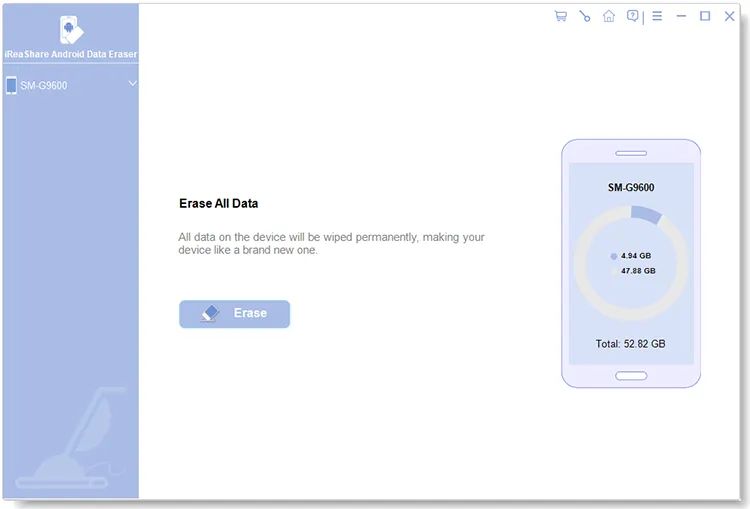
A connected Galaxy S9 (52.82 GB total) with the single Erase All Data button.
Features
Erases every kind of phone data
iReaShare Android Data Eraser deletes contacts, messages, call logs, photos, videos, music, documents, bookmarks, WhatsApp data and caches, plus accounts, passwords, search and keyboard history and app logs. It also targets files you had already deleted but that a recovery tool could still find.
Three security levels
iReaShare Android Data Eraser offers Low (the fastest, with no overwrite), Medium (one overwrite pass, the recommended default) and High (three passes, based on the U.S. DoD 5220.22-M standard, for phones that held banking or other sensitive data). More passes take longer.
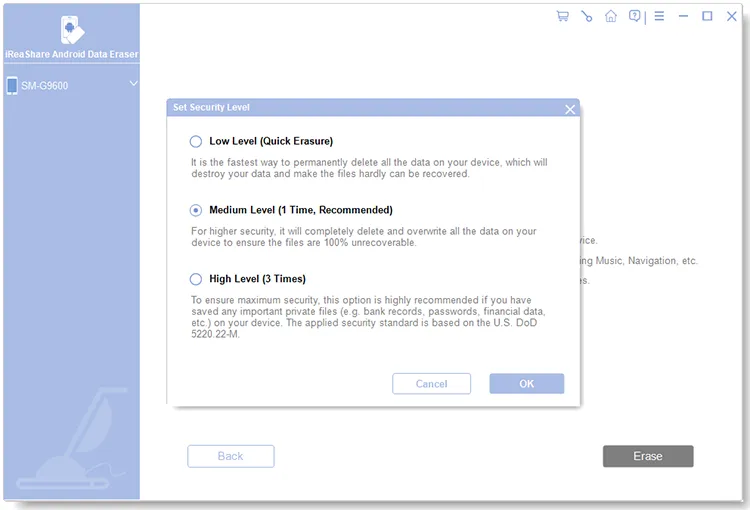
Set Security Level: Low Level (Quick Erasure), Medium Level (1 Time, Recommended) and High Level (3 Times, DoD 5220.22-M).
A guided factory reset in the middle
iReaShare Android Data Eraser asks whether the phone has already been reset. If not, it shows the steps for your phone's own factory reset and waits while the phone restarts; after you reconnect, it carries on. The vendor recommends the reset because it speeds up the erase and lowers the chance of anything being recovered.
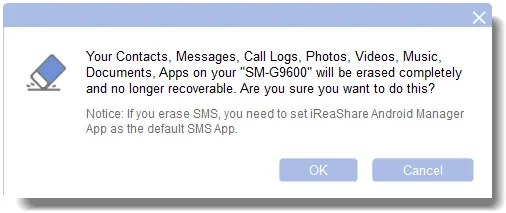
The last warning before erasing a Galaxy M30s, with a note that erasing SMS needs the iReaShare Android Manager app as the default SMS app, and the phone's Factory data reset screen beside it.
Overwrite after the delete
iReaShare Android Data Eraser first deletes the data, then writes over the storage so the old contents can't be pieced back together. A progress bar shows each data type as it goes, with a Stop button and a warning not to unplug the phone.
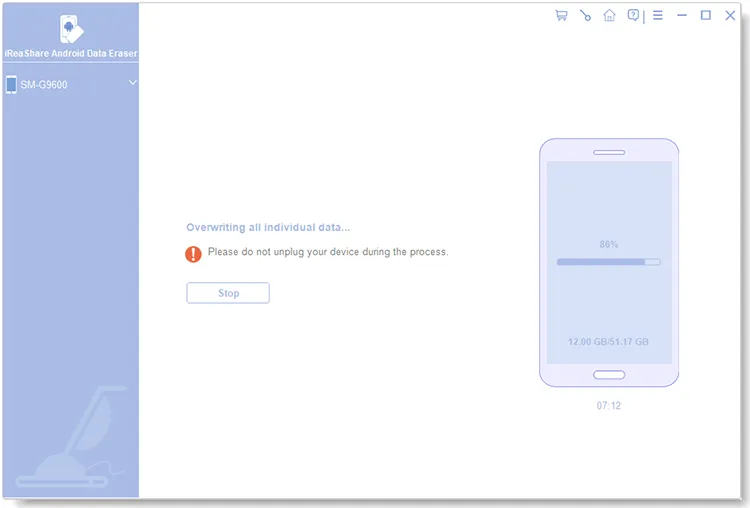
Overwriting in progress: 42%, contacts 879 of 3000, with a Stop button.
A PDF erasure report
iReaShare Android Data Eraser saves a report with the device name, brand, model, IMEI, serial number, Android ID, Android version and storage, the erase method and standard, overwrite passes, whether a factory reset was done, start and end times, and the result. It's something to hand a buyer or keep with a company's device records.
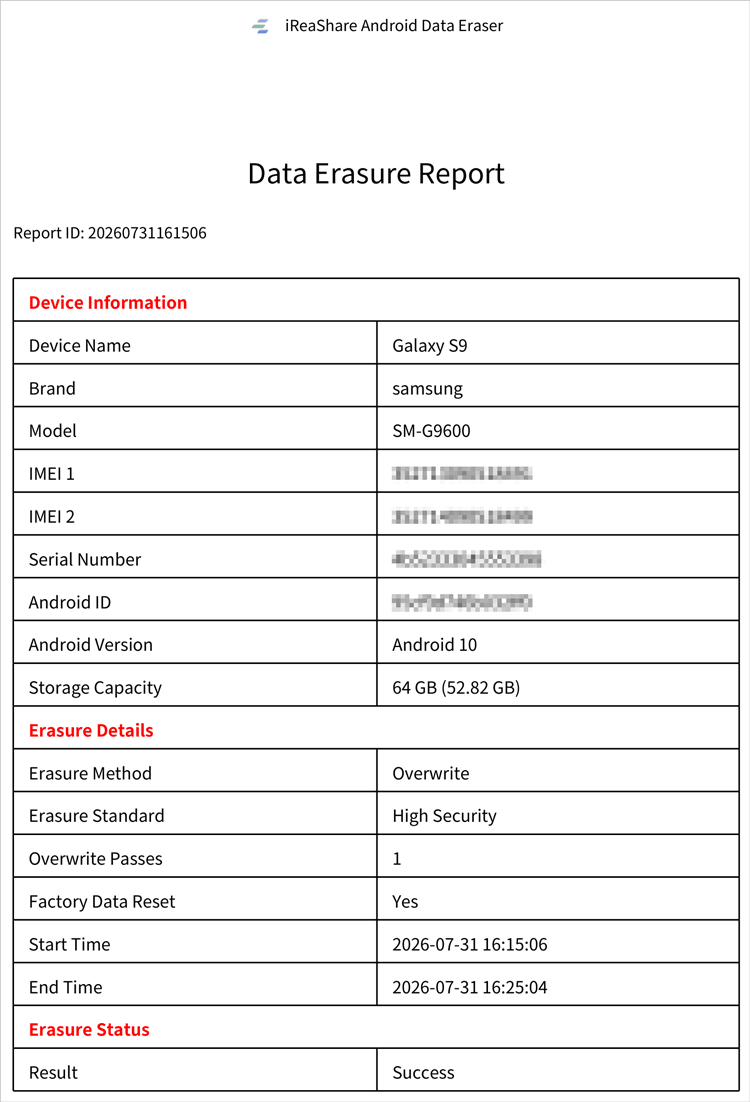
A sample report for a Galaxy S9 (SM-G9600, Android 10): overwrite method, High Security, factory reset Yes, result Success, about ten minutes from start to end.
USB or Wi-Fi connection
iReaShare Android Data Eraser connects over a USB cable (with USB debugging turned on) or over Wi-Fi by scanning a QR code with the iReaShare Android Manager app on the phone. The vendor describes the USB connection as a read-only, private process.
Benefits
- Peace of mind when selling. An overwrite plus a reset leaves much less for a curious buyer to find than deleting files one by one.
- Proof on paper. The PDF report is the part a free factory reset can't give you.
- Cheap for a one-off job. At $14.95 for a year it costs less than a phone case.
- Works across brands. One program for the Samsung you're selling now and the Xiaomi in the drawer.
Real-World Uses
- Trading in a Samsung. Back up to your new phone, remove your Google account, run a Medium wipe, and send the old phone off with a report saved on your PC.
- Clearing a drawer of old phones. Wipe several retired Android phones from one PC before recycling them. The 5-PC license helps if more than one computer is involved.
- Handing a phone to a family member. Wipe your messages, photos and accounts so they start fresh without your history.
- Small office device returns. Wipe a departing employee's Android phone and keep the erasure report with the asset record.
Who It's For, and Who Should Skip It
Good fit: people selling or giving away an Android phone who want a guided, belt-and-braces wipe and a report, and anyone with older phones (Android 9 or earlier) that may not encrypt storage by default.
Skip it if: your phone is recent and you're comfortable doing Settings, then Reset, then Erase all data yourself. On an encrypted phone that free reset already makes the old data unreadable. Skip it too if you need certified, audited erasure for many devices at once: a business erasure suite with central reports suits that better. And if you only want to delete a few photos or chats while keeping the phone in use, this is the wrong tool, since it wipes everything.
Usage Guide
- Download the installer from the Download Free Trial button, install it on your Windows PC and launch iReaShare Android Data Eraser.
- Back up the phone and remove your Google account from it.
- Connect the phone by USB and turn on USB debugging when the program asks, then choose "Transfer files" (MTP) and tap Allow. Or click the Wi-Fi icon, install the iReaShare Android Manager app on the phone and scan the QR code.
- Click Continue, choose Low, Medium or High and click OK.
- Type "delete" in the box and click Erase.
- Say whether the phone has already been reset. If it hasn't, follow the on-screen steps for a factory reset, finish the phone's setup and reconnect it, then repeat the level and "delete" confirmation.
- When the phone asks, make iReaShare Android Manager the default SMS app so text messages can be erased.
- Wait while it scans, erases and overwrites. Don't unplug the phone.
- Click Save Report to export the PDF erasure report.
Where it falls short
- The reset is manual. You perform the factory reset on the phone yourself, then reconnect and confirm again, so the job isn't fully hands-off.
- It needs extra permissions. USB debugging and a temporary default SMS app are required, which can confuse less technical users.
- The sample report is inconsistent. The vendor's sample shows "High Security" with 1 overwrite pass, while the level dialog says High means three passes, so check what your own report says.
- No independent track record yet. iReaShare is a young brand and we found no outside test of this tool.
- Locked phones are out of scope. You need to unlock the phone and allow debugging; it isn't a tool for a phone you can't get into.
What Users Say
Reviews
There are no user reviews to report yet. iReaShare's Trustpilot profile has no reviews, the product page shows no ratings, and download directories such as Softpedia and AlternativeTo only list the program (Softpedia notes that the unregistered version can't erase data). iReaShare is a young brand whose other tools, such as iReaShare iPhone Data Eraser and Data Wipe, are similar small utilities, so treat the 7-day refund window as your safety net and judge from the user guide and screenshots above.
Comparisons
iReaShare Android Data Eraser vs. Android's own factory reset
Android's built-in "Erase all data (factory reset)" is free and, on encrypted phones, makes the old data unreadable. iReaShare adds a deletion pass before the reset, one or three overwrite passes after it, and a PDF report. Pay for it if you want the overwrite on an older phone or the paperwork; otherwise the built-in reset is enough.
iReaShare Android Data Eraser vs. iReaShare iPhone Data Eraser
The two are separate programs with the same idea and look. The iPhone version handles iPhones, iPads and iPods and costs $25.95 a year; the Android version handles Android phones and tablets and costs $14.95 a year. If you have both kinds of phones to wipe, you need both licenses.
Editions and Pricing
Every edition has the same features; the license only changes how long it lasts and how many PCs it covers. Prices are from the order page on November 28, 2026.
iReaShare's store also sells 1-month licenses (from $9.95 for one PC). Each button above orders that exact license.
FAQs
Does iReaShare Android Data Eraser work on Samsung Galaxy phones?
Yes. iReaShare Android Data Eraser supports Samsung and most other Android brands on Android 6.0 and later; the vendor's screenshots show a Galaxy S9 and a Galaxy M30s.
Can I wipe a phone I can't unlock with iReaShare Android Data Eraser?
No. iReaShare Android Data Eraser needs the phone unlocked so you can turn on USB debugging (or install the Wi-Fi app) and confirm the prompts on screen.
Does iReaShare Android Data Eraser remove my Google account and Factory Reset Protection?
iReaShare Android Data Eraser wipes the phone's data, but you should remove your Google account in Settings before you start. Otherwise the next owner may be asked for your Google password after the reset.
Does iReaShare Android Data Eraser erase the SD card?
iReaShare's pages describe wiping the phone's own storage and don't promise anything about removable cards. Take the microSD card out before you sell the phone, or format it separately.
Is there a Mac version of iReaShare Android Data Eraser?
Yes. iReaShare offers a separate Mac download of Android Data Eraser from the same product page; the prices on this page are for the Windows version.
How do I stop the yearly renewal of iReaShare Android Data Eraser?
iReaShare Android Data Eraser's 1-year license renews through 2Checkout. Log in to 2Checkout's MyAccount with your order email, open the order and choose to stop automatic renewal, or email support@ireashare.com.
Can I get a refund for iReaShare Android Data Eraser?
iReaShare Android Data Eraser has a 7-day money-back guarantee, shorter than the 30 days iReaShare gives most of its other products. Write to support@ireashare.com with the order ID and the reason.
System Requirements
- Windows 11, 10, 8 or 7
- A USB port and the phone's USB cable, or Wi-Fi on the same network as the phone
- An Android phone or tablet on Android 6.0 or later, unlocked, with USB debugging allowed
- About 41 MB for the installer
Conclusion
iReaShare Android Data Eraser is worth $14.95 (or $24.95 for lifetime) if you're selling an older Android phone, or any phone where you want an overwrite on top of the reset and a report to prove it. The one reason to buy it is that guided reset-plus-overwrite with a PDF at the end. The main reason not to is that on a recent, encrypted phone the free factory reset already does the essential job, and this young brand has no independent reviews yet.
Download Free TrialBuy 1-Year LicenseBuy Lifetime License