iReaShare Android Manager: Manage, Back Up and Restore Your Android Phone from a PC
iReaShare Android Manager is a $29.95-a-year Windows program (a Mac version is a separate download) that connects to an Android phone or tablet over USB or Wi-Fi and lets you move, edit and back up its contacts, messages, call logs, photos, videos, music, e-books and apps from the computer. It's for people who want a desktop "PC suite" for any Android brand rather than the phone maker's own tool.
If you've ever tried to copy a few hundred photos off a phone through Windows Explorer, or wanted to save your text messages somewhere other than the phone itself, you know the gap this fills: Explorer sees files, but not your contacts, SMS or call history. Android Manager shows all of those as lists you can tick, export, import and edit.
Quick facts
- Version: 2.4.38 for Windows (installer dated October 20, 2026)
- Developer: iReaShare
- Runs on: Windows 11, 10, 8 and 7; a Mac version for Mac OS X 10.10 or later
- Phones: most Android phones and tablets (Samsung, Xiaomi, OPPO, Vivo, Motorola, Honor, Tecno, ZTE, TCL and others), including Android 17
- Connection: USB cable with USB debugging, or Wi-Fi with a companion app on the phone
- Price: $29.95 per year for 1 PC; also monthly ($19.95) and lifetime ($39.95) licenses
- Trial: free download for Windows and Mac
- Refunds: 30-day money-back guarantee on yearly and lifetime licenses, 7 days on monthly ones
- What we checked: the Windows installer, version 2.4.38 (24.7 MB, signed by Shenzhen Qixingshi Technology Co., Ltd), downloaded from ireashare.com on November 8, 2026, and the 1-year, 1-PC license at $29.95 on the order page, renewing every 12 months, on November 8, 2026. We didn't connect a phone or run a backup and restore ourselves.
Download Free TrialBuy Now
Overview
Android Manager has two tabs. My Device is the day-to-day view: the connected phone's model, Android version, storage and battery on the home screen, and a sidebar of categories (Contacts, Call Logs, SMS, Music, Videos, Photos, Books, User Apps) with item counts. Pick a category and you get a table with checkboxes and a toolbar of New, Delete, Export, Import and Refresh. Super Toolkit holds the one-click Backup and Restore tools.
The phone side needs a small helper app. Over USB, the program installs it for you once you switch the phone to "File transfer" and turn on USB debugging. Over Wi-Fi, you install the iReaShare Android Manager app from the vendor's download address on the phone, then scan a QR code shown on the PC.
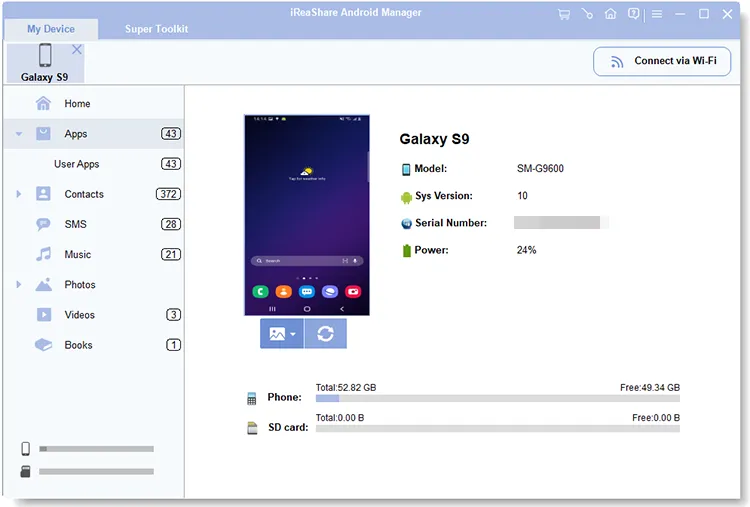
The My Device home screen with a Galaxy A53 5G on Android 16 connected: model, CPU, memory, storage use by type, and the category sidebar on the left.
Features
Read and send text messages from the computer
iReaShare Android Manager loads every conversation into a two-pane view: the thread list on the left with dates, the messages on the right. You can export threads to the PC, import them back, delete old ones, and write a new SMS to one or several contacts with the keyboard instead of your thumbs.
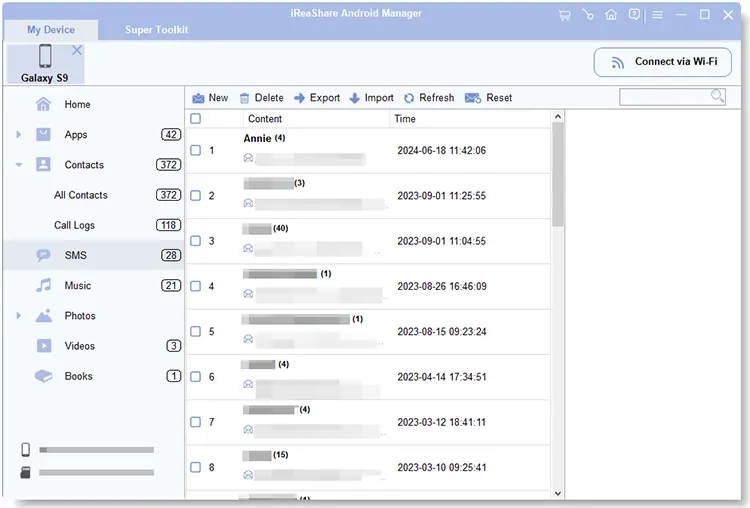
The SMS category: threads with their dates on the left, the selected conversation on the right, and New, Delete, Export, Import and Attachments on the toolbar.
Edit contacts and call logs on a big screen
iReaShare Android Manager lets you create, edit, group and delete contacts in a desktop form, and import or export them as VCF, XML or BAK files. Call logs can be exported to the PC and imported back, which helps when you move to a new phone and want the history to come along.
Move photos, videos and music without losing quality
iReaShare Android Manager copies media at its original resolution. The Videos list shows each clip's thumbnail, duration, size, format and date, so you can pick the large ones to move off the phone. Photos are grouped by album (Camera, Library and others), and you can create new albums and copy or move pictures into them. For music it handles MP3, WAV, FLAC, M4A and M4R, and you can build playlists on the PC.
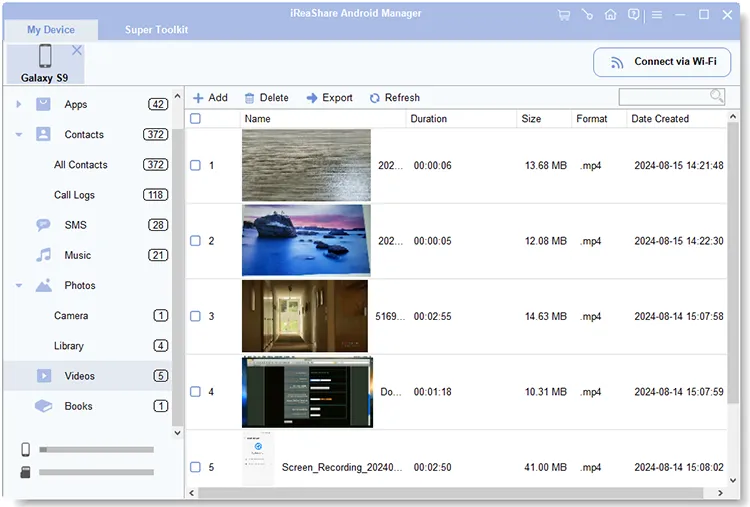
The Videos category lists each clip with its thumbnail, duration, file size, format (MP4, MOV) and creation date.
Install, remove and save apps
iReaShare Android Manager installs APK files from the computer onto the phone, uninstalls several apps in one go, and exports installed apps to the PC as a backup you can reinstall later. That's handy for side-loaded apps that aren't in the Play Store.
One-click backup and restore
iReaShare Android Manager's Backup tool lists every data type with its count (SMS, contacts, call logs, apps, music, photos, videos, books) and the total size, and saves the ones you tick to a folder you choose. Restore shows the backups it finds, from any of your phones, lets you pick categories, and adds them to the connected device. By default restored data doesn't overwrite what's already on the phone; a "Clear data before restoring" box is there if you want a clean copy.
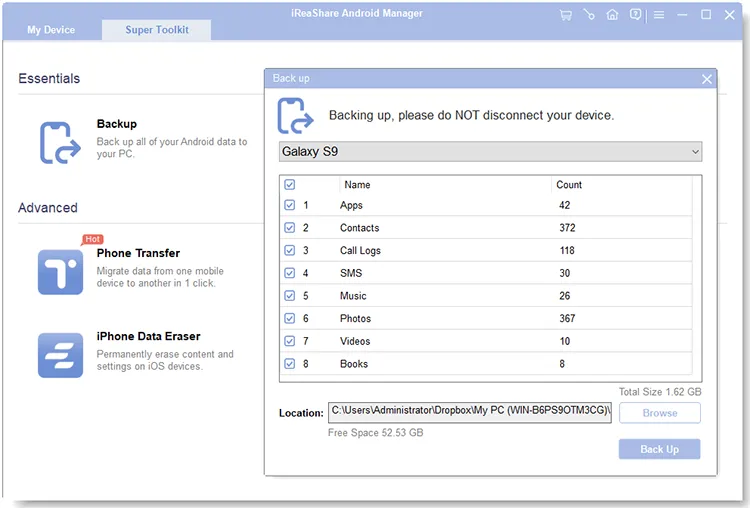
The Backup dialog: eight data types with their item counts, the total size (698.26 MB here) and the destination folder.
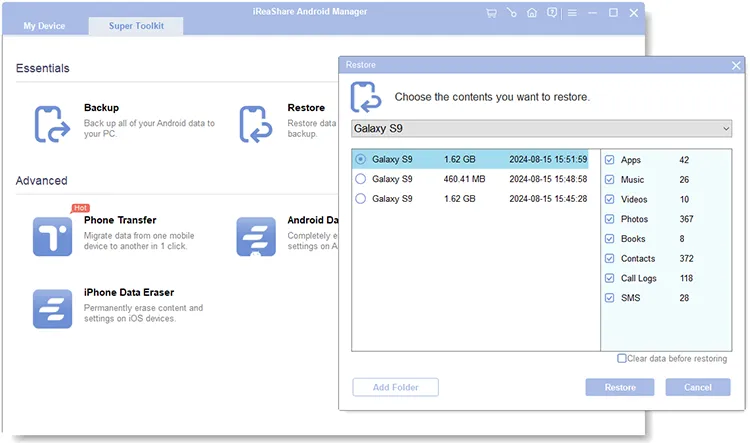
The Restore dialog lists backups from three different phones (Galaxy S9, a Samsung SC-53C and a Pixel 5) and the categories inside the selected one.
Benefits
- One tool for every Android brand. Samsung, Xiaomi and others each have their own PC software; this one works the same way whichever phone you plug in, which helps in a family with mixed phones.
- Your data stays local. Backups go to a folder on your PC, not to a cloud account, and the Wi-Fi link works over your own network.
- Selective, not all-or-nothing. You can export just this month's photos or one SMS thread instead of a full phone image.
- Typing on a real keyboard. Long text messages and contact clean-ups are much faster at a desk.
Real-World Uses
- Before a factory reset. Back up SMS, contacts, call logs and photos to the PC, reset the phone, then restore just the categories you want.
- Moving to a new Android phone. Restore last week's backup from the old phone onto the new one, including the call history most transfer apps skip.
- Keeping a record of messages. Export a conversation with a landlord or a client to the PC as proof.
- Freeing storage. Sort the Videos list, export the biggest clips to the PC, then delete them from the phone.
- Tidying contacts. Merge in a VCF file from an old phone, fix names and delete duplicates on the big screen.
Who It's For, and Who Should Skip It
Android Manager suits Windows users who want to look after an Android phone's personal data (messages, contacts, call logs, media) from the desktop, and who'd rather keep backups on their own PC than in Google's cloud.
Skip it if:
- You only move photos now and then. Windows Explorer or Google Photos does that for free.
- You need a full phone image. It backs up the data types it lists, not app data, settings or the whole system. For app data, look at your phone maker's own backup (Samsung Smart Switch and the like).
- You use an iPhone. This is Android only; iReaShare sells a separate iPhone Manager.
- You dislike subscriptions. The yearly plan renews automatically; the lifetime license costs only $10 more.
Usage Guide
- Download the Windows installer from ireashare.com, run it and launch iReaShare Android Manager.
- USB: connect the phone with its original cable, choose "File transfer" or "MTP" (not "Charge only"), and turn on USB debugging when the program asks. It then installs its helper app on the phone.
- Wi-Fi: put the phone and PC on the same network, click "Connect via Wi-Fi", allow the program through the Windows firewall, install the helper app on the phone and scan the QR code.
- Click a category in the left sidebar, tick the items you want and use Export, Import, New, Delete or Edit on the toolbar.
- For a full backup, open Super Toolkit > Backup, tick the data types, choose a folder and click Back Up. To restore, open Super Toolkit > Restore, pick the backup and the categories and click Restore.
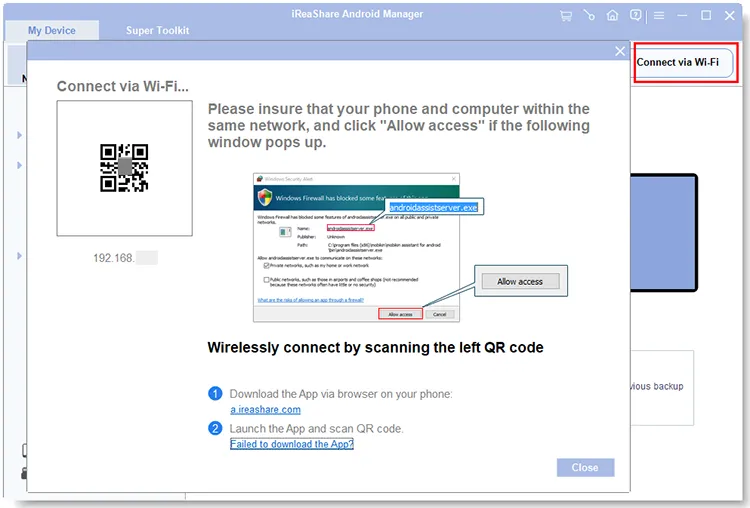
The Connect via Wi-Fi window: a QR code for the phone app and a reminder to allow the program through the Windows firewall.
Before you buy
- The 1-year plan renews automatically every 12 months. Renewals aren't refundable, so turn off auto-renewal in your 2Checkout (Verifone) account if you only need it once.
- The 30-day money-back guarantee covers listed cases such as critical technical problems support can't fix, duplicate purchases or a missing license code, not a change of mind, so run the free trial with your own phone first.
- Prices on the order page don't include sales tax or VAT, which is added for your country.
Where it falls short
- Detection is the weak spot. iReaShare's own help pages cover "the program does not recognize the Android device", "driver installed failed" and "USB debugging enabled but detection failed", which tells you these are the problems people hit. Use the phone's original cable and allow every prompt on the phone.
- It needs an app on the phone. Unlike Explorer, nothing works until the helper app is installed, which some people won't want on a work phone.
- Not a complete backup. App data, WhatsApp chats and system settings aren't part of the backup list.
- Little independent track record. iReaShare is a young brand with almost no reviews on Trustpilot or the big software review sites yet.
What Users Say
Independent reviews of iReaShare Android Manager are scarce: Trustpilot had no reviews of iReaShare when we looked, and the program mostly appears on download and giveaway sites. The most useful feedback comes from the Giveaway of the Day comments on version 1.0.12.
Giveaway of the Day
Lana: "The software works well. I tried only WiFi connection to two phones so far and it was very easy to connect and use."
She went on: "The interface and functionality looks almost identical to analogous Coolmuster manager. And I am happy about it, because I liked that manager which unfortunately does not work with newer versions of Android, while iReaShare manager does. The only doubt I have is that if this is a new reincarnation of the Coolmuster team, and I purchased the full version of Coolmuster manager which stopped being supported and updated, I will now think twice before buying the iReaShare manager because they can stop supporting this product too."
iReaShare's support team replied that it couldn't speak to any link between the two teams and that the product is "actively developed with a focus on keeping up with Android updates".
The theme so far: the program is easy to connect and does what it says, and the open question is long-term support. The version history since that giveaway (1.0.12 then, 2.4.38 now, with Android 17 listed as supported) suggests it's being kept up to date for now.
Editions and Pricing
| License |
1 PC |
5 PCs |
10 PCs |
Refund window |
| 1 Month (auto-renews) | $19.95 | $29.95 | $39.95 | 7 days |
| 1 Year (auto-renews) | $29.95 | $39.95 | $49.95 | 30 days |
| Lifetime (one payment) | $39.95 | $49.95 | $59.95 | 30 days |
Every license includes free updates and support for its term. The lifetime 1-PC license costs $10 more than one year, so if you expect to use it for more than a year, it's the better buy.
FAQs
Does iReaShare Android Manager work without a USB cable?
Yes. iReaShare Android Manager can connect over Wi-Fi when the phone and PC are on the same network: you install the helper app on the phone and scan the QR code the program shows. A USB cable is still the more reliable option for big transfers.
Does iReaShare Android Manager need root access?
iReaShare Android Manager works through USB debugging and its own helper app, and its setup guide doesn't ask you to root the phone at any point.
Can iReaShare Android Manager back up WhatsApp chats?
No. iReaShare Android Manager backs up SMS, contacts, call logs, apps, music, photos, videos and books. WhatsApp chats aren't on that list; iReaShare sells a separate WhatsApp Transfer tool for them.
Can I restore a backup from one Android phone to a different one?
Yes. iReaShare Android Manager's Restore tool lists backups from any device you've backed up and can restore them to whichever Android phone is connected, which makes it a simple way to carry messages and contacts to a new phone.
Does the restore delete what's already on my phone?
Not by default. iReaShare Android Manager adds the restored items to the phone; only if you tick "Clear data before restoring" does it wipe those categories first.
What happens when the 1-year license runs out?
The iReaShare Android Manager yearly license renews automatically through 2Checkout (Verifone) unless you turn auto-renewal off in your account or ask iReaShare support. Refunds aren't given for renewals, so cancel before the renewal date if you don't want another year.
Can I use one license on several computers?
A 1-PC license of iReaShare Android Manager covers one computer. The 5-PC and 10-PC licenses cost $10 and $20 more per term and suit a family or a small office.
System Requirements
- Windows 11, 10, 8 or 7 (the Mac version needs Mac OS X 10.10 or later)
- An Android phone or tablet; most brands and Android versions up to Android 17
- The phone's USB cable with USB debugging turned on, or the PC and phone on the same Wi-Fi network
- About 25 MB for the installer
Conclusion
iReaShare Android Manager is a sensible buy if you want to handle an Android phone's messages, contacts, call logs and media from a Windows PC and keep your backups at home. The one reason to buy it is that it covers the personal data Explorer can't see, with selective backup and restore across phones of any brand. The main reason to hesitate is the brand's short track record: there are very few independent reviews yet, so use the free trial with your own phone, and if it connects reliably, take the $39.95 lifetime license rather than the yearly plan.
Download Free TrialBuy Now