iReaShare iPhone Data Eraser: Wipe an iPhone or iPad and Overwrite Its Storage Before You Sell It
iReaShare iPhone Data Eraser is a Windows program that wipes an iPhone, iPad or iPod touch connected by USB before you sell, trade in or give it away. It guides you through Apple's own reset, then overwrites the device's storage once or twice and gives you a printable erasure report. It costs $25.95 for a year (renews automatically) or $35.95 for a lifetime license, each for one PC.
It's for people who want more than a tap on "Erase All Content and Settings": a step-by-step process, an overwrite pass for peace of mind, and a report to show a buyer or keep for records.
Quick facts
- Price: 1-year license $25.95 (auto-renews yearly); lifetime license $35.95 (one-time). Both for 1 PC; 5- and 10-PC versions are also sold.
- Developer: iReaShare (ireashare.com)
- Version: 2.0.9 for Windows; a Mac version is available separately
- Runs on: Windows 11, 10, 8 and 7
- Devices: iPhone, iPad and iPod touch, including iOS 27 (the guide's report shows an iPhone 12 on iOS 27.0)
- Erase levels: Low (reset only, no overwrite), Medium (1 overwrite pass, recommended), High (2 passes)
- Refund: 7-day money-back guarantee for eraser products
- What we checked: the installer from the download link (ireashare-iphone-data-eraser.exe, 32 MB, validly signed by Shenzhen Qixingshi Technology Co., Ltd., the publisher that also signs iReaShare's other installers, file dated October 13, 2026) and the prices on the order page (1-year license $25.95 with automatic yearly renewal, lifetime license $35.95 with no renewal) on November 27, 2026. We didn't wipe a device ourselves.
Before you buy
- Apple's reset already does most of the work. Modern iPhones and iPads encrypt everything, and Erase All Content and Settings destroys the keys, which makes the old data unreadable. iReaShare's tool runs that same reset as one of its steps and then adds overwrite passes. If you only want a clean phone, Apple's built-in reset is free.
- Turn off Find My first. The tool asks you to disable Find My iPhone, and you'll want to sign out of your Apple ID anyway before selling, or the next owner hits Activation Lock.
- Back up first. Everything on the device is gone for good, including photos and messages.
- The 1-year license renews automatically. If you only need it once, the lifetime license costs $10 more, or turn off renewal after buying.
- Short refund window. iReaShare gives 7 days, not 30, for its eraser products.
Download Free TrialBuy 1-Year LicenseBuy Lifetime License
Overview
Selling a phone raises an obvious worry: can the buyer get your photos, messages or banking apps back? iReaShare iPhone Data Eraser turns the wipe into a guided routine on your PC: connect the device, choose a security level, type "delete" to confirm, let it reset the device and overwrite the storage, then save a report with the device's model, serial number, iOS version, erase level and result. The interface has almost nothing else on it, which is the point.
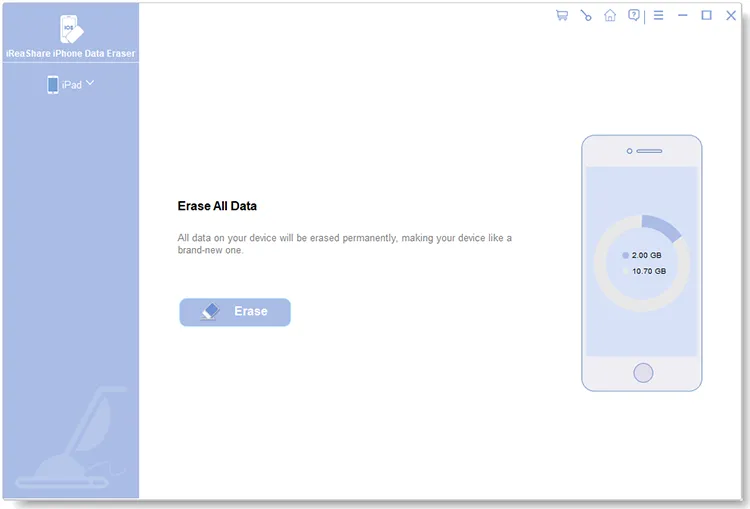
A connected iPhone (iOS 27.0, 64 GB) with the single Erase All Data button.
Features
Three erase levels
iReaShare iPhone Data Eraser offers Low (the quick erase, with no overwrite), Medium (one overwrite pass, the default) and High (two passes, recommended for devices that held banking or other sensitive data). More passes take longer.
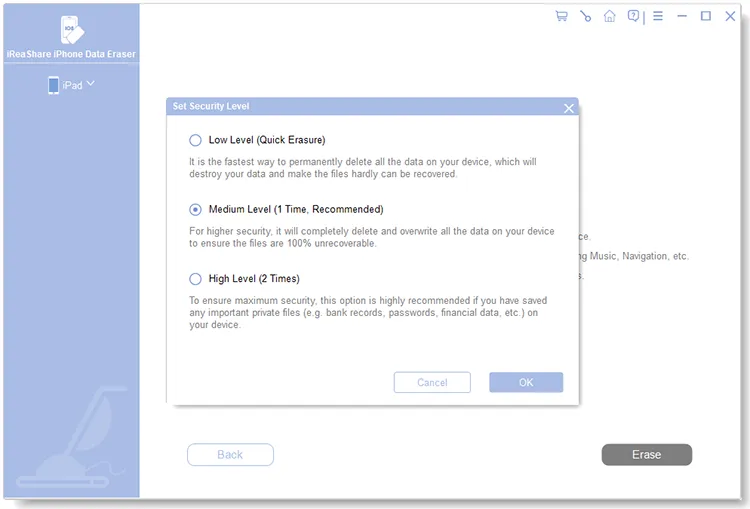
Set Security Level: Low Level (Quick Erasure), Medium Level (1 Time, Recommended) and High Level (2 Times).
A deliberate confirmation step
iReaShare iPhone Data Eraser asks you to back up, close background apps and type the word "delete" before it starts, so a wipe never happens by an accidental click.
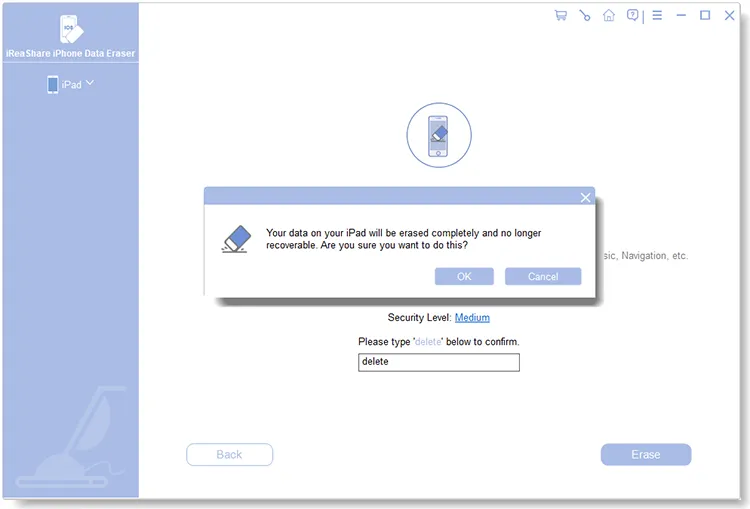
The confirmation screen: three warnings, the chosen security level (Medium) and the box where you type "delete".
Reset plus overwrite
iReaShare iPhone Data Eraser has you run Apple's Erase All Content and Settings (it walks you through it and waits while the device restarts), then fills the device's storage with overwrite data. During the overwrite iOS may show a "Storage Almost Full" warning, which the tool tells you to dismiss.
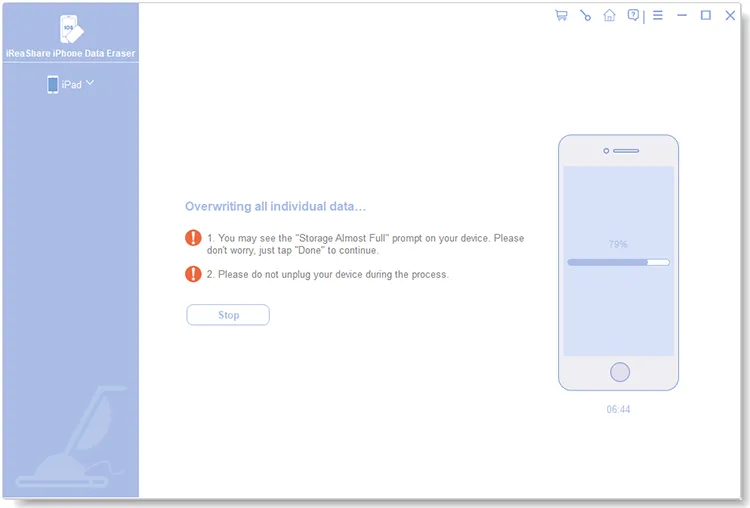
Overwriting in progress, with notes about the "Storage Almost Full" prompt and not unplugging the device.
An erasure report
iReaShare iPhone Data Eraser can save a Data Erasure Report when it finishes: device name, model, serial number, iOS version, storage, erasure method and standard, overwrite passes, whether the factory reset was done, start and end times, and the result. Useful as proof for a buyer, an employer or your own records.
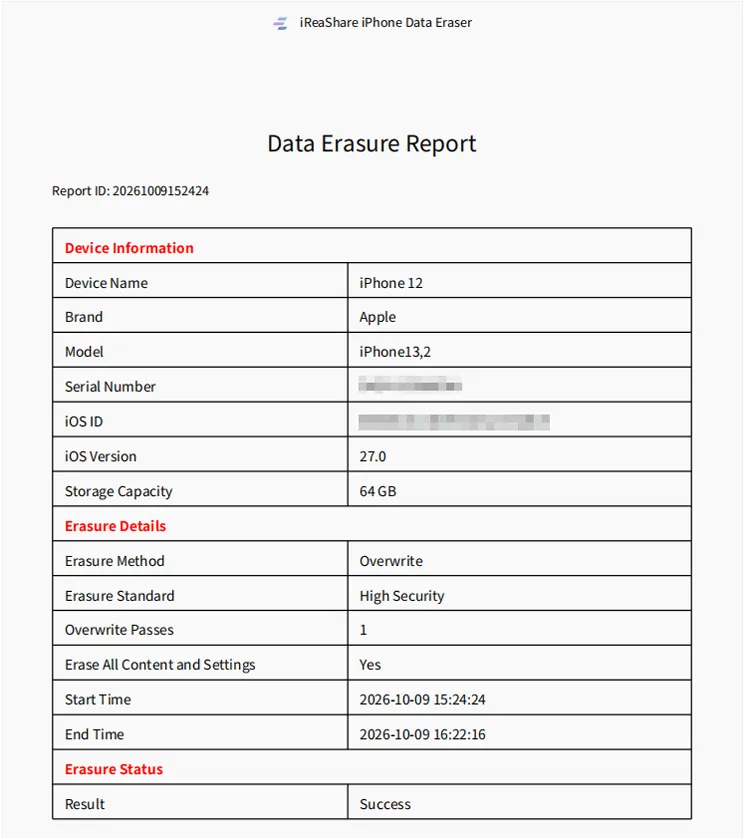
A sample report: iPhone 12 on iOS 27.0, 64 GB, method Overwrite, factory reset Yes, result Success.
Benefits
- Peace of mind before resale with an overwrite on top of Apple's reset.
- A record of the wipe that you can hand to a buyer or a company asset manager.
- Hard to get wrong. One button, three levels, a typed confirmation.
- Works for iPads and old iPods too, from the same PC.
Real-World Uses
- Selling or trading in an iPhone: wipe on High, save the report, and include it with the listing.
- Handing down a family iPad: a Medium wipe clears everything before a child gets it.
- Small business device turnover: wipe returned staff phones and keep each report on file (the 5- and 10-PC licenses suit IT staff).
Who It's For, and Who Should Skip It
Good fit: Windows users who want a guided wipe with an extra overwrite and a written report, and small offices recycling company iPhones.
Skip it if: you're happy with Apple's free Erase All Content and Settings, which on a modern, encrypted iPhone already makes data unrecoverable for practical purposes; you only want to delete some data (this erases everything); or you need certified erasure for a large fleet, where enterprise tools such as Blancco are the norm.
Usage Guide
- Back up the device, sign out of your Apple ID and turn off Find My iPhone.
- Install and launch iReaShare iPhone Data Eraser, connect the device with an Apple USB cable, unlock it and tap Trust.
- If the device isn't recognized, reinstall the Apple Mobile Device driver or the desktop version of iTunes, as the vendor's guide suggests.
- Click Erase, choose Low, Medium or High, type delete and click Erase.
- Follow the prompts to run Erase All Content and Settings on the device, reconnect after it restarts, and confirm.
- Let the overwrite finish without unplugging, then click Save Report.
Where it falls short
- Limited added value on new devices. Apple's encryption-based reset is already strong; the overwrite mostly adds time and reassurance.
- No published trial limits. iReaShare doesn't say what the free download can do before you buy.
- No independent reviews. iReaShare has a claimed Trustpilot profile with no reviews, and we found no third-party test of this tool.
- Erases everything or nothing. There's no option to wipe only messages or photos.
What Users Say
Reviews
There are no user reviews to report yet. iReaShare's Trustpilot profile was claimed in September 2024 and has no reviews, the product page shows no ratings, and we found no independent test of iPhone Data Eraser. iReaShare is a young brand (its other listings on this site, such as iReaShare Data Wipe, are similar small utilities), so treat the 7-day refund window as your safety net and decide from the vendor's user guide and screenshots above.
Comparisons
iReaShare iPhone Data Eraser vs Apple's Erase All Content and Settings
Apple's reset is free, built in and, on any iPhone with hardware encryption, makes the old data unreadable by destroying the keys. iReaShare's tool includes that reset and adds one or two overwrite passes plus a report. Choose iReaShare if you want the report or the extra step for your own peace of mind; otherwise Apple's reset is enough.
1-year vs lifetime license
Both licenses include the same features. The 1-year license renews automatically each year; the lifetime license costs $10 more and never renews, which makes it the better buy for anyone wiping devices more than once.
Editions and Pricing
Prices are from the order page on November 27, 2026. Each button orders that license. iReaShare also sells monthly licenses and 5- and 10-PC versions on its own store.
FAQs
Does iReaShare iPhone Data Eraser work with iPad and iPod touch?
Yes. iReaShare iPhone Data Eraser wipes iPhone, iPad and iPod touch models connected to a Windows PC by USB.
Do I need to turn off Find My iPhone?
Yes. iReaShare iPhone Data Eraser asks you to disable Find My iPhone so it can reset the device, and you should also sign out of your Apple ID before selling.
Can deleted data be recovered after iReaShare iPhone Data Eraser?
iReaShare iPhone Data Eraser combines Apple's encryption-key reset with overwrite passes on Medium and High, so recovery tools have nothing to work with. On Low, it relies on the reset alone.
Can I erase only photos or messages?
No. iReaShare iPhone Data Eraser erases the whole device. For selective deletion, delete items on the phone and empty Recently Deleted.
Is there a Mac version?
Yes. iReaShare offers a Mac download of iPhone Data Eraser; the licenses on this page are for the Windows version.
What if I want my money back?
iReaShare offers a 7-day money-back guarantee on eraser products (30 days on most of its other tools), and a renewal charge on the 1-year license isn't refundable under its policy, so cancel renewal in time if you don't need it.
System Requirements
- Windows 11, 10, 8 or 7
- A USB port and an Apple USB cable
- iTunes (desktop version) or the Apple Mobile Device driver if the device isn't detected
- An iPhone, iPad or iPod touch you can unlock, with Find My turned off
Conclusion
iReaShare iPhone Data Eraser is a reasonable buy at $35.95 for life if you want a guided wipe that adds overwrite passes and gives you a report to show a buyer or keep on file. It's simple and hard to misuse. The main reason not to buy: Apple's free Erase All Content and Settings already makes data on a modern iPhone unrecoverable, and this tool runs that same reset as part of its process. There are also no independent reviews yet, and the refund window is only 7 days.
Download Free TrialBuy 1-Year LicenseBuy Lifetime License