east-tec Eraser: Wipe Your Browsing Traces, Deleted Files and Free Space on Windows
east-tec Eraser is a $39.95-a-year Windows privacy tool that securely erases the traces of what you do on your PC and online: browser history and cookies, the history kept by over 300 programs, temporary files, the swap file and the Recycle Bin. It also shreds chosen files and wipes the free space where deleted files still live, so they can't be recovered.
Deleting a file only removes its name. The data stays on the disk until something overwrites it, and recovery tools find it in seconds. east-tec Eraser is the overwriting part.
Quick facts
- Version: 15.0.0 (installer dated August 3, 2026)
- Developer: East-Tec (EAST Technologies), selling privacy software since 1997
- Runs on: Windows 11, 10, 8, 7, Vista and XP; NTFS, exFAT and FAT drives
- Price: $39.95 per year for the Eraser Plan, with a year of updates and support
- Trial: 15 days, fully functional
- Also in: the Total Security Plan ($69.95 a year, all four East-Tec programs) and Total Privacy Plan ($59.95, with DisposeSecure)
What we checked: the installer on East-Tec's download page (eteraser-install.exe, 18,189,224 bytes, file version 15.0.0.209) and the price on the order page ($39.95 for the Eraser Plan - Yearly Subscription), on October 31, 2026. We didn't run a recovery tool against a wiped drive ourselves.
Before you buy
- It's a yearly plan. The order page sells the Eraser Plan as a yearly subscription that includes updates and support for the year.
- High-security wipes are slow. Reviewers who picked the 35-pass Gutmann method waited more than a day. The default methods are much faster and enough for most people.
- Use the trial on exFAT drives first. One Trustpilot reviewer reported that east-tec Eraser didn't work properly with exFAT.
Download Free TrialBuy Now
Overview
east-tec Eraser's window has a column of modules on the left: Dashboard, Privacy Guard, Erase Files & Folders, Erase Deleted Data, Media Wiper and Scheduler. Each module shows the security level and wipe method it will use before you start.
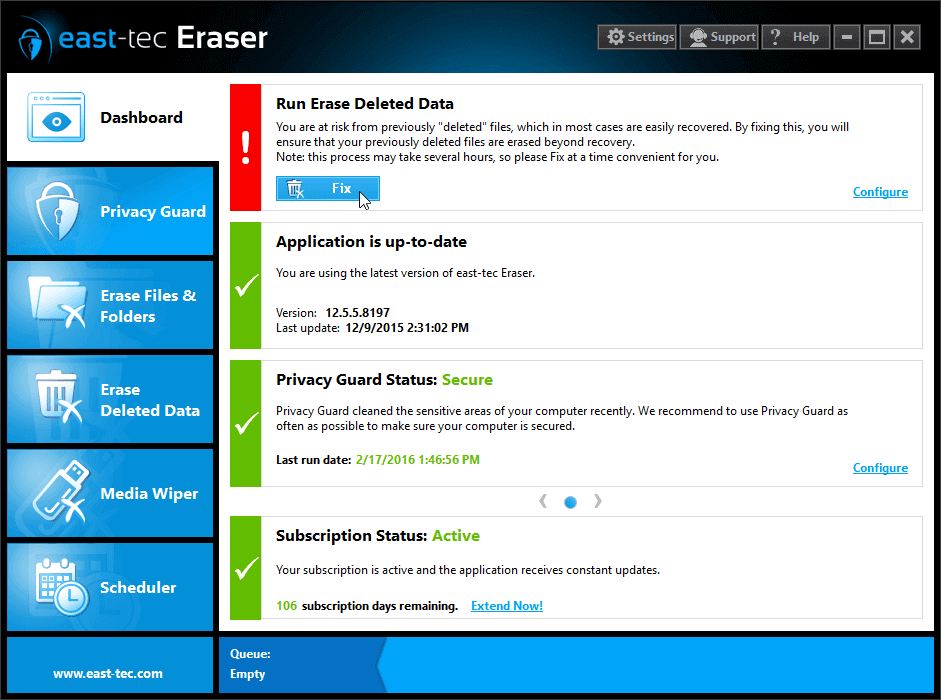
The east-tec Eraser Dashboard: a reminder to erase deleted data, the update status, the Privacy Guard status and the subscription status (from an earlier 12.x release).
Features
Privacy Guard cleans browsers and over 300 programs
east-tec Eraser's Privacy Guard erases history, cookies, cache, typed addresses and download lists from Chrome, Firefox, Edge, Opera, Safari and Internet Explorer, plus the recent-file lists and traces of over 300 programs, from office suites and photo editors to messengers, file-sharing tools and Windows Store apps. You tick the categories and programs to clean and run it once or on a schedule.
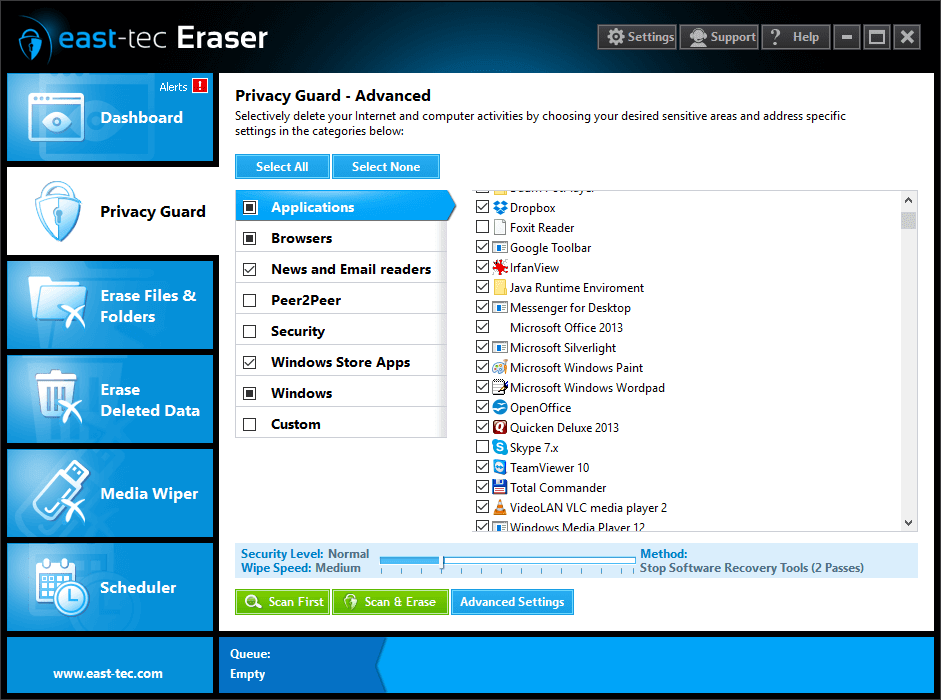
Privacy Guard - Advanced: tick the categories (Applications, Browsers, News and Email readers, Windows) and the programs to clean, then Scan First or Scan & Erase.
Erase Deleted Data makes old deletions unrecoverable
east-tec Eraser's Erase Deleted Data module wipes the free space on chosen drives, the slack space at the end of files, deleted file and folder names, the NTFS transaction log and the Recycle Bin. This is the step that destroys files you deleted months ago, which a normal delete leaves recoverable.
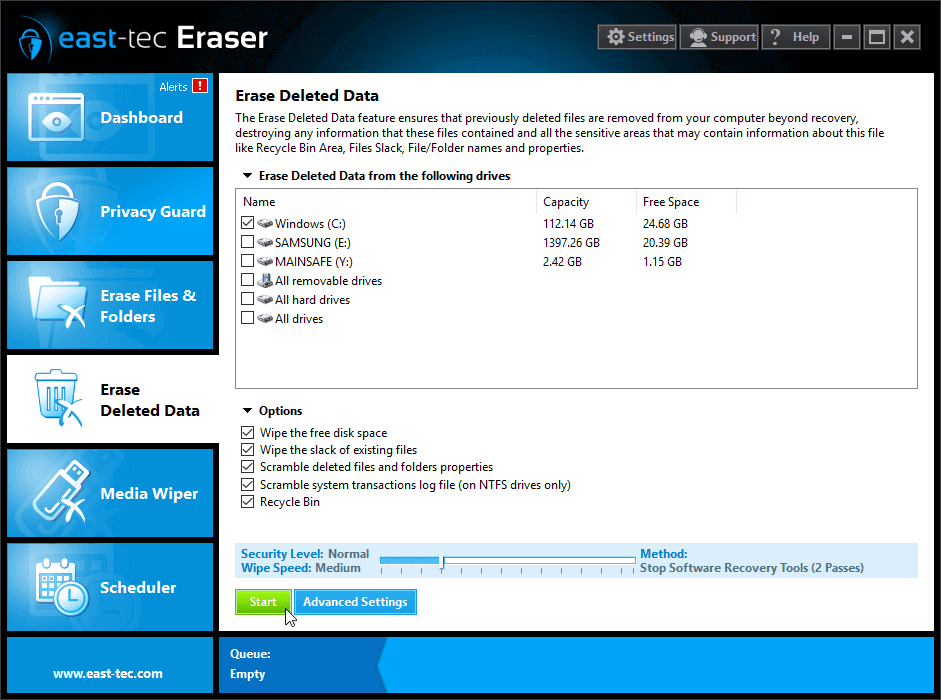
Erase Deleted Data: pick the drives, then the options to wipe free space, file slack, deleted names and the Recycle Bin.
File shredder, removable media wiper and scheduler
east-tec Eraser shreds chosen files and folders, wipes USB sticks and memory cards with the Media Wiper, and runs any of these jobs on a schedule. East-Tec says its wipe methods meet and exceed government and industry standards, and PC-WELT notes a stealth mode, filters to keep specific data, password protection and command-line control.
Benefits
- Privacy you can check. Each job shows the method and passes before it runs, so you know how thoroughly data was overwritten.
- A cleaner PC. Removing temporary files and caches also frees disk space.
- One tool instead of several. Browser cleaner, file shredder, free-space wiper and USB wiper are in one program.
Real-World Uses
- Before selling a laptop: shred personal folders, then wipe the free space so nothing deleted earlier can be recovered.
- On a shared or work PC: schedule Privacy Guard to clear browser history and recent-file lists every evening.
- For client files: securely erase finished project files, as one long-time customer on East-Tec's testimonials page describes doing.
Who It's For, and Who Should Skip It
Good fit: Windows users who want deleted files gone for good, people who share a PC, and freelancers who handle client data.
- Skip it if you only want a free browser cleaner. Your browser's own "clear browsing data" covers the basics.
- Skip it if you need to wipe a whole drive before disposing of a PC. east-tec DisposeSecure, which boots from USB and erases entire disks, is the tool for that.
- Skip it on a Mac. east-tec Eraser runs on Windows only.
Usage Guide
- Install: run the downloaded installer (about 17 MB) and start the 15-day trial.
- Privacy Guard: choose the browsers and programs to clean, run Scan First to preview, then Scan & Erase.
- Erase Deleted Data: tick the drives and options and click Start. Expect this to take a while on large drives.
- Scheduler: set the jobs you want to repeat.
Where it falls short
- Dated interface. AppTrap (2025) calls the UI dated and in need of a redesign.
- Slow at the highest settings. Tech Advisor timed just over 53 minutes to wipe 10 MB from a USB drive with a three-pass method, and AppTrap's 35-pass Gutmann wipe hadn't finished after a full day.
- Support complaints. Recent Trustpilot reviews say support is slow or doesn't reply.
What Users Say
Independent reviews
AppTrap (Baron Yeung, September 29, 2025) rated east-tec Eraser 9 out of 10: "While east-tec Eraser might look dated, it’s a very strong program." It lists "Good value compared to its competitors" as a pro and "Dated UI and could benefit from design updates" as a con, and reports that the Gutmann 35-pass wipe was "still not finished after leaving it on for a full day."
Tech Advisor (Simon Williams, January 30, 2014, reviewing east-tec Eraser 2014): "Although East-tec Eraser 2014 is only a single-task application, it deletes and wipes amazingly thoroughly" and "East-tec has also not made the mistake of over-charging for its utility". On speed: "The speed of a wipe is inversely proportional to security level."
Trustpilot
East-Tec's Trustpilot page (east-tec.com) showed a TrustScore of 2.8 out of 5 from 7 reviews on October 31, 2026, and the reviews shown there are mostly about support.
- Bill Gates (2 stars, October 2025): "The sproduct itself is great, sadly this is let down by terrible support."
- Finn Johansen (3 stars, January 2025): "East-tec Eraser won't work properly with exFAT"
Quoted on East-Tec's site
East-Tec's Reviews & Recognition page collects press quotes, for example Top Ten Reviews: "There isn't much that this app can't do - and its price undercuts many of its rivals," and Smart Computing: "It's not often that we see perfect software, but east-tec Eraser is close." On its testimonials page, customer Sam Becker writes: "I have been using east-tec Eraser for over 10 years and would highly recommend it to securely clean and erase information you don't need anymore."
The pattern: reviewers agree east-tec Eraser wipes thoroughly and costs less than many rivals. The complaints are a dated look, slow high-security wipes and slow support.
Editions and Pricing
| Plan | Price | Includes |
|---|
| Eraser Plan | $39.95 per year | east-tec Eraser |
| Privacy + Encryption Plan | $59.95 per year | east-tec Eraser + east-tec SafeBit |
| Total Privacy Plan | $59.95 per year | east-tec Eraser + east-tec DisposeSecure (20 PCs) |
| Total Security Plan | $69.95 per year | Eraser + InvisibleSecrets + SafeBit + DisposeSecure (30 PCs) |
Prices from East-Tec's store on October 31, 2026. The Buy Now button on this page is for the Eraser Plan.
FAQs
Can files erased by east-tec Eraser be recovered?
No, not with recovery software. east-tec Eraser overwrites the data itself with the method you pick, so tools that undelete files find nothing to restore. That includes files deleted before you installed it, once you wipe the free space.
Does east-tec Eraser work on SSDs?
east-tec Eraser runs on any Windows drive, but SSDs spread writes across their memory, so no file-level shredder can guarantee every old copy is overwritten. For an SSD you're getting rid of, a full-drive erase is the safer route.
Which wipe method should I use in east-tec Eraser?
For everyday privacy, east-tec Eraser's default methods are enough and finish much faster. The multi-pass government methods are for when a policy requires them, and the 35-pass Gutmann method can take a day or more.
Do East-Tec plans renew automatically?
Yes. East-Tec sells its programs as yearly plans ("Yearly Subscription" at checkout) with a year of updates and support, and the plan renews each year unless you cancel it.
Is east-tec support responsive?
East-Tec support gets mixed marks. East-Tec's own testimonial pages praise it, but several recent Trustpilot reviewers (2025 and 2026) say their support requests went unanswered or were slow. Test the trial before you buy, so you only need support for licensing.
Does east-tec Eraser run on Windows 11?
Yes. east-tec Eraser 15 supports Windows 11 and 10, plus 8, 7, Vista and XP.
System Requirements
- Windows: 11, 10, 8, 7, Vista or XP
- File systems: NTFS, exFAT, FAT32, FAT16, FAT12
- Hardware: 300 MHz processor, 256 MB RAM, 50 MB disk space
Conclusion
east-tec Eraser is worth $39.95 a year if you want deleted files and browsing traces gone for good on Windows. It wipes thoroughly, covers browsers and hundreds of programs, and costs less than many rivals.
The reasons to hesitate are a dated interface, slow wipes at the highest security levels and slow support. Try the 15-day trial on your own drives, especially exFAT ones, before you buy.
Download Free TrialBuy Now