east-tec InvisibleSecrets: Encrypt Files and Hide Them Inside Ordinary Pictures
east-tec InvisibleSecrets is a $29.95-a-year Windows encryption program with a twist: besides encrypting files, it can hide them inside innocent-looking files such as JPEG images (steganography), so nobody can tell the secret data is there. It also makes self-decrypting packages, locks applications and manages passwords.
Quick facts
- Version: 4.8 (installer dated May 8, 2013)
- Developer: East-Tec (formerly sold under the NeoByte Solutions name)
- Runs on: Windows 11, 10, 8, 7, Vista and XP
- Price: $29.95 per year for the InvisibleSecrets Plan
- Trial: 15 days, fully functional
What we checked: East-Tec's download page, which lists version 4.8, the installer (etinvisiblesecrets-install.exe, 3,775,592 bytes, dated May 8, 2013) and the price on the order page ($29.95 for the InvisibleSecrets Plan - Yearly Subscription), on October 31, 2026. We didn't test how well hidden files resist detection tools.
Before you buy
- It hasn't been updated since 2013. Version 4.8's main change was the East-Tec rebranding; East-Tec lists Windows 11 as supported, but test it in the trial.
- Hiding isn't magic. Steganography hides that a file exists; the encryption is what protects the content. Use a strong password.
Download Free TrialBuy Now
Overview
east-tec InvisibleSecrets opens on a menu of tools: Hide Files, Encrypt Files, Self-Decrypting Packages, Shred Files, Destroy Internet Traces, IP-to-IP Password Transfer and Locked Applications, with the Password Manager in the top bar. Each tool runs as a step-by-step wizard, which reviewers singled out as easy for beginners.
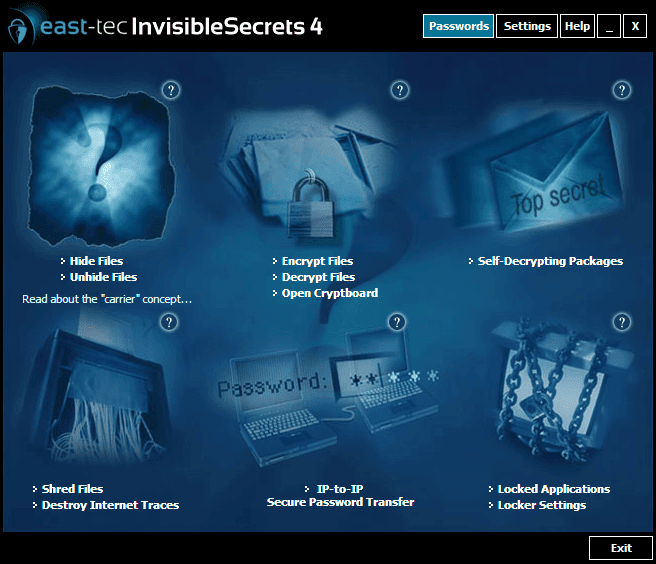
The east-tec InvisibleSecrets 4 main window: Hide Files, Encrypt Files, Self-Decrypting Packages, Shred Files, IP-to-IP Password Transfer and Locked Applications.
Features
Hide files inside images and other carriers
east-tec InvisibleSecrets hides encrypted files inside carrier files, such as JPEG pictures, so the carrier still opens normally while the secret file stays invisible. A customer quoted by East-Tec chose it for "the type of files supported (JPG especially)".
Encryption and self-decrypting packages
east-tec InvisibleSecrets encrypts files and folders with strong algorithms, and builds self-decrypting executable packages you can email or put on a USB stick; the recipient only needs the password, not the program.
Application locker and password manager
east-tec InvisibleSecrets password-protects any program, and can hide it from the Start menu. Its password manager stores logins in an encrypted file, its generator creates strong passwords, and IP-to-IP transfer sends a password securely to another computer.
Benefits
- Deniability. A hidden file doesn't look like encrypted data.
- Easy sharing. Self-decrypting packages open on any Windows PC.
- Several privacy tools in one. Encryption, hiding, a shredder, a locker and a password manager.
Who It's For, and Who Should Skip It
Good fit: people who want to keep a few sensitive files private on a shared PC, or send them by email, without obvious encrypted archives.
- Skip it for whole-drive or vault encryption. east-tec SafeBit creates encrypted drives you use like normal disks.
- Skip it if you need actively maintained software. The last update was in 2013.
Where it falls short
- No updates since 2013. The interface and features are from that era.
- Few current reviews. Most press coverage is a decade or more old.
What Users Say
Quoted on East-Tec's site
East-Tec's Reviews & Recognition page quotes CNET: "The program has a very user-friendly interface. Novice users will especially like the wizard-like approach it takes to walk you through each feature when selected." and Softpedia (Editor's Pick): "Compared to other similar apps that come packed with a single encryption capability, this program is able to combine multiple tools in order to ensure that your sensitive information remains private." Its testimonials include Johnathan Jakobs: "When i was looking for a stego program, i tried many. And I definitely like east-tec InvisibleSecrets the best."
Independent sources
Independent reviews of the current version are scarce. Software directories such as G2 and SourceForge list InvisibleSecrets with few or no user reviews, and East-Tec's Trustpilot page (2.8 out of 5 from 7 reviews on October 31, 2026) is mostly about slow support across its products.
The pattern: past reviews liked the wizards and the mix of tools in one program. Today the concern is age, not features.
Editions and Pricing
| Plan | Price | Includes |
|---|
| InvisibleSecrets Plan | $29.95 per year | east-tec InvisibleSecrets |
| Privacy Protection Plan | $59.95 per year | InvisibleSecrets + east-tec Eraser |
| Total Security Plan | $69.95 per year | InvisibleSecrets + Eraser + SafeBit + DisposeSecure |
FAQs
What is steganography in east-tec InvisibleSecrets?
Steganography is hiding a file inside another file. east-tec InvisibleSecrets encrypts your file and tucks it inside a carrier such as a JPEG picture, which still opens as a normal picture.
Does the recipient need east-tec InvisibleSecrets to open my files?
Not for self-decrypting packages. east-tec InvisibleSecrets builds an executable that opens with the password on any Windows PC; hidden files inside images do need InvisibleSecrets to extract.
Is east-tec InvisibleSecrets still updated?
East-Tec still sells and supports it, but the latest version, 4.8, dates from 2013. Run the 15-day trial on your Windows version first.
Do East-Tec plans renew automatically?
Yes. East-Tec sells its programs as yearly plans ("Yearly Subscription" at checkout) with a year of updates and support, and the plan renews each year unless you cancel it.
Is east-tec support responsive?
East-Tec support gets mixed marks. East-Tec's own testimonial pages praise it, but several recent Trustpilot reviewers (2025 and 2026) say their support requests went unanswered or were slow. Test the trial before you buy, so you only need support for licensing.
System Requirements
- Windows: 11, 10, 8, 7, Vista or XP
- File systems: NTFS, exFAT, FAT32, FAT16, FAT12
- Hardware: 300 MHz processor, 256 MB RAM, 50 MB disk space
Conclusion
east-tec InvisibleSecrets is worth $29.95 a year if you specifically want to hide files inside pictures, not just encrypt them. Few programs combine steganography with encryption, a locker and a password manager this simply.
The main reason to hesitate is age: it hasn't been updated since 2013. Use the trial to confirm it runs well on your PC.
Download Free TrialBuy Now