east-tec SafeBit: Encrypted Drives You Use Like Any Other Disk
east-tec SafeBit is a $29.95-a-year Windows disk encryption program that creates encrypted "safes": virtual drives protected with 256-bit AES. Open a safe with its password and it appears as a normal drive letter; everything you save there is encrypted on the fly.
Quick facts
- Version: 2.2 (installer dated September 24, 2015)
- Developer: East-Tec (formerly sold under the NeoByte Solutions name)
- Encryption: 256-bit AES
- Runs on: Windows 11, 10, 8, 7, Vista and XP
- Price: $29.95 per year for the SafeBit Plan
- Trial: 15 days, fully functional
What we checked: East-Tec's download page (version 2.2), the installer (etsafebit-install.exe, 2,874,848 bytes, file version 2.2.0.5462, dated September 24, 2015) and the price on the order page ($29.95 for the SafeBit Plan - Yearly Subscription), on October 31, 2026. We didn't benchmark encryption speed.
Before you buy
- Last updated in 2015. Version 2.2 added Windows 10 compatibility; East-Tec lists Windows 11 too, but try it first.
- Don't lose the password. AES-256 safes can't be opened without it. Keep backups of safes and passwords.
Download Free TrialBuy Now
Overview
east-tec SafeBit's main window lists your safes with their status, drive letter, size and last-opened date, with buttons to create, open, close, destroy and back up safes. Close all safes with one click or a hotkey when you step away.
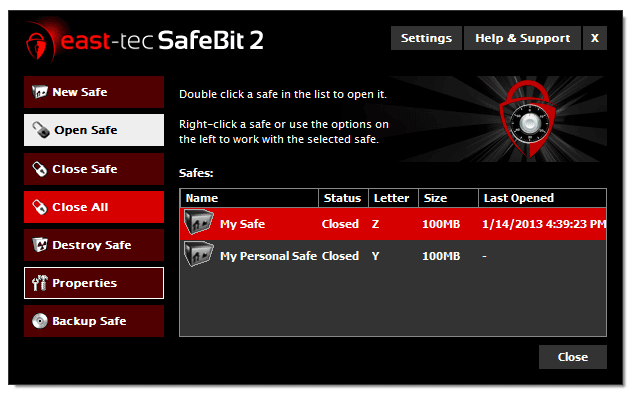
The east-tec SafeBit 2 window: New Safe, Open Safe, Close Safe, Close All, Destroy Safe, Properties and Backup Safe, with two 100 MB safes listed.
Features
On-the-fly AES-256 encryption
east-tec SafeBit encrypts data right before it's written and decrypts it right after it's read, so you work with files in a safe exactly as on any drive, and even install and run programs inside one.
Safes travel to USB drives and the cloud
east-tec SafeBit safes are files, so you can copy them to USB sticks or external drives, or keep them in Dropbox, Google Drive or OneDrive, and open them on any PC with SafeBit installed.
USB keys, virtual keyboard and panic hotkeys
east-tec SafeBit can store a safe's password, encoded, on a USB stick or memory card that then works as a key; offers a virtual keyboard against keyloggers; and has hotkeys to open the safe list or close every safe instantly, plus an inactivity timeout.
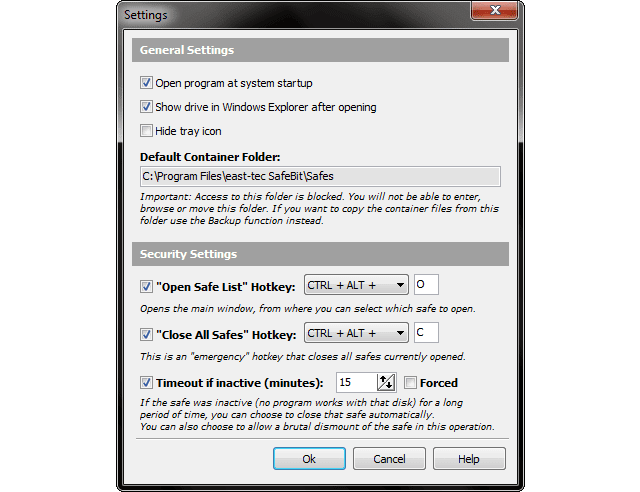
SafeBit Settings: start with Windows, the default safe folder, hotkeys for the safe list and Close All Safes, and the inactivity timeout.
Benefits
- No change to how you work. Files in an open safe behave like any other files.
- Protection if the PC is stolen. Closed safes are unreadable.
- Portable privacy. Encrypted safes can live on USB drives or in the cloud.
Who It's For, and Who Should Skip It
Good fit: laptop users with client or personal files, and anyone who keeps sensitive files in cloud folders.
- Skip it if you want to hide files inside pictures. east-tec InvisibleSecrets does steganography.
- Skip it if you need actively developed encryption software. The last update was in 2015.
Where it falls short
- No updates since 2015.
- Recent complaints. A May 2025 Trustpilot reviewer who used SafeBit wrote, "I wouldn't recommend buying ANY of the products offered by East-Tec".
- Windows only. Safes can be stored in the cloud but only opened on Windows with SafeBit.
What Users Say
Quoted on East-Tec's site
East-Tec's Reviews & Recognition page quotes the U.S. Department of Homeland Security SAVER program: "The encryption and decryption process is transparent to the user. ... Once downloaded, it can be installed in approximately one minute and does not ordinarily require an IT professional." It also quotes Top Ten Reviews ("Whatever you encrypt with SafeBit will probably not be cracked in your lifetime.") and Softpedia ("One of the easiest softwares to work with.").
Trustpilot
East-Tec's Trustpilot page (east-tec.com) showed a TrustScore of 2.8 out of 5 from 7 reviews on October 31, 2026, and the reviews shown there are mostly about support. Christian Steiner (1 star, May 2025, about SafeBit): "I wouldn't recommend buying ANY of the products offered by East-Tec". G2 lists SafeBit with no user reviews.
The pattern: older reviews praise how easy and transparent SafeBit is; recent comments question East-Tec's support and upkeep.
Editions and Pricing
| Plan | Price | Includes |
|---|
| SafeBit Plan | $29.95 per year | east-tec SafeBit |
| Privacy + Encryption Plan | $59.95 per year | SafeBit + east-tec Eraser |
| Total Security Plan | $69.95 per year | SafeBit + Eraser + InvisibleSecrets + DisposeSecure |
FAQs
What encryption does east-tec SafeBit use?
east-tec SafeBit uses 256-bit AES, the algorithm NIST selected as the U.S. federal standard.
Can I open an east-tec SafeBit safe on another computer?
Yes, on any Windows PC with east-tec SafeBit installed. Copy the safe file there, or keep it on a USB drive or in a cloud folder, and open it with the password or your USB key.
What happens if I forget my east-tec SafeBit password?
The safe stays locked. east-tec SafeBit has no back door, so store the password safely or save it on a USB key.
Do East-Tec plans renew automatically?
Yes. East-Tec sells its programs as yearly plans ("Yearly Subscription" at checkout) with a year of updates and support, and the plan renews each year unless you cancel it.
Is east-tec support responsive?
East-Tec support gets mixed marks. East-Tec's own testimonial pages praise it, but several recent Trustpilot reviewers (2025 and 2026) say their support requests went unanswered or were slow. Test the trial before you buy, so you only need support for licensing.
System Requirements
- Windows: 11, 10, 8, 7, Vista or XP
- File systems: NTFS, exFAT, FAT32, FAT16, FAT12
- Hardware: 300 MHz processor, 256 MB RAM, 50 MB disk space
Conclusion
east-tec SafeBit is a simple way to keep files in encrypted drives on Windows for $29.95 a year. It's easy, transparent while you work, and its safes can go to USB sticks or the cloud.
It hasn't been updated since 2015, and recent reviews complain about East-Tec's support. Try the 15-day trial before committing.
Download Free TrialBuy Now