east-tec DisposeSecure: Wipe Entire Hard Drives Before You Sell, Donate or Recycle a PC
east-tec DisposeSecure erases whole hard drives and partitions beyond recovery, so old computers can leave your home or company without your data. It runs from a bootable USB stick, CD or DVD on any x86 PC regardless of its operating system, from Windows, or over the network, and the $29.50 yearly plan covers wiping up to 10 PCs.
Formatting a drive or reinstalling Windows doesn't remove the data underneath. DisposeSecure overwrites every sector.
Quick facts
- Version: 5.5 (installer dated August 11, 2016)
- Developer: East-Tec (EAST Technologies)
- Runs: from a bootable USB/CD/DVD/floppy on any x86 PC; a Windows module on Windows 11 to XP and Server 2008/2003; a network module for several PCs
- Price: $29.50 per year, covering up to 10 PCs (20 in Total Privacy, 30 in Total Security)
- Standards: overwrite methods that meet the U.S. DoD 5220.22-M standard and other government standards
- Trial: 15 days, fully functional
What we checked: the installer on East-Tec's download page (etdisposesecure-install.exe, 11,625,016 bytes, file version 5.5.0.5934, dated August 11, 2016) and the order page, which lists the DisposeSecure Plan as 10 units at $2.95, $29.50 a year, on October 31, 2026. We didn't wipe a drive ourselves.
Before you buy
- The plan counts PCs. The $29.50 plan covers up to 10 computers; each wipe uses one.
- The program is old. The current installer dates from 2016, and the boot-disk requirements still mention floppy disks and drives up to 1 TB. Check your hardware in the trial.
- Wiping is permanent. Back up anything you need first; there is no undo.
Download Free TrialBuy Now
Overview
East-Tec built DisposeSecure for computer disposal: an IT department retiring PCs, a family selling an old laptop, a company that needs records of what was wiped. You prepare bootable media in Windows, boot the old PC from it, and erase its drives; or you wipe a drive attached to a working Windows PC; or you wipe several PCs at once over the local network.
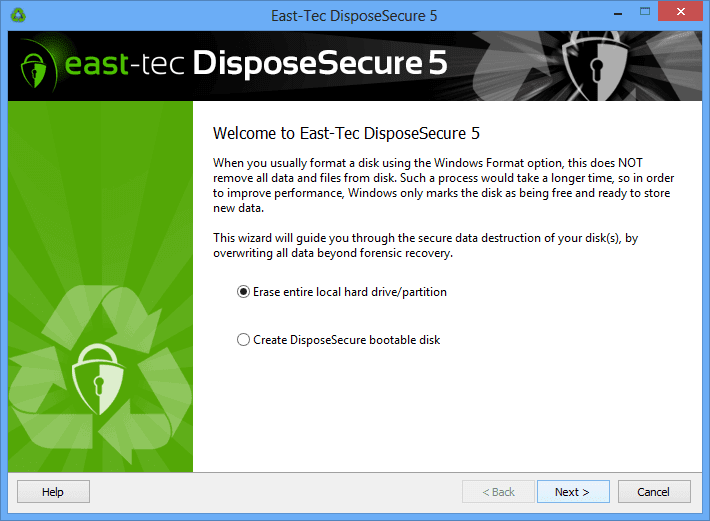
The DisposeSecure 5 Windows wizard: erase an entire local drive or partition, or create a DisposeSecure bootable disk.
Features
Bootable media that wipes any PC
east-tec DisposeSecure creates bootable USB sticks, CDs, DVDs or ISO images. Booting an old computer from that media lets you erase its drives whatever operating system it ran (Windows, Linux, BSD and others), as long as it's an x86 PC.

Create Bootable Media: choose a USB stick, DVD drive or ISO image and how many sanitizations to put on it; the counter shows the sanitizations remaining.
Network sanitization for many PCs
east-tec DisposeSecure's network module wipes several PCs on the local network at once, booting them via PXE and identifying them by MAC address or boot order, and sends each machine's report back to the server.

The network module: sanitize PCs by MAC address or boot sequence, and create PXE bootable media.
Wiping reports for audits
east-tec DisposeSecure generates detailed reports of each wipe, saved locally for printing or sent over the network, which organizations use as proof of data destruction.
Benefits
- Safe resale and donation. Old PCs leave without recoverable data.
- Works on dead or unbootable systems. The boot disk doesn't need the old operating system to work.
- Paperwork included. Reports help meet data-disposal rules.
Real-World Uses
- A small office refresh: boot each retired PC from one USB stick and wipe it, keeping a report per machine.
- Selling a family laptop: erase the whole drive, then let the buyer install a fresh operating system.
- An external drive you're giving away: wipe it from the Windows module without rebooting.
Who It's For, and Who Should Skip It
Good fit: IT staff and small businesses disposing of PCs, and anyone selling or donating a computer.
- Skip it to delete individual files. east-tec Eraser shreds files and browsing traces without wiping the whole disk.
- Skip it for modern NVMe/SSD-only fleets without testing. The program dates from 2016 and its boot environment is old; confirm in the trial that it detects your drives.
Usage Guide
- Install DisposeSecure on a working Windows PC and start the trial.
- Create bootable media on a USB stick, DVD or ISO, and choose how many sanitizations to store on it.
- Boot the old PC from that media, select the drives to sanitize and confirm.
- Keep the report for your records.
Where it falls short
- Old software. Version 5.5 dates from 2016, and the published boot-disk limit is drives up to 1 TB.
- Plain interface. Softpedia's review of version 4 (2012) praised the wiping but marked the interface down.
- Per-PC licensing. Each sanitization uses one of the plan's PCs.
What Users Say
Independent reviews
Softpedia reviewed DisposeSecure 4 in January 2012 and rated it very good, calling it fast with a top-notch drive scrub, while criticizing the interface, the lack of bootable USB media in that version (version 5 added it) and the price. Independent reviews of version 5.5 are scarce.
Quoted on East-Tec's site
East-Tec's Reviews & Recognition page quotes CNET ("DisposeSecure is a powerful and competent tool, and its interface and features reflect that."), Softpedia ("A good sanitizing program, with many options to choose from.") and Download3K. Its customer page lists organizations such as U.S. Attorneys' Offices and quotes Northern Health: "Our experience is that the product has been easy to use and reliable. We use it because it is accepted by the British Columbia Government for data erasure."
Trustpilot
East-Tec's Trustpilot page (east-tec.com) showed a TrustScore of 2.8 out of 5 from 7 reviews on October 31, 2026, and the reviews shown there are mostly about support. One 1-star reviewer (June 2026) wrote that East-Tec software "does not work on my new PC" and that support hadn't replied, without naming the product.
The pattern: the wiping is well regarded and used by public bodies, but the software is old and support complaints are recent. Test it on your hardware first.
Editions and Pricing
| Plan | Price | Includes |
|---|
| DisposeSecure Plan | $29.50 per year | DisposeSecure, up to 10 PCs |
| Total Privacy Plan | $59.95 per year | DisposeSecure (20 PCs) + east-tec Eraser |
| Total Security Plan | $69.95 per year | DisposeSecure (30 PCs) + Eraser + InvisibleSecrets + SafeBit |
FAQs
Can east-tec DisposeSecure wipe a PC that won't start Windows?
Yes, as long as the PC can boot from USB, CD or DVD. east-tec DisposeSecure runs from its own boot disk, so the installed operating system doesn't matter.
How many computers does the DisposeSecure plan cover?
The DisposeSecure Plan covers up to 10 PCs a year; the order page lists it as 10 units at $2.95. The Total Privacy and Total Security plans raise that to 20 and 30.
Does east-tec DisposeSecure meet DoD 5220.22-M?
Yes. East-Tec says DisposeSecure's methods meet and exceed the U.S. Department of Defense 5220.22-M sanitizing standard and other major government standards.
Will east-tec DisposeSecure work on drives larger than 1 TB?
East-Tec's published boot-disk requirements list drives up to 1 TB, and the program dates from 2016. Test larger or newer drives with the trial before relying on it.
Do East-Tec plans renew automatically?
Yes. East-Tec sells its programs as yearly plans ("Yearly Subscription" at checkout) with a year of updates and support, and the plan renews each year unless you cancel it.
Is east-tec support responsive?
East-Tec support gets mixed marks. East-Tec's own testimonial pages praise it, but several recent Trustpilot reviewers (2025 and 2026) say their support requests went unanswered or were slow. Test the trial before you buy, so you only need support for licensing.
System Requirements
- Boot disk: any Intel 80386-compatible PC, 550 KB free conventional memory, bootable USB/CD/DVD/floppy, drives up to 1 TB
- PC making the media: Windows 11/10/8/7/Vista/XP, 300 MHz, 128 MB RAM, 50 MB disk
- Windows module: Windows 11/10/8/7/Vista/XP or Server 2008/2003; NTFS, exFAT, FAT
- Internet: needed to activate licenses
Conclusion
east-tec DisposeSecure is a good buy at $29.50 a year if you need to wipe whole drives on several PCs before they leave your hands. The boot disk works on almost any old PC, and the reports suit organizations.
Its age is the main concern: version 5.5 is from 2016 and the published limits are dated. Run the trial on your own machines first.
Download Free TrialBuy Now