Coolmuster iOS Eraser for Mac: Erase and Overwrite an iPhone or iPad from Your Mac Before It Changes Hands
Coolmuster iOS Eraser for Mac is a $25.95-a-year macOS app that wipes an iPhone, iPad or iPod touch over USB and, at its Medium and High levels, overwrites the storage afterwards so deleted files can't be recovered. One license covers 3 devices from one Mac; lifetime costs $35.95.
Apple's own "Erase All Content and Settings" is free and, on any recent iPhone, already makes the old data unreadable by destroying the encryption keys. This app is for people who want an overwrite pass on top before a phone goes to a buyer, a trade-in counter or a relative.
Quick facts
- Version: 1.0.15 for Mac, released October 14, 2025
- Developer: Coolmuster
- Runs on: macOS 10.10 or later. Intel build, so Apple silicon Macs use Rosetta 2
- Devices: iPhone, iPad and iPod touch, iOS 5 and later, by USB
- Security levels: Low (quick erase), Medium (1 overwrite pass), High (2 passes)
- Price: $25.95 for one year (3 devices, 1 Mac), $35.95 lifetime
- Refunds: Coolmuster doesn't approve refunds on eraser products
- What we checked: Mac version 1.0.15 in the vendor's release notes and inside the downloaded app's Info.plist, the 3.3 MB disk image from the vendor (file dated October 14, 2025) holding the full Intel-only app with a macOS 10.10 minimum, checkout price $25.95 for one year and $35.95 for lifetime on November 11, 2026. We didn't wipe a device with it; the steps below come from the vendor's Mac manual and screenshots.
Before you buy
- The Mac edition is well behind Windows. Mac 1.0.15 dates from October 2025; Windows 4.0.19 (October 2026) added a PDF erasure report, a manual reset step and extra fake contacts for deeper overwriting. None of that is in the Mac build.
- It wipes the whole device; there's no selective deletion. Back up first.
- Sign out of iCloud and turn off Find My on the iPhone before you hand it over, or Activation Lock will stop the next owner.
- Coolmuster's refund policy says refund requests for eraser products won't be approved, so make sure your device connects in the free trial. The yearly plan renews automatically.
Download Free Trial Buy Now
Overview
The app opens on a single "Erase All Data" screen with the connected device's name and a storage gauge (9.90 GB used of 14.89 GB on the iPhone 6 in Coolmuster's example). Click Erase, choose a level, type "delete", and the program erases the device and reboots it. You unlock it with the passcode when asked, click Try Again, and on Medium or High it then overwrites the storage before showing "Done!".
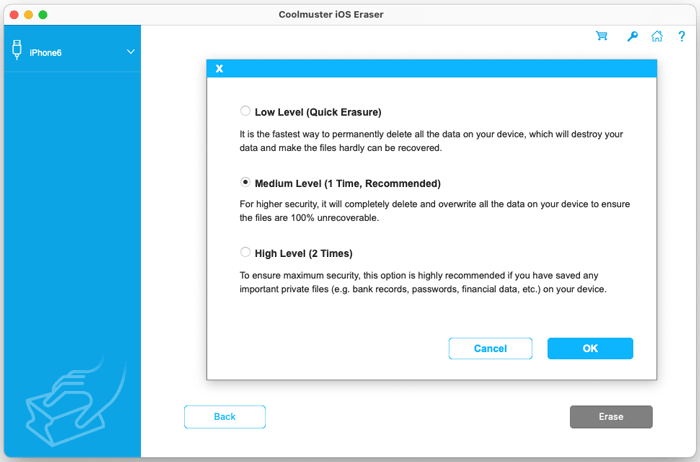
The Mac security level dialog: Low Level (Quick Erasure), Medium Level (1 Time, Recommended) and High Level (2 Times).
Features
Three erase levels
Coolmuster iOS Eraser for Mac's Low level is the quickest delete. Medium, the recommended one, deletes and overwrites once. High overwrites twice and is the level Coolmuster suggests for a device that held bank records, passwords or financial data. Note that the iOS tool's High level is two passes, where Coolmuster's Android Eraser uses three.
Overwriting after the erase
Coolmuster iOS Eraser for Mac's Medium and High levels run an "Overwriting all individual data" phase after the reboot, filling the storage so that deleted files can't be carved back out. The device may show a "Storage Almost Full" message during it; you tap Done and leave it connected.
All data types, no jailbreak
Coolmuster iOS Eraser for Mac covers contacts, messages, call history, photos, videos, music, installed apps and app data, according to the vendor, and works on a normal, non-jailbroken device. It supports iPhone, iPad and iPod touch models back to iOS 5.
A typed confirmation before anything happens
Coolmuster iOS Eraser for Mac won't start until you type "delete" and confirm a second warning, which guards against wiping the wrong device when several are plugged in.
Benefits
- An extra layer over Apple's reset for anyone uneasy about selling a phone that held work or banking data.
- Runs on the Mac you have. No Windows PC needed.
- Several devices per license. Three iPhones or iPads for the price of one wipe.
Real-World Uses
- Selling an old iPhone privately after upgrading.
- Trading in at a shop where staff and refurbishers handle the device.
- Clearing a family iPad before it goes to a relative.
- Retiring a work iPhone that held client contacts and messages.
Who It's For, and Who Should Skip It
It's for Mac users who want a belt-and-braces wipe of an iPhone or iPad before it leaves their hands.
Skip it if Apple's free Erase All Content and Settings is enough for you (for most people it is), if you need a written erasure report (the Windows edition makes one, this Mac build doesn't), or if you only want to delete particular photos or chats.
Usage Guide
- Back up the device and sign out of iCloud with Find My turned off.
- Install the app by dragging it from the disk image to Applications; if macOS blocks it as from an unidentified developer, allow it in System Settings.
- Connect by USB and tap Trust on the device.
- Click Erase, choose Low, Medium or High next to Security Level, and click OK.
- Type "delete", click Erase, then OK to confirm.
- Unlock when asked. After the reboot, enter the passcode on the device and click Try Again on the Mac.
- Wait for the overwrite (Medium and High), tapping Done on any "Storage Almost Full" prompt, until the app shows Done!
- Set the device up again, or reset it from Settings if it reports full storage.
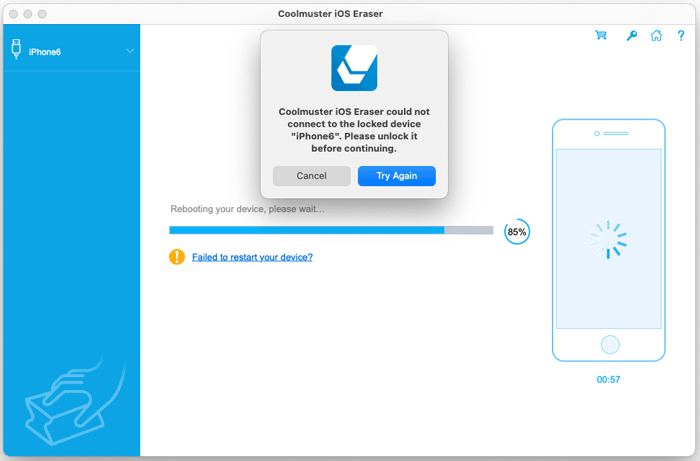
Rebooting the iPhone at 85%: the app can't reach the locked phone and asks you to unlock it, then click Try Again.
Where It Falls Short
- Slow. Overwriting a whole device takes time; Coolmuster's own example screenshots show close to 10 minutes on an iPad, and a reviewer called the process "a little slow".
- USB only. No Wi-Fi connection, unlike Coolmuster's Android Eraser.
- Intel-only app. It runs on M-series Macs through Rosetta 2.
- Babysitting needed. You'll be asked to unlock the device mid-process and dismiss storage warnings, so you can't walk away at the start.
What Users Say
There's no independent review of the Mac edition. Coolmuster's product and review pages (101 reviews) cover both editions, and several of the recent ones are clearly about the Windows version (one says it "works well on Windows 11", others praise the newer erasure report). Coolmuster as a company scores 4.6 out of 5 from 223 Trustpilot reviews, none about this eraser.
From Coolmuster's product page
"I like this newly released iOS Data Eraser tool. There are three 3 different data erasing levels. I chose the Medium level to erase data on my iPhone 7. It's great, after erasing, my iPhone 7 just like a new one. So I can trade it safely."
Jane
"It is pretty useful to keep personal data safe on the old iPhone before selling it. I have tried to recover data with some third-party software after using this eraser tool, and it turns out that my all personal data is gone!!"
Jeesie
From Coolmuster's review page
"Used it before trading in my iPhone. Peace of mind knowing my files were gone."
Ryan Mitchell, July 17, 2026
"Does exactly what it says, though the erasing process felt a little slow."
Jessica Turner, September 4, 2026
"Cleaned everything well, but is data truly unrecoverable afterward?"
Sarah Wilson, April 3, 2026
Buyers like how simple it is and the feeling of safety at resale. The complaints are about speed, and the questions are whether the data is really gone, which an overwrite on top of Apple's encryption makes very unlikely.
Comparisons
iOS Eraser for Mac vs. Apple's Erase All Content and Settings
Apple's reset is free, built in and takes minutes, and it removes the encryption keys so the old data can't be read. iOS Eraser adds an overwrite pass, at the cost of time and $25.95.
iOS Eraser for Mac vs. the Windows edition
Same price and tiers, but the Windows edition is a year newer: it produces a PDF erasure report and adds 100 fake contacts to the overwrite. If you have a Windows PC and want the report, buy that one instead.
Editions and Pricing
One edition, priced by term and by how many devices and Macs it covers, before tax, on November 11, 2026.
| License term | 3 devices, 1 Mac | 9 devices, 3 Macs | 30 devices, 1 Mac |
|---|
| 1 year (auto-renews) | $25.95 | $35.95 | $185.95 |
| Lifetime | $35.95 | $45.95 | $245.95 |
For a one-off, take the one-year plan and cancel the renewal right after the wipe.
FAQs
Does Coolmuster iOS Eraser for Mac remove Activation Lock?
Coolmuster iOS Eraser for Mac doesn't remove Activation Lock. Turn off Find My and sign out of your Apple ID on the device before erasing, so the next owner can activate it.
Does it work on Apple silicon Macs?
Coolmuster iOS Eraser for Mac runs on M-series Macs through Rosetta 2, since the app is built for Intel only.
Can I erase a phone I can't unlock?
Coolmuster iOS Eraser for Mac needs the device trusted and unlocked with its passcode during the process, so it won't wipe a locked or disabled iPhone. Apple's recovery mode is the route for that.
Which level should I choose?
Coolmuster iOS Eraser for Mac recommends Medium, one overwrite pass. Choose High, two passes, if the device held financial or password data and you can leave it connected longer.
Does the license work for the Windows version?
Coolmuster iOS Eraser for Mac licenses cover the Mac edition only; the Windows edition is sold separately at the same price.
Will the iPhone work normally afterwards?
Coolmuster iOS Eraser for Mac leaves the device ready to set up as new. If it complains that storage is full after the overwrite, reset it from Settings and set it up again.
System Requirements
- macOS 10.10 or later; Intel Mac, or Apple silicon with Rosetta 2
- 200 MB of free disk space
- iPhone, iPad or iPod touch on iOS 5 or later, with a USB cable
Conclusion
Coolmuster iOS Eraser for Mac does what it promises, an erase plus one or two overwrite passes from a Mac, and it's worth $25.95 to someone who wants that extra step before selling an iPhone and has no Windows PC. But be clear on what you're buying: Apple's free reset already protects most sellers, the Mac build is a year older than the Windows edition and lacks its erasure report, and refunds aren't offered on eraser products. Try it first, and cancel the renewal after the wipe.
Download Free Trial Buy Now