Coolmuster PDF Splitter: Cut Big PDFs into Smaller Ones by Page Count, Equal Parts or Page Range
Coolmuster PDF Splitter is a $15.95-a-year Windows program that splits PDF files into smaller PDFs on your own PC: every N pages, into a set number of equal parts, or a page range you type, for one file or a whole folder at once. Five-PC and ten-PC lifetime licenses are also sold.
It's for the 300-page scan you need to email in pieces, the bank statement where only pages 4 to 6 matter, or the folder of reports that each need their cover page taken off. No upload, no Acrobat.
Quick facts
- Version: 3.0.3, released April 30, 2026
- Developer: Coolmuster
- Runs on: Windows 11, 10, 8 and 7. There's no Mac version
- Split methods: every N pages, evenly into N files, or by page range into one file
- Price: $15.95 for one year on one PC, $9.95 for one month; lifetime from $35.95 for 5 PCs
- Guarantee: 30 days on the yearly and lifetime licenses, 7 days on the monthly one
- What we checked: the 57.6 MB installer from the vendor (file dated April 30, 2026, digitally signed by Shenzhen Qixingshi Technology Co., Ltd), version 3.0.3 in the vendor's release notes, checkout price $15.95 for the one-year plan and $25.95 for lifetime on November 11, 2026. We didn't split files with it ourselves; the workflow below comes from the vendor's manual and program screenshots.
Before you buy
- It can't split encrypted or password-protected PDFs. Remove the protection first.
- It only splits. Joining files is a separate product, Coolmuster PDF Merger.
- The yearly and monthly licenses renew automatically, and automatic renewals aren't refunded. Cancel in time if it's a one-off job.
Download Free Trial Buy Now
Overview
The left of the window lists every PDF you've added with its size, page count and date, each with a checkbox. The right side holds a page viewer, the "Select Split Method" panel, the output folder and the Start button. The split method applies to every ticked file, which is what makes the batch mode useful: load a folder of 40 reports, choose "Split by every page(s): 1", and you get every page of every report as its own PDF in one run.
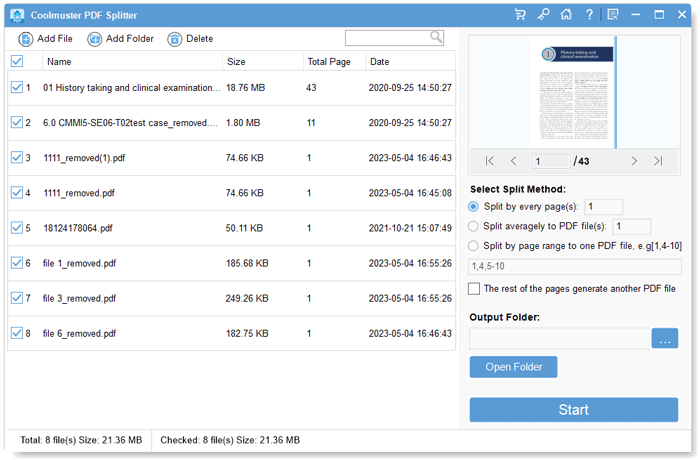
Eight PDFs ticked, a 43-page file in the viewer, and the three split methods with the "rest of the pages" checkbox below them.
Features
Split every page, or every few pages
Coolmuster PDF Splitter's first method cuts a file into chunks of a fixed size: 1 gives you one PDF per page, 2 gives two-page files, 10 gives ten-page files. It suits scans of single-page forms and anything that has to go out in size-limited pieces.
Split a file evenly into a set number of parts
Coolmuster PDF Splitter's second method divides each PDF into the number of files you enter, sharing the pages out evenly. Use it when you know you need, say, four parts for four reviewers and don't want to count pages.
Pull out exactly the pages you want
Coolmuster PDF Splitter's third method takes a page list such as 1,4,5-10 and saves those pages as one PDF. Tick "The rest of the pages generate another PDF file" and everything you didn't list goes into a second PDF, which is a quick way to remove a cover sheet or separate an appendix.
Page viewer and batch loading
Coolmuster PDF Splitter loads single files, several at once, or a whole folder, and shows the selected file page by page so you can confirm the page numbers before typing a range. The vendor says the split files keep the original layout, fonts, links and images.
Benefits
- Documents stay on your PC. Useful for statements, medical files and contracts you shouldn't upload.
- Batch jobs in one run. One setting applied to a folder of files saves a lot of repetition.
- Range plus remainder. The "rest of the pages" option gives you both halves of a split in a single pass.
Real-World Uses
- Email size limits: split a 120 MB scanned manual into 20-page files that fit in an attachment.
- Bookkeeping: a scanner batch of 50 receipts saved as one PDF becomes 50 single-page PDFs.
- Sending just what's needed: pages 4 to 6 of a statement go to the landlord; the rest stays with you.
- Review rounds: divide a long report into four equal parts for four colleagues.
Who It's For, and Who Should Skip It
It's for Windows users who split PDFs regularly, especially in batches, and want it done locally.
Skip it if you're on a Mac (Preview can export selected pages already), if your PDFs are password-protected, if you want to split by bookmarks or file size (it has neither method), or if you only split a file now and then, when a free tool like PDFsam Basic covers you.
Usage Guide
- Install and open it. Run the downloaded installer and start Coolmuster PDF Splitter.
- Add files. Click Add File or Add Folder, or drag PDFs onto the window. Remove mistakes with Delete.
- Choose files. Untick the select-all box at the top if you don't want to split everything you loaded.
- Pick a split method and enter the number or page range; tick the rest-of-pages box if you want the remainder too.
- Set the output folder with the "..." button.
- Click Start. When the progress bar reaches 100%, click Show in folder to see the new files.
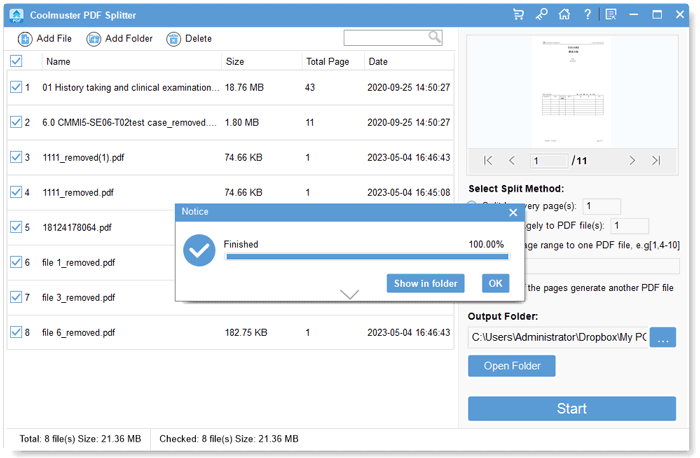
A finished batch: the Notice box shows 100% with Show in folder and OK, over the list of eight split files.
Where It Falls Short
- Only three methods. No split by bookmark, by file size, or at blank pages, which bigger PDF toolkits offer.
- One setting for the whole batch. The method and range apply to every ticked file, so different files needing different ranges mean separate runs.
- Trial limits aren't spelled out. Coolmuster says only that the trial restricts the number of pages or files that can be split.
- A 57.6 MB download for a single-purpose tool.
What Users Say
The user reviews of Coolmuster PDF Splitter are the five on Coolmuster's own review page. All are positive; none mention a problem.
From Coolmuster's review page
"I recently had the opportunity to try out Coolmuster PDF Splitter, and it's good. As someone who frequently deals with large PDF files and the need to extract specific pages or sections, this software helps me a lot. Its user-friendly interface, fast splitting process, and flexible options make it an excellent choice for anyone dealing with PDF management tasks."
Markus Kasanmascheff, "Efficient and Reliable PDF Splitter Tool", July 6, 2023
"Coolmuster PDF Splitter helps me to split large PDF files into smaller, more manageable parts. It offers 3 modes, in which I can split my PDF files as I wish. And the user interface of Coolmuster PDF Splitter is clean, intuitive, and easy to navigate."
Hemanth Shenoy, "A good PDF Splitter software", June 29, 2023
"I downloaded it and had a try, and found that it is very useful. It can extract what pages I need anytime without a network, so it is safer than those online PDF splitters actually."
James, "Separate My Pages FAST", June 1, 2023
Another review on the same page says it splits "by page range, bookmark, or even size". The program's own split panel and manual show only the three methods above, so don't buy it for bookmark or size splitting. What reviewers value is the batch splitting and working offline.
Comparisons
Coolmuster PDF Splitter vs. Coolmuster PDF Merger
Same price, same window layout, opposite jobs. The Splitter can't merge and the Merger can't split, so a buyer who needs both pays for two licenses.
Coolmuster PDF Splitter vs. online splitters
Web splitters are free for small files but upload your document and usually handle one file at a time. Coolmuster PDF Splitter runs offline and does folders in one batch, which is where it earns its price.
Editions and Pricing
There's one edition. You choose the term and the number of PCs; prices before tax on November 11, 2026.
| License term | 1 PC | 5 PCs | 10 PCs |
|---|
| 1 month (auto-renews) | $9.95 | $19.95 | $29.95 |
| 1 year (auto-renews) | $15.95 | $25.95 | $35.95 |
| Lifetime | $25.95 | $35.95 | $45.95 |
FAQs
Can Coolmuster PDF Splitter split a password-protected PDF?
Coolmuster PDF Splitter can't open encrypted or password-protected PDFs. You need to remove the protection with another tool first.
Can I choose the names of the split files?
Coolmuster PDF Splitter's FAQ says the output names can keep the original name, take a prefix or suffix, or be set by you, which helps when a batch produces hundreds of files.
Does Coolmuster PDF Splitter run on a Mac?
Coolmuster PDF Splitter is Windows-only (11, 10, 8 and 7).
Is there a lifetime license for one PC?
Coolmuster PDF Splitter's one-PC lifetime license exists at checkout ($25.95), but Coolmuster's own order page offers one-PC buyers only the monthly and yearly plans; lifetime appears there for 5 or 10 PCs. The yearly plan renews automatically, so cancel it if you only need the tool once.
Can I get a refund?
Coolmuster PDF Splitter has a 30-day money-back guarantee on yearly and lifetime licenses and 7 days on monthly ones, for set reasons such as an unresolved technical problem or a missing advertised feature. Change of mind and automatic renewals aren't refunded.
Do updates cost extra?
Coolmuster PDF Splitter updates are free while your license is valid, through the program's Check for Updates menu, and the existing license code works on the new version.
System Requirements
- Windows 11, 10, 8 or 7
- Intel Pentium 1 GHz or faster
- 512 MB of RAM or more
- 1 GB of free disk space
Conclusion
Coolmuster PDF Splitter is a sensible buy if you split PDFs on Windows often and in batches: three clear methods, the useful "rest of the pages" option, and nothing leaves your PC. The $15.95 yearly plan is the one-PC option on the order page; cancel the renewal if it's a one-off job. The reason to look elsewhere is its range: no bookmark or size splitting, no protected files, and no merging, so anyone who needs a broader PDF toolbox will outgrow it quickly.
Download Free Trial Buy Now