Coolmuster Android Eraser for Mac: Wipe an Android Phone Beyond Recovery Before You Sell It
Coolmuster Android Eraser for Mac is a $25.95-a-year macOS app that erases everything on an Android phone and then overwrites it, in one of three security levels, so recovery tools can't bring your photos, messages or accounts back after you sell or hand on the phone. One license covers 3 phones from one Mac; lifetime costs $35.95.
A factory reset on its own clears the phone for the next owner, but people still worry about what a recovery tool might pull back. This app runs a full erase-and-overwrite first, with a typed "delete" confirmation, and then has you finish with the factory reset.
Quick facts
- Version: 4.0.52 for Mac, released July 8, 2026
- Developer: Coolmuster
- Runs on: macOS 10.10 or later. Intel build, so Apple silicon Macs use Rosetta 2
- Phones: Android 6.0 and later, by USB or Wi-Fi
- Security levels: Low (quick erase), Medium (1 overwrite pass), High (3 passes, based on US DoD 5220.22-M)
- Price: $25.95 for one year (3 phones, 1 Mac), $35.95 lifetime
- Refunds: Coolmuster doesn't approve refunds on eraser products
- What we checked: Mac version 4.0.52 in the vendor's release notes and inside the downloaded app's Info.plist, the 10.6 MB disk image from the vendor (file dated July 8, 2026) with Intel-only program files and a macOS 10.10 minimum, checkout price $25.95 for one year and $35.95 for lifetime on November 11, 2026. We didn't wipe a phone with it; the steps below come from the vendor's Mac manual and screenshots.
Before you buy
- It wipes the whole phone. There's no way to erase only some files or apps.
- Erasing can't be undone. Back up anything you want to keep first.
- Refunds: Coolmuster lists eraser products under a 7-day guarantee, but its policy also says refund requests for eraser products won't be approved. Check that your phone connects with the free trial.
- The one-year plan renews automatically. Most people need this once, so cancel after the wipe or buy lifetime.
Download Free Trial Buy Now
Overview
The Mac app has one job and one screen to start it: "Erase All Data", with the connected phone's model and a storage gauge on the right (6.60 GB used of 52.82 GB in the vendor's example). Click Continue, pick a security level, type "delete", and the program scans the phone, erases the data, then overwrites it. The last step is a factory reset you do on the phone itself.
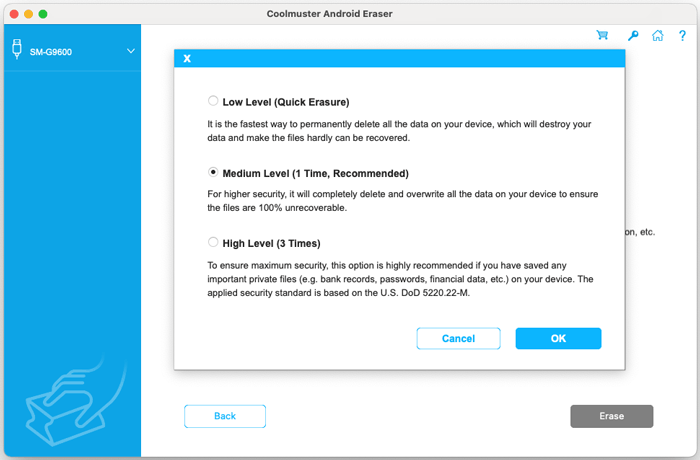
The security level dialog: Low (Quick Erasure), Medium (1 Time, Recommended) and High (3 Times), with the DoD 5220.22-M note on the High level.
Features
Three security levels, from quick to three-pass
Coolmuster Android Eraser for Mac's Low level is the fastest delete. Medium, the recommended default, deletes and overwrites once. High overwrites three times, following the US Defense Department's 5220.22-M method, and is the one Coolmuster suggests if the phone held banking details or passwords. More passes take longer.
Erase, then overwrite
Coolmuster Android Eraser for Mac doesn't stop at deleting. After erasure it runs an "Overwriting all individual data" phase with a progress bar and timer; in the vendor's screenshot it is writing filler contacts (634 of 3,000) so the old ones can't be pieced back together. The vendor lists messages, contacts, media, call logs, apps, documents and account details as covered.
Safety catches before anything is erased
Coolmuster Android Eraser for Mac makes you type the word "delete" and confirm again before it starts, and the phone itself asks you to allow the app to become the default SMS app so it can remove messages. At the end it prompts you to set your normal SMS app back.
USB or Wi-Fi, any major Android brand
Coolmuster Android Eraser for Mac connects by USB with USB debugging, or wirelessly by scanning a QR code with the Coolmuster Android Assistant companion app, which it installs on the phone. The vendor names Samsung, Huawei, Xiaomi and Google Pixel among the supported brands, on Android 6.0 and later.
Benefits
- Peace of mind at resale. Overwriting means a buyer running a recovery app finds filler, not your photos.
- Done from the Mac you already have. No Windows PC needed, unlike many phone-wiping tools.
- Three phones per license. A family clearing out old handsets covers them all with one purchase.
Real-World Uses
- Selling an old Galaxy on a marketplace after moving to a new phone.
- Returning a work phone that held client emails and contacts.
- Trade-in or recycling where you never see who handles the device next.
- Passing a tablet to a child without leaving your accounts and messages on it.
Who It's For, and Who Should Skip It
It's for Mac users getting rid of an Android phone who want more than a factory reset before it leaves their hands.
Skip it if you want to delete only certain files or apps (it erases everything), if you need a printed erasure certificate for a business (the Mac manual shows no report at the end), or if you're comfortable that the factory reset of a modern encrypted Android phone is enough, which for most people it is.
Usage Guide
- Back up first anything you want to keep. Nothing comes back after the wipe.
- Install it. Open the disk image and drag Coolmuster Android Eraser to Applications. If macOS says it's from an unidentified developer, allow it in System Settings.
- Connect the phone by USB (turn on USB debugging, tap Allow, accept the companion app) or by Wi-Fi with the QR code.
- Click Continue on the Erase All Data screen.
- Pick a security level and click OK, type "delete", click Erase, then OK.
- Allow SMS deletion on the phone when asked, and keep the cable connected while it erases and overwrites.
- Factory reset the phone from its Settings, restore the default SMS app when prompted, and click Continue in the program.
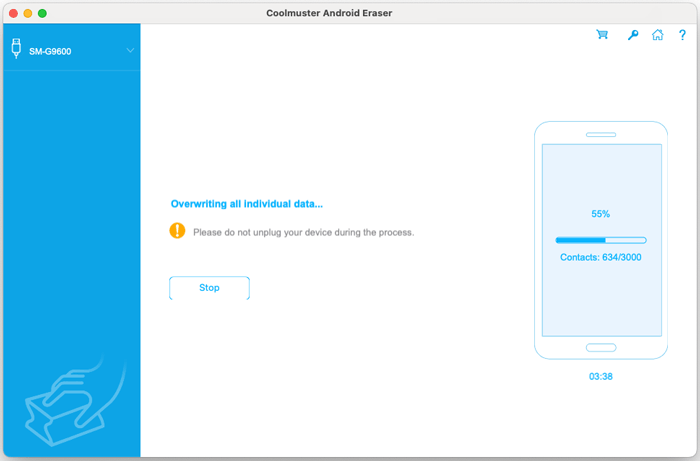
The overwrite phase at 55%, writing contacts 634 of 3,000 after 3 minutes 38 seconds, with a warning not to unplug the phone.
Where It Falls Short
- It's slow on High. Three passes over a full phone take a long time; one customer on Coolmuster's page wrote that the high level "really took some time".
- The Mac edition lags Windows. Windows is at 4.1.36 (November 2026); the Mac build is 4.0.52, and reviews on the shared review page mention an erase report that the Mac manual doesn't show.
- Intel-only app. It runs on M-series Macs only through Rosetta 2.
- The factory reset is on you. The program erases and overwrites; the final reset is a manual step on the phone.
What Users Say
There's no independent review of the Mac edition. Coolmuster's product and review pages (91 reviews) cover both editions, and Coolmuster as a company scores 4.6 out of 5 from 223 reviews on Trustpilot, none of which mention this eraser.
From Coolmuster's product page
"I chose high lever when erasing my S9. Yes, it really took some time to do that. But perfect. My S9 looks like a new one now."
Vivi
"Just switched my Samsung S9 to Samsung S20. The tool helps me wiped my Samsung S9 as new, so I could resell it without worry."
Tong
From Coolmuster's review page
"I tested text messages, contacts, videos, photos, and more"
MissTai, "Yes --- 100% permanent deletion", June 9, 2026
"Requires a computer connection, works well, and even provides an authoritative erase report."
Bennett. .LO, August 26, 2026
The reviews agree it's simple and thorough, and the one recurring caveat is time on the High level. The Mac manual's last screen is a plain "Done!" with no report, so don't count on the erase report Bennett mentions.
Comparisons
Android Eraser for Mac vs. a factory reset
A factory reset is free, built in and quick, and on an encrypted modern phone it already leaves the old data unreadable. Android Eraser adds deletion and overwriting before that reset, for people who want the extra layer.
Android Eraser for Mac vs. Coolmuster iOS Eraser for Mac
Same price and license tiers, same three-level approach. iOS Eraser for Mac is for iPhones and iPads; this one is for Android. Buy the one that matches the phone you're getting rid of.
Editions and Pricing
One edition, priced by term and by how many phones and Macs it covers, before tax, on November 11, 2026.
| License term | 3 phones, 1 Mac | 9 phones, 3 Macs | 30 phones, 1 Mac |
|---|
| 1 year (auto-renews) | $25.95 | $35.95 | $185.95 |
| Lifetime | $35.95 | $45.95 | $245.95 |
For a one-off wipe of a phone or two, take the one-year plan and cancel the renewal straight away; if you'll wipe phones every couple of years, lifetime is $10 more.
FAQs
Does Coolmuster Android Eraser for Mac work on M1, M2 or M3 Macs?
Coolmuster Android Eraser for Mac runs on Apple silicon Macs through Rosetta 2, because the app is built for Intel only. macOS offers to install Rosetta the first time you open it.
Will it remove my Google account and Factory Reset Protection?
Coolmuster Android Eraser for Mac erases data but leaves the factory reset to you. Remove your Google account from the phone's settings before the reset, or the next owner will hit Google's Factory Reset Protection lock.
Does it erase the SD card?
Coolmuster Android Eraser for Mac describes its wipe as covering the device's data; it doesn't promise anything for removable memory cards. Take the SD card out and format it, or keep it, before selling.
Which security level should I choose?
Coolmuster Android Eraser for Mac recommends Medium, one overwrite pass, for most phones. Choose High, three passes, if the phone held banking, password or financial data and you can leave it connected for longer.
Can I use the license on Windows?
Coolmuster Android Eraser for Mac licenses cover the Mac edition. The Windows edition is sold separately at the same price.
What does "3 Devices, 1 PC" mean?
Coolmuster Android Eraser for Mac's basic license lets you wipe up to three phones or tablets, using one Mac.
System Requirements
- macOS 10.10 or later; Intel Mac, or Apple silicon with Rosetta 2
- 512 MB of RAM or more, 200 MB of free disk space
- Android 6.0 or later, connected by USB cable or on the same Wi-Fi network
Conclusion
Coolmuster Android Eraser for Mac is a reasonable $25.95 for a Mac owner who wants an erase-and-overwrite pass before selling an Android phone, without borrowing a Windows PC. Try the free trial first, since eraser refunds aren't approved, and cancel the renewal afterwards. Skip it if a factory reset on your encrypted phone already satisfies you, or if you need a formal erasure report, which the Mac edition doesn't show.
Download Free Trial Buy Now