Coolmuster PDF to ePub Converter: Turn PDFs into eBooks for Your Reader, Phone or Tablet
Coolmuster PDF to ePub Converter is a $15.95-a-year Windows program that converts PDF files into ePub eBooks, a batch at a time, with a choice per file of selectable text, page images or both, and of which pages to include. Five-PC and ten-PC lifetime licenses are also sold.
A PDF is a fixed page. On a 6-inch e-reader or a phone, that means pinching and scrolling sideways through every line. An ePub reflows text to fit the screen and lets you change the font size, which is why people convert manuals, papers and novels that only came as PDFs.
Quick facts
- Version: 2.5.3, released February 2, 2026 (added Korean, Russian, Indonesian, Hindi, Turkish and Dutch)
- Developer: Coolmuster
- Runs on: Windows 11, 10, 8 and 7. There's no Mac version
- Input and output: PDF in, ePub out
- Conversion modes: Text, Image or Mix, set per file
- Price: $15.95 for one year on one PC, $9.95 for one month; lifetime from $35.95 for 5 PCs
- Guarantee: 30 days on the yearly and lifetime licenses, 7 days on the monthly one
- What we checked: the 18.1 MB installer from the vendor (file dated February 2, 2026, digitally signed by Shenzhen Qixingshi Technology Co., Ltd), version 2.5.3 in the vendor's release notes, checkout price $15.95 for the one-year plan and $25.95 for lifetime on November 11, 2026. We didn't convert a PDF with it ourselves; the workflow below comes from the vendor's manual and program screenshots.
Before you buy
- It reads PDF only. If you also have Word, text, HTML or MOBI files, Coolmuster ePub Converter ($25.95 a year) takes all five.
- No converter can make a complex magazine layout reflow perfectly; columns, sidebars and tables are the hard part. Image mode keeps the look, but then the text doesn't reflow.
- The yearly and monthly licenses renew automatically, and automatic renewals aren't refunded.
Download Free Trial Buy Now
Overview
The file list is the heart of it. Every PDF you add gets a row with its size, total pages, the pages selected for conversion and its mode, so a 160-page manual can go through as images while a 2-page memo next to it converts as text. On the right are a page viewer, the Page Range box (All, Current or Range), the output folder and the Start button.
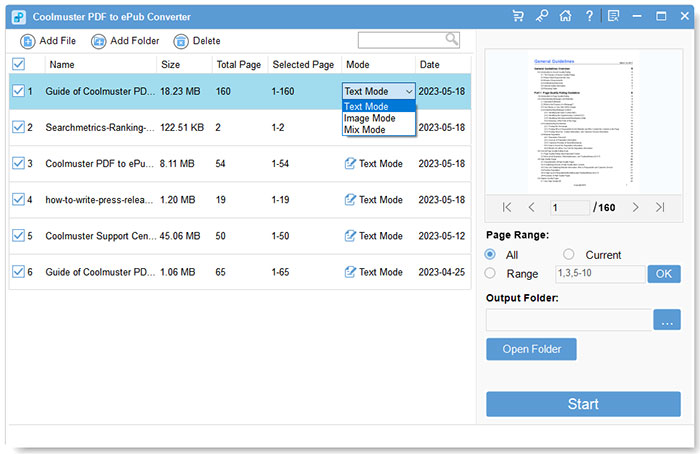
Six PDFs in the list; the mode menu on the first file offers Text Mode, Image Mode and Mix Mode, with page 1 of 160 in the viewer.
Features
Three conversion modes, chosen per file
Coolmuster PDF to ePub Converter's Text mode produces an ePub with selectable, reflowing text. Image mode turns each page into a picture, so the layout looks exactly like the PDF but the text can't be selected or resized. Mix mode combines both. Because the mode is set per row, a mixed batch of novels and diagram-heavy manuals can go through in one run.
Convert only the pages you need
Coolmuster PDF to ePub Converter can convert all pages, just the page in the viewer, or a list such as 1,3,5-10, and the range is stored per file in the Selected Page column. Leaving out a cover scan, an index or blank pages makes the eBook cleaner.
Batch conversion with a preview
Coolmuster PDF to ePub Converter takes several files, a folder, or files dragged onto the window, and the viewer lets you page through each one before converting. The vendor says text, fonts, images and hyperlinks carry over.
ePub files for most readers
Coolmuster PDF to ePub Converter's output is standard ePub, which Apple Books on iPhone and iPad, Kobo, Nook, PocketBook and Android reading apps open. Kindle users can send ePub files to their Kindle through Amazon's Send to Kindle service.
Benefits
- Comfortable reading on small screens. Text-mode ePubs reflow and let you pick the font size.
- A choice when text fails. If a PDF's text conversion comes out messy, Image mode still gives you a usable eBook.
- Offline and private. Your documents aren't uploaded anywhere.
Real-World Uses
- Reading a PDF novel on a Kobo with your own font size instead of a shrunken page.
- Study material on an iPad: convert lecture notes in Text mode and keep the diagram-heavy chapters in Mix mode.
- Manuals for the road: pull only the troubleshooting chapter (say pages 45-80) out of a 300-page manual into an ePub on your phone.
- A shelf of old PDFs: load a folder of downloaded papers and convert them all in one batch.
Who It's For, and Who Should Skip It
It's for Windows users with a pile of text-heavy PDFs who want them as ePubs, and like a simple per-file setting for mode and pages.
Skip it if you're on a Mac, if you also convert Word, HTML or MOBI files (Coolmuster ePub Converter covers those), or if you're comfortable with Calibre, the free eBook manager that also converts PDF to ePub and gives far more control over the result, at the cost of a steeper learning curve.
Usage Guide
- Install and open it from the downloaded installer.
- Add PDFs with Add Files or Add Folder, or drag them onto the window.
- Check each file in the viewer; remove wrong ones with Delete.
- Set the mode in each row's Mode column: Text, Image or Mix.
- Set the page range for the selected file: All, Current, or Range with a list like 1,3,4,5-10, then press Enter or OK.
- Choose the output folder with "..." and click Start. When it finishes, Open Folder shows the ePub files.
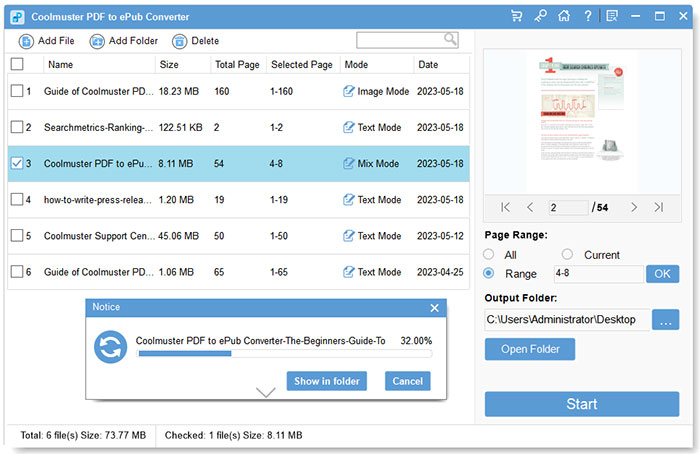
One file ticked, set to pages 4-8 in Mix Mode, converting at 32%; the other rows keep their own modes and ranges.
Where It Falls Short
- Few output settings. The manual shows no options for the book's title, author, cover or chapter breaks. Calibre or an ePub editor can fix those afterwards.
- No OCR. A scanned PDF has no text layer, so Text mode has nothing to work with; you'd get an image-based ePub at best.
- Trial limits aren't published for this product, so test with your own files before buying.
- Only $10 below the five-format version. Coolmuster's ePub Converter takes five input formats for $25.95 a year against $15.95 here.
What Users Say
The user reviews of Coolmuster PDF to ePub Converter are the five on Coolmuster's own review page, all five-star in tone. Three were posted on the same day in June 2023 under handles, and read like marketing; the two below are more concrete.
From Coolmuster's review page
"I was surprised by how well Coolmuster PDF to ePub Converter handled my PDF files. The conversion was smooth, and the ePub format looked great on my e-reader."
David Wilson, "Excellent ePub Conversion", January 2, 2025
"Coolmuster PDF to ePub Converter helps me to convert PDF files to ePub format easily. So I can view the converted ePub files on my iPad Pro as I wish. ... Its trial version works well."
Alan Jackson, "A good choice.", July 5, 2023
Praise centers on batch conversion and partial conversion. There are no detailed reports on how it copes with multi-column layouts, footnotes or tables, which is where PDF-to-ePub conversion usually struggles, so judge that with the trial on your own files.
Comparisons
PDF to ePub Converter vs. Coolmuster ePub Converter
Coolmuster ePub Converter makes ePubs from PDF, Word, HTML, text and MOBI for $25.95 a year or $35.95 lifetime. PDF to ePub Converter does PDF only, for $15.95 a year or $25.95 lifetime. If PDFs are all you have, this one saves $10.
PDF to ePub Converter vs. Calibre
Calibre is free and handles conversion, metadata, covers and your whole eBook library, but its conversion settings are long and technical. Coolmuster's tool is simpler, with a per-file Text/Image/Mix choice Calibre doesn't offer in the same way, and it costs money.
Editions and Pricing
There's one edition. You choose the term and the number of PCs; prices before tax on November 11, 2026. The one-PC lifetime license ($25.95 at checkout) isn't offered on Coolmuster's own order page, where one-PC buyers choose the monthly or yearly plan and lifetime appears only for 5 or 10 PCs. If you take the yearly plan for a one-off job, cancel the renewal afterwards.
| License term | 1 PC | 5 PCs | 10 PCs |
|---|
| 1 month (auto-renews) | $9.95 | $19.95 | $29.95 |
| 1 year (auto-renews) | $15.95 | $25.95 | $35.95 |
| Lifetime | $25.95 | $35.95 | $45.95 |
FAQs
Which mode should I pick in Coolmuster PDF to ePub Converter?
Coolmuster PDF to ePub Converter's Text mode is the right start for books and documents that are mostly text, since only text reflows on a small screen. Use Image mode for comics, slides or layouts that must look exactly like the PDF, and Mix when a text book has important figures.
Can I read the converted files on a Kindle?
Coolmuster PDF to ePub Converter makes ePub, which current Kindles accept through Amazon's Send to Kindle service; Amazon converts it on the way.
Does it convert scanned PDFs?
Coolmuster PDF to ePub Converter has no OCR, so a scanned PDF only converts usefully in Image mode, as pictures of the pages.
Does it work on a Mac?
Coolmuster PDF to ePub Converter is Windows-only (11, 10, 8 and 7).
Can I get a refund?
Coolmuster PDF to ePub Converter has a 30-day money-back guarantee on yearly and lifetime licenses and 7 days on monthly ones, for set reasons such as an unresolved technical problem or a feature that doesn't match the product page. Change of mind and automatic renewals aren't refunded.
Do I have to pay for new versions?
Coolmuster PDF to ePub Converter updates are free while the license is valid, through the program's Check for Updates menu.
System Requirements
- Windows 11, 10, 8 or 7
- Intel Pentium 1 GHz or faster
- 512 MB of RAM or more
- 1 GB of free disk space
Conclusion
Coolmuster PDF to ePub Converter is worth $15.95 a year for a Windows user who wants text-heavy PDFs on an e-reader without learning Calibre: per-file Text, Image or Mix modes and page ranges are genuinely handy in a batch. Don't buy it for scanned or complex-layout PDFs, which no simple converter handles well, and if you have other formats too, spend the extra $10 on Coolmuster's ePub Converter instead.
Download Free Trial Buy Now