Coolmuster HEIC Converter: Batch-Convert iPhone HEIC Photos to JPG or PNG on Windows
Coolmuster HEIC Converter is a $9.95-a-year Windows program that turns iPhone HEIC and HEIF photos into JPG or PNG files in one batch, with a quality slider and an option to keep the photos' EXIF data. It works on pictures already copied to the PC; it doesn't connect to the phone.
It's a small, single-job utility. If a folder of IMG_xxxx.heic files won't open in the program you need, or a printing kiosk or website rejects them, this gets you JPGs in a couple of clicks. Whether that's worth paying for depends on how often it happens to you, and the alternatives are listed below.
Quick facts
- Version: 3.3.6 for Windows, released June 12, 2025
- Developer: Coolmuster
- Runs on: Windows 11, 10, 8 and 7 (a separate Mac edition is sold)
- Converts: HEIC and HEIF to JPG/JPEG or PNG
- Options: quality 0 to 100 percent, keep or strip EXIF, output folder
- Price: $9.95 for one year on one PC, $19.95 lifetime
- Trial: converts three images free
- What we checked: Windows version 3.3.6 in the vendor release notes, the 6.9 MB installer from the vendor (file dated February 6, 2026), checkout price $9.95 on November 11, 2026, and the three-image trial limit on the vendor's product page. We didn't convert our own photos with it.
Before you buy
- You can often avoid HEIC altogether: on the iPhone, Settings > Camera > Formats > Most Compatible shoots JPG, and Settings > Photos > Transfer to Mac or PC > Automatic converts photos to JPG when you copy them over USB.
- The one-year license renews automatically; the lifetime license is only $10 more.
- Coolmuster gives a 30-day money-back guarantee on one-year and lifetime licenses of non-recovery products like this one.
Download Free Trial Buy Now
Overview
The whole program is one window: a file list on the left with thumbnails, file size, pixel dimensions and date, and the output settings on the right, Output Format, Keep Exif Data, Quality, Output Folder and a Convert button. The June 2025 release added Korean, Russian, Indonesian, Hindi, Turkish and Dutch to the interface.
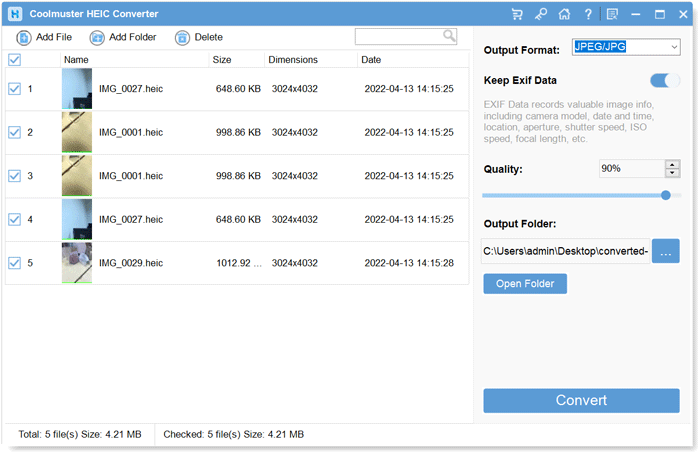
Five 3024x4032 HEIC photos queued for JPG at 90 percent quality with EXIF kept.
Features
Coolmuster HEIC Converter converts a whole folder at once
Coolmuster HEIC Converter takes single files with Add File, an entire folder with Add Folder, or anything you drag onto its window. Every photo gets a tick box, so you can convert all of them or just a few, and a search box finds a file by name in a long list.
Keeps the photo's date, camera and location if you want
Coolmuster HEIC Converter has a Keep Exif Data switch for JPG output that carries over the camera model, date and time, GPS location, aperture, shutter speed, ISO and focal length. Turn it off to strip location before sharing.
You choose the quality and the format
Coolmuster HEIC Converter outputs JPG/JPEG with a 0 to 100 percent quality setting, or lossless PNG, into the folder you pick. A progress window shows each file and offers Show in folder when it's done.
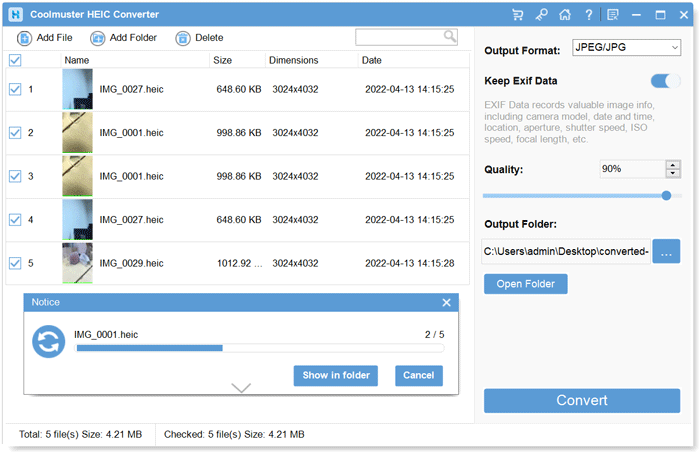
The conversion progress window, 2 of 5 done, with a Show in folder button.
Benefits
- Hundreds of iPhone photos become usable JPGs in one pass, with no upload to a web converter.
- Location data can stay for your archive or go before you share.
- At $19.95 lifetime, it's cheap for anyone who gets HEIC files regularly.
Real-World Uses
- A family member emails you a folder of iPhone photos and your photo printer software won't open them.
- An estate agent or insurer's upload form accepts only JPG.
- You archive years of iPhone backups as JPG so any future device can read them.
Who It's For, and Who Should Skip It
It's for Windows users who keep receiving HEIC photos and want a private, offline, batch converter that keeps the metadata.
Skip it if it's your own iPhone: switching the camera to Most Compatible, or the Photos transfer setting to Automatic, solves the problem at the source for free. Skip it too for a one-off handful of photos, which the three-image trial or Windows' own HEIF support may cover.
Usage Guide
- Copy the HEIC photos from the iPhone to the PC first, then install and launch the program.
- Click Add File or Add Folder, or drag the photos into the window.
- Tick the photos, choose JPEG/JPG or PNG, and switch Keep Exif Data on or off.
- Set the quality and the output folder.
- Click Convert, then Show in folder.
Where it falls short
- Two output formats only, JPG and PNG. No WebP, TIFF or resizing.
- Photos only; Live Photo motion and HEVC videos aren't converted.
- A yearly subscription for a converter is hard to justify; the lifetime license makes more sense.
- It reads files on the PC only and can't pull photos from the phone.
What Users Say
We found no independent review. Coolmuster's review page shows 107 reviews, and the most recent ones are short, generic and posted under novelty usernames, so we give them little weight. The older testimonials on the product page are more specific.
From Coolmuster's product page
"There are many HEIC images on my computer, but this software can convert all my images simultaneously. I drag my pictures to the software, and it will fast list them on the interface. What's more, I can convert my images to JPG/PNG with the original quality."
Gina
"I have an iPhone and Android and want to get and use some HEIF photos on my Android phone. However, my Android device doesn't recognize the pictures. By chance, I found this HEIC to JPG converter and tried it. It worked for me."
Sarah Palin
From Coolmuster's review page
"I needed a simple way to convert HEIC photos for wider compatibility, and this tool does the job well. The batch conversion option is especially useful."
LazyKoala, November 6, 2026
Coolmuster as a company has 4.6 out of 5 from 223 Trustpilot reviews (read through a page summarizer). What people value here is batch speed and drag and drop; nobody we found complained, but nobody independent tested it either.
Comparisons
Coolmuster HEIC Converter vs online HEIC converters
Web converters are free but upload your photos to someone else's server and often cap batch size. This program works offline and keeps EXIF under your control.
Coolmuster HEIC Converter vs changing the iPhone settings
The iPhone's Most Compatible camera format and Automatic transfer setting are free and fix future photos. The converter is for HEIC files you already have or receive from others.
Editions and Pricing
| PCs | 1 Year (renews) | Lifetime |
|---|
| 1 | $9.95 | $19.95 |
| 5 | $19.95 | $29.95 |
| 10 | $29.95 | $39.95 |
FAQs
How many photos can the Coolmuster HEIC Converter trial convert?
Coolmuster's product page says the free version converts three HEIC images. Batch conversion beyond that needs a license.
Does Coolmuster HEIC Converter upload my photos anywhere?
No. Coolmuster HEIC Converter runs on the PC, and Coolmuster says it doesn't save or disclose the files you convert.
Can Coolmuster HEIC Converter convert HEIC to PDF or WebP?
No. Coolmuster HEIC Converter outputs JPG/JPEG and PNG only.
Does Coolmuster HEIC Converter lose quality?
Coolmuster says HEIC Converter keeps the original quality when you leave the Quality setting at 100 percent or choose PNG. Lower settings make smaller JPG files.
Is there a Mac version of Coolmuster HEIC Converter?
Yes, Coolmuster HEIC Converter for Mac, sold separately at the same prices.
System Requirements
- Windows 11, 10, 8 or 7
- 750 MHz or faster CPU, 512 MB RAM, 1 GB free disk space
Conclusion
Worth the $19.95 lifetime license if HEIC photos keep landing on your Windows PC and you want them converted offline, in bulk, with the metadata intact. It's simple and does exactly one thing.
The reason not to buy: if the photos come from your own iPhone, two free settings on the phone make the converter unnecessary.
Download Free Trial Buy Now