MobiKin HEIC to JPG Converter for Mac: A Simple Batch Converter, If You Need More Than Preview
MobiKin HEIC to JPG Converter for Mac is a $19.95 Mac app (lifetime license, 1 Mac) that converts iPhone and iPad HEIC/HEIF photos to JPG or PNG in batches, with a quality setting and a switch to keep or strip Exif data. It is for Mac users who regularly need folders of iPhone photos in a format that Windows PCs, websites or older software accept.
Be aware before you pay: every Mac already converts HEIC for free, through Preview or Finder's Quick Actions. This app is a tidier, single-purpose way to do the same thing.
Quick facts
- Version: 3.10.20, released October 21, 2025
- Developer: MobiKin
- Runs on: macOS 10.13 High Sierra or later (a separate Windows version is sold)
- Input: HEIC and HEIF. Output: JPG/JPEG or PNG
- Price: $19.95 lifetime for 1 Mac. A 1-year license is $9.95
- Trial: converts up to 3 HEIC files
- Refunds: 30-day money-back guarantee, under MobiKin's refund conditions
- What we checked: the 3.22 MB disk image downloaded from mobikin.com, dated October 21, 2025, and the lifetime 1-Mac license at $19.95 on the order page on November 11, 2026.
Download Free TrialBuy Now
Overview
The Mac edition is newer than its Windows sibling: it was released in April 2025 as version 3.2.12, gained Chinese, French, German, Italian, Spanish, Portuguese and Japanese in May, six more languages in June, and bug fixes in October 2025. It has the same layout as the Windows version: a drop zone, then a file list with thumbnails, file type, size, dimensions and date, and a settings panel for format, Exif, quality and output folder.
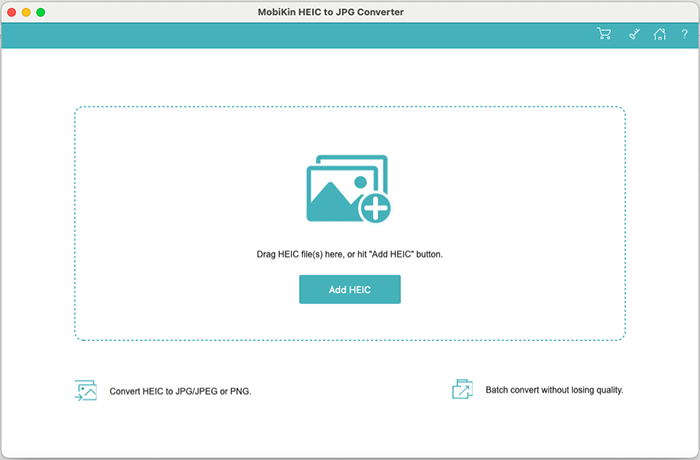
The start window: drag photos in or click Add HEIC.
Features
Batch convert HEIC to JPG or PNG
MobiKin HEIC to JPG Converter for Mac converts as many HEIC photos as you add in one run, once registered. Add single files, a folder, or drag them in, tick what you want and click Convert. The File Type column shows when a file named .heic is really a JPEG, which happens with photos passed through some apps.
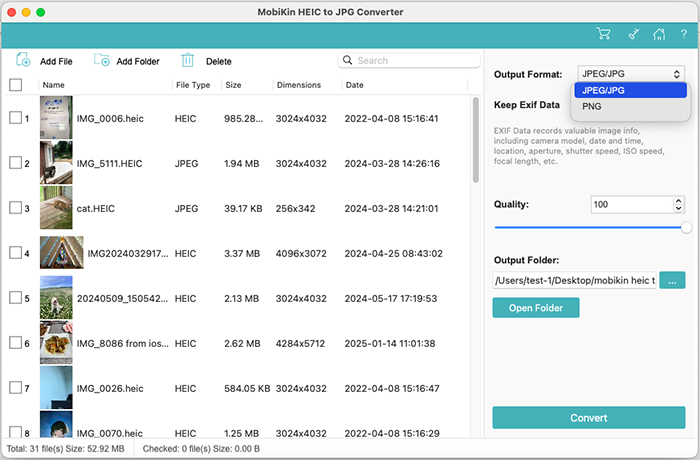
A list of 31 photos with the format menu open and quality at 100. Note the File Type column showing two ".HEIC" files that are really JPEG.
Quality and Exif control
MobiKin HEIC to JPG Converter for Mac lets you pick the output quality; at 100 the JPG keeps the original quality. The "Keep Exif Data" switch carries over camera details, date, time and location, or drops them when you share photos publicly.
No ads, conversion on the Mac
MobiKin HEIC to JPG Converter for Mac converts on your Mac without ads or watermarks, so private photos don't go through an upload site.
Benefits
- Faster than one-by-one exports when you have hundreds of photos.
- One window for all settings, instead of Preview's export dialog per batch.
- Exif control in a single switch.
- Cheap lifetime license with free updates.
Real-World Uses
- You send weekly site photos from your iPhone to a client whose Windows system rejects HEIC.
- You prepare product photos for an online shop that only accepts JPG or PNG.
- You share holiday pictures and want the location data removed first.
Who It's For, and Who Should Skip It
MobiKin HEIC to JPG Converter for Mac suits Mac users who convert HEIC often and want a dedicated, uncomplicated tool for it.
Skip it if you convert now and then. On a Mac you can select photos in Finder and use Quick Actions > Convert Image (macOS 12 Monterey and later), or open them in Preview and export as JPEG or PNG, at no cost. On your iPhone, Settings > Camera > Formats > "Most Compatible" makes new photos JPG in the first place.
Usage Guide
- Download the disk image, drag the app to Applications and open it.
- Click Add HEIC, or drag photos onto the window.
- Tick the photos, choose JPEG/JPG or PNG, set the quality and the Keep Exif Data switch, and choose an output folder.
- Click Convert, then "Show in Finder" to see the results.
- Register with the license code to remove the 3-file limit.
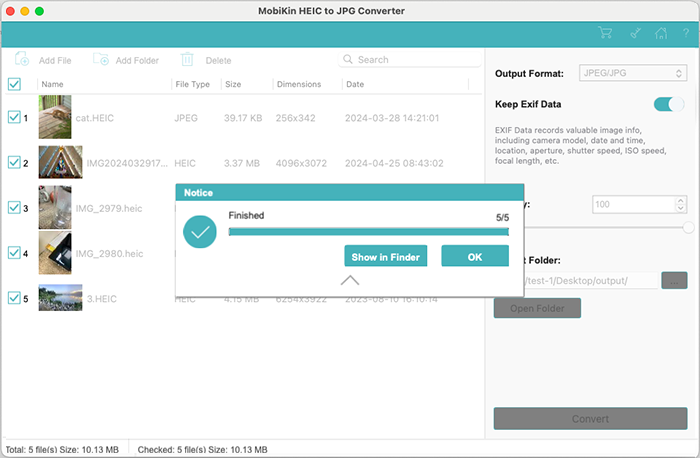
Five photos converted, with a Show in Finder button.
Where it falls short
- Free built-in alternatives do the same basic job on every Mac.
- Only JPG and PNG output, with no resizing, renaming or editing.
- Big batches slow down, according to several comments.
- Odd colours on some files: one user reports unexpected colour changes on some HEIC images.
What Users Say
We found no independent reviews of the Mac edition. MobiKin's own review page has short comments that can't be verified, but several include criticism:
Comments on MobiKin's review page
"Works well for most files, but some HEIC images came out with unexpected color changes." - Samuel Lee, December 26, 2025
"Good for offline conversion. Didn’t like that it doesn’t remember my last output folder." - Kevin Ramirez, July 18, 2025
"Converted all my HEIC files to JPG in seconds. A bit pricey for what it does, though." - Linda Clark, October 20, 2025
"Very good, much more stable and reliable than online tools." - Lucas Murphy, February 10, 2026
"It handled over 200 files without crashing, which surprised me. Output looked fine." - Rachel Adams, June 20, 2025
"Batch conversion could be faster with larger photo collections." - David Wilson, July 31, 2026
MobiKin on Trustpilot
MobiKin's company page shows a TrustScore of 3.6 from 48 reviews across its products (read through a page summarizer). None is about this converter; most praise support and refunds, and a few describe programs that didn't work for the reviewer.
The pattern: simple and reliable for plain conversions. Users want more formats, a remembered output folder and faster large batches, and one notes it's pricey for what it does.
Comparisons
MobiKin HEIC to JPG Converter for Mac vs Preview and Quick Actions
macOS converts HEIC to JPEG or PNG for free. Quick Actions handles a selection in Finder in a couple of clicks; Preview adds a quality slider on export. MobiKin's app adds an Exif switch, a file-type check and one window for big batches, which is convenience rather than new capability.
Mac vs Windows version
The Windows version is the same tool at the same price. It is the more useful purchase of the two, because Windows lacks a built-in batch HEIC-to-JPG converter.
Editions and Pricing
| License | Term | Macs | Price |
|---|
| Lifetime (this listing) | One-time payment | 1 | $19.95 |
| Lifetime | One-time payment | 2-5 | $29.95 |
| Lifetime | One-time payment | 6-10 | $39.95 |
| 1 Year | Renews yearly | 1 | $9.95 |
| 1 Year | Renews yearly | 2-5 | $19.95 |
| 1 Year | Renews yearly | 6-10 | $29.95 |
FAQs
Does MobiKin HEIC to JPG Converter for Mac work on Apple Silicon Macs?
MobiKin lists macOS 10.13 or later and an Intel processor as the requirements and doesn't mention Apple Silicon. Try the free version on your M-series Mac before buying.
Is MobiKin HEIC to JPG Converter for Mac better than Preview?
MobiKin HEIC to JPG Converter for Mac converts the same way Preview does but adds an Exif on/off switch and a batch list. If Quick Actions already does what you need, you don't need the app.
What is the trial limit?
The free version of MobiKin HEIC to JPG Converter for Mac converts up to 3 HEIC files, without watermarks.
Can I use the license on Windows too?
No. The Mac and Windows versions are separate products with separate licenses.
Can I get a refund?
MobiKin offers a 30-day money-back guarantee on most products, but not for a change of mind, so try the free version first.
System Requirements
- macOS 10.13 High Sierra or later
- Intel Core processor at 1 GHz or faster
- 1 GB of free disk space
Conclusion
Fine, but optional. MobiKin HEIC to JPG Converter for Mac is a clean, inexpensive batch converter that works as described, and the Exif switch is handy.
Most Mac users can get the same result free with Quick Actions or Preview, so buy it only if you convert large batches often and like a dedicated tool. The 3-file trial lets you judge that.
Download Free TrialBuy Now