Aostsoft PDF to Image Converter: PDF Pages to JPG, PNG, TIFF and More, with DPI Control
Aostsoft PDF to Image Converter is a $59.95 Windows tool that turns PDF pages into images in 14 formats (JPG, PNG, TIFF, GIF, BMP, PSD and others) in batches, with your own DPI, JPEG quality and image size. It fits anyone who needs PDF pages as pictures for websites, slides, previews or image-only systems.
You need page 3 of a brochure as a JPG for a web post, thumbnails of 200 catalogue PDFs, or every page of a report as PNG for a slide deck. Screenshots are blurry and inconsistent; exporting page by page takes forever.
Quick facts
- Version: 4.0.2 (released August 16, 2026)
- Developer: Aostsoft
- Platform: Windows 7, 8, 10 and 11
- Converts: PDF to JPG, JPEG, BMP, GIF, TIFF, PNG, EMF, WMF, PSD, PCX, DCX, JP2, J2K and ICO
- Price: $59.95, one-time license with lifetime updates
- Trial: free; output carries a watermark and only part of each file is converted
- Guarantee: 30-day money-back
- Needs: no Adobe Acrobat or Microsoft Office
- What we checked: the 11.2 MB installer on the vendor's download server and the $59.95 one-time price on the order page, both on November 26, 2026. We didn't run a licensed conversion, so output quality is described from the vendor's information
Before you buy
If you only need one image format, Aostsoft sells single-format versions (PDF to JPG JPEG, PDF to PNG, PDF to TIFF and others) for $45.95. This $59.95 tool is the one to get when you need several formats or the multi-page TIFF and GIF options.
Download Free TrialBuy Now
Overview
Aostsoft PDF to Image Converter loads PDFs or whole folders, and you pick the image format from a long list. Each page becomes its own image, or, for TIFF and GIF, a whole PDF can become a single multi-page TIFF or a multi-frame GIF.
The settings that matter for images are here: DPI (resolution), JPEG quality from 1 to 100, and the output image size. GIF output can loop all frames endlessly, which turns a PDF into a simple animated slideshow.
It opens encrypted PDFs, converts page ranges and needs no Adobe software.
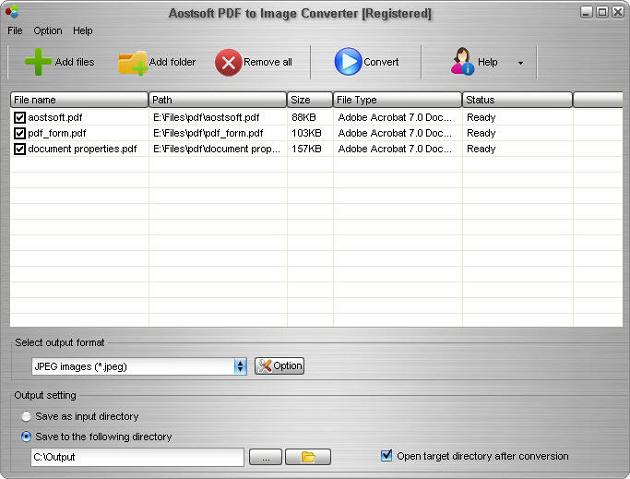
The converter with three PDFs queued and "JPEG images (*.jpeg)" picked as the output format (vendor screenshot of a registered copy).
Features
14 image formats
Aostsoft PDF to Image Converter writes JPG/JPEG, BMP, GIF, TIFF, PNG, EMF, WMF, PSD, PCX, DCX, JP2, J2K and ICO, covering web, print, Photoshop and fax-style uses from one tool.
DPI, quality and size control
Aostsoft PDF to Image Converter lets you set the DPI of the rendered pages, JPEG quality from 1 to 100 and the output image size, so you can trade file size against sharpness.
Multi-page TIFF and animated GIF
Aostsoft PDF to Image Converter can turn a multi-page PDF into one multi-page TIFF or one multi-frame GIF that loops, or save each page as a separate image.
Page ranges and encrypted PDFs
Aostsoft PDF to Image Converter converts a whole PDF or chosen pages, and opens encrypted PDF files.
Folder batches
Aostsoft PDF to Image Converter converts whole folders and subfolders, with drag-and-drop and a choice of output folder.
Benefits
- Sharp, consistent images instead of screenshots.
- One run produces images for a whole folder of PDFs.
- The right resolution for the job: low DPI for thumbnails, high DPI for print.
- One-time payment with lifetime updates.
Real-World Uses
- A marketer exports catalogue pages as high-quality JPGs for social posts and the web shop.
- A teacher turns PDF worksheets into PNGs to drop into slides.
- A records office converts PDFs into multi-page TIFFs for an imaging system.
- A designer brings a PDF page into Photoshop as a PSD at print resolution.
Who It's For, and Who Should Skip It
It suits marketers, designers, teachers and office staff who regularly need PDF pages as image files in more than one format.
Skip it if you need a single format (the $45.95 single-format converters do that), or the occasional page (free tools and a PDF viewer's export work). It doesn't do OCR or edit images. Windows only.
Usage Guide
- Download the free trial from the button on this page and install it.
- Launch Aostsoft PDF to Image Converter and add PDFs or a folder.
- Choose the image format under Select output format; click Option to set DPI, JPEG quality, image size, page range and single or multi-page output.
- Set the output folder and click Convert.
- Check the images; register with your license key to remove the watermark.
Where it falls short
- The trial watermarks images and converts only part of each file.
- High DPI on long PDFs produces very large files; pick the DPI for the job.
- No preview of the rendered page before converting.
- No independent reviews of its rendering quality.
- Windows only.
What Users Say
Reviews and ratings
Aostsoft's single-format converters have almost no public reviews. G2 lists Aostsoft as a seller but says there are not enough reviews to give buying insight, and we found no rating for PDF to Image Converter on Capterra or Trustpilot, only download-directory listings that repeat the vendor's description. So there are no other buyers' experiences to lean on here. The free trial is the real test: run a few of your own files through it and look at the output (watermark aside) before you pay, and keep the 30-day money-back guarantee in mind if the full version disappoints.
Comparisons
vs Aostsoft PDF to TIFF and other single-format converters
The single-format tools ($45.95 each) cover one image type. This one covers 14 types for $59.95, so it pays off from the second format.
vs free PDF viewers' export
Many viewers can save a page as an image, one page at a time and with few settings. Aostsoft PDF to Image Converter adds batches, DPI and quality control, and multi-page TIFF and GIF.
vs Aostsoft All Document Converter Professional
The All Document Converter Professional ($169.95) is Aostsoft's all-in-one: Word, Excel, PowerPoint, PDF, HTML, text and images converted in many directions, with OCR. If you convert three or more kinds of files, it costs less than buying the single converters one by one. For this one job, the single converter is the cheaper buy.
Editions and Pricing
| Product | Price | License | What it converts | Buy |
|---|
| PDF to Image Converter | $59.95 | One-time, lifetime updates | PDF to 14 image formats | Buy |
| PDF to JPG JPEG Converter | $45.95 | One-time, lifetime updates | PDF to JPG only | Sold separately |
| PDF to TIFF Converter | $45.95 | One-time, lifetime updates | PDF to TIFF only | Sold separately |
| All Document Converter Professional | $169.95 | One-time, lifetime updates | Documents, PDF and images in many directions, with OCR | Sold separately |
Prices are from Aostsoft's order page on November 26, 2026, in US dollars. The Buy button in the table orders this converter; the other products are listed for comparison. The license key arrives by email right after payment.
FAQs
What resolution can Aostsoft PDF to Image Converter export at?
Aostsoft PDF to Image Converter has a custom DPI setting, so you choose the resolution; higher DPI gives sharper, larger images.
Can Aostsoft PDF to Image Converter make one TIFF from a whole PDF?
Yes. It can write a multi-page PDF as one multi-page TIFF, or as one multi-frame GIF.
Does Aostsoft PDF to Image Converter work with encrypted PDFs?
Yes, it converts encrypted PDF files.
Is Aostsoft PDF to Image Converter a one-time purchase?
Yes: $59.95 once, lifetime updates, 30-day money-back guarantee.
What does the Aostsoft PDF to Image Converter trial limit?
The trial adds a watermark and converts only part of each file.
Does Aostsoft PDF to Image Converter run on Windows 11?
Yes, Windows 7, 8, 10 and 11 are supported.
System Requirements
- Windows 7, Windows 8, Windows 10 or Windows 11
- 256 MB RAM
- 50 MB free disk space (the installer is 11.2 MB)
- 500 MHz processor
- No Adobe Acrobat, Reader or Microsoft Office needed
Conclusion
Aostsoft PDF to Image Converter is worth $59.95 if you turn PDFs into images often and in more than one format: the DPI and quality controls and the multi-page TIFF and GIF output are what make it more than a screenshot.
If you only need JPG or only TIFF, the single-format versions save $14, and for an occasional page a free viewer is enough.
Download Free TrialBuy Now