MobiKin WhatsApp Recovery for iOS (Mac): Export iPhone WhatsApp Chats to Your Mac
MobiKin WhatsApp Recovery for iOS (Mac) is a $45.95 Mac app (lifetime license, 3 devices, 1 Mac) that pulls WhatsApp messages and attachments off an iPhone or iPad, or out of a Finder/iTunes backup on your Mac, and saves them as readable files. It is for iPhone users who want their WhatsApp history on the Mac: to keep, search or print.
The program's own scan screen is more modest than its marketing. From a connected iPhone it reads existing data only; deleted chats come back only if a local backup on your Mac still holds them.
Quick facts
- Version: 3.0.6, released December 23, 2025
- Developer: MobiKin
- Runs on: Mac OS X 10.10 or later (a separate Windows version is sold)
- Devices: iPhone, iPad and iPod touch on iOS 5 through iOS 27
- Sources: the connected device, or a Finder/iTunes backup on the Mac. No iCloud
- Exports: chats as HTML or CSV; photos, videos and other attachments as files
- Price: $45.95 lifetime for 3 devices on 1 Mac. 1-year plans start at $35.95
- Trial: scans and previews; saving needs a license
- Refunds: 7-day money-back guarantee
- What we checked: the 6.79 MB disk image downloaded from mobikin.com, dated December 23, 2025, and the lifetime 3-device license at $45.95 on the order page on November 11, 2026. We didn't run it on an iPhone.
Before you buy
MobiKin's product page says MobiKin WhatsApp Recovery for iOS (Mac) lets you "recover WhatsApp conversations from your iPhone even if you don't have a backup". The app's own device scan screen says otherwise: WhatsApp and WhatsApp Attachments sit under "Existing Data Only (Unable to recover deleted data)". If your chat was deleted and you have no local backup on the Mac from before the deletion, this app won't bring it back. Run the free trial and check the preview before paying: refunds close after 7 days.
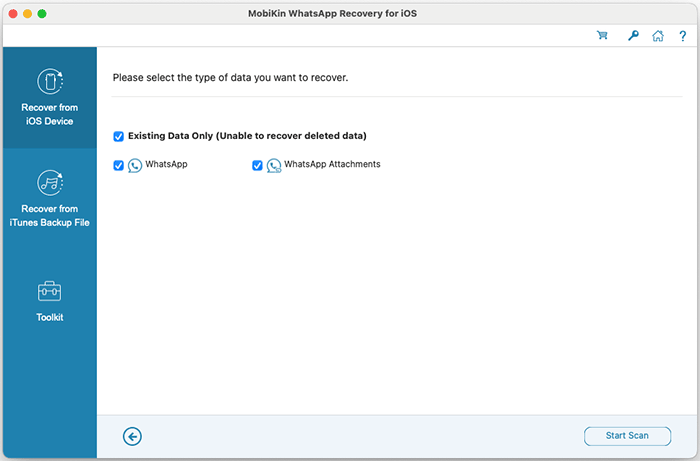
The Mac app's device scan screen: WhatsApp and its attachments are listed under "Existing Data Only (Unable to recover deleted data)".
Download Free TrialBuy Now
Overview
MobiKin WhatsApp Recovery for iOS (Mac) is new: version 3.0.6, released December 23, 2025, is the first Mac release, and it arrived with 14 interface languages. It follows the Windows version, which has been sold since April 2024. The window has two modes, Recover from iOS Device and Recover from iTunes Backup File, plus a Toolkit button. After a scan you browse chats on the left and read each conversation in chat bubbles on the right, with a search box at the top.
Features
Export WhatsApp chats from the iPhone to the Mac
MobiKin WhatsApp Recovery for iOS (Mac) connects to an iPhone or iPad over USB (tap Trust, and enter the passcode or use Face ID when asked during the scan), reads its WhatsApp data and lists each conversation with message counts and times. You preview it, tick what you need and click "Recover to Computer". Chats are saved as HTML files you can read, search and print, or as CSV.
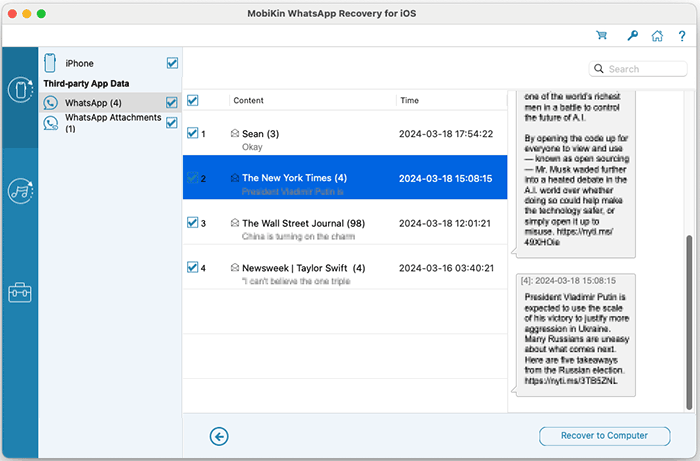
WhatsApp conversations read from an iPhone, with a long chat open on the right.
Pull WhatsApp out of a Finder or iTunes backup
MobiKin WhatsApp Recovery for iOS (Mac) lists the local iPhone backups on your Mac with device name, date, size, iOS version, model and serial number. Scan one and export its WhatsApp messages and attachments without restoring the backup to a phone. This is the only way the app recovers chats that were deleted from the phone, and only if the backup was made before the deletion.
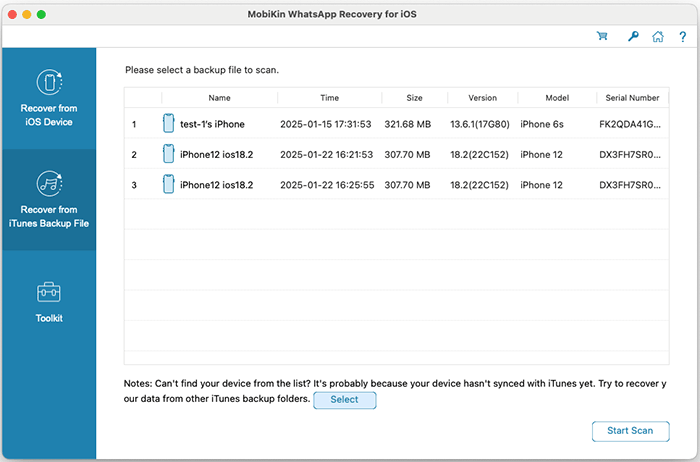
Choosing a local iPhone backup on the Mac to scan for WhatsApp data.
Save attachments
MobiKin WhatsApp Recovery for iOS (Mac) lists WhatsApp attachments separately and saves them to the Mac as files: photos, videos, documents and the rest.
Benefits
- Readable WhatsApp archive on your Mac, which WhatsApp's iCloud backup doesn't give you.
- Selective export: a single conversation for a lawyer or an insurer, without touching the phone.
- Uses backups you already have: old Finder backups of a lost or broken iPhone become browsable.
Real-World Uses
- You need a dated, printable copy of a WhatsApp conversation with a contractor.
- Your iPhone was stolen, but you backed it up to your MacBook last month and want the WhatsApp photos from that backup.
- You archive a long family group chat to the Mac before clearing it from the phone.
Who It's For, and Who Should Skip It
MobiKin WhatsApp Recovery for iOS (Mac) suits Mac users who want iPhone WhatsApp chats as files, and anyone with local iPhone backups on the Mac.
Skip it if you want to undelete a chat with no local backup from before the deletion: it can't. Skip it if your only backup is in iCloud, which it doesn't read. For a single chat, WhatsApp's free Export Chat may be enough. And because this is a brand-new Mac release, expect early bugs; the trial is the place to find them.
Usage Guide
- Download the disk image, install the app and choose "Recover from iOS Device".
- Connect the iPhone by USB, select it, and tap "Trust" on the phone. Enter the passcode or use Face ID when the prompt appears.
- Tick WhatsApp and WhatsApp Attachments and click Start Scan.
- Preview the conversations, tick what you want and click "Recover to Computer".
- For a backup, choose "Recover from iTunes Backup File", pick the backup (or use Select for another folder) and click Start Scan.
Where it falls short
- No undelete from the device, despite the name. Only a local backup can supply deleted chats.
- No iCloud support.
- Missing attachments: comments on MobiKin's page mention some attachments and thumbnails that didn't come back.
- Intel-era requirements: MobiKin lists an Intel Core CPU and Mac OS X 10.10 and doesn't mention Apple Silicon. Test the trial on an M-series Mac.
- Brand new: one release so far, so the track record is short.
What Users Say
We found no independent reviews of the Mac version. The comments on MobiKin's own review page can't be verified; the ones with reservations are the most useful:
Comments on MobiKin's review page
"I got most media files back, but some thumbnails are missing." - Michael Davis, June 18, 2026
"It saved my important chats, but I’m not sure why some attachments didn’t restore." - Olivia Bennett, March 23, 2026
"Hopefully future updates can improve speed and file filtering." - Sophie Harrison, September 4, 2026
"Works as advertised, though preview could be clearer." - Christopher Brown, February 28, 2026
"The scan took some time, but data recovery from iTunes backup was successful." - Sarah Collins, February 2, 2026
"Reliable for message recovery from iTunes backup. Pricing feels fair for the results." - Mark Sullivan, January 12, 2026
MobiKin on Trustpilot
MobiKin's company page shows a TrustScore of 3.6 from 48 reviews across its products (read through a page summarizer). None mentions this app. Most praise quick refunds and support; a few report tools that failed for them.
The pattern: backup extraction works for most users; missing attachments and slow scans are the main complaints.
Comparisons
MobiKin WhatsApp Recovery for iOS (Mac) vs MobiKin Doctor for iOS (Mac)
Doctor for iOS for Mac ($69.95 lifetime) also handles WhatsApp from the device and backups, and adds contacts, messages, notes, photos, iCloud data and undelete for contacts and messages. WhatsApp Recovery for iOS is the cheaper choice if WhatsApp is all you need.
Mac vs Windows version
The Windows version has the same two modes and price. Buy the one for the computer you'll plug the iPhone into; the licenses are separate.
Editions and Pricing
| License | Term | Devices and Macs | Price |
|---|
| Lifetime (this listing) | One-time payment | 3 devices, 1 Mac | $45.95 |
| Lifetime | One-time payment | 9 devices, 3 Macs | $75.95 |
| Lifetime | One-time payment | Unlimited devices, 1 Mac | $289.95 |
| 1 Year | Renews yearly | 3 devices, 1 Mac | $35.95 |
| 1 Year | Renews yearly | 9 devices, 3 Macs | $65.95 |
| 1 Year | Renews yearly | Unlimited devices, 1 Mac | $189.95 |
FAQs
Can MobiKin WhatsApp Recovery for iOS (Mac) recover deleted WhatsApp messages without a backup?
No. MobiKin WhatsApp Recovery for iOS (Mac) reads only the WhatsApp data that still exists on a connected iPhone; its scan screen says it is unable to recover deleted data there. Deleted chats can come back only from a local backup made before they were deleted.
Does it work on Apple Silicon Macs?
MobiKin lists an Intel Core processor and Mac OS X 10.10 or later, without mentioning M-series chips. Run the free trial on your Mac before buying.
Does it read iCloud backups?
No. MobiKin WhatsApp Recovery for iOS (Mac) works with the connected device and local backups on the Mac only.
Does it support iOS 26 and the iPhone 17?
Yes. MobiKin lists iOS 5 through iOS 27 and the iPhone 17 and 18 series for MobiKin WhatsApp Recovery for iOS (Mac).
Can I use my Windows license on the Mac?
No. The Mac and Windows versions are separate products with separate licenses.
Is there a refund?
MobiKin offers a 7-day money-back guarantee on its recovery tools, including this one, and doesn't refund partial recovery. Check the trial's preview first.
System Requirements
- Mac OS X 10.10 or later
- Intel Core processor at 1 GHz or faster
- 1 GB of free disk space
- iPhone, iPad or iPod touch with iOS 5 to iOS 27, and its USB cable
Conclusion
A useful WhatsApp exporter for Mac owners, not an undelete tool. MobiKin WhatsApp Recovery for iOS (Mac) turns iPhone WhatsApp chats and local backups into readable files on your Mac.
It can't recover deleted chats from the phone itself, doesn't read iCloud, and is a first release. Check the trial preview on your own Mac and iPhone before buying, since refunds close after 7 days.
Download Free TrialBuy Now