Leawo iOS Data Recovery: an Old iPhone Recovery Tool That Stopped at iOS 10
Leawo iOS Data Recovery is a Windows program that pulls deleted contacts, messages, call history, notes and other data from an iPhone, iPad or iPod touch, or from its iTunes or iCloud backup. It costs $59.95 a year or $69.95 for a lifetime license, but its own spec sheet supports only iOS 6 to iOS 10 and devices up to the iPhone 7, and Leawo's update log hasn't moved since July 2017. For any iPhone made in the last eight years, treat it as unsupported.
The idea is still the one that sells these tools: you deleted a thread of messages or a contact list, you never backed up, and you want it back. Leawo iOS Data Recovery scans the phone or a backup, shows you what it found, and saves what you tick to the PC. The question on this page is whether it can still do that for the phone you actually own.
Quick facts
- Current version: 3.4.2.0 for Windows; Leawo's change log dates this release to July 25, 2017
- Developer: Leawo Software Co., Ltd.
- Runs on: Windows 7, 8, 8.1, 10 and 11, with iTunes installed (a separate Mac version is sold)
- Supported iOS: iOS 6 to iOS 10 and iTunes 8 to iTunes 12, per Leawo's spec sheet
- Supported devices: iPhone 4 to iPhone 7 Plus and iPhone SE (first generation), iPad 1 to iPad Pro, iPad Air 2, iPad mini 4, iPod touch 4 to 6
- Recovery modes: from the device, from an iTunes backup, from an iCloud backup
- Trial: scans and previews only; recovering files needs a license
- Price: $59.95 for 1 year (auto-renews) or $69.95 lifetime, 1 PC
- Interface languages: English, German and Japanese
What we checked: the Windows installer from Leawo's download page (iosdatarecovery.exe, file version 3.4.2.0, 23,619,440 bytes, file dated July 6, 2020), Leawo's update feed for the product (last entry 3.4.2.0, July 25, 2017), and the plan prices on Leawo's order page ($59.95 for 1 year, $69.95 lifetime) on November 1, 2026. We didn't run a recovery on a phone.
Before you buy
- The product looks abandoned. The last release in Leawo's update feed is 3.4.2.0 from July 2017, whose notes fix a Windows 10 startup error. Nothing since covers a newer iPhone or iOS version.
- The support list stops at the iPhone 7 and iOS 10. The spec sheet and the product page's device tables name nothing newer. Leawo's other site (leawo.com) describes the same product as supporting iOS 18 and the iPhone 16, but it links the same 3.4.2.0 installer, so don't count on it.
- Run the free scan first. The trial scans and previews but won't recover. If it doesn't recognize your device or shows nothing useful, don't buy.
- Refunds are narrow. Leawo's refund policy covers a reproducible bug it can't fix within 14 days, and excludes features it never advertised, so a phone outside the support list is a weak refund case. The yearly plan's money-back window is 5 days.
Download Free TrialBuy Now
Overview
Leawo iOS Data Recovery opens on a home screen with three big tiles: Recover from iOS Device, Recover from iTunes Backup and Recover from iCloud Backup. Each one leads to a scan, then to a two-pane browser with data types on the left (Camera Roll, Messages, Contacts, Call History, Notes, Calendar and so on, each with a count) and the items on the right. A checkbox at the bottom hides everything except deleted items, and the Recover button saves your selection to a folder on the PC.
Leawo lists 14 recoverable data types in total. How many you actually get depends on the mode and the device, which is the most important detail on this page (see "Where it falls short").
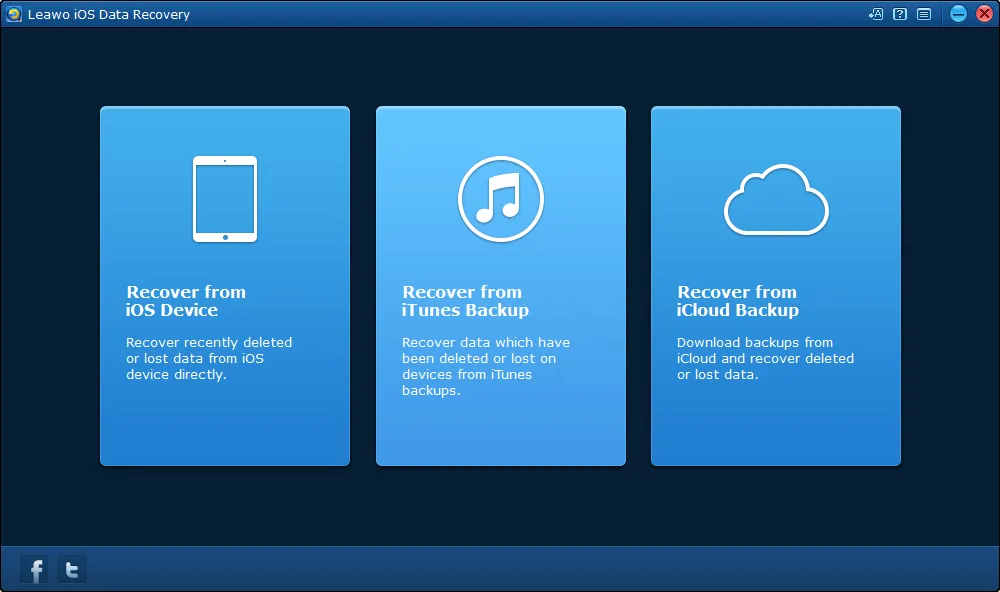
The home screen: Recover from iOS Device, Recover from iTunes Backup and Recover from iCloud Backup.
Features
Scan a connected iPhone without a backup
Leawo iOS Data Recovery reads a connected device directly, so you can look for deleted messages, contacts, call history, WhatsApp chats, notes, calendar entries, reminders and Safari bookmarks even if you never backed up. You pick the device from a row of pictures and click Start; the analysis runs with a progress bar before the results open.
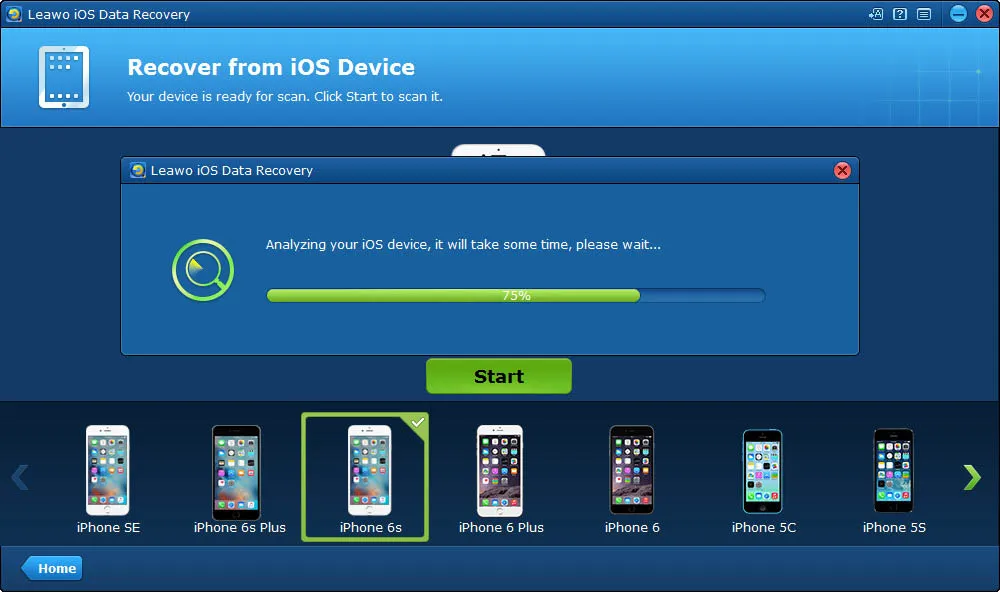
Recover from iOS Device: the device picker (iPhone SE to iPhone 5S) with iPhone 6s selected and the "Analyzing your iOS device" progress bar.
Extract selected items from an iTunes backup
Leawo iOS Data Recovery lists the iTunes backups on the PC with their device name, last backup date and serial number, scans the one you choose and lets you take back single items. Restoring through iTunes would replace everything on the phone with the backup; this pulls out only the contacts or messages you want.
Download and browse an iCloud backup
Leawo iOS Data Recovery signs in to iCloud with your Apple ID, lists the device backups stored there, downloads the one you pick and shows its contents in the same browser. It needs an internet connection, and Leawo says it keeps no record of your iCloud ID or content. The sign-in screen asks only for an Apple ID and password, from before Apple made two-factor sign-in the norm.
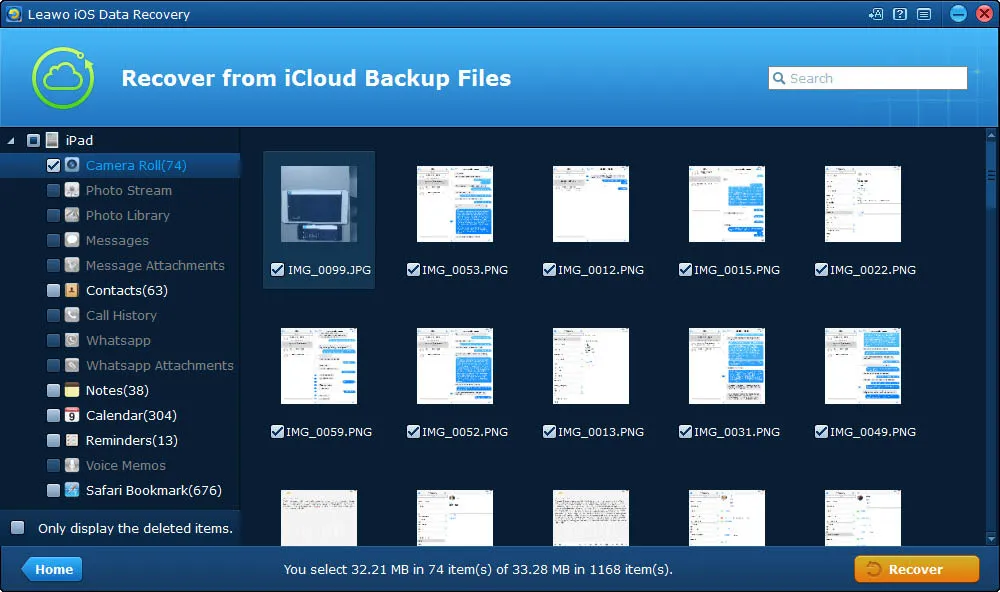
Recover from iCloud Backup Files: an iPad backup's Camera Roll (74 items) shown as thumbnails, with the other data types listed on the left.
Preview, filter and pick before saving
Leawo iOS Data Recovery shows each contact's details, each message and each photo before you save anything, has a search box, and can show only the deleted items. The status bar counts what you've selected, and the files go to a folder you choose.
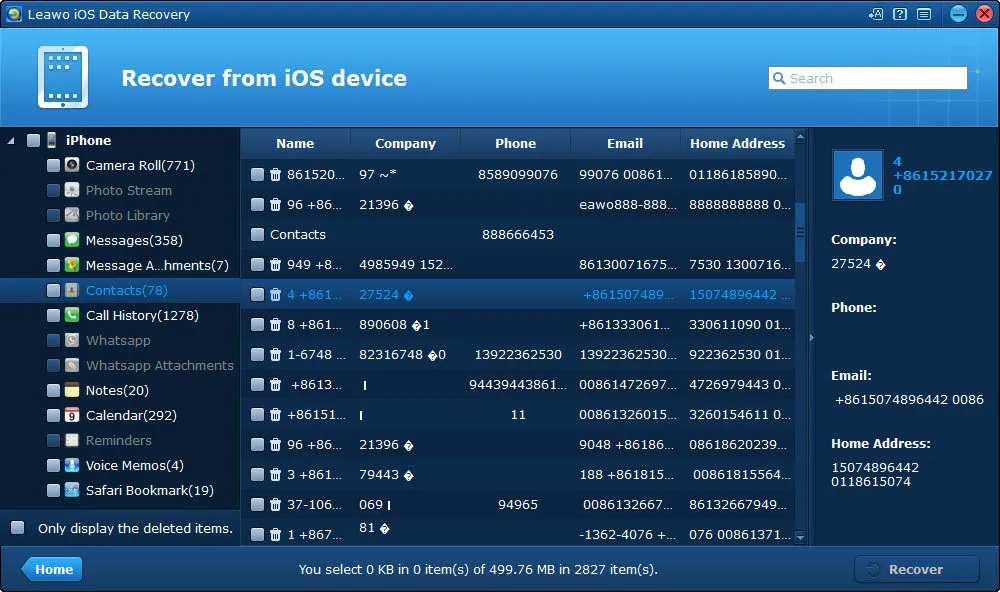
Scan results from a device: data types with counts on the left (Camera Roll 771, Messages 358, Call History 1278), the contact list in the middle and the selected contact's details on the right.
Benefits
- Selective restore from backups. Taking one deleted thread out of an iTunes backup without wiping the phone is the part of this tool that still makes sense for an old device.
- Low price for a lifetime license. At $69.95 lifetime it costs less than most iPhone recovery tools, but only because it has stopped growing.
- Nothing to learn. Three tiles, one scan, one Recover button.
Real-World Uses
- An old iPhone 6 in a drawer. You want the texts from a phone that last ran iOS 10. This is the generation the tool was built for.
- A smashed phone that still connects. If the PC still recognizes it over USB, a device scan can export contacts and messages from a phone you can't use.
- An old iTunes backup on a PC. You have a 2016 backup of an iPad and want its notes and calendar back as files, not a full restore.
Who It's For, and Who Should Skip It
It's for people with an iPhone 7 or older, an iPad from the same era, or an iTunes backup made before iOS 11, who want individual items back on a Windows PC.
Skip it if your iPhone runs any iOS released after 2016, which covers every iPhone from the iPhone 8 on. Leawo hasn't listed one of them in eight years. If the data is in a recent iCloud or Finder/iTunes backup, restoring that backup through Apple's own tools is free; if it isn't, you need a recovery tool that is still updated for current iOS and still lists your model, and you should check that before you pay anyone.
Usage Guide
- Install iTunes first. Leawo's guide says the program can't work without iTunes installed, though you don't need to open it.
- Install and open Leawo iOS Data Recovery, then connect the device with its cable and trust the computer if asked.
- Choose a mode. For a device, pick it from the list and click Start. For iTunes, choose the backup and click Scan. For iCloud, sign in, pick a backup and click Download.
- Browse the results. Click a data type on the left, tick "Only display the deleted items" if you want, and select what you need.
- Recover. Click Recover, set the output folder and click Go. The trial stops at this step.
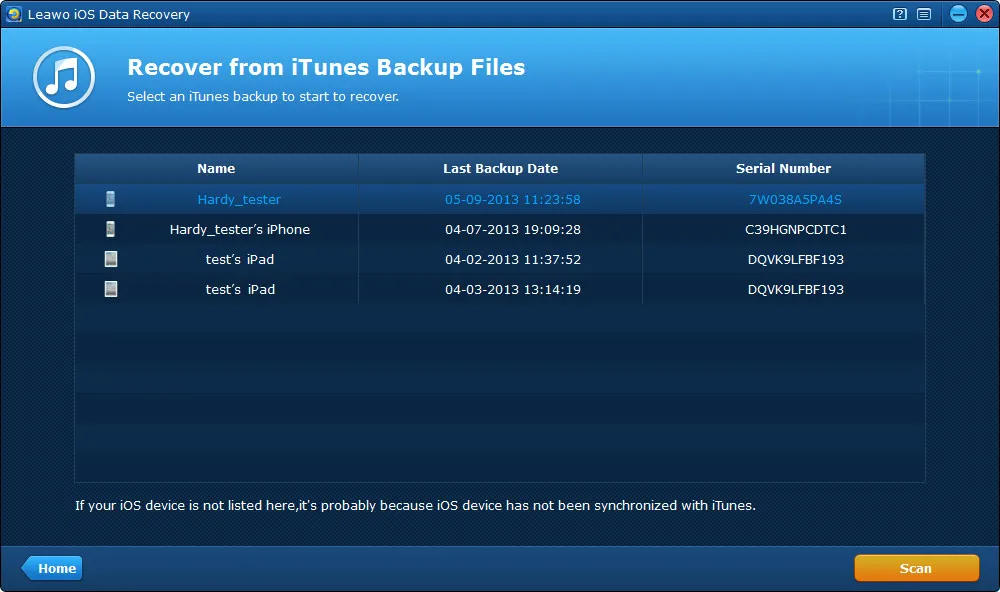
Recover from iTunes Backup Files: four backups listed by name, last backup date (2013) and serial number, with the Scan button at the bottom right.
Where it falls short
- Photos from the device only on the oldest models. Leawo iOS Data Recovery's device mode on an iPhone 4s or later recovers messages, contacts, call history, WhatsApp, notes, calendar, reminders and Safari bookmarks, but not the Camera Roll, photo library, voice memos or attachments. Those come straight off the device only in DFU mode on an iPhone 4 or iPod touch 4. On newer models, deleted photos come only from a backup.
- It needs iTunes. On Windows that means installing Apple's iTunes, which Apple has been replacing with separate apps.
- Deleted data gets overwritten. When a reviewer couldn't fully recover a photo deleted long ago, Leawo's support replied that files may have been overwritten. The longer you keep using the phone, the less any tool finds.
- Freezes and missed files were reported in 2013 and 2014, on iPhone 4-era devices; see What Users Say.
What Users Say
There are no independent reviews of Leawo iOS Data Recovery from the last few years; the search results are mostly competitors' sales pages. Leawo's own review page is the main source, and the dates tell the story: most of its entries were written from 2013 to 2015, and the newest is from October 2019.
Leawo's review page (moderated by Leawo): 4.9 out of 5 from 713 ratings
Almost all of the ratings are five stars, and most of the text is a word or two ("good", "very good"). Leawo approves reviews before they appear. The few that describe a real recovery:
Jen Pirak (5 stars, October 2018): "We needed to recover over 1,000 contacts from a smashed phone. We took the phone to the phone store and they said we were out of luck because we had never backed up to iTunes or iCloud. This software saved the day!! Worked perfect for recovering directly from the device as long as you can plus in the micro USB charger and your computer can still recognize the device."
Harry (5 stars, April 2018): "Its great, i found all my important messengers"
Huỳnh Hương (5 stars, March 2018): "it worked, really amazing. Alot of my pictures and messages came back"
The critical reviews (all from 2013 and 2014)
Rachel (3 stars, February 2014): "Couldn't get it to scan the iPhone 4 past 21%. It would freeze at 21% every time I used it."
sean (3 stars, "quick test", November 2013): "deleted a photo on purpose for testing, but didn't see it in the scan result". Leawo replied that "recover deleted photos directly only support iPhone 4 and iPod Touch 4 now."
Joel Morrish (2 stars, June 2013): "Could not get anything off the iPhone or the backup, although it could read the backup file. To actually recover any data, it would popup a register dialog and fail to save anything, so I cannot say it would actually work."
Pierre Eubanks (3 stars, June 2013): "This software works fine with iPad 'native' apps. It found all my deleted files very quickly. However, I had lost quite a few files with other iPad apps (Pages, numbers, etc.) which this software does not seem to search."
Jim Feng (3 stars, June 2013): "I can see the file but wasn't able to recover fully of the picture. Still comes up scrambled. Guess it was too long ago when I deleted."
Trustpilot (Leawo as a company)
Leawo's Trustpilot page showed a TrustScore of 4.4 from 151 reviews, with 83% five-star and 9% one-star ratings. None of them mention iOS Data Recovery; they're about Leawo's Blu-ray and video tools. Several praise fast support replies, and one reviewer, Nick, wrote: "Leawo refunded the full amount of my order no problem!"
The pattern: people who used it on the phones of its day, especially to rescue contacts and messages from a damaged device, were happy. The complaints are about photos it couldn't find on newer models, scans that froze, and data that had already been overwritten. Nobody has written about it on a current iPhone.
Comparisons
Leawo iOS Data Recovery vs restoring with Apple's tools
Restoring an iTunes, Finder or iCloud backup is free and works with every iPhone, but it replaces the whole device with the backup. Leawo iOS Data Recovery's one advantage is taking single items out of a backup, and on a device it can find deleted items with no backup at all, within the iOS 10 limit above.
Leawo iOS Data Recovery vs Leawo iOSFix
They solve different problems. iOS Data Recovery gets deleted data back; Leawo iOSFix repairs an iPhone stuck on the Apple logo, in a boot loop or in recovery mode, and it is a newer, separate product.
Editions and Pricing
| Plan | Price | Term | Money-back window |
|---|
| 1 Year | $59.95 | 1 PC, auto-renews yearly | 5 days |
| Lifetime | $69.95 | 1 PC, one-time payment | 14 days |
Only $10 separates the plans, and with no updates in years, a renewing subscription buys nothing extra. If you buy at all, buy the lifetime license.
FAQs
Does Leawo iOS Data Recovery work with iOS 17 or iOS 18?
Leawo iOS Data Recovery isn't listed for anything after iOS 10 on Leawo's spec sheet, and its last update is from 2017. Run the free scan on your phone before paying; if it doesn't see your data, it won't recover it either.
Can Leawo iOS Data Recovery recover deleted photos from my iPhone?
Leawo iOS Data Recovery recovers photos directly from the device only on an iPhone 4 or iPod touch 4 in DFU mode. On later models it can show photos only if they're in an iTunes or iCloud backup it can read.
What does the free trial of Leawo iOS Data Recovery do?
The Leawo iOS Data Recovery trial scans the device or backup and shows what it found, but it can't save anything. Use it to check that your device and your lost items show up before you buy.
Does Leawo iOS Data Recovery need iTunes?
Yes. Leawo iOS Data Recovery needs iTunes (10.4 or later, per its Windows requirements) installed on the PC, even though you don't have to open it while you recover.
Can I get a refund if Leawo iOS Data Recovery doesn't find my data?
Leawo refunds a purchase within 14 days only for a reproducible bug its support can't fix, and refuses requests that just say the program doesn't work or that concern features it never advertised. Don't treat the money-back window as a trial; use the free scan instead.
Is there a Mac version of Leawo iOS Data Recovery?
Yes. Leawo iOS Data Recovery for Mac is sold separately at the same price, as version 3.4.1 for Intel Macs running macOS 10.12 Sierra to 10.15 Catalina.
System Requirements
- Windows 7, 8, 8.1, 10 or 11
- 1 GHz or faster Intel or AMD processor
- 512 MB RAM (1 GB or more recommended)
- 2 GB of free disk space
- iTunes 10.4 or later, internet connection (for iCloud), DirectX 8.1 or later, a sound card
- Installer size: 22.5 MB
Conclusion
For most people, no. Leawo iOS Data Recovery was a simple, cheap way to get deleted messages and contacts off an iPhone in 2014, and the screens still look easy. But it has had no update since 2017 and lists nothing newer than the iPhone 7 and iOS 10, so it isn't worth $59.95 or $69.95 for a current iPhone.
The one reason to consider it is an old device or an old iTunes backup from that era that you need individual items from. Even then, run the free scan first and buy the lifetime license only if your data shows up in it.
Download Free TrialBuy Now